
Overview
ABB 3HAC043075-003 Migration-Ready Reduction Gear for IRB6700 Legacy Control Systems
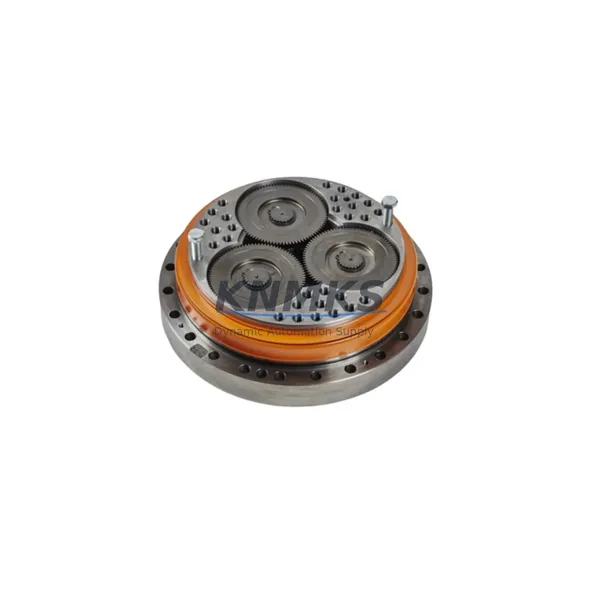
The ABB 3HAC043075-003 is a precision reduction gear unit designed for the IRB6700 series industrial robot, and serves as the verified direct replacement for the discontinued 3HAC043075-002. For maintenance engineers and automation integrators managing aging robot cells, this component is a critical spare in any IRB6700 retrofit or overhaul program. Whether you are restoring a single robot axis or executing a full production line modernization, the 3HAC043075-003 delivers the mechanical precision and dimensional compatibility required to minimize downtime and protect existing program logic.
In legacy robot installations, reduction gears are among the highest-wear components. Backlash accumulation, oil seal degradation, and bearing fatigue are common failure modes in IRB6700 units that have exceeded 40,000 operating hours. Sourcing a verified replacement — rather than a non-OEM substitute — is essential when the robot is integrated into a safety-rated cell or coordinated multi-axis application. The 3HAC043075-003 maintains full dimensional and torque-rating compatibility with the original axis assembly, allowing direct installation without modification to the robot arm structure, motor coupling, or cable harness routing.
When planning a reduction gear replacement on the IRB6700, engineers should confirm the axis number and mounting orientation before ordering. The IRB6700 platform uses different gear ratios across its six axes, and the 3HAC043075-003 is specific to its designated axis position. Cross-referencing the robot’s serial number and axis configuration in the ABB RobotStudio or IRC5 controller parameter file ensures the correct unit is selected. The IRC5 controller cabinet — which governs motion control, axis calibration, and safety supervision for the IRB6700 — stores axis-specific calibration offsets that must be re-entered or re-learned after gear replacement. Technicians should back up the RAPID program, system parameters, and EIO configuration from the IRC5 before beginning mechanical disassembly.
Migration Compatibility Table
| Parameter | 3HAC043075-002 (Discontinued) | 3HAC043075-003 (Current) |
|---|---|---|
| Application | IRB6700 Axis Reduction | IRB6700 Axis Reduction |
| Replacement Relationship | Legacy / Discontinued | Direct Drop-In Replacement |
| Mounting Interface | Standard IRB6700 Flange | Compatible — No Modification Required |
| Motor Coupling | OEM Specification | Fully Compatible |
| Calibration Requirement | Axis Calibration Required Post-Install | Axis Calibration Required Post-Install |
| Controller Compatibility | IRC5 Cabinet | IRC5 Cabinet |
| Communication Link | Axis Computer / Drive Unit | Fully Compatible |
| Installation Space | Standard IRB6700 Arm Envelope | Identical Envelope — No Structural Change |
| Pre-Shipment Testing | — | Yes — Function Verified Before Dispatch |
| Support terms | — | support terms confirmed by quotation |
Retrofit Planning for Existing Automation Systems
A successful IRB6700 reduction gear retrofit requires more than sourcing the correct part number. The mechanical replacement must be coordinated with the broader control system to ensure the robot returns to production with full accuracy and safety compliance. Before disassembly, the IRC5 controller’s axis computer board and drive unit module should be inspected for fault logs related to motor current overload or position deviation — symptoms that often accompany advanced gear wear. If the drive unit has been compensating for mechanical backlash through increased current output, the drive parameters may need to be reset to factory defaults after the new gear is installed.
The ABB DSQC series measurement boards inside the IRC5 cabinet handle resolver feedback from each axis motor. After gear replacement, the resolver signal chain should be verified to confirm that position feedback is clean and free of noise — particularly if the cable harness was disturbed during disassembly. Similarly, the IRC5 panel board and safety board should be checked to confirm that all axis enable signals are correctly restored before the robot is powered up for calibration.
For cells where the IRB6700 operates in coordinated motion with a IRBP positioner or external axis, the axis calibration sequence must account for the full kinematic chain. The RobotStudio calibration wizard or the FlexPendant’s fine calibration routine should be used to re-establish the axis zero position after gear installation. If the robot is integrated with a Profibus DP or DeviceNet fieldbus network connecting to a PLC or SCADA system, the communication link should be verified after restart to confirm that the robot’s I/O mapping and program triggers are functioning correctly.
In control cabinet environments where the IRB6700 shares a power distribution rail with other equipment, engineers should confirm that the 24VDC control power supply feeding the IRC5 is within specification before returning the robot to automatic mode. Voltage sag during robot startup can cause axis initialization faults that are easily misdiagnosed as mechanical issues.
Downtime Control During System Migration
Unplanned downtime during a reduction gear replacement is one of the most significant risks in robot maintenance. A structured approach to the replacement process can reduce total downtime from several days to a single shift. The key is preparation: having the 3HAC043075-003 on-site and pre-inspected before the robot is taken offline eliminates the most common source of delay — waiting for parts after the robot is already disassembled.
Before the maintenance window begins, the RAPID program and all system parameters should be backed up from the IRC5 controller to a USB drive or network share. The axis calibration reference positions — stored in the MOC.cfg file — are particularly important, as these values are used to restore the robot’s zero-point calibration after the gear is replaced. If the original calibration marks on the robot arm are still visible and undamaged, the fine calibration process can be completed quickly using the FlexPendant. If the marks are worn, a calibration tool or laser tracker may be required, which should be arranged in advance.
For production environments where the IRB6700 is part of a continuous welding, assembly, or material handling line, a parallel verification strategy is recommended: while the robot is offline for gear replacement, the upstream and downstream stations should be placed in a safe hold state rather than a full shutdown. This preserves the line’s thermal and process state, reducing the time required to return to full production after the robot is recommissioned. The total recommissioning sequence — power-up, axis calibration, program verification, and test cycle — typically takes two to four hours when all preparation steps have been completed in advance.
Retrofit Support FAQ
Q1: Is the 3HAC043075-003 a direct replacement for the discontinued 3HAC043075-002?
Yes. The 3HAC043075-003 is the current production replacement for the discontinued 3HAC043075-002. It is dimensionally and functionally compatible with the IRB6700 axis assembly and requires no structural modification to the robot arm or motor coupling.
Q2: What calibration steps are required after installing the 3HAC043075-003?
After mechanical installation, axis calibration must be performed using the ABB FlexPendant fine calibration routine or RobotStudio. The axis zero position must be re-established and verified against the robot’s reference marks or a calibration tool. All RAPID programs should be tested in manual reduced-speed mode before returning the robot to automatic operation.
Q3: Is the unit pre-shipment tested, and what support terms is provided?
Yes. Each 3HAC043075-003 unit is function-verified before dispatch. A support terms confirmed by quotation is provided from the date of shipment, covering manufacturing defects and verified compatibility with the IRB6700 platform.
Q4: What is the typical lead time and stock availability?
This part is held availability confirmed by RFQ for immediate dispatch. Lead time for in-stock units is typically 3–7 business days depending on destination. For urgent requirements, expedited shipping options are available. Contact our team to confirm current inventory status before placing your order.
© 2026 KNMKS. All rights reserved.
Original Source: https://knmks.com
Contact: admin@knmks.com | +86 18359268345
Product Identification
- Brand / Ecosystem
-
ABB
ABB - Model / Series
-
IRB6700 3HAC043075-003 3HAC043075-002 IRB67003HAC043075-002
IRC5 Series - Product Family
- Other Components
- Availability Status
- Available on request after model and quantity confirmation
- Inquiry Type
- B2B RFQ, replacement inquiry and project spare-part request
- Pre-Quote Check
- Exact SKU, brand, series, quantity, nameplate photos and destination country are checked before quotation
System Path
Where this product fits in the KNMKS automation structure.
Specification & Inquiry Focus
- Component range
- Breakers, terminals and cabinet accessories
- Common needs
- Model, photo and installation requirement
- Project support
- Maintenance and mixed spare-part inquiry
Buyer Confirmation
Information KNMKS checks before replying.
- Exact model
- IRB6700 3HAC043075-003 3HAC043075-002 IRB67003HAC043075-002
- Brand / ecosystem
- ABB
- Product family
- Other Components
- Application note
- Replacement, maintenance, project build or spare-part list
- Useful photos
- Nameplate, installed unit, cabinet layout or connector side
- Delivery details
- Quantity, destination country and target schedule
Document Support
Files and notes can be confirmed during quotation.
- Product photos or nameplate confirmation when available
- Packing and delivery notes before quotation confirmation
- Support scope and delivery terms confirmed per inquiry
- Export document coordination for qualified B2B requests
Inquiry Support
- Mixed automation spare parts inquiry
- Cabinet component and accessory support
- Model identification from photos or labels
What to Send Us
- Brand and exact model number: ABB IRB6700 3HAC043075-003 3HAC043075-002 IRB67003HAC043075-002
- Quantity and required delivery time
- Application, replacement requirement or nameplate photo
- Destination country and shipping preference
RFQ Preparation
This is a product inquiry page built for RFQ communication.
Fast Model Check
Send this model to KNMKS for confirmation.
Include quantity, destination country and photos if this is a maintenance replacement. The inquiry will be saved with a reference number after submission.
Brand & Compatibility Note
KNMKS displays automation product information for well-known industrial brand ecosystems and compatible replacement references. Brand names are used for product identification and compatibility reference only; final availability and commercial terms are confirmed per quotation.
 Manufacturing
 Machine Tools
 Packaging
 Energy & Power

 PLCs & Controllers
 HMI & Displays
 Servo Systems
 Variable Frequency Drives