
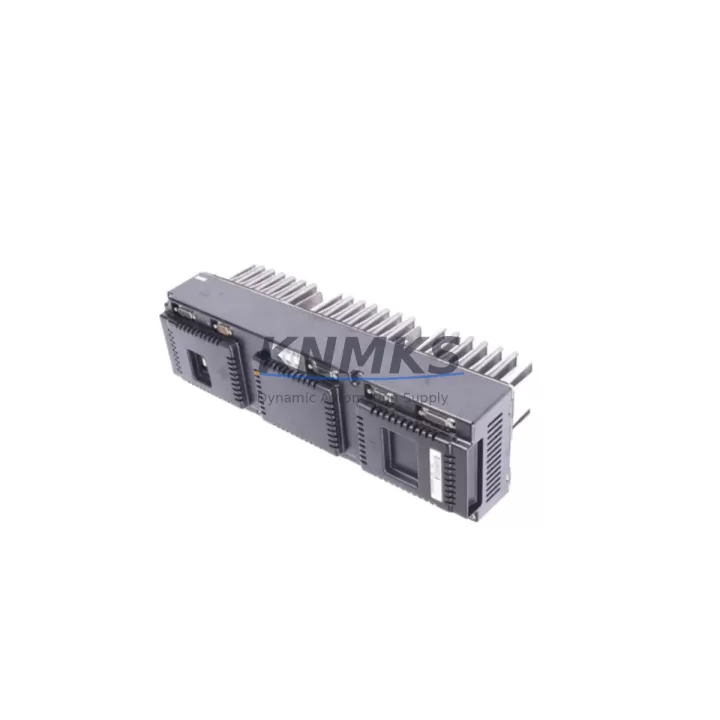
Overview
ABB 3HAC038457-001 Maintenance-Proven Spare Part for Factory Uptime
The ABB 3HAC038457-001 is an original seam tracking module designed for the Weldguide III system integrated with ABB IRC5 robot controllers. In continuous arc welding production environments, this module is a safety-critical component responsible for real-time weld seam detection, adaptive torch positioning, and closed-loop feedback to the IRC5 motion controller. When this module fails or degrades, the result is immediate production stoppage, weld quality deviation, and potential scrap accumulation on high-value workpieces.
At KNMKS, every 3HAC038457-001 unit is sourced as an original ABB spare, subjected to pre-shipment functional verification, and dispatched with a support terms confirmed by quotation covering manufacturing defects and operational failure under normal industrial use. Our global inventory position allows rapid fulfillment to maintenance teams across Asia, Europe, and the Americas — minimizing the window between fault detection and line recovery.
For maintenance engineers managing ABB welding cells, the 3HAC038457-001 is a high-priority line item in any annual spare parts budget. Its failure mode is typically non-gradual: seam tracking loss appears suddenly during production, often triggered by connector fatigue, firmware incompatibility after IRC5 software updates, or physical shock from weld spatter ingress. Stocking at least one verified replacement unit eliminates the risk of extended downtime while awaiting procurement lead times that can stretch 6–14 weeks through standard distribution channels.
Spare Maintenance Table
| SKU / Part Number | 3HAC038457-001 |
| Brand | ABB |
| Series | Weldguide III |
| Compatible Controller | ABB IRC5 (single cabinet and dual cabinet configurations) |
| Function | Real-time seam tracking, adaptive torch guidance, arc sensor feedback |
| Product Type | Seam Tracking Module |
| Origin | Sweden (SE) |
| Weight | 560 g |
| Application Environment | Arc welding automation cells, automotive body-in-white, structural steel fabrication, pressure vessel manufacturing |
| Installation | Mounts within IRC5 controller cabinet; interfaces via dedicated Weldguide III communication bus |
| Compatibility Verification | Confirm IRC5 RobotWare version and Weldguide III option license before installation |
| Condition | Original spare — new or fully refurbished to OEM specification |
| Pre-Shipment Testing | Functional verification completed prior to dispatch |
| Support terms | 12 months from date of shipment |
| Lead Time | availability confirmed by RFQ — typically ships within 2 business days |
Maintenance Planning for Continuous Operation
Replacing the 3HAC038457-001 in a live welding cell is rarely an isolated task. Maintenance engineers should treat this event as a structured inspection opportunity across the entire Weldguide III signal chain and IRC5 power distribution architecture.
Begin with the IRC5 main computer board (DSQC639 or DSQC1000 series) — verify that the RobotWare Weldguide III option is correctly licensed and that no firmware mismatch exists between the controller and the replacement module. A firmware version conflict is one of the most common causes of seam tracking initialization failure after module swap.
Inspect the Weldguide III sensor cable assembly and its connectors at both the module end and the torch bracket. Weld spatter, cable fatigue near the dress pack, and connector pin corrosion are leading causes of intermittent seam tracking errors that are often misdiagnosed as module failure. Replacing the module without addressing cable integrity will result in repeat faults within weeks.
Check the IRC5 I/O module (DSQC652 or equivalent digital I/O board) for any latched fault signals related to the Weldguide III interface. A failed I/O channel can prevent the seam tracking module from communicating its position corrections to the motion planner, even when the module itself is fully functional.
Review the 24 VDC auxiliary power supply feeding the Weldguide III subsystem within the IRC5 cabinet. Voltage sag or ripple on this rail — often caused by aging capacitors in the DSQC604 or equivalent power unit — can cause the seam tracking module to reset mid-weld, producing erratic torch behavior that mimics a module fault.
For cells using arc welding process control via the DSQC378B weld timer board or equivalent process interface, verify that weld parameter handshaking between the process board and the Weldguide III module is intact. Corrupted parameter sets after a controller battery failure (DSQC175 battery unit) can silently disable adaptive seam tracking without generating a hard fault alarm.
Finally, inspect the IRC5 backplane and axis computer (DSQC668) for any communication bus errors logged in the event log. Backplane connector oxidation in high-humidity environments is a known long-term reliability issue in older IRC5 installations and can manifest as intermittent Weldguide III communication loss.
Site Replacement Workflow
Step 1 — Fault Isolation: Use the IRC5 FlexPendant event log to confirm the fault code is specific to the Weldguide III module (typically event codes in the 7xxxx range for process equipment faults). Rule out cable and I/O faults before condemning the module.
Step 2 — Controller Backup: Perform a full system backup via RobotStudio or the FlexPendant before any hardware change. This preserves the Weldguide III calibration data, seam tracking parameters, and weld schedules.
Step 3 — Power Down Sequence: Follow the IRC5 lockout/tagout procedure. Discharge the capacitor bank and verify zero-energy state before opening the controller cabinet.
Step 4 — Module Swap: Remove the faulty 3HAC038457-001 by releasing the DIN rail or panel mount fasteners and disconnecting the bus connector. Install the replacement unit, ensuring the connector is fully seated and the locking tab is engaged.
Step 5 — Firmware and License Verification: Power up and confirm that the IRC5 recognizes the new module. Verify the Weldguide III option license is active in the RobotWare configuration. If the module requires firmware update, apply it via the standard ABB update procedure before running production.
Step 6 — Seam Tracking Calibration: Run the Weldguide III calibration routine to re-establish the sensor reference position relative to the torch TCP. Do not skip this step — an uncalibrated module will produce systematic weld offset errors.
Step 7 — Trial Weld and Validation: Execute a trial weld on a test piece and verify seam tracking performance across the full joint geometry before returning the cell to production.
Spare Parts Support FAQ
Q: Is the 3HAC038457-001 compatible with all IRC5 controller variants?
A: The 3HAC038457-001 is designed for IRC5 controllers with the Weldguide III software option installed. Compatibility depends on the RobotWare version and the specific Weldguide III license variant (standard or extended). Confirm your controller’s RobotWare version and option configuration before ordering. Our technical team can assist with compatibility verification based on your controller serial number.
Q: What does the support terms confirmed by quotation cover, and how is a support terms claim handled?
A: The support terms confirmed by quotation cover manufacturing defects and functional failure under normal operating conditions from the date of shipment. It does not cover damage caused by incorrect installation, overvoltage events, or physical impact. To initiate a support terms claim, contact admin@knmks.com with the order reference, fault description, and event log data. We will arrange return logistics and replacement dispatch.
Q: How do you verify the module is functional before shipment?
A: Each 3HAC038457-001 unit undergoes pre-shipment functional verification including power-on self-test, communication bus integrity check, and visual inspection for connector and PCB condition. A test report is available upon request for critical procurement requirements.
Q: Can you support long-term supply for multi-site maintenance programs?
A: Yes. KNMKS maintains standing inventory of high-demand ABB IRC5 and Weldguide III spare parts to support annual maintenance contracts, multi-site spare parts programs, and emergency buffer stock arrangements. Contact us to discuss volume pricing, reserved stock agreements, and scheduled delivery programs aligned with your planned maintenance calendar.
© 2026 KNMKS. All rights reserved.
Original Source: https://knmks.com
Contact: admin@knmks.com | +86 18359268345
Product Identification
- Brand / Ecosystem
-
ABB
ABB - Model / Series
-
3HAC038457-001
IRC5 Series - Product Family
- PLCs & Controllers
- Availability Status
- Available on request after model and quantity confirmation
- Inquiry Type
- B2B RFQ, replacement inquiry and project spare-part request
- Pre-Quote Check
- Exact SKU, brand, series, quantity, nameplate photos and destination country are checked before quotation
System Path
Where this product fits in the KNMKS automation structure.
Specification & Inquiry Focus
- Control platform
- PLC, PAC and modular controllers
- Common needs
- CPU, rack, power and I/O expansion
- Project support
- Replacement, cabinet build and maintenance
Buyer Confirmation
Information KNMKS checks before replying.
- Exact model
- 3HAC038457-001
- Brand / ecosystem
- ABB
- Product family
- PLCs & Controllers
- Application note
- Replacement, maintenance, project build or spare-part list
- Useful photos
- Nameplate, installed unit, cabinet layout or connector side
- Delivery details
- Quantity, destination country and target schedule
Document Support
Files and notes can be confirmed during quotation.
- Product photos or nameplate confirmation when available
- Packing and delivery notes before quotation confirmation
- Support scope and delivery terms confirmed per inquiry
- Export document coordination for qualified B2B requests
Inquiry Support
- Model cross-checking before quotation
- CPU, power, rack and expansion module matching
- Support for replacement and project inquiry
What to Send Us
- Brand and exact model number: ABB 3HAC038457-001
- Quantity and required delivery time
- Application, replacement requirement or nameplate photo
- Destination country and shipping preference
RFQ Preparation
This is a product inquiry page built for RFQ communication.
Fast Model Check
Send this model to KNMKS for confirmation.
Include quantity, destination country and photos if this is a maintenance replacement. The inquiry will be saved with a reference number after submission.
Brand & Compatibility Note
KNMKS displays automation product information for well-known industrial brand ecosystems and compatible replacement references. Brand names are used for product identification and compatibility reference only; final availability and commercial terms are confirmed per quotation.
 Manufacturing
 Machine Tools
 Packaging
 Energy & Power



 HMI & Displays
 Servo Systems
 Variable Frequency Drives
 Sensors