
Overview
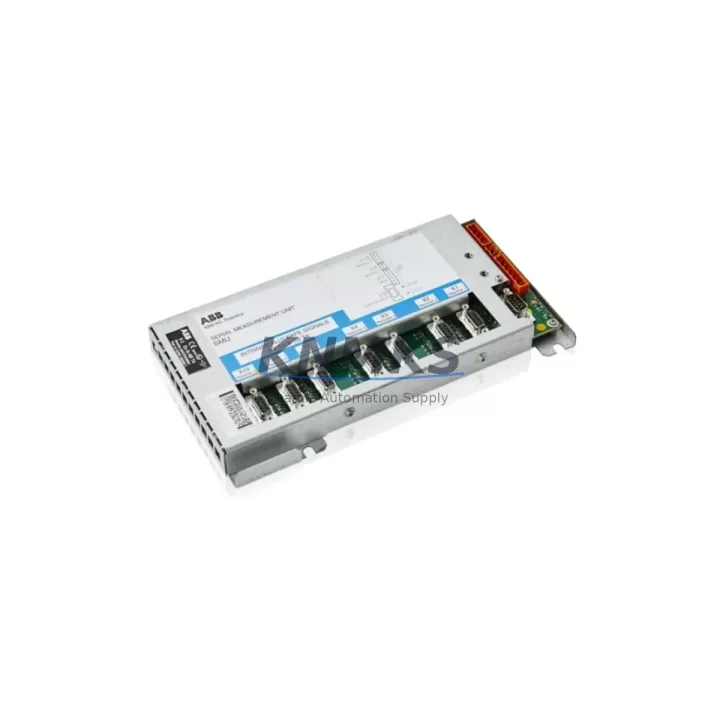
ABB 3HAC025196-002 SMU-03 Migration-Ready DeviceNet Module for Legacy Control Systems
The ABB 3HAC025196-002 (SMU-03) is a DeviceNet communication module engineered for the IRC5 robot controller platform and RB6640 control cabinet systems. As a direct migration-ready replacement for the discontinued 3HAC057546-003 and the legacy 3HNA013638-001, this module enables automation engineers to restore full DeviceNet network functionality without redesigning the control architecture. Whether you are managing a planned retrofit, responding to an unplanned failure, or executing a phased system upgrade, the 3HAC025196-002 provides a verified drop-in solution backed by a support terms confirmed by quotation and pre-shipment functional testing.
In legacy ABB robot installations, the SMU-03 module serves as the primary DeviceNet slave interface, enabling the IRC5 controller to communicate with field devices including I/O blocks, distributed sensor arrays, and remote terminal units across the DeviceNet network. When the original 3HAC057546-003 reaches end-of-life or sustains damage, the 3HAC025196-002 restores this communication link without requiring firmware re-architecture or PLC program recompilation, provided the installed RobotWare version is compatible.
Before proceeding with installation, engineers should confirm the following: the IRC5 main computer module (DSQC 639 or equivalent) firmware version supports the SMU-03 interface; the DeviceNet cable pinout and termination resistors at both ends of the network segment are intact; the module address (MAC ID) configured on the outgoing unit matches the replacement; and the backplane slot assignment within the IRC5 drive module rack is preserved. Incorrect MAC ID assignment is one of the most common causes of post-replacement communication faults and should be verified against the original system documentation or extracted from the FlexPendant diagnostic screens before the old module is removed.
For installations where the IRC5 controller also manages a PROFIBUS DP network in parallel, engineers should note that the SMU-03 operates independently of the DSQC 667 PROFIBUS adapter. Both modules can coexist in the same IRC5 cabinet without address conflicts, provided the backplane configuration is correctly mapped in RobotStudio or the system parameters file. Similarly, if the control cabinet includes an ABB DSQC 652 digital I/O module or an ABB DSQC 378B analog I/O board, these units are unaffected by the DeviceNet module swap and do not require reconfiguration.
Power budget verification is a critical pre-installation step. The IRC5 internal power supply (typically the DSQC 661 or DSQC 662 unit) must have sufficient 24 VDC capacity to support the SMU-03 alongside all other installed modules. Engineers should review the power distribution board load calculations before insertion. Terminal wiring on the DeviceNet connector (CAN_H, CAN_L, V+, V−, Shield) must be re-terminated to the replacement module using the original cable assembly; no re-crimping is required if the existing connector is undamaged.
HMI screen updates are generally not required when replacing the 3HAC025196-002 on a like-for-like basis, as the module presents the same device profile to the IRC5 controller. However, if the replacement is part of a broader RobotWare upgrade from version 5.x to 6.x, the system integrator should validate all FlexPendant I/O signal mappings and confirm that any custom RAPID program routines referencing DeviceNet signal aliases remain intact after the software migration.
Installation space within the IRC5 cabinet is standardized for the SMU-03 form factor. The module mounts directly onto the IRC5 backplane connector without adapter brackets. Confirm that the cabinet door clearance and cable routing channels are unobstructed before final seating. After installation, perform a controlled power-on sequence: energize the IRC5 main computer first, allow the system to complete its boot cycle, then verify DeviceNet network status via the FlexPendant event log before resuming production.
Migration Compatibility Table
| Parameter | Details |
|---|---|
| Replacement For | 3HAC057546-003, 3HNA013638-001 (SMU-03 legacy variants) |
| Compatible Platform | ABB IRC5 Robot Controller, RB6640 Control Cabinet |
| Communication Protocol | DeviceNet (CAN-based, ISO 11898) |
| Backplane Interface | IRC5 internal backplane — direct slot insertion, no adapter required |
| Power Requirement | 24 VDC via IRC5 internal power supply (DSQC 661 / DSQC 662) |
| MAC ID Configuration | Must match original unit; verify via FlexPendant before removal |
| Firmware Compatibility | RobotWare 5.x and 6.x (verify specific build with system documentation) |
| Terminal Wiring | CAN_H, CAN_L, V+, V−, Shield — re-terminate from existing cable assembly |
| Installation Space | Standard IRC5 module slot — no bracket modification required |
| Pre-Shipment Testing | Functional communication test performed on every unit before dispatch |
| Support terms | 12 months from date of delivery |
| Retrofit Recommendation | Direct replacement; validate MAC ID, firmware version, and power budget before installation |
Retrofit Planning for Existing Automation Systems
A successful IRC5 DeviceNet module retrofit requires coordinated planning across hardware, software, and network layers. Begin by auditing the full IRC5 cabinet configuration: document all installed modules including the DSQC 639 main computer, DSQC 652 digital I/O units, DSQC 378B analog boards, and any DSQC 667 PROFIBUS adapter present in the rack. This inventory establishes the baseline for power budget calculations and slot assignment verification.
Next, extract the current DeviceNet network topology from the system documentation or scan the live network using a DeviceNet configuration tool. Record all node MAC IDs, device types, and expected I/O data sizes. The 3HAC025196-002 must be configured to the same MAC ID as the outgoing 3HAC057546-003 before insertion to prevent network address conflicts that would trigger fault codes on the IRC5 controller and halt production.
If the retrofit is being performed as part of a broader control system modernization — for example, migrating from an older S4C+ platform to IRC5 — additional planning is required for the RAPID program migration, I/O signal remapping, and FlexPendant screen updates. In these scenarios, the SMU-03 module replacement is typically one step in a multi-phase project that also involves updating the IRC5 main computer firmware, reconfiguring the DSQC 652 I/O modules, and validating all safety circuit connections before resuming automated operation.
For sites operating multiple robot cells on a shared DeviceNet segment, the replacement of a single SMU-03 module should be coordinated with the network administrator to avoid disrupting adjacent nodes during the installation window. A controlled network isolation procedure — disconnecting the affected IRC5 node from the trunk cable before module removal — prevents bus errors from propagating to other controllers on the same segment.
Downtime Control During System Migration
Minimizing unplanned downtime during a DeviceNet module replacement requires preparation before the maintenance window begins. The original RAPID program and system parameters should be backed up to a USB drive or network share using RobotStudio prior to any hardware intervention. This backup preserves all I/O signal configurations, motion parameters, and safety settings, ensuring that a full system restore is possible if the replacement module requires additional configuration.
The physical replacement of the 3HAC025196-002 can typically be completed within 30 to 60 minutes by a qualified automation technician, provided the MAC ID is pre-configured and the terminal wiring is prepared in advance. The most time-consuming steps are the post-installation verification sequence: powering on the IRC5, confirming DeviceNet network status on the FlexPendant, running a dry-cycle of the RAPID program without production load, and verifying all I/O signal states against the pre-maintenance baseline.
To further reduce risk, consider staging the replacement during a scheduled production break rather than responding reactively to a module failure. Maintaining a spare 3HAC025196-002 in the site’s critical spare parts inventory — alongside other high-risk IRC5 components such as the DSQC 639 main computer and DSQC 661 power supply — provides a buffer against unplanned outages and supports the support terms confirmed by quotation coverage period without gaps in system protection.
For multi-robot installations, a phased replacement approach — updating one IRC5 node at a time while keeping adjacent cells in production — is the recommended strategy for maintaining overall line throughput during the migration period.
Retrofit Support FAQ
Q: Is the ABB 3HAC025196-002 a direct replacement for the 3HAC057546-003?
A: Yes. The 3HAC025196-002 (SMU-03) is the current production replacement for the discontinued 3HAC057546-003. It is also compatible with systems originally fitted with the 3HNA013638-001. Verify the MAC ID and RobotWare firmware version before installation to ensure seamless substitution.
Q: Does the replacement module require any firmware update on the IRC5 controller?
A: In most cases, no firmware update is required for a like-for-like SMU-03 replacement. However, if the IRC5 is running RobotWare 5.x and the site plans to upgrade to 6.x as part of the same maintenance window, the firmware migration should be completed and validated before the DeviceNet module is re-enabled on the network.
Q: What pre-shipment testing is performed on each unit?
A: Every 3HAC025196-002 unit undergoes a functional DeviceNet communication test before dispatch. The test verifies node initialization, MAC ID response, and data exchange integrity. A test report is available upon request. All units are covered by a support terms confirmed by quotation from the date of delivery.
Q: What is the lead time and stock availability?
A: Stock is maintained in our warehouse for immediate dispatch. Standard lead time for in-stock units is 3–7 business days depending on destination. For urgent requirements, expedited shipping options are available. Contact our team to confirm current inventory levels and delivery schedules for your region.
© 2026 KNMKS. All rights reserved.
Original Source: https://knmks.com
Contact: admin@knmks.com | +86 18359268345
Product Identification
- Brand / Ecosystem
-
ABB
ABB - Model / Series
-
3HAC025196-002 / 3HAC057546-003RB6640 / SMU-03 / 3HNA013638-001
IRC5 Series - Product Family
- PLCs & Controllers
- Availability Status
- Available on request after model and quantity confirmation
- Inquiry Type
- B2B RFQ, replacement inquiry and project spare-part request
- Pre-Quote Check
- Exact SKU, brand, series, quantity, nameplate photos and destination country are checked before quotation
System Path
Where this product fits in the KNMKS automation structure.
Specification & Inquiry Focus
- Control platform
- PLC, PAC and modular controllers
- Common needs
- CPU, rack, power and I/O expansion
- Project support
- Replacement, cabinet build and maintenance
Buyer Confirmation
Information KNMKS checks before replying.
- Exact model
- 3HAC025196-002 / 3HAC057546-003RB6640 / SMU-03 / 3HNA013638-001
- Brand / ecosystem
- ABB
- Product family
- PLCs & Controllers
- Application note
- Replacement, maintenance, project build or spare-part list
- Useful photos
- Nameplate, installed unit, cabinet layout or connector side
- Delivery details
- Quantity, destination country and target schedule
Document Support
Files and notes can be confirmed during quotation.
- Product photos or nameplate confirmation when available
- Packing and delivery notes before quotation confirmation
- Support scope and delivery terms confirmed per inquiry
- Export document coordination for qualified B2B requests
Inquiry Support
- Model cross-checking before quotation
- CPU, power, rack and expansion module matching
- Support for replacement and project inquiry
What to Send Us
- Brand and exact model number: ABB 3HAC025196-002 / 3HAC057546-003RB6640 / SMU-03 / 3HNA013638-001
- Quantity and required delivery time
- Application, replacement requirement or nameplate photo
- Destination country and shipping preference
RFQ Preparation
This is a product inquiry page built for RFQ communication.
Fast Model Check
Send this model to KNMKS for confirmation.
Include quantity, destination country and photos if this is a maintenance replacement. The inquiry will be saved with a reference number after submission.
Brand & Compatibility Note
KNMKS displays automation product information for well-known industrial brand ecosystems and compatible replacement references. Brand names are used for product identification and compatibility reference only; final availability and commercial terms are confirmed per quotation.
 Manufacturing
 Machine Tools
 Packaging
 Energy & Power



 HMI & Displays
 Servo Systems
 Variable Frequency Drives
 Sensors