
Overview
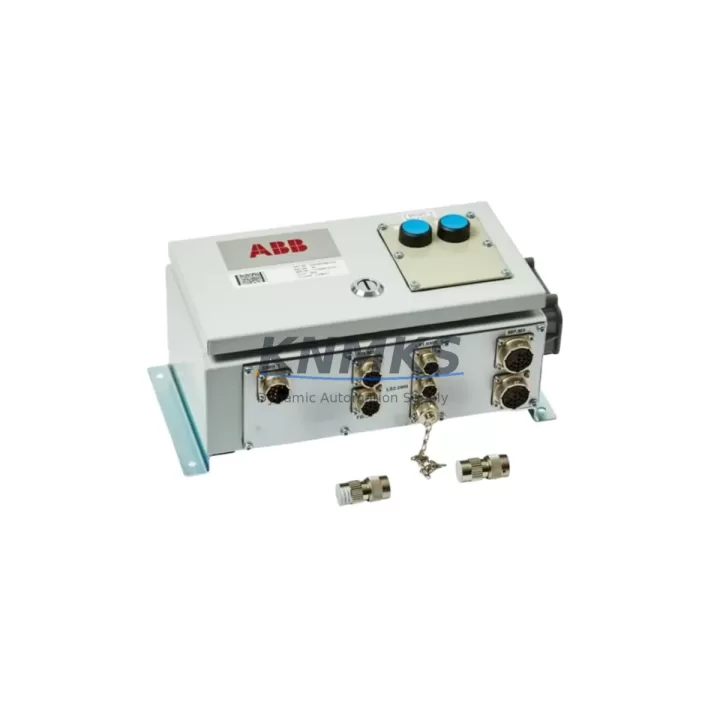
ABB 3HAC024540-004 Migration-Ready SMB for Legacy IRC5 Systems
The ABB 3HAC024540-004 Serial Measurement Board (SMB) is a migration-ready replacement module engineered for legacy IRC5 robot controller platforms, including the IRB 6620, IRB 6640, and IRB 7600 series. As ABB progressively phases out older SMB variants, maintenance engineers and automation integrators face increasing pressure to source verified, drop-in replacements that preserve existing program logic, resolver signal chains, and axis calibration data without requiring full controller replacement.
This module serves as a direct functional replacement for obsolete or failed SMB units within the IRC5 single-cabinet and dual-cabinet controller configurations. It interfaces directly with the ABB DSQC 633 axis computer board via the internal SMB bus, maintaining resolver feedback integrity across all six robot axes. During retrofit planning, engineers must confirm that the existing SMB cable harness — typically routed through the robot base and upper arm — is compatible with the 3HAC024540-004 connector pinout. In most IRB 6620 installations, the original 3HAC024540-001 or 3HAC024540-003 variants can be replaced with the -004 revision without harness modification, provided firmware on the IRC5 main computer (DSQC 639) is at RobotWare 5.13 or later.
Before committing to a swap, the retrofit team should verify axis calibration offsets stored in the SMB EEPROM. The 3HAC024540-004 ships with a blank EEPROM; calibration data from the original unit must be transferred using ABB RobotStudio or the FlexPendant calibration wizard prior to resuming production. This step is critical for maintaining TCP accuracy and preventing axis collision faults on restart. Alongside the SMB replacement, it is common practice to inspect the DSQC 633 axis computer, the DSQC 609 power distribution board, and the SMB battery backup unit (3HAC044075-001) for signs of capacitor aging or voltage irregularity, as these components share the same power rail and are subject to similar wear cycles in high-duty-cycle installations.
For control cabinets undergoing broader modernization — such as migration from IRC5 to IRC5P (Compact) or integration of SafeMove2 safety modules — the 3HAC024540-004 provides a stable interim solution that keeps the existing mechanical arm operational while the control architecture is upgraded in stages. This phased approach minimizes production downtime and allows the programming team to validate updated RAPID code and I/O mappings against the live system before full cutover. In multi-robot cells, where a DSQC 1000 main computer or DSQC 1030 fieldbus adapter is being introduced for EtherNet/IP or PROFINET migration, retaining a verified SMB in each robot arm ensures resolver data continuity throughout the transition.
All units supplied by KNMKS are sourced from verified distribution channels, functionally tested prior to dispatch, and covered by a support terms confirmed by quotation against manufacturing defects. Global stock availability supports urgent replacement scenarios with short lead times across Europe, North America, and Asia-Pacific.
Migration Compatibility Table
| Parameter | Details |
|---|---|
| Compatible Controllers | ABB IRC5 Single Cabinet, IRC5 Dual Cabinet, IRC5P Compact |
| Compatible Robot Models | IRB 6620, IRB 6640, IRB 7600, IRB 4600 (verify harness) |
| Replaces / Supersedes | 3HAC024540-001, 3HAC024540-003 |
| Interface | SMB Bus to DSQC 633 Axis Computer |
| Connector Compatibility | Direct drop-in; verify harness pinout for pre-2010 installations |
| Minimum RobotWare Version | RobotWare 5.13 or later recommended |
| EEPROM Calibration | Blank on delivery; transfer axis calibration data before restart |
| Communication Protocol | Resolver-based analog feedback; no fieldbus configuration required |
| Installation Space | Standard IRC5 SMB slot; no mechanical modification required |
| Retrofit Complexity | Low — direct swap with calibration transfer |
| Support terms | 12 months from date of dispatch |
| Origin | Sweden (SE) |
Retrofit Planning for Existing Automation Systems
A successful SMB retrofit within an IRC5 control cabinet requires a structured pre-swap checklist. Begin by documenting the current axis calibration offsets via the FlexPendant (Calibration > Fine Calibration) and backing up the full system configuration using RobotStudio’s Backup & Restore function. This preserves RAPID program modules, I/O signal definitions, SafeMove configuration, and communication settings for the DSQC 1030 fieldbus adapter if present.
Next, confirm the power supply status of the DSQC 609 power distribution board. A degraded 24V DC rail is a common root cause of SMB communication faults and should be ruled out before attributing failures to the SMB itself. If the DSQC 609 shows voltage ripple beyond ±5%, replace it concurrently to avoid repeat failures. Similarly, inspect the SMB battery backup unit (3HAC044075-001) — a depleted battery will cause resolver position loss on power cycle, which can be misdiagnosed as an SMB hardware fault.
For installations where the IRC5 cabinet also hosts a DSQC 378 I/O board or a DSQC 652 digital I/O module, verify that the DeviceNet or EtherNet/IP node addresses are documented before the swap, as a controller restart after SMB replacement will re-enumerate all connected devices. In cells migrating to PROFINET via the DSQC 1030 adapter, confirm that the GSD file version matches the RobotWare option installed, and that the PLC-side configuration reflects the correct module slot assignments.
Finally, confirm physical installation clearances within the cabinet. The 3HAC024540-004 occupies the standard SMB mounting position on the IRC5 backplane; no additional rail space or DIN adapter is required. Torque the connector retention screws to the specified value and perform a controlled power-on sequence with the robot in a known safe position before releasing axes to automatic mode.
Downtime Control During System Migration
Minimizing unplanned downtime during an SMB replacement begins with preparation completed entirely offline. With a full RobotStudio backup in hand, the physical swap can be completed in under 30 minutes for a single IRC5 cabinet. The critical path item is calibration data transfer: using the FlexPendant calibration wizard, axis offsets can be re-entered manually from the documented values, or transferred electronically if the original SMB EEPROM is still readable.
To protect original program logic, never perform a factory reset or system restore during an SMB swap unless the controller firmware is also being upgraded. The RAPID program, I/O configuration, and SafeMove parameters reside on the main computer (DSQC 639 or DSQC 1000) and are unaffected by SMB replacement. After the new 3HAC024540-004 is seated and calibration is confirmed, run a slow-speed (25% override) dry cycle of the existing program to verify TCP positions and axis limits before returning to full production speed.
For multi-robot lines, stagger SMB replacements across shifts to maintain partial line throughput. Coordinate with the PLC team to confirm that the robot’s PROFINET or EtherNet/IP heartbeat signal is suppressed during the swap window to prevent upstream fault propagation to the line controller. Document the swap date, firmware version, and calibration values in the maintenance log for support terms tracking and future reference.
Retrofit Support FAQ
Q1: Is the ABB 3HAC024540-004 a direct replacement for the 3HAC024540-001?
Yes. The -004 revision is the current production variant and is backward compatible with IRC5 controllers previously fitted with the -001 or -003 variants. Verify the SMB cable harness connector type for installations predating 2010.
Q2: Does the unit ship pre-calibrated?
No. The 3HAC024540-004 ships with a blank EEPROM. Axis calibration data must be transferred from the original unit or re-entered manually using the FlexPendant calibration wizard before the robot is returned to service. KNMKS recommends documenting calibration offsets before removing the original SMB.
Q3: What is the support terms coverage and how is it validated?
All units carry a support terms confirmed by quotation from the date of dispatch, covering manufacturing defects and functional failures under normal operating conditions. Support requests are supported by the original invoice and dispatch documentation provided with each shipment.
Q4: Can KNMKS confirm stock availability before I place an order?
Yes. Contact the KNMKS sales team directly to confirm current stock levels, lead times, and shipping options for your region. Urgent replacement orders are prioritized and can typically be dispatched within 1–2 business days from verified stock.
© 2026 KNMKS. All rights reserved.
Original Source: https://knmks.com
Contact: admin@knmks.com | +86 18359268345
Product Identification
- Brand / Ecosystem
-
ABB
ABB - Model / Series
-
3HAC024540-004
IRC5 Series - Product Family
- Other Components
- Availability Status
- Available on request after model and quantity confirmation
- Inquiry Type
- B2B RFQ, replacement inquiry and project spare-part request
- Pre-Quote Check
- Exact SKU, brand, series, quantity, nameplate photos and destination country are checked before quotation
System Path
Where this product fits in the KNMKS automation structure.
Specification & Inquiry Focus
- Component range
- Breakers, terminals and cabinet accessories
- Common needs
- Model, photo and installation requirement
- Project support
- Maintenance and mixed spare-part inquiry
Buyer Confirmation
Information KNMKS checks before replying.
- Exact model
- 3HAC024540-004
- Brand / ecosystem
- ABB
- Product family
- Other Components
- Application note
- Replacement, maintenance, project build or spare-part list
- Useful photos
- Nameplate, installed unit, cabinet layout or connector side
- Delivery details
- Quantity, destination country and target schedule
Document Support
Files and notes can be confirmed during quotation.
- Product photos or nameplate confirmation when available
- Packing and delivery notes before quotation confirmation
- Support scope and delivery terms confirmed per inquiry
- Export document coordination for qualified B2B requests
Inquiry Support
- Mixed automation spare parts inquiry
- Cabinet component and accessory support
- Model identification from photos or labels
What to Send Us
- Brand and exact model number: ABB 3HAC024540-004
- Quantity and required delivery time
- Application, replacement requirement or nameplate photo
- Destination country and shipping preference
RFQ Preparation
This is a product inquiry page built for RFQ communication.
Fast Model Check
Send this model to KNMKS for confirmation.
Include quantity, destination country and photos if this is a maintenance replacement. The inquiry will be saved with a reference number after submission.
Brand & Compatibility Note
KNMKS displays automation product information for well-known industrial brand ecosystems and compatible replacement references. Brand names are used for product identification and compatibility reference only; final availability and commercial terms are confirmed per quotation.
 Manufacturing
 Machine Tools
 Packaging
 Energy & Power

 PLCs & Controllers
 HMI & Displays
 Servo Systems
 Variable Frequency Drives