
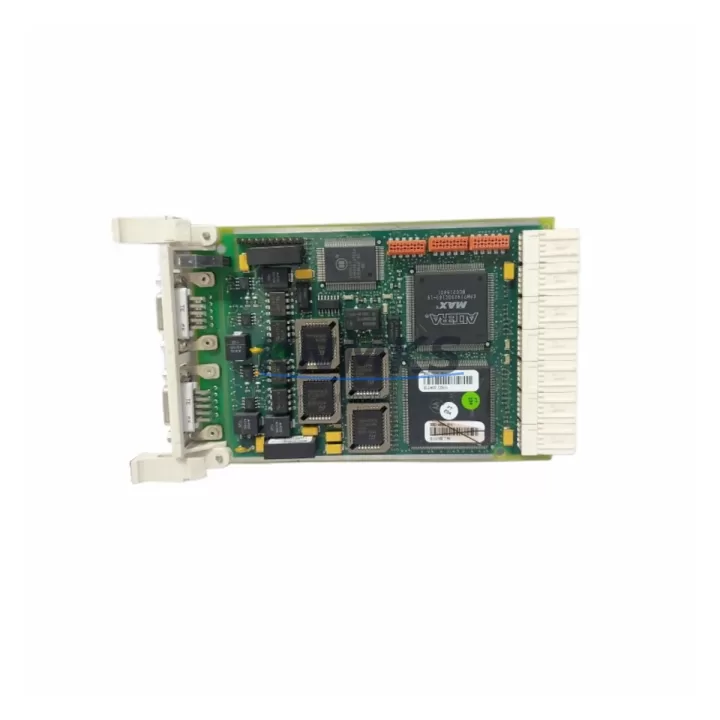
Overview
ABB 3BSE014666R1 CI541V1 Migration-Ready PROFIBUS DP for AC500: Legacy System Migration and Compatible Upgrade
The ABB 3BSE014666R1 CI541V1 is a PROFIBUS DP communication module designed for the ABB AC500 PLC platform. As industrial facilities face increasing pressure to modernize aging control architectures, the CI541V1 serves as a critical bridge component — enabling seamless migration from discontinued fieldbus configurations to current-generation AC500 systems without requiring full control cabinet redesigns. Whether you are replacing a failed communication module in a legacy production line, upgrading a control system to support expanded PROFIBUS DP device networks, or restoring a system after an unplanned outage, the 3BSE014666R1 CI541V1 provides a verified, drop-in compatible solution backed by 12 months of support terms coverage and pre-shipment functional testing.
KNMKS maintains ready stock of the CI541V1 to support urgent retrofit and replacement requirements. Each unit is inspected and tested prior to dispatch, with full documentation available upon request. Our engineering support team can assist with compatibility verification, terminal wiring guidance, and firmware version confirmation before shipment.
Migration Compatibility Table
| Parameter | Details |
|---|---|
| SKU / Part Number | 3BSE014666R1 / CI541V1 |
| Brand / Series | ABB / AC500 |
| Module Type | PROFIBUS DP Communication Module |
| Compatible Backplane / Rack | AC500 CPU backplane (TB511, TB521, TB541 series); verify slot position with system configurator |
| Communication Protocol | PROFIBUS DP (EN 50170 / IEC 61158) |
| Installation Interface | Direct backplane insertion; no additional wiring adapter required for standard AC500 racks |
| Terminal / Connector | 9-pin D-Sub (DB9) PROFIBUS DP connector; confirm bus termination resistor settings on-site |
| Replacement Compatibility | Direct replacement for CI541V1 in AC500 systems; verify firmware version compatibility with CPU module |
| Firmware Compatibility | Confirm AC500 CPU firmware version supports CI541V1 hardware revision; update via PS501 Control Builder if required |
| Module Address Configuration | Set via rotary switch on module face; confirm address map matches existing PROFIBUS DP network configuration |
| HMI / SCADA Compatibility | Compatible with ABB CP600 HMI series and third-party SCADA systems via PROFIBUS DP; verify tag mapping after replacement |
| Retrofit Recommendation | Suitable for direct swap in existing AC500 control cabinets; confirm available backplane slot and power budget |
| Pre-Shipment Testing | Functional communication test performed on each unit before dispatch |
| Support terms | 12 Months from date of shipment |
| Origin | Germany |
| Stock Status | availability confirmed by RFQ — Ready to Ship |
Retrofit Planning for Existing Automation Systems
Successful integration of the ABB 3BSE014666R1 CI541V1 into an existing control system requires careful pre-installation planning. Before removing the legacy communication module, engineers should document the current PROFIBUS DP network topology, including all slave device addresses, GSD files, and bus cable termination points. The CI541V1 occupies a standard AC500 backplane slot; confirm that the target rack — such as a TB541 or TB521 backplane — has an available slot and that the system power supply, for example an ABB CP502 or CP503 power supply module, can support the additional module load without exceeding the backplane power budget.
Terminal wiring for the PROFIBUS DP bus cable should be verified against the existing DB9 connector pinout. In systems where the legacy module used a non-standard cable shield connection, re-termination may be required. If the control cabinet also includes ABB DI581 or DO581 digital I/O modules connected via the PROFIBUS DP network, confirm that their GSD configurations remain valid after the communication module swap. For systems using ABB CI590 PROFIBUS DP gateway modules to bridge legacy S800 I/O clusters, verify that the gateway’s slave address and baud rate settings are preserved during the migration.
Where the existing system includes an ABB PM591 or PM592 CPU module, use ABB PS501 Control Builder Plus to export the current hardware configuration before replacing the CI541V1. This preserves the module address assignments and I/O mapping, reducing the risk of program logic errors after the swap. If the system also uses an ABB CP635 or CP651 HMI panel, verify that the PROFIBUS DP communication driver and tag database remain consistent with the new module’s address settings. Signal isolators installed on analog input channels connected to PROFIBUS DP remote I/O stations should also be checked for loop power compatibility after the module replacement.
Downtime Control During System Migration
Minimizing unplanned downtime is the primary concern during any communication module replacement in a live production environment. For the ABB 3BSE014666R1 CI541V1, the recommended approach is to perform a full backup of the AC500 CPU program and hardware configuration using PS501 Control Builder before initiating any physical module swap. This ensures that the original program logic, I/O address assignments, and PROFIBUS DP network parameters can be restored immediately if the replacement process encounters unexpected compatibility issues.
Where production schedules permit, plan the physical swap during a scheduled maintenance window. Power down the control cabinet in the correct sequence — disable field devices first, then the I/O modules, and finally the CPU and communication modules — to avoid bus fault alarms that could corrupt the active program state. After installing the CI541V1, power up in reverse order and verify PROFIBUS DP bus status indicators before enabling field device communication. Confirm that all slave devices are recognized by the new module before releasing the system to production.
For systems where continuous operation is required, consider staging the migration by temporarily rerouting critical PROFIBUS DP signals through an available CI590 gateway or a parallel communication path while the primary module is replaced. This approach maintains field control continuity and reduces the risk of process interruption. KNMKS can provide pre-configured and tested CI541V1 units with confirmed firmware versions to further reduce on-site commissioning time.
Retrofit Support FAQ
Q1: Is the ABB 3BSE014666R1 CI541V1 a direct replacement for the existing CI541V1 in my AC500 system?
Yes. The 3BSE014666R1 is the standard ABB part number for the CI541V1 PROFIBUS DP communication module. It is designed for direct backplane insertion into AC500 racks. Confirm the hardware revision and firmware version compatibility with your installed CPU module before installation. KNMKS can provide the hardware revision details of the unit availability confirmed by RFQ upon request.
Q2: What commissioning steps are required after replacing the CI541V1?
After physical installation, verify the module address rotary switch setting matches the original configuration. Reload the hardware configuration from PS501 Control Builder if required. Check PROFIBUS DP bus status LEDs on the CI541V1 and confirm all slave devices are online. If HMI tag communication is affected, verify the PROFIBUS DP driver settings on the connected HMI panel. Document all commissioning steps for maintenance records.
Q3: Does KNMKS provide pre-shipment testing for the CI541V1?
Yes. Every ABB 3BSE014666R1 CI541V1 unit shipped by KNMKS undergoes functional communication testing before dispatch. Test records are available upon request. Units are packaged in anti-static protective packaging to prevent damage during transit. The support terms confirmed by quotation cover manufacturing defects and functional failures under normal operating conditions from the date of shipment.
Q4: What is the lead time and support terms coverage for the CI541V1?
KNMKS maintains ready stock of the ABB 3BSE014666R1 CI541V1. Standard orders are dispatched within 1–3 business days. All units are covered by a support terms confirmed by quotation from the date of shipment. For urgent retrofit requirements, expedited dispatch is available — contact our sales team to confirm availability and shipping options.
© 2026 KNMKS. All rights reserved.
Original Source: https://knmks.com
Contact: admin@knmks.com | +86 18359268345
Product Identification
- Brand / Ecosystem
-
ABB
ABB - Model / Series
-
3BSE014666R1 CI541V1
AC500 Series - Product Family
- PLCs & Controllers
- Availability Status
- Available on request after model and quantity confirmation
- Inquiry Type
- B2B RFQ, replacement inquiry and project spare-part request
- Pre-Quote Check
- Exact SKU, brand, series, quantity, nameplate photos and destination country are checked before quotation
System Path
Where this product fits in the KNMKS automation structure.
Specification & Inquiry Focus
- Control platform
- PLC, PAC and modular controllers
- Common needs
- CPU, rack, power and I/O expansion
- Project support
- Replacement, cabinet build and maintenance
Buyer Confirmation
Information KNMKS checks before replying.
- Exact model
- 3BSE014666R1 CI541V1
- Brand / ecosystem
- ABB
- Product family
- PLCs & Controllers
- Application note
- Replacement, maintenance, project build or spare-part list
- Useful photos
- Nameplate, installed unit, cabinet layout or connector side
- Delivery details
- Quantity, destination country and target schedule
Document Support
Files and notes can be confirmed during quotation.
- Product photos or nameplate confirmation when available
- Packing and delivery notes before quotation confirmation
- Support scope and delivery terms confirmed per inquiry
- Export document coordination for qualified B2B requests
Inquiry Support
- Model cross-checking before quotation
- CPU, power, rack and expansion module matching
- Support for replacement and project inquiry
What to Send Us
- Brand and exact model number: ABB 3BSE014666R1 CI541V1
- Quantity and required delivery time
- Application, replacement requirement or nameplate photo
- Destination country and shipping preference
RFQ Preparation
This is a product inquiry page built for RFQ communication.
Fast Model Check
Send this model to KNMKS for confirmation.
Include quantity, destination country and photos if this is a maintenance replacement. The inquiry will be saved with a reference number after submission.
Brand & Compatibility Note
KNMKS displays automation product information for well-known industrial brand ecosystems and compatible replacement references. Brand names are used for product identification and compatibility reference only; final availability and commercial terms are confirmed per quotation.
 Manufacturing
 Machine Tools
 Packaging
 Energy & Power



 HMI & Displays
 Servo Systems
 Variable Frequency Drives
 Sensors