
Overview
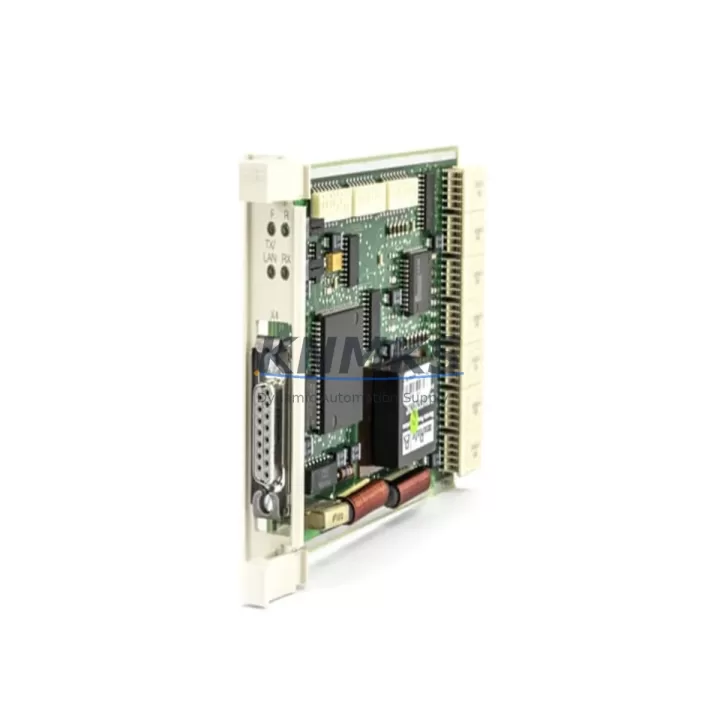
ABB 3BSE000435R1 Maintenance-Proven Spare Part for Factory Uptime
The ABB 3BSE000435R1 (CS513) is a PROFIBUS DP communication module designed for the ABB AC500 PLC platform — one of the most widely deployed programmable logic controller families in process automation, discrete manufacturing, and utility infrastructure. As a field-proven communication interface, the CS513 enables reliable PROFIBUS DP master/slave connectivity between the AC500 CPU and distributed I/O stations, drives, and instrumentation. Maintaining a verified spare of the 3BSE000435R1 in your parts inventory is a fundamental strategy for reducing unplanned downtime and protecting production continuity.
For maintenance engineers managing aging control cabinets or multi-site AC500 installations, the CS513 module is a critical link in the communication chain. A failed or degraded PROFIBUS DP module can cause complete loss of field device visibility, triggering cascading faults across the control loop. Having a pre-tested, support terms-backed replacement on the shelf eliminates the lead time risk associated with emergency procurement and allows same-shift restoration of normal operations.
Procurement engineers sourcing long-cycle spare parts for 12–36 month maintenance agreements will find the 3BSE000435R1 a high-priority line item. ABB’s AC500 series has an extended product lifecycle, but communication modules are subject to wear from thermal cycling, vibration, and connector fatigue — particularly in high-cycle industrial environments. Stocking one or two units per control cabinet cluster is a widely adopted best practice in automotive, water treatment, and energy sector maintenance programs.
Spare Maintenance Table
| Part Number | 3BSE000435R1 |
| Module Designation | CS513 PROFIBUS DP Communication Module |
| Brand | ABB |
| Compatible Platform | ABB AC500 PLC Series (PM571, PM581, PM591, PM595 CPUs) |
| Communication Protocol | PROFIBUS DP (Master / Slave) |
| Baud Rate | Up to 12 Mbit/s |
| Connector Type | 9-pin D-Sub (DB9) PROFIBUS standard |
| Mounting | AC500 CPU left-side expansion slot |
| Supply Voltage | Supplied via AC500 backplane (3.3 V / 5 V internal bus) |
| Operating Temperature | -25°C to +70°C |
| Protection Class | IP20 (panel-mount installation) |
| Origin | Germany |
| Condition | Original, unused or refurbished-to-spec |
| Pre-Shipment Testing | Communication link verification, firmware check, connector inspection |
| Support terms | 12 Months |
| Typical Application | Process automation, discrete manufacturing, utility control, SCADA integration |
Maintenance Planning for Continuous Operation
When replacing or inspecting the ABB 3BSE000435R1 CS513 module, a thorough maintenance workflow should extend beyond the module itself. The PROFIBUS DP network relies on a correctly terminated cable topology — verify that the PROFIBUS termination resistors at both ends of the segment are active and that the cable shielding is properly grounded at the cabinet entry point. A degraded or improperly terminated PROFIBUS segment can cause intermittent communication errors that mimic module failure.
Inspect the AC500 CPU module (such as the PM581 or PM591) for firmware compatibility with the CS513. Mismatched firmware versions between the CPU and communication module are a common source of initialization failures after module swap. Alongside the CS513, review the condition of the TB521-ETH or TB511 terminal base units, as worn or corroded contacts on the backplane connector can cause intermittent module faults that are incorrectly attributed to the communication module itself.
For cabinets running mixed I/O and communication loads, also inspect the AC500 power supply module (such as the PS501 or PS502) to confirm that the internal bus voltage is within specification. An under-voltage condition on the backplane can cause the CS513 to fail initialization or drop the PROFIBUS link under load. If the installation includes distributed I/O via S500 I/O modules (e.g., DI581, DO581, AI531), verify that each remote station address is correctly set and that no address conflicts exist on the PROFIBUS segment after the module replacement.
In installations where the AC500 communicates upstream to a SCADA or DCS via Modbus TCP or IEC 61850, confirm that the communication module replacement does not affect the CPU’s Ethernet port configuration or the CM589-PNIO PROFINET module if co-installed. Fuse protection for the 24 VDC field supply feeding PROFIBUS-connected instruments should also be checked — a blown fuse on the field supply rail can cause multiple slave devices to drop off the network simultaneously, creating a fault pattern that resembles a master module failure.
Site Replacement Workflow
Step 1 — Pre-Replacement Verification: Before removing the 3BSE000435R1, export the current AC500 project from Automation Builder or PS501 Control Builder. Confirm the GSD file version for all PROFIBUS slave devices is archived. Note the current module slot position — the CS513 must be reinstalled in the same expansion slot to preserve the hardware configuration.
Step 2 — Safe Removal: Place the AC500 CPU in STOP mode via the keyswitch or software command. Power down the cabinet following the site lockout/tagout procedure. Disconnect the PROFIBUS DB9 connector before removing the module from the terminal base. Avoid touching the backplane connector pins.
Step 3 — Module Installation: Insert the replacement 3BSE000435R1 into the correct slot on the terminal base. Reconnect the PROFIBUS cable. Power up the cabinet and allow the CPU to complete its boot sequence. The CS513 LED indicators should show a steady green RUN state and a flashing or steady green BF (Bus Fault) LED should clear within 30 seconds as slave devices come online.
Step 4 — Post-Replacement Validation: Verify all PROFIBUS slave stations are online in the diagnostic view of Automation Builder. Check for any address conflicts or GSD mismatch warnings. Run a short production cycle or I/O force test to confirm all field signals are correctly mapped. Document the replacement date, module serial number, and firmware version in the cabinet maintenance log.
This workflow is compatible with legacy AC500 V1 installations and current AC500-eCo and AC500-S variants, minimizing retraining requirements for maintenance teams managing mixed-generation fleets.
Spare Parts Support FAQ
Q1: Is the 3BSE000435R1 compatible with all AC500 CPU variants?
The CS513 is designed for the ABB AC500 platform and is compatible with PM571, PM581, PM591, and PM595 CPU modules when used with the appropriate terminal base. Compatibility with AC500-eCo (PM554, PM564) should be verified against the specific hardware generation and firmware version. Contact our technical team with your CPU part number for confirmation before ordering.
Q2: What is included in the pre-shipment testing process?
Every 3BSE000435R1 unit dispatched from our inventory undergoes a pre-shipment inspection covering physical connector condition, firmware version verification, and a powered communication link test where applicable. Units are packed in anti-static packaging with a test record. This process supports our support terms confirmed by quotation commitment from the date of delivery.
Q3: Can you support long-term supply agreements for the 3BSE000435R1?
Yes. We support 12–36 month supply agreements for maintenance programs requiring guaranteed stock availability. This is particularly relevant for multi-site operators managing AC500 fleets where the CS513 is a common spare. Contact admin@knmks.com to discuss volume pricing, reserved stock arrangements, and delivery scheduling.
Q4: What should I do if the replacement CS513 does not initialize correctly after installation?
If the CS513 fails to initialize, first confirm the module is seated correctly in the terminal base and the backplane connector is fully engaged. Check that the CPU firmware version supports the installed CS513 hardware revision — this information is available in the ABB AC500 firmware release notes. Verify PROFIBUS cable termination and that no address conflicts exist on the segment. If the issue persists, contact our technical support team with the CPU type, firmware version, and LED fault pattern for remote diagnosis assistance.
© 2026 KNMKS. All rights reserved.
Original Source: https://knmks.com
Contact: admin@knmks.com | +86 18359268345
Product Identification
- Brand / Ecosystem
-
ABB
ABB - Model / Series
-
3BSE000435R1
AC500 Series - Product Family
- PLCs & Controllers
- Availability Status
- Available on request after model and quantity confirmation
- Inquiry Type
- B2B RFQ, replacement inquiry and project spare-part request
- Pre-Quote Check
- Exact SKU, brand, series, quantity, nameplate photos and destination country are checked before quotation
System Path
Where this product fits in the KNMKS automation structure.
Specification & Inquiry Focus
- Control platform
- PLC, PAC and modular controllers
- Common needs
- CPU, rack, power and I/O expansion
- Project support
- Replacement, cabinet build and maintenance
Buyer Confirmation
Information KNMKS checks before replying.
- Exact model
- 3BSE000435R1
- Brand / ecosystem
- ABB
- Product family
- PLCs & Controllers
- Application note
- Replacement, maintenance, project build or spare-part list
- Useful photos
- Nameplate, installed unit, cabinet layout or connector side
- Delivery details
- Quantity, destination country and target schedule
Document Support
Files and notes can be confirmed during quotation.
- Product photos or nameplate confirmation when available
- Packing and delivery notes before quotation confirmation
- Support scope and delivery terms confirmed per inquiry
- Export document coordination for qualified B2B requests
Inquiry Support
- Model cross-checking before quotation
- CPU, power, rack and expansion module matching
- Support for replacement and project inquiry
What to Send Us
- Brand and exact model number: ABB 3BSE000435R1
- Quantity and required delivery time
- Application, replacement requirement or nameplate photo
- Destination country and shipping preference
RFQ Preparation
This is a product inquiry page built for RFQ communication.
Fast Model Check
Send this model to KNMKS for confirmation.
Include quantity, destination country and photos if this is a maintenance replacement. The inquiry will be saved with a reference number after submission.
Brand & Compatibility Note
KNMKS displays automation product information for well-known industrial brand ecosystems and compatible replacement references. Brand names are used for product identification and compatibility reference only; final availability and commercial terms are confirmed per quotation.
 Manufacturing
 Machine Tools
 Packaging
 Energy & Power



 HMI & Displays
 Servo Systems
 Variable Frequency Drives
 Sensors