
Overview
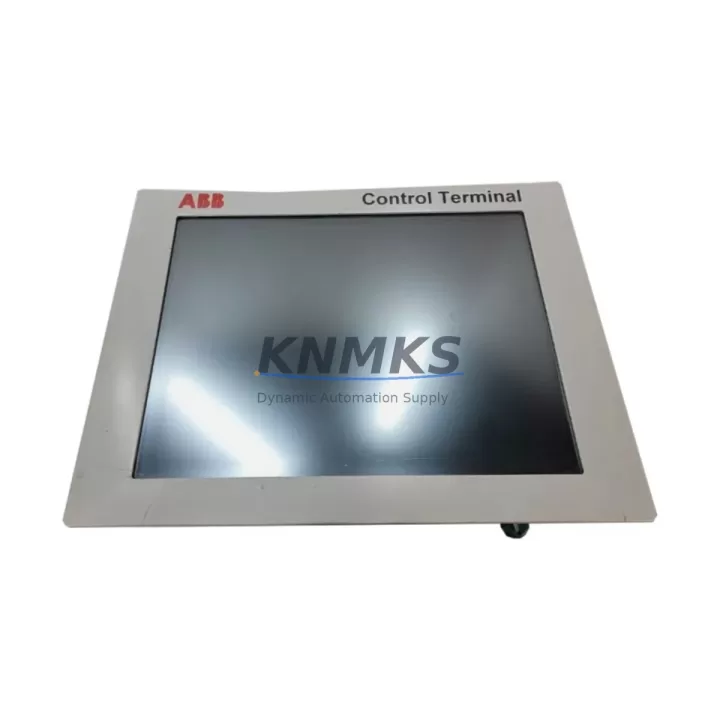
ABB 3BHE031734R3203 Migration-Ready HMI for Legacy Control Systems
The ABB 3BHE031734R3203 (TPC1571HD3A1201E-T) is a 12-inch industrial HMI touch panel engineered for direct integration into ABB AC500, AC800M, and Symphony Plus distributed control environments. As legacy TPC1571-series panels approach end-of-life and spare part availability narrows, the 3BHE031734R3203 serves as the verified migration-ready replacement — preserving existing panel cutout dimensions, PROFIBUS DP and Ethernet communication links, and operator screen layouts without requiring a full control cabinet redesign. For automation engineers managing aging production lines, this unit eliminates the need to re-engineer HMI wiring harnesses or reprogram PLC address mappings from scratch, dramatically compressing retrofit project timelines and reducing unplanned downtime exposure.
Before committing to a panel swap, engineers should confirm the following against the existing installation: 24 VDC power supply capacity (minimum 4 A sustained draw), terminal block pitch compatibility at the rear I/O connector, PROFIBUS DP segment address assignment (avoid address conflicts with co-installed CP600 operator panels or PM591 processor modules), available backplane slot clearance for the mounting bezel, and the firmware revision currently running on the connected AC500 CPU. Where the legacy TPC1571 communicated via RS-232 serial links to third-party SCADA systems, a protocol bridge or updated communication driver may be required before the 3BHE031734R3203 can assume full supervisory duties. HMI screen projects built in Panel Builder 600 are forward-compatible and can be transferred directly to the replacement unit via USB or Ethernet download, preserving alarm setpoints, trend displays, and recipe data without manual re-entry.
Migration Compatibility Table
| Parameter | Legacy TPC1571 (Original) | ABB 3BHE031734R3203 (Replacement) | Migration Note |
|---|---|---|---|
| Display Size | 12.1″ TFT LCD | 12.1″ TFT LCD | Direct drop-in; no panel cutout modification required |
| Supply Voltage | 24 VDC ±20% | 24 VDC ±20% | Verify PSU capacity ≥ 4 A before energizing |
| Communication Ports | PROFIBUS DP, Ethernet, RS-232 | PROFIBUS DP, Ethernet (RS-232 via adapter) | RS-232 legacy links may require protocol adapter |
| Mounting Interface | Panel-mount, IP65 front | Panel-mount, IP65 front | Gasket seal condition should be inspected at installation |
| HMI Software | Panel Builder 600 (legacy) | Panel Builder 600 / Panel Builder 800 | Existing .PB6 projects transfer without re-engineering |
| Backplane / Rack | Standalone panel mount | Standalone panel mount | No rack or backplane changes needed |
| Firmware Compatibility | TPC1571 firmware ≤ v3.x | Supports firmware v3.x and v4.x | Update AC500 CPU firmware if running v2.x or earlier |
| Support terms | OEM support terms expired (EOL) | support terms confirmed by quotation (KNMKS) | Covers functional defects; full pre-shipment test report included |
Retrofit Planning for Existing Automation Systems
A successful TPC1571 retrofit begins well before the replacement unit arrives on site. The first step is a full audit of the control cabinet: document the existing terminal block layout, measure available depth behind the panel cutout, and photograph the current wiring harness routing. In many AC500-based systems, the HMI shares a 24 VDC rail with PM591 or PM592 processor modules and DC532 digital I/O modules — confirm that the shared rail can sustain the combined inrush current when the new panel initializes. If the cabinet also houses a CI590-CS31-HA communication interface module for legacy CS31 field bus devices, verify that the PROFIBUS DP segment termination resistors are correctly positioned after the panel swap, as an improperly terminated segment can cause intermittent communication faults that are difficult to diagnose under production pressure.
For sites running Symphony Plus DCS architectures, the 3BHE031734R3203 integrates with S+ Operations workstations via OPC DA or OPC UA bridges. Engineers should pre-configure the OPC server tag mapping before the maintenance window opens, so that operator displays come online immediately after the panel boots. Where the legacy installation included a TP830 or TP845 operator terminal in a parallel supervisory role, the new HMI’s Ethernet port can be assigned to the same subnet without IP conflict, provided DHCP reservations or static assignments are updated in the site network switch. Signal isolators — particularly for 4–20 mA analog loops feeding AI523 or AI531 analog input modules — should be inspected for drift before the retrofit, since a panel replacement is an ideal opportunity to recalibrate field instruments without additional downtime.
Programming cable access is another practical consideration: the 3BHE031734R3203 supports USB-A and RJ45 Ethernet for project download, eliminating the need for the legacy RS-232 programming cable that many sites have already retired. Confirm that the engineering workstation running Panel Builder 600 or Panel Builder 800 has the correct USB driver installed before the maintenance window, and pre-load the updated HMI project onto a USB flash drive as a backup transfer method. This redundancy ensures that a network connectivity issue during the maintenance window does not extend planned downtime.
Downtime Control During System Migration
Minimizing production interruption during an HMI panel replacement requires a structured pre-outage preparation protocol. At least 48 hours before the scheduled maintenance window, back up the existing HMI project from the legacy TPC1571 using Panel Builder 600’s export function, and store the .PB6 file on both the engineering workstation and a USB drive kept in the control room. Simultaneously, export the current PLC program from the AC500 CPU using Automation Builder, and record all active PROFIBUS DP node addresses, Ethernet IP assignments, and alarm threshold values. This documentation serves as the recovery baseline if the retrofit encounters an unexpected compatibility issue.
During the swap itself, label every wire and terminal before disconnection — a thermal label printer and pre-printed terminal markers reduce reconnection errors to near zero. Power down the 24 VDC supply rail in a controlled sequence: HMI first, then field I/O modules, then the CPU, to avoid spurious output signals that could trigger downstream actuators. After mounting the 3BHE031734R3203 and reconnecting terminals, perform a point-to-point continuity check before energizing. On first power-up, the panel will boot to a default screen; download the pre-tested HMI project immediately and verify that all communication links — PROFIBUS DP status LEDs, Ethernet ping response, and OPC tag updates — are healthy before releasing the system to operators. A structured 15-minute functional verification checklist, covering alarm acknowledgment, setpoint entry, trend display refresh, and emergency stop HMI interlock, should be completed and signed off before the maintenance window closes. This approach consistently holds total retrofit downtime to under four hours for a single-panel replacement in a well-prepared AC500 system.
Retrofit Support FAQ
Q1: Is the ABB 3BHE031734R3203 a direct replacement for the original TPC1571HD3A1201E-T?
Yes. The 3BHE031734R3203 is the current ABB part number for the TPC1571HD3A1201E-T HMI panel. It shares the same 12.1-inch display format, 24 VDC power input, panel-mount cutout dimensions, and PROFIBUS DP / Ethernet communication interfaces. Existing HMI projects created in Panel Builder 600 are directly transferable without re-engineering operator screens or alarm configurations.
Q2: What pre-shipment testing does KNMKS perform before dispatch?
Every 3BHE031734R3203 unit undergoes a full functional test prior to shipment: power-on verification, display uniformity check, touchscreen calibration, communication port continuity, and firmware version confirmation. A test report is included with each shipment. Units are covered by a support terms confirmed by quotation against functional defects from the date of delivery, with direct technical support available via admin@knmks.com.
Q3: Can the replacement panel communicate with both AC500 PLCs and Symphony Plus DCS simultaneously?
The 3BHE031734R3203 supports concurrent PROFIBUS DP and Ethernet communication, allowing it to exchange data with AC500 CPU modules on the PROFIBUS segment while simultaneously connecting to Symphony Plus S+ Operations via an OPC server on the Ethernet network. Dual-network operation requires correct subnet configuration and should be validated during commissioning before the system is returned to automatic control.
Q4: What is the typical lead time and stock availability?
KNMKS maintains ready stock of the ABB 3BHE031734R3203 to support urgent retrofit and breakdown replacement requirements. Standard orders ship within 2–5 business days. For projects requiring multiple units or scheduled delivery windows aligned with planned maintenance shutdowns, contact admin@knmks.com or call +86 18359268345 to confirm allocation and arrange consolidated shipment.
© 2026 KNMKS. All rights reserved.
Original Source: https://knmks.com
Contact: admin@knmks.com | +86 18359268345
Product Identification
- Brand / Ecosystem
-
ABB
ABB - Model / Series
-
3BHE031734R3203
Legacy Series - Product Family
- HMI & Displays
- Availability Status
- Available on request after model and quantity confirmation
- Inquiry Type
- B2B RFQ, replacement inquiry and project spare-part request
- Pre-Quote Check
- Exact SKU, brand, series, quantity, nameplate photos and destination country are checked before quotation
System Path
Where this product fits in the KNMKS automation structure.
Specification & Inquiry Focus
- Display range
- Operator panels and touch screens
- Common needs
- Screen size, interface and version matching
- Project support
- Retrofit, spare unit and panel replacement
Buyer Confirmation
Information KNMKS checks before replying.
- Exact model
- 3BHE031734R3203
- Brand / ecosystem
- ABB
- Product family
- HMI & Displays
- Application note
- Replacement, maintenance, project build or spare-part list
- Useful photos
- Nameplate, installed unit, cabinet layout or connector side
- Delivery details
- Quantity, destination country and target schedule
Document Support
Files and notes can be confirmed during quotation.
- Product photos or nameplate confirmation when available
- Packing and delivery notes before quotation confirmation
- Support scope and delivery terms confirmed per inquiry
- Export document coordination for qualified B2B requests
Inquiry Support
- Panel size and interface confirmation
- Replacement unit inquiry for discontinued HMIs
- Protective packaging for display shipment
What to Send Us
- Brand and exact model number: ABB 3BHE031734R3203
- Quantity and required delivery time
- Application, replacement requirement or nameplate photo
- Destination country and shipping preference
RFQ Preparation
This is a product inquiry page built for RFQ communication.
Fast Model Check
Send this model to KNMKS for confirmation.
Include quantity, destination country and photos if this is a maintenance replacement. The inquiry will be saved with a reference number after submission.
Brand & Compatibility Note
KNMKS displays automation product information for well-known industrial brand ecosystems and compatible replacement references. Brand names are used for product identification and compatibility reference only; final availability and commercial terms are confirmed per quotation.
 Manufacturing
 Machine Tools
 Packaging
 Energy & Power
 PLCs & Controllers
 Servo Systems
 Variable Frequency Drives
 Sensors