
Overview
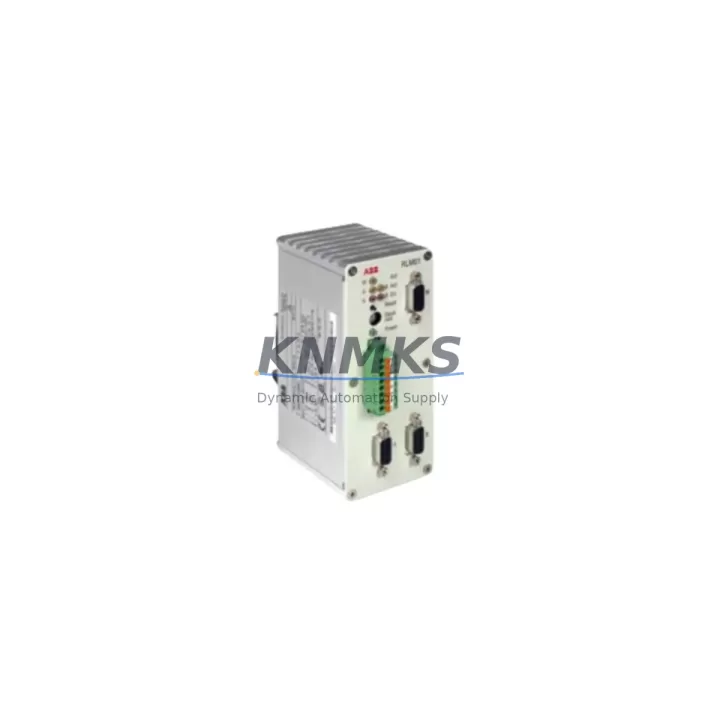
ABB 3BDZ000398R1 RLM01 Migration-Ready PROFIBUS Redundancy Module: Legacy System Migration and Compatible Upgrade
The ABB 3BDZ000398R1 RLM01 is a PROFIBUS DP Redundancy Link Module engineered for industrial control environments where communication continuity and system availability are non-negotiable. Designed for integration within the ABB AC500 PLC platform, this module provides a validated migration path for facilities operating legacy PROFIBUS DP networks that require redundancy upgrades, controller replacements, or communication architecture modernization. Whether you are decommissioning an aging S800 I/O segment, replacing a discontinued communication interface, or expanding an existing AC500 rack with redundant fieldbus capability, the RLM01 delivers the compatibility, form factor, and firmware alignment required for a controlled, low-risk retrofit.
Industrial sites running legacy ABB Advant, Freelance, or early AC500 configurations frequently encounter the challenge of maintaining PROFIBUS DP redundancy when original modules reach end-of-life. The 3BDZ000398R1 RLM01 addresses this directly by supporting both primary and backup communication paths on a single PROFIBUS DP segment, enabling seamless switchover without interrupting field device polling cycles or PLC scan logic. This is particularly critical in petrochemical, power generation, and water treatment applications where unplanned communication loss triggers safety interlocks or process shutdowns.
Before installation, engineers should verify the following parameters against the existing system configuration: available backplane slot positions within the AC500 CPU rack, terminal block wiring compatibility for the PROFIBUS DP connector (9-pin D-sub, standard pinout), module address assignment within the GSD file or hardware configuration tool (PS501 Control Builder Plus), firmware version alignment between the RLM01 and the installed CPU module (PM573, PM583, or PM595 series), and available 24 VDC power budget on the rack power supply — typically the AC500 PM-series power supply or an external CP600 panel-mounted unit. Confirm that the existing PROFIBUS cable shielding and termination resistors are intact, as redundancy switchover performance is directly affected by signal integrity on both DP channels.
Migration Compatibility Table
| Parameter | Specification / Recommendation |
|---|---|
| Compatible Platform | ABB AC500 PLC (PM573, PM583, PM595 CPU series) |
| Communication Protocol | PROFIBUS DP (IEC 61158), redundant master/slave |
| Backplane Interface | AC500 internal bus, standard rack slot (TB511, TB521, TB541) |
| Connector Type | 9-pin D-sub, PROFIBUS standard pinout |
| Power Requirement | 24 VDC via AC500 backplane; verify rack PSU headroom |
| Firmware Compatibility | Align with CPU firmware; update via Control Builder Plus (PS501) |
| Legacy Replacement Path | Replaces discontinued ABB PROFIBUS DP interface modules in Advant/Freelance systems |
| Installation Space | Standard AC500 rack slot; confirm physical clearance in existing control cabinet |
| Commissioning Tool | ABB Control Builder Plus (PS501), GSD file import required |
| Support terms | 12 months from date of shipment; covers manufacturing defects and functional failure |
Retrofit Planning for Existing Automation Systems
Successful integration of the 3BDZ000398R1 RLM01 into an existing control architecture requires a structured pre-retrofit assessment. Begin by auditing the current rack configuration: identify occupied and available slots on the AC500 terminal base (TB511-ETH or TB521-ETH), and confirm that the backplane bus is not saturated by existing I/O modules such as the DC532 digital input module or AX522 analog I/O module. If the control cabinet houses a legacy S800 I/O cluster connected via CI854 PROFIBUS DP interface, the RLM01 can serve as the redundant master-side counterpart, maintaining communication to remote I/O nodes during primary channel faults.
For sites migrating from Freelance DCS to AC500-based PLC control, the RLM01 supports the PROFIBUS DP segment that previously connected to the Freelance AC800F controller. During the cutover window, engineers should export the existing GSD-based device configuration, re-import it into Control Builder Plus, and validate all device addresses before energizing the new rack. The PM595 CPU — ABB’s high-performance AC500 processor — is the recommended pairing for applications requiring fast redundancy switchover times under 10 ms.
Power budget verification is mandatory before commissioning. The AC500 power supply module (PS501 or PS502) must have sufficient current headroom to support the RLM01 alongside existing modules. In cabinets where the power supply is already loaded above 80% capacity, consider adding a secondary CP600 power supply or redistributing I/O across a second rack. Communication cable routing should follow PROFIBUS installation guidelines: shielded twisted-pair cable, maximum segment length per baud rate, and proper termination at both ends of each DP segment.
HMI integration should be validated post-installation. If the site uses an ABB CP600 or CP635 operator panel connected to the AC500 CPU via Ethernet or serial link, confirm that the HMI project references the correct PLC variable addresses and that no address remapping is required after the PROFIBUS redundancy module is added to the hardware configuration. Update the HMI project in Panel Builder 600 and perform a full download before resuming production.
Downtime Control During System Migration
Minimizing production downtime during a PROFIBUS redundancy module retrofit requires a phased approach. In the pre-shutdown phase, prepare the replacement RLM01, verify firmware compatibility, and pre-configure the module address in Control Builder Plus offline. Export a full backup of the existing PLC program, hardware configuration, and HMI project before any physical work begins. This backup serves as the rollback baseline if commissioning issues arise.
During the maintenance window, follow a structured sequence: de-energize the rack, install the RLM01 in the designated slot, reconnect PROFIBUS DP cables to both channel A and channel B connectors, and restore power. Use Control Builder Plus to download the updated hardware configuration to the CPU. Perform a forced online comparison between the downloaded configuration and the running program to confirm no unintended logic changes were introduced. Validate PROFIBUS DP communication on both channels using the diagnostic functions within Control Builder Plus before releasing the system to operations.
For critical processes where even a planned shutdown carries significant risk, consider a hot-standby migration strategy: install the RLM01 in a parallel rack, validate communication on the secondary channel while the primary system remains live, then perform a controlled switchover during a low-production period. This approach is particularly effective in continuous process industries such as oil refining, chemical production, and power generation, where the cost of unplanned downtime far exceeds the engineering effort required for a staged cutover.
All units supplied by KNMKS are tested prior to shipment, including functional verification of both PROFIBUS DP channels, backplane interface continuity, and firmware version confirmation. In-stock inventory ensures short lead times for urgent replacement requirements. Each unit is covered by a support terms confirmed by quotation against manufacturing defects and functional failure from the date of shipment.
Retrofit Support FAQ
Q1: Is the ABB 3BDZ000398R1 RLM01 a direct drop-in replacement for legacy ABB PROFIBUS DP interface modules?
A: The RLM01 is designed for the AC500 platform and is the current-generation replacement for discontinued PROFIBUS redundancy interfaces used in earlier ABB control systems. Physical installation requires an available AC500 rack slot, and the hardware configuration must be updated in Control Builder Plus. It is not a pin-for-pin replacement for non-AC500 platforms without additional adaptation.
Q2: What commissioning steps are required after installing the RLM01?
A: After physical installation, import or update the hardware configuration in Control Builder Plus (PS501), assign the correct module address, download the configuration to the CPU, and verify PROFIBUS DP communication on both redundant channels using the built-in diagnostic tools. Validate all field device responses before returning the system to automatic control.
Q3: How do I verify wiring compatibility between the RLM01 and my existing PROFIBUS DP cable infrastructure?
A: The RLM01 uses a standard 9-pin D-sub PROFIBUS DP connector. Verify that your existing cable uses shielded twisted-pair with correct termination at both segment ends. Check baud rate settings against your existing DP master configuration and confirm that cable length does not exceed the maximum for your selected baud rate. No special adapter is required for standard PROFIBUS DP installations.
Q4: What does the support terms confirmed by quotation cover, and what is the typical lead time for in-stock units?
A: The support terms confirmed by quotation cover manufacturing defects and functional failure under normal operating conditions from the date of shipment. In-stock units are typically dispatched within 1–3 business days. For urgent replacement requirements, expedited shipping is available. Contact admin@knmks.com or call +86 18359268345 to confirm current stock availability and lead time.
© 2026 KNMKS. All rights reserved.
Original Source: https://knmks.com
Contact: admin@knmks.com | +86 18359268345
Product Identification
- Brand / Ecosystem
-
ABB
ABB - Model / Series
-
3BDZ000398R1 RLM01
AC500 Series - Product Family
- PLCs & Controllers
- Availability Status
- Available on request after model and quantity confirmation
- Inquiry Type
- B2B RFQ, replacement inquiry and project spare-part request
- Pre-Quote Check
- Exact SKU, brand, series, quantity, nameplate photos and destination country are checked before quotation
System Path
Where this product fits in the KNMKS automation structure.
Specification & Inquiry Focus
- Control platform
- PLC, PAC and modular controllers
- Common needs
- CPU, rack, power and I/O expansion
- Project support
- Replacement, cabinet build and maintenance
Buyer Confirmation
Information KNMKS checks before replying.
- Exact model
- 3BDZ000398R1 RLM01
- Brand / ecosystem
- ABB
- Product family
- PLCs & Controllers
- Application note
- Replacement, maintenance, project build or spare-part list
- Useful photos
- Nameplate, installed unit, cabinet layout or connector side
- Delivery details
- Quantity, destination country and target schedule
Document Support
Files and notes can be confirmed during quotation.
- Product photos or nameplate confirmation when available
- Packing and delivery notes before quotation confirmation
- Support scope and delivery terms confirmed per inquiry
- Export document coordination for qualified B2B requests
Inquiry Support
- Model cross-checking before quotation
- CPU, power, rack and expansion module matching
- Support for replacement and project inquiry
What to Send Us
- Brand and exact model number: ABB 3BDZ000398R1 RLM01
- Quantity and required delivery time
- Application, replacement requirement or nameplate photo
- Destination country and shipping preference
RFQ Preparation
This is a product inquiry page built for RFQ communication.
Fast Model Check
Send this model to KNMKS for confirmation.
Include quantity, destination country and photos if this is a maintenance replacement. The inquiry will be saved with a reference number after submission.
Brand & Compatibility Note
KNMKS displays automation product information for well-known industrial brand ecosystems and compatible replacement references. Brand names are used for product identification and compatibility reference only; final availability and commercial terms are confirmed per quotation.
 Manufacturing
 Machine Tools
 Packaging
 Energy & Power



 HMI & Displays
 Servo Systems
 Variable Frequency Drives
 Sensors