
Overview
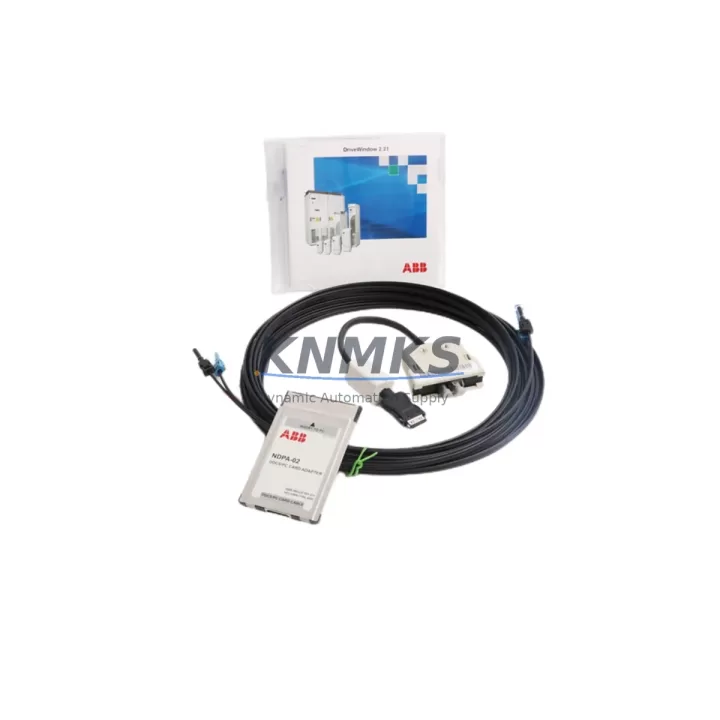
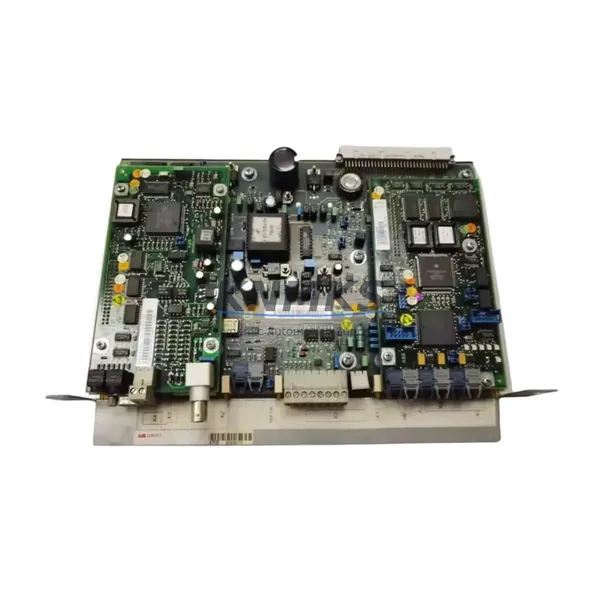
ABB 3AFE64547992 Migration-Ready Drive Kit for Legacy Control Systems
The ABB 3AFE64547992 is a migration-ready drive service kit engineered for facilities managing the transition away from discontinued ACS600 and aging ACS800 series variable frequency drives. As legacy ABB drive platforms approach end-of-life and OEM spare part availability narrows, the 3AFE64547992 provides a verified, wiring-compatible replacement path that minimizes retrofit risk and protects existing control logic investments.
This kit is specifically suited for industrial environments where the original ACS800 or ACS600 drive chassis remains structurally sound but internal drive components — including power modules, control boards, or interface cards — have reached end of service life. Rather than replacing the entire drive cabinet, maintenance engineers can deploy the 3AFE64547992 as a targeted component-level upgrade, preserving panel wiring, terminal block layouts, and existing fieldbus connections.
Before installation, engineers should verify the following against the existing system: DC bus voltage rating, input power capacity (kW/HP), output current range, cooling configuration (forced air vs. IP54 enclosure), and the firmware version currently running on the ACS800 RMIO control board. Mismatched firmware between the replacement kit and the host drive’s RMIO-02 or RMIO-11 board is one of the most common causes of post-retrofit commissioning delays and should be resolved prior to energization.
Terminal wiring compatibility is a critical checkpoint. The 3AFE64547992 maintains the standard ABB ACS800 terminal layout, meaning U1/V1/W1 input and U2/V2/W2 output connections, PE grounding, and the 24 VDC auxiliary supply terminals align with existing cabinet wiring without modification in most standard configurations. However, if the legacy system used a custom I/O extension module — such as the RAIO-01 analog I/O adapter or an RDIO-01 digital I/O board — these should be inspected for compatibility with the replacement kit before the panel is de-energized.
Migration Compatibility Table
| Parameter | Legacy ACS600 / ACS800 | ABB 3AFE64547992 Kit | Action Required |
|---|---|---|---|
| Terminal Layout | Standard ABB ACS800 terminal block | Compatible — same pinout | Verify torque specs on existing lugs |
| Backplane / Rack Interface | ACS800 drive module slot | Direct drop-in for supported frame sizes | Confirm frame size (R2–R6) before ordering |
| Communication Protocol | PROFIBUS-DP, Modbus RTU, DeviceNet | Compatible via existing fieldbus adapter | Retain RPBA-01 / RMBA-01 adapter; re-address if needed |
| Firmware Version | RMIO board firmware (varies) | Verify against kit documentation | Update RMIO firmware if version mismatch detected |
| I/O Extension Modules | RAIO-01, RDIO-01 (optional) | Compatible with standard I/O mapping | Re-map I/O addresses in drive parameters if changed |
| Installation Space | Standard ACS800 cabinet footprint | Same mechanical envelope | No cabinet modification required in standard cases |
| Replacement Category | Discontinued / End-of-Life spare | Migration-ready service kit | Confirm BOM against original drive order code |
| Support terms | OEM support terms expired | 12-Month KNMKS support terms | Support terms certificate issued at shipment |
Retrofit Planning for Existing Automation Systems
A successful retrofit using the ABB 3AFE64547992 begins well before the maintenance window opens. The planning phase should include a full audit of the existing drive cabinet: document the current parameter set by uploading it via DriveWindow or DriveStudio software, photograph all terminal connections, and record the positions of any installed option boards.
In many ACS800-based systems, the drive communicates upstream to a PLC — commonly an ABB AC500 series controller or a Siemens S7-300 — via a PROFIBUS-DP network using the RPBA-01 fieldbus adapter. This adapter is typically retained during the retrofit and remounted on the replacement kit. However, the node address and baud rate settings stored in the adapter must be verified against the PLC’s hardware configuration to avoid communication faults on first power-up.
For systems that include an ACS800 multidrives cabinet with a shared DC bus, the retrofit scope expands. Engineers must coordinate the replacement sequence across multiple drive modules to maintain DC bus continuity. In these configurations, the RDCU-02C control unit and associated AINT-02 inverter module interface boards are often involved, and their parameter compatibility with the 3AFE64547992 kit should be confirmed in advance.
HMI screens connected to the drive — whether a local ABB CDP312R control panel or a SCADA terminal — may display drive-specific parameter values that are mapped by parameter number. After the retrofit, verify that all HMI display mappings remain valid, particularly for output frequency, motor current, fault history, and run/stop status signals. If the HMI uses a serial RS-485 link to the drive, the communication settings (baud rate, parity, stop bits) must match the replacement kit’s default configuration.
Signal isolation is another consideration in older panel designs. If the existing system uses external signal isolators between the drive’s analog outputs and the PLC’s analog input cards, these devices — often DIN-rail mounted isolators from brands such as Phoenix Contact or Weidmüller — should be tested for signal integrity after the retrofit is complete. Analog reference signals (0–10 V or 4–20 mA) must be verified at the PLC input terminals, not just at the drive output terminals.
Finally, if the legacy system includes a programming cable connection point (typically a USB-to-RS232 adapter for older RMIO boards), ensure the replacement kit’s control board supports the same interface before the maintenance window begins. Having the correct cable and a pre-loaded parameter backup file on the commissioning laptop eliminates one of the most common sources of unplanned downtime extension.
Downtime Control During System Migration
Minimizing production downtime during a drive retrofit requires a structured pre-shutdown checklist and a clear rollback plan. Before de-energizing the existing ACS800 drive, upload the complete parameter set to a laptop using DriveStudio or DriveWindow. Save the file with the drive serial number and date in the filename. This backup is the single most important document in the retrofit — it allows the commissioning engineer to restore the original control logic to the replacement kit within minutes rather than hours.
During the physical swap, work systematically: remove the control wiring first (I/O, fieldbus, and auxiliary power), then the power terminals (motor and supply cables), and finally the mechanical mounting. Label every wire before removal using the existing panel drawings. If panel drawings are unavailable or outdated, photograph each terminal strip before disconnection.
After installing the 3AFE64547992 kit, restore power in stages: auxiliary 24 VDC first, then verify the control board initializes correctly and the fieldbus adapter establishes communication with the PLC before applying main AC power. This staged energization approach allows faults to be identified and corrected without exposing the motor or driven equipment to potentially incorrect drive parameters.
Commission the drive in local control mode first, running the motor uncoupled from the load if possible, to verify rotation direction, speed reference response, and fault-free operation across the full speed range. Only after successful local commissioning should the drive be handed back to remote PLC control. Document the commissioning results — measured output current, speed reference accuracy, and any parameter changes made during startup — and retain this record alongside the support terms certificate.
With proper pre-planning, a single-drive retrofit using the ABB 3AFE64547992 can typically be completed within a 4–8 hour maintenance window, including parameter restore, wiring reconnection, and functional testing. For multidrives cabinets or systems with complex fieldbus topologies, allow additional time for network re-commissioning and HMI verification.
Retrofit Support FAQ
Q: Is the ABB 3AFE64547992 a direct replacement for discontinued ACS600 and ACS800 drive components?
A: The 3AFE64547992 is a migration-ready drive service kit designed for ACS800 series systems and compatible upgrade paths from ACS600 platforms. Compatibility depends on the specific frame size, power rating, and option board configuration of the original drive. Contact KNMKS with your original drive order code for a pre-sale compatibility confirmation before ordering.
Q: What wiring changes are required during installation?
A: In standard ACS800 configurations, the 3AFE64547992 maintains the same terminal layout as the original drive module, so power and control wiring can typically be reconnected without modification. However, if the existing system uses non-standard I/O wiring, custom fieldbus cabling, or legacy analog signal conditioning, these should be reviewed against the kit’s terminal documentation before the maintenance window begins.
Q: Has this kit been tested before shipment?
A: Yes. All units supplied by KNMKS undergo pre-shipment functional testing, including power-on initialization, control board communication verification, and basic I/O checks. A test record is available upon request. Each unit ships with a support terms confirmed by quotation covering manufacturing defects and functional failures under normal operating conditions.
Q: What is the lead time and stock availability?
A: KNMKS maintains inventory of the ABB 3AFE64547992 to support urgent retrofit and breakdown replacement requirements. Standard orders ship within 1–3 business days. For large-quantity orders or time-critical projects, contact our sales team directly to confirm current stock levels and expedited shipping options.
© 2026 KNMKS. All rights reserved.
Original Source: https://knmks.com
Contact: admin@knmks.com | +86 18359268345
Product Identification
- Brand / Ecosystem
-
ABB
ABB - Model / Series
-
3AFE64547992
S800 Series - Product Family
- Variable Frequency Drives
- Availability Status
- Available on request after model and quantity confirmation
- Inquiry Type
- B2B RFQ, replacement inquiry and project spare-part request
- Pre-Quote Check
- Exact SKU, brand, series, quantity, nameplate photos and destination country are checked before quotation
System Path
Where this product fits in the KNMKS automation structure.
Specification & Inquiry Focus
- Drive range
- AC drives, VFDs and accessories
- Common needs
- Voltage, kW/HP and load type
- Project support
- Motor control, energy saving and spares
Buyer Confirmation
Information KNMKS checks before replying.
- Exact model
- 3AFE64547992
- Brand / ecosystem
- ABB
- Product family
- Variable Frequency Drives
- Application note
- Replacement, maintenance, project build or spare-part list
- Useful photos
- Nameplate, installed unit, cabinet layout or connector side
- Delivery details
- Quantity, destination country and target schedule
Document Support
Files and notes can be confirmed during quotation.
- Product photos or nameplate confirmation when available
- Packing and delivery notes before quotation confirmation
- Support scope and delivery terms confirmed per inquiry
- Export document coordination for qualified B2B requests
Inquiry Support
- Input/output voltage and kW/HP confirmation
- Energy-saving motor control inquiry
- Accessory and spare-unit support
What to Send Us
- Brand and exact model number: ABB 3AFE64547992
- Quantity and required delivery time
- Application, replacement requirement or nameplate photo
- Destination country and shipping preference
RFQ Preparation
This is a product inquiry page built for RFQ communication.
Fast Model Check
Send this model to KNMKS for confirmation.
Include quantity, destination country and photos if this is a maintenance replacement. The inquiry will be saved with a reference number after submission.
Brand & Compatibility Note
KNMKS displays automation product information for well-known industrial brand ecosystems and compatible replacement references. Brand names are used for product identification and compatibility reference only; final availability and commercial terms are confirmed per quotation.
 Manufacturing
 Machine Tools
 Packaging
 Energy & Power
 PLCs & Controllers
 HMI & Displays
 Servo Systems
 Sensors