
Overview
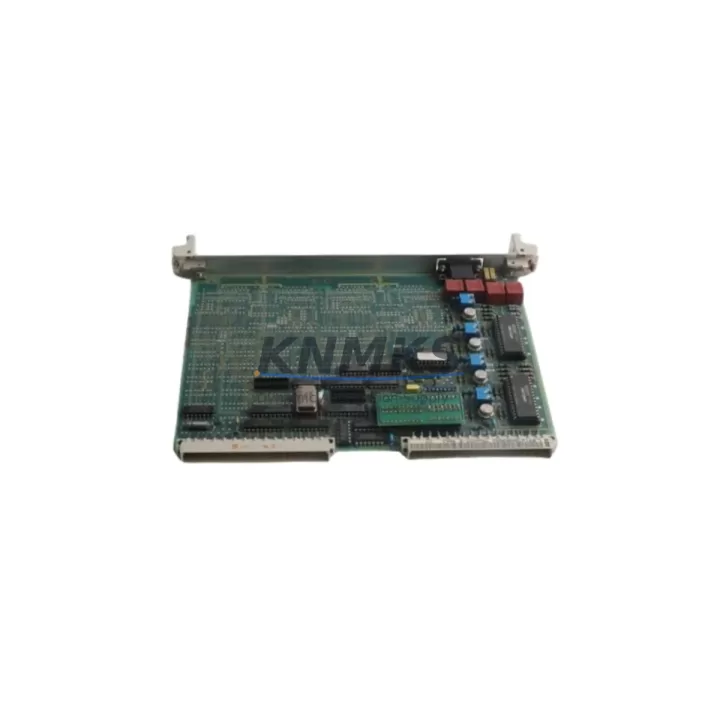
ABB 35TP90 GJR5143600R0001 Maintenance-Proven Spare Part for Factory Uptime
The ABB 35TP90 (part number GJR5143600R0001) is an original analog output module designed for the ABB AC500 PLC platform — one of the most widely deployed modular automation systems in process control, utilities, and discrete manufacturing. For maintenance engineers managing aging control cabinets or executing planned overhauls, sourcing a verified, pre-tested 35TP90 is critical to minimizing unplanned downtime and restoring production continuity without compromising system integrity.
This module provides analog output channels used to drive field devices such as control valves, variable frequency drives, and positioners. When a 35TP90 fails or degrades — often presenting as signal drift, loss of output, or erratic actuator behavior — rapid replacement with a like-for-like original spare is the safest path to recovery. Substituting with non-original or untested modules risks introducing calibration offsets, firmware incompatibilities, or communication faults that extend downtime rather than resolve it.
At KNMKS, every 35TP90 GJR5143600R0001 unit is inspected and functionally tested prior to dispatch. Each spare ships with a support terms confirmed by quotation, providing procurement engineers with the confidence needed for long-term spare parts planning and multi-site inventory agreements.
Spare Maintenance Table
| Part Number | GJR5143600R0001 |
| Model / SKU | 35TP90 |
| Brand | ABB |
| Series | AC500 |
| Module Type | Analog Output Module |
| Compatible CPUs | PM571, PM572, PM581, PM582, PM591, PM592, PM595 |
| Output Channels | Typically 4 × analog output (0–10 V / 4–20 mA, model-dependent) |
| Backplane Interface | AC500 S500 I/O bus |
| Supply Voltage | 24 V DC (via backplane / TB511 terminal base) |
| Operating Temperature | 0 °C to +60 °C |
| Protection Class | IP20 |
| Country of Origin | Germany |
| Installation | Mounts on TB511 or compatible AC500 terminal base |
| Firmware Compatibility | Compatible with AC500 V2 / V3 firmware environments |
| Pre-Shipment Testing | Functional output verification performed before dispatch |
| Support terms | 12 Months — KNMKS Spare Parts Support terms |
| Typical Application | Process control, utilities, discrete manufacturing, HVAC automation |
Maintenance Planning for Continuous Operation
Replacing a 35TP90 analog output module is rarely an isolated task. In a well-maintained AC500 control cabinet, the module works in close coordination with several adjacent components that should be inspected or tested concurrently to prevent repeat failures and ensure a clean restoration.
Begin with the TB511 terminal base — the mechanical and electrical interface between the 35TP90 and the backplane bus. Worn or corroded terminal base contacts are a common root cause of intermittent analog signal faults that are incorrectly attributed to the module itself. Inspect the base for discoloration, mechanical damage, or loose field wiring before installing the replacement module.
Next, verify the 24 V DC power supply feeding the I/O rail. Voltage ripple or transient dips — often caused by aging power supply units or shared rail loading — can cause analog output instability that mimics module failure. A replacement ABB CP-E 24/5.0 or equivalent DIN-rail power supply should be on hand as a contingency spare in any AC500 maintenance kit.
Check the AC500 CPU module (e.g., PM571 or PM582) for firmware version alignment. Mismatched firmware between the CPU and I/O modules can cause configuration errors or output mapping faults after a module swap. Confirm the replacement 35TP90 is recognized correctly in the hardware configuration within Automation Builder before returning the system to service.
For cabinets with mixed I/O, also inspect adjacent digital output modules (such as the DO531 or DO545) and any communication modules (e.g., CM572-DP for PROFIBUS or CM589-PNIO for PROFINET) for alarm states or bus errors that may have been masked by the analog fault. Signal isolation barriers or galvanic isolators on 4–20 mA loops should be tested for drift, particularly in environments with high electrical noise from VFDs or motor starters.
Finally, review the fuse protection on the analog output field wiring. A shorted field device can blow a channel fuse or damage output circuitry — replacing the module without identifying and clearing the field fault will result in immediate repeat failure. Ensure all field loop fuses are intact and correctly rated before commissioning the replacement 35TP90.
Site Replacement Workflow
Step 1 — Isolate and document: Place the AC500 CPU in STOP mode via Automation Builder or the local keyswitch. Record the current analog output values and any active alarms. Photograph the existing wiring on the TB511 terminal base before disconnection.
Step 2 — Remove the faulty module: Disconnect field wiring from the terminal base. Release the module locking mechanism and slide the 35TP90 out of the terminal base. Do not remove the terminal base from the DIN rail unless replacement is also required — this preserves field wiring continuity.
Step 3 — Install the replacement: Slide the new 35TP90 GJR5143600R0001 into the terminal base until the locking tab engages. Reconnect field wiring per the original documentation. Verify terminal torque to manufacturer specification.
Step 4 — Firmware and configuration check: Power up the system and confirm the module is recognized in Automation Builder. Verify the hardware configuration matches the installed module type. Download configuration if required.
Step 5 — Functional test: Force analog output values from the CPU and verify correct signal levels at the field device terminals using a calibrated multimeter or loop calibrator. Confirm actuator response before returning to AUTO mode.
Step 6 — Return to service: Set the CPU to RUN mode. Monitor analog output channels for the first 30 minutes of operation. Log the replacement in the site maintenance record with the new module serial number and support terms start date.
This workflow is compatible with both hot-swap-capable AC500 configurations and systems requiring a full power-down sequence. Consult the site-specific safety procedures and AC500 hardware manual before proceeding.
Spare Parts Support FAQ
Q1: Is the 35TP90 GJR5143600R0001 a direct drop-in replacement for all AC500 analog output applications?
The 35TP90 is designed for the ABB AC500 S500 I/O platform and is compatible with PM571 through PM595 CPU families when used with the correct terminal base (TB511 or equivalent). Always verify the hardware configuration in Automation Builder to confirm the module type matches the existing slot assignment before installation.
Q2: What pre-shipment testing does KNMKS perform on this module?
Each 35TP90 unit undergoes functional output verification prior to dispatch — analog output channels are tested for correct signal range and linearity. Units that do not meet specification are not shipped. All dispatched units are covered by a 12-month KNMKS spare parts support terms from the date of receipt.
Q3: Can KNMKS support long-term or blanket purchase agreements for AC500 spare parts?
Yes. KNMKS supports 12–36 month supply agreements for critical AC500 components including analog output modules, CPU modules, and communication modules. Long-term agreements include reserved stock allocation, priority dispatch, and fixed pricing — reducing procurement risk for multi-site maintenance programs.
Q4: What should I do if the replacement 35TP90 is not recognized by the AC500 CPU after installation?
First, confirm the module is fully seated in the terminal base and the locking tab is engaged. Check that the hardware configuration in Automation Builder matches the installed module type and slot position. If the module remains unrecognized, verify CPU firmware version compatibility and check the I/O bus for errors on adjacent modules. Contact KNMKS technical support with the CPU firmware version and error codes for further diagnosis.
© 2026 KNMKS. All rights reserved.
Original Source: https://knmks.com
Contact: admin@knmks.com | +86 18359268345
Product Identification
- Brand / Ecosystem
-
ABB
ABB - Model / Series
-
35TP90 GJR5143600R0001
AC500 Series - Product Family
- PLCs & Controllers
- Availability Status
- Available on request after model and quantity confirmation
- Inquiry Type
- B2B RFQ, replacement inquiry and project spare-part request
- Pre-Quote Check
- Exact SKU, brand, series, quantity, nameplate photos and destination country are checked before quotation
System Path
Where this product fits in the KNMKS automation structure.
Specification & Inquiry Focus
- Control platform
- PLC, PAC and modular controllers
- Common needs
- CPU, rack, power and I/O expansion
- Project support
- Replacement, cabinet build and maintenance
Buyer Confirmation
Information KNMKS checks before replying.
- Exact model
- 35TP90 GJR5143600R0001
- Brand / ecosystem
- ABB
- Product family
- PLCs & Controllers
- Application note
- Replacement, maintenance, project build or spare-part list
- Useful photos
- Nameplate, installed unit, cabinet layout or connector side
- Delivery details
- Quantity, destination country and target schedule
Document Support
Files and notes can be confirmed during quotation.
- Product photos or nameplate confirmation when available
- Packing and delivery notes before quotation confirmation
- Support scope and delivery terms confirmed per inquiry
- Export document coordination for qualified B2B requests
Inquiry Support
- Model cross-checking before quotation
- CPU, power, rack and expansion module matching
- Support for replacement and project inquiry
What to Send Us
- Brand and exact model number: ABB 35TP90 GJR5143600R0001
- Quantity and required delivery time
- Application, replacement requirement or nameplate photo
- Destination country and shipping preference
RFQ Preparation
This is a product inquiry page built for RFQ communication.
Fast Model Check
Send this model to KNMKS for confirmation.
Include quantity, destination country and photos if this is a maintenance replacement. The inquiry will be saved with a reference number after submission.
Brand & Compatibility Note
KNMKS displays automation product information for well-known industrial brand ecosystems and compatible replacement references. Brand names are used for product identification and compatibility reference only; final availability and commercial terms are confirmed per quotation.
 Manufacturing
 Machine Tools
 Packaging
 Energy & Power



 HMI & Displays
 Servo Systems
 Variable Frequency Drives
 Sensors