
Overview
ABB 200-CPU 30/40-SL Migration-Ready CPU for Legacy Control Systems
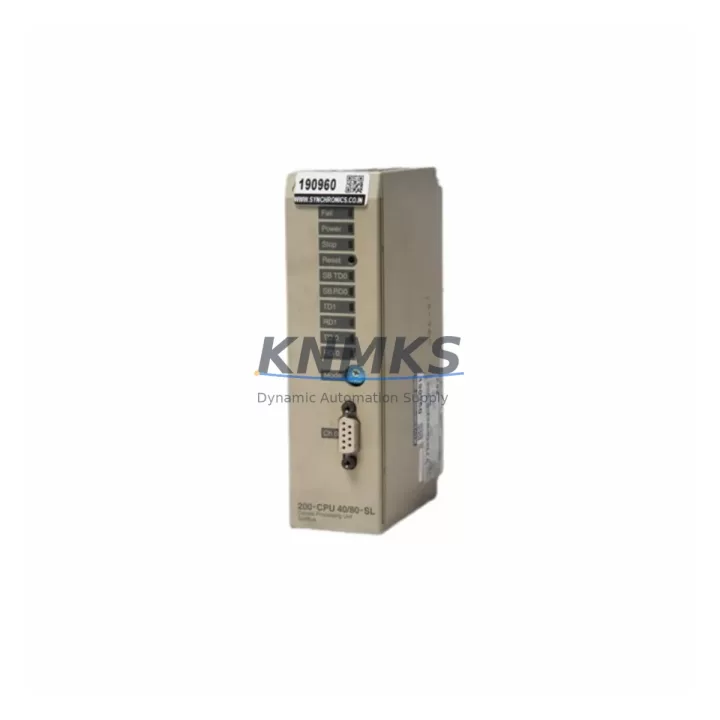
The ABB 200-CPU 30/40-SL is a compact, high-performance central processing unit designed for the ABB AC500 programmable logic controller platform. As legacy automation infrastructure ages and original equipment manufacturers discontinue support for older CPU variants, the 200-CPU 30/40-SL has become a critical migration-ready replacement for facilities operating AC500-based control cabinets across process automation, machine control, and building management applications. Whether you are replacing a failed unit on an active production line or executing a planned retrofit of an aging DCS/PLC architecture, this CPU module provides the processing capacity, communication flexibility, and backward compatibility required to maintain operational continuity with minimal engineering rework.
The 200-CPU 30/40-SL supports both the SL (Standard Library) firmware environment and is compatible with the AC500 V2 and V3 backplane ecosystem. It integrates directly into existing AC500 racks without requiring mechanical modification, making it a preferred choice for maintenance engineers who need to restore system function quickly while preserving existing I/O wiring, terminal assignments, and program logic. The onboard PROFIBUS DP master/slave interface and Modbus RTU/TCP support allow the module to communicate with legacy field devices, drives, and HMI panels without protocol gateway additions, significantly reducing retrofit complexity and downtime exposure.
Migration Compatibility Table
| Parameter | Details |
|---|---|
| SKU / Part Number | 200-CPU 30/40-SL |
| Brand / Series | ABB / AC500 |
| Compatible Backplane | AC500 TB511, TB521, TB541, TB561 terminal base units |
| Replaces / Supersedes | PM554, PM564 (select variants), earlier 200-CPU SL revisions |
| Communication Interfaces | PROFIBUS DP (master/slave), Modbus RTU, Modbus TCP/IP, RS-485 |
| Installation Format | DIN rail / AC500 rack-mount; no mechanical modification required |
| Power Supply Compatibility | 24 VDC nominal; verify existing PS501 or PS502 power supply capacity before swap |
| Program Memory | Up to 512 KB user program; SD card slot for program backup and firmware update |
| Firmware Compatibility | AC500 V2.x / V3.x; confirm firmware version alignment with existing I/O modules |
| Commissioning Requirement | Reload program via SD card or Automation Builder; verify I/O module addresses and PROFIBUS node IDs |
| HMI Compatibility | Compatible with CP600 and CP400 series HMI panels via Modbus TCP or PROFIBUS |
| support terms confirmed by quotation | Yes — all units ship with support terms confirmed by quotation and pre-shipment functional test certificate |
Retrofit Planning for Existing Automation Systems
A successful retrofit of the 200-CPU 30/40-SL into an existing AC500 control cabinet begins with a thorough audit of the current system architecture. Before removing the failed or obsolete CPU, engineers should document the existing PROFIBUS node address map, verify the terminal base type (TB511 or TB521 are most common in legacy installations), and confirm that the installed power supply — typically an ABB CP-E 24/5.0 or equivalent — can sustain the current draw of the replacement CPU alongside the existing I/O expansion modules.
In systems where digital and analog I/O is distributed across multiple racks, the 200-CPU 30/40-SL communicates with expansion modules such as the DC532 digital input module and the AX522 analog I/O module via the internal AC500 bus. These modules retain their configured addresses after a CPU swap, provided the replacement CPU is loaded with the original program and the I/O configuration file is restored correctly. Engineers should back up the existing program using ABB Automation Builder before initiating any hardware change.
For installations that include a CM572-DP PROFIBUS communication module or a CM589-PNIO PROFINET adapter, the communication parameters — including baud rate, station address, and GSD file assignments — must be verified against the replacement CPU’s firmware version. Mismatched firmware between the CPU and communication modules is one of the most common causes of post-retrofit communication faults. Where the existing HMI is an ABB CP635 or CP651 panel, the Modbus TCP connection string and register map should be exported and validated before the CPU is replaced to avoid HMI screen data loss.
In multi-rack configurations, the TB541 or TB561 terminal base units that host remote I/O modules must be confirmed as compatible with the 200-CPU 30/40-SL’s bus protocol. If the existing installation uses an older S500 I/O bus coupler, a firmware update or coupler replacement may be required to maintain full I/O visibility after the CPU swap. Signal isolators installed between field transmitters and analog input modules should also be checked for loop power compatibility, as some legacy isolators are sensitive to changes in the CPU’s scan cycle timing.
Downtime Control During System Migration
Minimizing unplanned downtime during a CPU migration on an active production system requires a structured pre-outage preparation protocol. The 200-CPU 30/40-SL supports cold-start program loading via SD card, which allows maintenance teams to pre-load the verified program image, I/O configuration, and communication parameters onto the replacement module before the scheduled maintenance window begins. This approach reduces the in-cabinet swap time to under 30 minutes in most standard AC500 rack configurations.
Prior to the outage, engineers should capture a full snapshot of the running system: current PROFIBUS node status, analog input scaling values, PID setpoints, and any retentive data registers that hold process-critical values such as batch counters or recipe parameters. The AC500 platform supports retentive data storage in non-volatile memory, but this data is CPU-resident and will not transfer automatically to the replacement unit. Restoring retentive values manually or via a pre-prepared initialization routine is essential to avoid process upsets on restart.
During the swap, field wiring connected to the terminal base units remains undisturbed, as the 200-CPU 30/40-SL mounts directly onto the existing TB511 or TB521 base without rewiring. After seating the replacement CPU and restoring power, the recommended commissioning sequence is: confirm power supply output voltage, verify CPU boot status LEDs, load program from SD card, check I/O module status in Automation Builder, confirm PROFIBUS communication with all slave devices, and validate HMI data display before releasing the system to production. This structured sequence protects original program logic, maintains field control continuity, and reduces the risk of introducing new faults during the retrofit.
Retrofit Support FAQ
Q1: Is the 200-CPU 30/40-SL a direct drop-in replacement for the PM554 or PM564 CPU modules?
The 200-CPU 30/40-SL is compatible with the AC500 terminal base ecosystem and can replace select PM554 and PM564 variants in the same rack position, provided the terminal base type (TB511/TB521) is confirmed as compatible. Program migration from Automation Builder projects targeting PM5xx CPUs requires a project retarget step in the IDE, after which I/O mapping and communication configurations should be verified before going live.
Q2: What pre-shipment testing is performed on each unit?
Every 200-CPU 30/40-SL unit undergoes a full functional test prior to dispatch, including power-on boot verification, communication port integrity check (PROFIBUS and Modbus), and firmware version confirmation. A test certificate is included with each shipment. All units are covered by a support terms confirmed by quotation from the date of delivery.
Q3: Can the existing field wiring and terminal connections be reused after the CPU swap?
Yes. Because the 200-CPU 30/40-SL mounts onto the existing AC500 terminal base unit, all field wiring connected to the I/O modules and terminal bases remains in place. No rewiring is required for the CPU replacement itself. Only the CPU module is physically swapped; the terminal base, I/O modules, and field wiring are undisturbed.
Q4: What is the lead time and stock availability?
The 200-CPU 30/40-SL is maintained availability confirmed by RFQ for immediate dispatch. Standard lead time for in-stock units is 3–7 business days for international shipments. For urgent replacement requirements, expedited dispatch options are available. Contact our sales team to confirm current stock levels and arrange priority shipping for emergency maintenance situations.
© 2026 KNMKS. All rights reserved.
Original Source: https://knmks.com
Contact: admin@knmks.com | +86 18359268345
Product Identification
- Brand / Ecosystem
-
ABB
ABB - Model / Series
-
200-CPU 30/40-SL
AC500 Series - Product Family
- PLCs & Controllers
- Availability Status
- Available on request after model and quantity confirmation
- Inquiry Type
- B2B RFQ, replacement inquiry and project spare-part request
- Pre-Quote Check
- Exact SKU, brand, series, quantity, nameplate photos and destination country are checked before quotation
System Path
Where this product fits in the KNMKS automation structure.
Specification & Inquiry Focus
- Control platform
- PLC, PAC and modular controllers
- Common needs
- CPU, rack, power and I/O expansion
- Project support
- Replacement, cabinet build and maintenance
Buyer Confirmation
Information KNMKS checks before replying.
- Exact model
- 200-CPU 30/40-SL
- Brand / ecosystem
- ABB
- Product family
- PLCs & Controllers
- Application note
- Replacement, maintenance, project build or spare-part list
- Useful photos
- Nameplate, installed unit, cabinet layout or connector side
- Delivery details
- Quantity, destination country and target schedule
Document Support
Files and notes can be confirmed during quotation.
- Product photos or nameplate confirmation when available
- Packing and delivery notes before quotation confirmation
- Support scope and delivery terms confirmed per inquiry
- Export document coordination for qualified B2B requests
Inquiry Support
- Model cross-checking before quotation
- CPU, power, rack and expansion module matching
- Support for replacement and project inquiry
What to Send Us
- Brand and exact model number: ABB 200-CPU 30/40-SL
- Quantity and required delivery time
- Application, replacement requirement or nameplate photo
- Destination country and shipping preference
RFQ Preparation
This is a product inquiry page built for RFQ communication.
Fast Model Check
Send this model to KNMKS for confirmation.
Include quantity, destination country and photos if this is a maintenance replacement. The inquiry will be saved with a reference number after submission.
Brand & Compatibility Note
KNMKS displays automation product information for well-known industrial brand ecosystems and compatible replacement references. Brand names are used for product identification and compatibility reference only; final availability and commercial terms are confirmed per quotation.
 Manufacturing
 Machine Tools
 Packaging
 Energy & Power



 HMI & Displays
 Servo Systems
 Variable Frequency Drives
 Sensors