
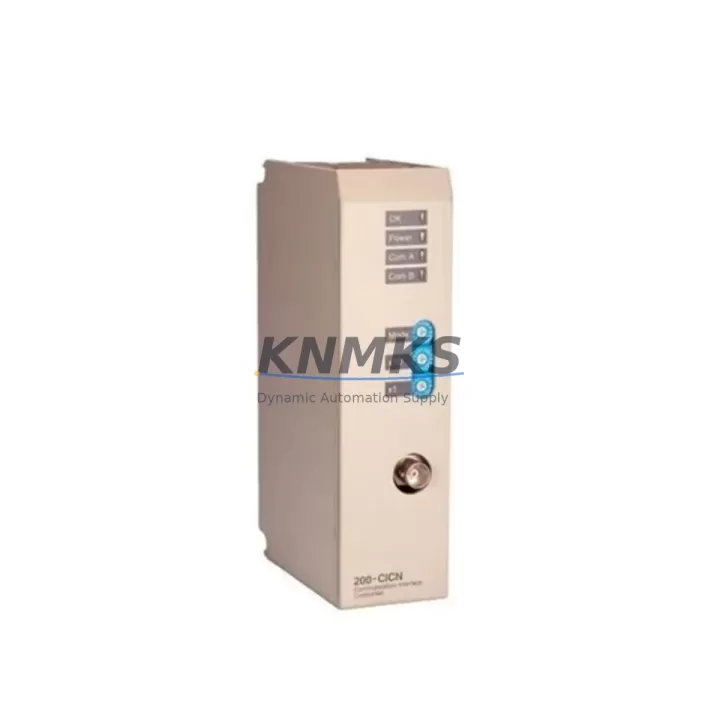
Overview
ABB 200-CICN Maintenance-Proven Spare Part for Factory Uptime
The ABB 200-CICN is a ControlNet communication module designed for the ABB AC500 PLC platform — one of the most widely deployed modular programmable logic controller systems in industrial automation. As a dedicated communication interface, the 200-CICN enables deterministic, high-speed data exchange between AC500 CPUs and ControlNet-based field devices, I/O networks, and distributed control architectures. For maintenance engineers managing aging automation infrastructure, keeping a verified 200-CICN spare on the shelf is a fundamental strategy for minimizing unplanned downtime and protecting production continuity.
Whether you are managing a food processing line, a water treatment facility, a chemical plant, or a discrete manufacturing cell, the 200-CICN sits at the heart of your control cabinet’s communication backbone. When this module fails — due to firmware corruption, connector wear, surge damage, or end-of-life degradation — the entire ControlNet segment it serves goes offline. Having a tested, original replacement unit available on-site reduces mean time to repair (MTTR) from days to hours.
Spare Maintenance Table
| Parameter | Specification / Value |
|---|---|
| Part Number | 200-CICN |
| Brand | ABB |
| Series | AC500 |
| Module Type | ControlNet Communication Module |
| Compatible Platform | ABB AC500 PLC (PM5xx, PM5xx-ETH CPU families) |
| Network Protocol | ControlNet (IEEE 802.4 / ODVA) |
| Communication Speed | 5 Mbit/s |
| Connector Type | BNC (coaxial), dual-port redundant |
| Power Supply | Supplied via AC500 backplane bus |
| Operating Temperature | 0°C to +60°C |
| Storage Temperature | -25°C to +70°C |
| Humidity | 5% to 95% RH, non-condensing |
| Country of Origin | Germany |
| Mounting | AC500 terminal unit / backplane slot |
| Firmware | Compatible with Automation Builder / PS501 Control Builder Plus |
| Pre-shipment Testing | Yes — functional verification before dispatch |
| Support terms | 12 Months from date of shipment |
| Condition | Original, new or reconditioned-to-spec |
Maintenance Planning for Continuous Operation
Effective spare parts planning for a ControlNet-based AC500 system goes well beyond stocking the 200-CICN module itself. When a ControlNet communication fault is diagnosed, experienced maintenance engineers know that the root cause may extend to adjacent components in the same electrical circuit or control cabinet. A structured inspection checklist should accompany every 200-CICN replacement.
Begin with the AC500 CPU module (such as the PM564-T or PM583-ETH) to confirm that the backplane communication bus is healthy and that the CPU firmware version is compatible with the replacement 200-CICN. A firmware mismatch between the CPU and the communication module is a common cause of post-replacement faults that are easily overlooked under time pressure.
Next, inspect the AC500 backplane and terminal unit. The 200-CICN mounts onto a dedicated terminal unit (TU515 or TU516 series), and worn or oxidized backplane connectors can cause intermittent communication errors that mimic module failure. Clean and reseat the terminal unit before installing the replacement module.
Check the ControlNet coaxial cable and BNC connectors throughout the segment. Damaged coax, loose BNC terminations, or missing 75-ohm terminators at segment ends are frequent contributors to ControlNet instability. Replace any suspect cable sections and verify terminator resistance with a multimeter before powering up the new module.
Inspect the 24 VDC power supply module feeding the AC500 rack. Voltage sag or ripple on the backplane supply can cause communication modules to reset unexpectedly. If the power supply is original to the installation and has not been replaced within the last five years, include it in your preventive replacement schedule alongside the 200-CICN.
For systems with distributed I/O on the ControlNet segment, verify the status of remote I/O adapter modules and digital/analog I/O modules connected downstream. A failed remote adapter can cause the entire ControlNet segment to fault, which may be misdiagnosed as a 200-CICN failure. Use the AC500 diagnostic tools in Automation Builder to isolate the fault to the correct node before committing to module replacement.
Finally, review the surge protection devices and fuses on the ControlNet segment power feed. Industrial environments with frequent motor starts, welding equipment, or variable frequency drives nearby are prone to transient surges that can damage communication electronics. Installing or replacing DIN-rail surge arresters on the ControlNet power supply lines is a low-cost measure that significantly extends module service life.
Site Replacement Workflow
Step 1 — Fault Isolation: Use the AC500 CPU diagnostic log and Automation Builder online monitoring to confirm that the 200-CICN module is the source of the ControlNet fault. Check for error codes related to the communication slot before removing any hardware.
Step 2 — Safe Shutdown: Place the affected PLC segment in a safe state per your site’s lockout/tagout (LOTO) procedure. Do not hot-swap the 200-CICN unless your system configuration explicitly supports it — most AC500 ControlNet configurations require a controlled power-down for module replacement.
Step 3 — Module Removal: Disconnect the BNC coaxial cables from the 200-CICN. Release the module from the terminal unit by pressing the release lever and sliding the module out of the backplane slot. Note the slot position for reinstallation reference.
Step 4 — Replacement Installation: Insert the new 200-CICN into the same terminal unit slot. Reconnect the BNC cables, ensuring both ports are firmly seated and the coaxial terminations are tight. Verify that the 75-ohm terminators are in place at both ends of the ControlNet segment.
Step 5 — Configuration Restore: Power up the rack and use Automation Builder to download the existing ControlNet network configuration to the new module. Verify that all nodes on the segment are recognized and that scheduled connection tables are restored correctly.
Step 6 — Functional Verification: Run a full I/O check on all devices connected to the ControlNet segment. Confirm that data exchange rates and connection health indicators are within normal parameters before returning the system to production.
This workflow is applicable whether you are replacing a failed 200-CICN in an emergency shutdown scenario or performing a planned swap during a scheduled maintenance window. The same procedure supports system upgrades where an older ControlNet module is being replaced to extend the operational life of an AC500 installation that is not yet scheduled for full migration.
Spare Parts Support FAQ
Q1: Is the 200-CICN compatible with all AC500 CPU variants?
The 200-CICN is designed for the ABB AC500 platform and is compatible with PM5xx series CPUs that support ControlNet communication. Compatibility should be verified against your specific CPU firmware version using the ABB Automation Builder compatibility matrix. For older PM5xx-ETH or PM564 variants, confirm the terminal unit type (TU515/TU516) matches the module’s mechanical interface before ordering.
Q2: What is included in the support terms confirmed by quotation and pre-shipment testing?
Every 200-CICN shipped from our inventory undergoes functional verification prior to dispatch, including backplane communication checks and ControlNet port integrity testing. The support terms confirmed by quotation cover manufacturing defects and functional failures under normal operating conditions from the date of shipment. Support requests are supported with replacement or repair at no additional cost.
Q3: How should I manage long-term spare parts inventory for AC500 ControlNet systems?
For AC500 installations with ControlNet as the primary field network, we recommend maintaining a minimum of one 200-CICN spare per ControlNet segment, particularly for systems where the module is no longer in active production or has extended lead times. Pair this with spares for the associated CPU module, power supply, and at least one set of BNC terminators and coaxial patch cables. Annual inventory audits aligned with your planned maintenance shutdowns help ensure spare availability without excessive capital tied up availability confirmed by RFQ.
Q4: Can the 200-CICN be used to replace older or discontinued ABB ControlNet modules?
The 200-CICN is the current-generation ControlNet communication module for the AC500 platform and is the recommended replacement for earlier ControlNet interface options used in the same series. For systems migrating from legacy ABB Freelance or older AC500 variants, consult the ABB migration guide or contact our technical support team to confirm backward compatibility and any required configuration changes before installation.
© 2026 KNMKS. All rights reserved.
Original Source: https://knmks.com
Contact: admin@knmks.com | +86 18359268345
Product Identification
- Brand / Ecosystem
-
ABB
ABB - Model / Series
-
200-CICN
AC500 Series - Product Family
- PLCs & Controllers
- Availability Status
- Available on request after model and quantity confirmation
- Inquiry Type
- B2B RFQ, replacement inquiry and project spare-part request
- Pre-Quote Check
- Exact SKU, brand, series, quantity, nameplate photos and destination country are checked before quotation
System Path
Where this product fits in the KNMKS automation structure.
Specification & Inquiry Focus
- Control platform
- PLC, PAC and modular controllers
- Common needs
- CPU, rack, power and I/O expansion
- Project support
- Replacement, cabinet build and maintenance
Buyer Confirmation
Information KNMKS checks before replying.
- Exact model
- 200-CICN
- Brand / ecosystem
- ABB
- Product family
- PLCs & Controllers
- Application note
- Replacement, maintenance, project build or spare-part list
- Useful photos
- Nameplate, installed unit, cabinet layout or connector side
- Delivery details
- Quantity, destination country and target schedule
Document Support
Files and notes can be confirmed during quotation.
- Product photos or nameplate confirmation when available
- Packing and delivery notes before quotation confirmation
- Support scope and delivery terms confirmed per inquiry
- Export document coordination for qualified B2B requests
Inquiry Support
- Model cross-checking before quotation
- CPU, power, rack and expansion module matching
- Support for replacement and project inquiry
What to Send Us
- Brand and exact model number: ABB 200-CICN
- Quantity and required delivery time
- Application, replacement requirement or nameplate photo
- Destination country and shipping preference
RFQ Preparation
This is a product inquiry page built for RFQ communication.
Fast Model Check
Send this model to KNMKS for confirmation.
Include quantity, destination country and photos if this is a maintenance replacement. The inquiry will be saved with a reference number after submission.
Brand & Compatibility Note
KNMKS displays automation product information for well-known industrial brand ecosystems and compatible replacement references. Brand names are used for product identification and compatibility reference only; final availability and commercial terms are confirmed per quotation.
 Manufacturing
 Machine Tools
 Packaging
 Energy & Power



 HMI & Displays
 Servo Systems
 Variable Frequency Drives
 Sensors