
Overview
ABB 1SBP260102R1001 XC08L1 Maintenance-Proven Spare Part for Factory Uptime
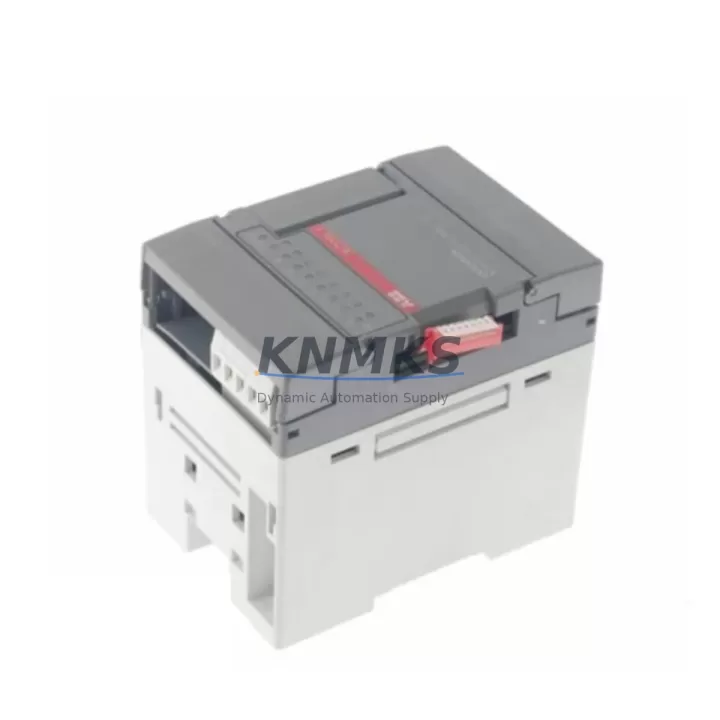
The ABB 1SBP260102R1001 XC08L1 is a digital I/O extension module designed for the ABB AC500 PLC platform — one of the most widely deployed programmable logic controller families in process automation, machine control, and utility infrastructure. Sourced as an original spare, this module is a critical component for maintenance engineers managing aging AC500 control cabinets, executing planned shutdowns, or responding to unplanned line stoppages. With verified compatibility across the AC500 V2 and V3 series, the XC08L1 supports rapid field replacement without requiring firmware reconfiguration or hardware adaptation.
For procurement engineers, stocking the 1SBP260102R1001 XC08L1 as a shelf spare eliminates the lead-time risk associated with sourcing I/O extension modules during emergency downtime events. KNMKS maintains ready inventory with pre-shipment functional testing, support terms confirmed by quotation coverage, and long-term supply continuity — making it a reliable choice for both single-unit emergency orders and multi-unit annual maintenance contracts.
Spare Maintenance Table
| Parameter | Specification |
|---|---|
| Part Number | 1SBP260102R1001 |
| Model | XC08L1 |
| Brand | ABB |
| Series | AC500 (V2 / V3 Compatible) |
| Product Type | Digital I/O Extension Module |
| I/O Channels | 8 Digital Inputs / Outputs (configurable) |
| Supply Voltage | 24 V DC (nominal) |
| Operating Temperature | -25°C to +60°C |
| Protection Rating | IP20 |
| Mounting | DIN Rail, AC500 backplane slot |
| Communication Interface | AC500 internal bus (CS31 compatible) |
| Origin | Germany |
| Condition | Original New / Tested Surplus |
| Support terms | 12 Months |
| Pre-Shipment Test | Yes — functional verification before dispatch |
| Application | Process automation, machine control, utility infrastructure |
Maintenance Planning for Continuous Operation
When replacing the XC08L1 I/O extension module during a scheduled or emergency maintenance event, a thorough inspection of the surrounding control cabinet components is essential to prevent repeat failures and ensure system stability. Maintenance engineers should begin by verifying the 24 V DC power supply rail feeding the AC500 CPU and I/O bus — a degraded ABB CP600 or equivalent panel power supply can cause intermittent I/O faults that mimic module failure. Confirm that the TB511-ETH or TB521-ETH communication processor is operating normally, as a corrupted communication module can generate false I/O error codes that lead to unnecessary module swaps.
Inspect the terminal block wiring connected to the XC08L1 field I/O channels. Loose or corroded connections on the field-side terminal strips — particularly on 24 V digital input circuits — are a common root cause of signal loss that is often misdiagnosed as module failure. Check the associated relay output modules (such as the ABB TA521 or equivalent relay expansion units) for contact wear if the XC08L1 is driving relay-coupled loads. For systems using CS31 remote I/O topology, verify the CS31 bus cable integrity and termination resistors before concluding that the XC08L1 itself is defective.
In control cabinets with mixed I/O configurations, also inspect the DC24V fuse protection for each I/O group — blown fuse elements on the 24 V supply to the XC08L1 field circuits are frequently overlooked. If the AC500 system includes an HMI panel (such as the ABB CP600 series), confirm that the HMI communication link to the CPU is intact, as HMI communication faults can mask underlying I/O module alarms. For older AC500 installations, consider proactively replacing the CPU backup battery (ABB 1SAP180300R0001 or equivalent) during the same maintenance window to avoid configuration loss during power cycling.
Site Replacement Workflow
The 1SBP260102R1001 XC08L1 is a direct plug-in replacement for the existing XC08L1 slot position on the AC500 backplane. No hardware modification or special tooling is required. Follow this workflow to minimize downtime:
1. Pre-Replacement Verification: Confirm the replacement module part number matches the installed unit. Cross-reference the AC500 project configuration in Automation Builder to verify the I/O channel assignment and address mapping for the XC08L1 slot.
2. Safe Isolation: Place the AC500 CPU in STOP mode via the Automation Builder online interface or the local CPU keyswitch. De-energize the 24 V DC field supply to the I/O bus before removing the module. Do not remove the module under live bus voltage.
3. Module Swap: Slide the XC08L1 out of the backplane slot. Insert the replacement module firmly until the bus connector seats fully. Reconnect field wiring terminal blocks in the correct channel sequence.
4. System Restart and Verification: Restore 24 V DC field supply. Set the CPU to RUN mode. Monitor the I/O status in Automation Builder or the HMI display to confirm all channels are reporting correctly. Perform a functional test of connected field devices before returning the line to production.
This direct-replacement approach eliminates the need for PLC reprogramming, preserves existing I/O address mapping, and restores production continuity with minimal intervention — a key advantage for maintenance teams managing legacy AC500 installations where engineering resources are limited.
Spare Parts Support FAQ
Q1: Is the 1SBP260102R1001 XC08L1 compatible with both AC500 V2 and V3 systems?
Yes. The XC08L1 is compatible with AC500 V2 and V3 backplane configurations. Always verify the slot position and I/O address assignment in your Automation Builder project before installation to confirm channel mapping is preserved.
Q2: What pre-shipment testing is performed on this module?
Each unit undergoes functional verification prior to dispatch, including power-on self-test and I/O channel continuity checks. A test report is available upon request. All units are shipped with support terms confirmed by quotation coverage from the date of invoice.
Q3: Can KNMKS support long-term or repeat supply of the XC08L1 for annual maintenance contracts?
Yes. KNMKS maintains standing inventory of the 1SBP260102R1001 XC08L1 and can support scheduled annual procurement, multi-unit blanket orders, and emergency single-unit dispatch. Contact admin@knmks.com or +86 18359268345 to discuss supply agreements.
Q4: What is the recommended spare parts strategy for AC500 I/O systems?
For AC500 installations with high uptime requirements, we recommend stocking at least one XC08L1 per installed rack, along with a spare CPU module (PM573 or PM583 series), a replacement power supply unit, and critical communication modules. This minimum spare set covers the most common failure modes and supports same-shift recovery from most I/O-related faults.
© 2026 KNMKS. All rights reserved.
Original Source: https://knmks.com
Contact: admin@knmks.com | +86 18359268345
Product Identification
- Brand / Ecosystem
-
ABB
ABB - Model / Series
-
1SBP260102R1001 XC08L1
AC500 Series - Product Family
- PLCs & Controllers
- Availability Status
- Available on request after model and quantity confirmation
- Inquiry Type
- B2B RFQ, replacement inquiry and project spare-part request
- Pre-Quote Check
- Exact SKU, brand, series, quantity, nameplate photos and destination country are checked before quotation
System Path
Where this product fits in the KNMKS automation structure.
Specification & Inquiry Focus
- Control platform
- PLC, PAC and modular controllers
- Common needs
- CPU, rack, power and I/O expansion
- Project support
- Replacement, cabinet build and maintenance
Buyer Confirmation
Information KNMKS checks before replying.
- Exact model
- 1SBP260102R1001 XC08L1
- Brand / ecosystem
- ABB
- Product family
- PLCs & Controllers
- Application note
- Replacement, maintenance, project build or spare-part list
- Useful photos
- Nameplate, installed unit, cabinet layout or connector side
- Delivery details
- Quantity, destination country and target schedule
Document Support
Files and notes can be confirmed during quotation.
- Product photos or nameplate confirmation when available
- Packing and delivery notes before quotation confirmation
- Support scope and delivery terms confirmed per inquiry
- Export document coordination for qualified B2B requests
Inquiry Support
- Model cross-checking before quotation
- CPU, power, rack and expansion module matching
- Support for replacement and project inquiry
What to Send Us
- Brand and exact model number: ABB 1SBP260102R1001 XC08L1
- Quantity and required delivery time
- Application, replacement requirement or nameplate photo
- Destination country and shipping preference
RFQ Preparation
This is a product inquiry page built for RFQ communication.
Fast Model Check
Send this model to KNMKS for confirmation.
Include quantity, destination country and photos if this is a maintenance replacement. The inquiry will be saved with a reference number after submission.
Brand & Compatibility Note
KNMKS displays automation product information for well-known industrial brand ecosystems and compatible replacement references. Brand names are used for product identification and compatibility reference only; final availability and commercial terms are confirmed per quotation.
 Manufacturing
 Machine Tools
 Packaging
 Energy & Power



 HMI & Displays
 Servo Systems
 Variable Frequency Drives
 Sensors