
Overview
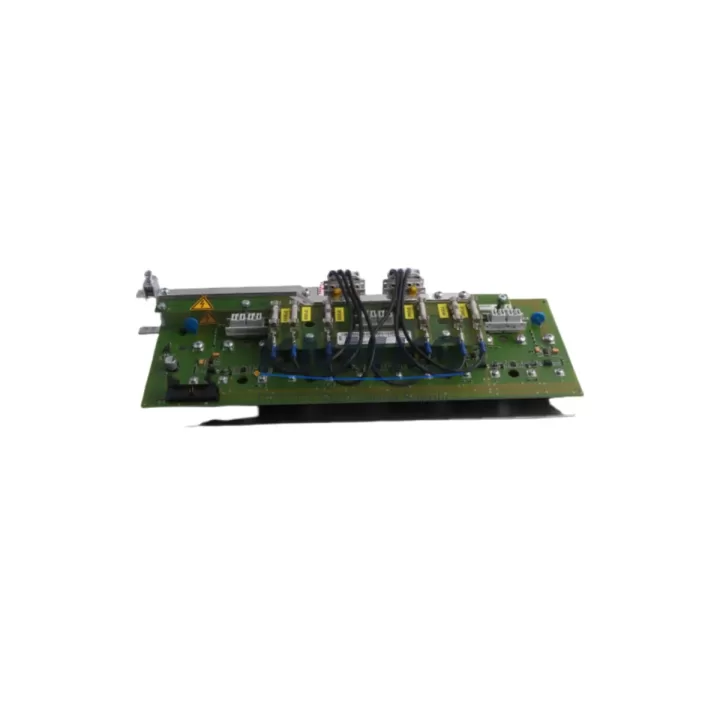
ABB 1SAY130130R0100-07SS91 Maintenance-Proven Spare Part for Factory Uptime
The ABB 1SAY130130R0100-07SS91 is a digital output module designed for the ABB AC500 PLC platform — one of the most widely deployed modular programmable logic controller families in industrial automation, process control, and machine safety applications. Maintaining a verified stock of this module is a critical element of any proactive maintenance strategy for facilities running AC500-based control architectures.
For maintenance engineers and procurement teams managing factory uptime, the 1SAY130130R0100-07SS91 represents a high-priority spare. Digital output modules are among the most failure-prone components in a PLC cabinet due to their direct interface with field devices — motors, solenoids, contactors, and indicator circuits — all of which impose inductive and resistive loads that degrade output channels over time. A single failed output channel can halt an entire production line if no replacement is available on-site.
This listing provides an original ABB spare part, pre-shipment tested, dispatched from verified stock, and backed by a support terms confirmed by quotation. Fast dispatch is available for urgent breakdown recovery scenarios.
Spare Maintenance Table
| SKU / Part Number | 1SAY130130R0100-07SS91 |
| Brand | ABB |
| Series | AC500 PLC Platform |
| Module Type | Digital Output Module |
| Output Channels | Transistor / relay digital outputs (AC500 standard configuration) |
| Supply Voltage | 24 V DC (nominal, AC500 backplane powered) |
| Compatibility | ABB AC500 CPU modules (PM571, PM581, PM591, PM595 series and compatible backplanes) |
| Mounting | DIN rail via AC500 terminal base (TB511, TB521 or equivalent) |
| Operating Temperature | -25 °C to +60 °C |
| Protection Class | IP20 (cabinet installation) |
| Origin | Germany (DE) |
| Condition | Original new, pre-shipment tested |
| Support terms | 12 months from date of dispatch |
| Dispatch | Fast dispatch from verified stock; urgent breakdown orders supported |
| Application | Process automation, machine control, conveyor systems, utilities, water treatment, packaging lines |
Maintenance Planning for Continuous Operation
When a digital output module such as the 1SAY130130R0100-07SS91 is scheduled for replacement or fails unexpectedly, a thorough inspection of the surrounding control cabinet components is essential to prevent repeat failures and ensure a clean restoration of system operation.
Begin with the AC500 CPU module (such as the PM571 or PM581) — verify firmware version compatibility and confirm that the I/O configuration table in the project matches the replacement module’s channel count and type. A mismatch in the hardware configuration file can cause the CPU to flag a module fault immediately after restart.
Inspect the terminal base (TB511 or TB521) to which the output module connects. Terminal bases accumulate mechanical wear at the module locking tab and can develop intermittent contact issues that mimic module faults. If the terminal base shows signs of discoloration, arcing marks, or physical deformation, replace it alongside the output module.
Check the 24 V DC power supply feeding the AC500 backplane and I/O bus. Voltage sags or ripple on the DC rail — often caused by aging power supply capacitors or undersized supply units — can cause digital output modules to behave erratically or report overcurrent faults. A replacement ABB CP-E 24/10.0 or equivalent 24 V DC panel power supply should be part of the cabinet spare kit.
Review the field wiring terminals connected to the output channels. Loose or corroded terminal connections are a leading cause of output channel degradation. Tighten all field-side terminals and inspect for signs of insulation damage, particularly on inductive load circuits driving solenoid valves or motor contactors.
If the control system includes communication modules such as the ABB CM572-DP (PROFIBUS) or CM589-PNIO (PROFINET), verify that the network configuration is intact after the module swap. Some AC500 configurations require a hardware restart or online reconfiguration to re-enumerate I/O modules on the backplane after a replacement.
For cabinets with signal isolators or relay output expansion modules, inspect the relay coil circuits driven by the output channels. Relay contacts that have been switching inductive loads for extended periods may show contact erosion — a set of replacement relay modules (such as ABB CR-M or equivalent DIN rail relays) should be stocked alongside the digital output module spare.
Finally, verify the fuse protection on each output group. Blown fuses on the output supply rail are a common consequence of field-side short circuits that may have contributed to the original module failure. Replace any blown fuses and investigate the root cause before restoring power to the affected output group.
Site Replacement Workflow
The 1SAY130130R0100-07SS91 is designed for tool-free module exchange on the AC500 platform, enabling rapid field replacement without specialist equipment. Follow this workflow to minimize downtime and ensure a clean system restoration:
1. Safe isolation: Place the AC500 CPU in STOP mode via the programming tool (Automation Builder or PS501 Control Builder) or the physical RUN/STOP switch. De-energize the 24 V DC supply to the affected I/O segment. Lock out and tag out (LOTO) the cabinet before opening.
2. Module removal: Release the locking tab on the terminal base and slide the 1SAY130130R0100-07SS91 module upward to disengage from the backplane connector. Note the slot position for correct reinstallation.
3. Replacement installation: Insert the new 1SAY130130R0100-07SS91 into the same terminal base slot. Confirm the locking tab engages fully. The module’s hardware address is determined by its physical slot position — no DIP switch or address configuration is required on standard AC500 terminal bases.
4. Power restoration and diagnostics: Re-energize the 24 V DC supply and set the CPU to RUN mode. Monitor the module status LED — a steady green indicates normal operation. Use the Automation Builder diagnostic view to confirm all output channels are recognized and no hardware faults are logged.
5. Functional test: Force each output channel individually via the programming tool to verify field device response before returning the system to automatic operation. Document the replacement in the site maintenance log.
This workflow is compatible with hot-swap capable AC500 configurations where the CPU supports online I/O reconfiguration, further reducing planned downtime windows during scheduled maintenance.
Spare Parts Support FAQ
Q1: Is the 1SAY130130R0100-07SS91 compatible with all AC500 CPU generations?
The 1SAY130130R0100-07SS91 is designed for the ABB AC500 modular PLC platform and is compatible with AC500 terminal bases (TB511, TB521 and equivalents) used across PM571, PM581, PM591, and PM595 CPU generations. Always verify the hardware configuration in your Automation Builder project to confirm the module type matches the I/O slot assignment before installation.
Q2: What is the recommended stock quantity for a production facility?
For facilities with multiple AC500 cabinets, a minimum of one spare 1SAY130130R0100-07SS91 per control cabinet is recommended, with an additional buffer unit held centrally for emergency dispatch to any line. High-criticality lines (continuous process, cleanroom, or safety-rated applications) should maintain two units on-site. A 12-month forward stock strategy aligned with annual maintenance planning cycles reduces procurement lead-time risk.
Q3: How is the module tested before shipment?
All units are pre-shipment tested for electrical continuity, output channel integrity, and backplane connector condition. Modules are dispatched in original or equivalent protective packaging to prevent ESD damage during transit. A test report is available upon request for quality-critical procurement processes.
Q4: What support terms and long-term supply support is provided?
Each 1SAY130130R0100-07SS91 is covered by a support terms confirmed by quotation from the date of dispatch, covering manufacturing defects and verified electrical failures under normal operating conditions. Long-term supply agreements are available for facilities requiring guaranteed stock reservation across multiple procurement cycles — contact the sales team to discuss annual volume commitments and priority dispatch arrangements.
© 2026 KNMKS. All rights reserved.
Original Source: https://knmks.com
Contact: admin@knmks.com | +86 18359268345
Product Identification
- Brand / Ecosystem
-
ABB
ABB - Model / Series
-
1SAY130130R0100-07SS91
AC500 Series - Product Family
- PLCs & Controllers
- Availability Status
- Available on request after model and quantity confirmation
- Inquiry Type
- B2B RFQ, replacement inquiry and project spare-part request
- Pre-Quote Check
- Exact SKU, brand, series, quantity, nameplate photos and destination country are checked before quotation
System Path
Where this product fits in the KNMKS automation structure.
Specification & Inquiry Focus
- Control platform
- PLC, PAC and modular controllers
- Common needs
- CPU, rack, power and I/O expansion
- Project support
- Replacement, cabinet build and maintenance
Buyer Confirmation
Information KNMKS checks before replying.
- Exact model
- 1SAY130130R0100-07SS91
- Brand / ecosystem
- ABB
- Product family
- PLCs & Controllers
- Application note
- Replacement, maintenance, project build or spare-part list
- Useful photos
- Nameplate, installed unit, cabinet layout or connector side
- Delivery details
- Quantity, destination country and target schedule
Document Support
Files and notes can be confirmed during quotation.
- Product photos or nameplate confirmation when available
- Packing and delivery notes before quotation confirmation
- Support scope and delivery terms confirmed per inquiry
- Export document coordination for qualified B2B requests
Inquiry Support
- Model cross-checking before quotation
- CPU, power, rack and expansion module matching
- Support for replacement and project inquiry
What to Send Us
- Brand and exact model number: ABB 1SAY130130R0100-07SS91
- Quantity and required delivery time
- Application, replacement requirement or nameplate photo
- Destination country and shipping preference
RFQ Preparation
This is a product inquiry page built for RFQ communication.
Fast Model Check
Send this model to KNMKS for confirmation.
Include quantity, destination country and photos if this is a maintenance replacement. The inquiry will be saved with a reference number after submission.
Brand & Compatibility Note
KNMKS displays automation product information for well-known industrial brand ecosystems and compatible replacement references. Brand names are used for product identification and compatibility reference only; final availability and commercial terms are confirmed per quotation.
 Manufacturing
 Machine Tools
 Packaging
 Energy & Power



 HMI & Displays
 Servo Systems
 Variable Frequency Drives
 Sensors