
Overview
ABB 1SAP180100R0001 Maintenance-Proven Spare for AC500: Keeping Your Factory Running Without Interruption
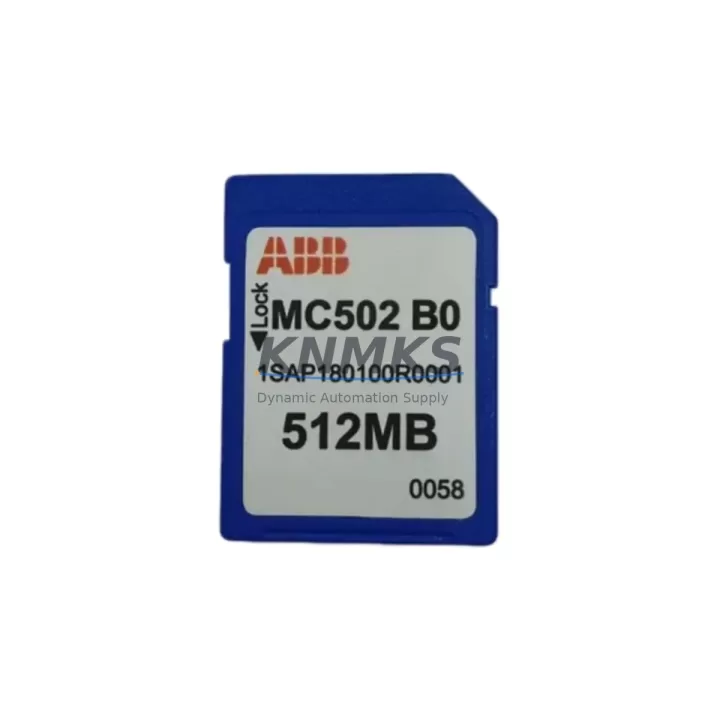
The ABB 1SAP180100R0001 (MC502-B0) is an original SD memory card designed for the ABB AC500 PLC series — one of the most widely deployed programmable logic controller platforms in industrial automation, process control, and manufacturing environments worldwide. This memory card stores the PLC application program, configuration data, and firmware, making it a mission-critical component for system startup, recovery, and long-term operational continuity. When this card fails or becomes corrupted, the entire control system can halt, triggering unplanned downtime that costs far more than the spare part itself.
For maintenance engineers managing aging AC500 installations, keeping a verified 1SAP180100R0001 in the spare parts cabinet is not optional — it is a fundamental part of any responsible preventive maintenance strategy. Whether you are performing a scheduled annual overhaul, responding to an emergency fault, or rebuilding a control cabinet after a power surge, having this card on hand means the difference between a two-hour recovery and a two-day shutdown.
Spare Maintenance Table
| Parameter | Specification |
|---|---|
| Part Number / SKU | 1SAP180100R0001 |
| Model Designation | MC502-B0 |
| Brand | ABB |
| Compatible Series | ABB AC500 PLC (PM5xx CPU modules) |
| Compatible CPUs | PM554, PM564, PM573, PM583, PM591, PM592, PM595 and related AC500 variants |
| Card Type | SD Memory Card (industrial-grade) |
| Function | Program storage, configuration backup, firmware carrier |
| Origin | Germany (ABB OEM) |
| Product Type | PLC Memory Card |
| Operating Temperature | -25°C to +70°C (storage); -25°C to +60°C (operating) |
| Humidity | 5–95% RH, non-condensing |
| Installation | Direct slot insertion into AC500 CPU front panel SD slot |
| Compatibility Verification | Confirmed for AC500 V2 and V3 CPU generations |
| Maintenance Role | Emergency replacement, program recovery, system commissioning |
| Support terms | 12 Months from date of shipment |
| Pre-shipment Testing | Electrically tested and verified before dispatch |
| Lead Time | availability confirmed by RFQ — ships within 1–3 business days |
Maintenance Planning for Continuous Operation
Experienced maintenance engineers know that the 1SAP180100R0001 memory card rarely fails in isolation. When a control cabinet is opened for inspection or emergency repair, a systematic check of the surrounding components is essential to prevent repeat failures and ensure the system returns to full operational status.
When replacing or inspecting the MC502-B0 memory card in an AC500 CPU, the following components in the same control cabinet or electrical circuit should be evaluated concurrently:
CPU Power Supply: The ABB AC500 CPU modules are powered through dedicated power supply modules such as the PM5xx series internal supply or external 24 VDC rail-mounted units. A failing or under-voltage power supply is one of the most common root causes of memory card corruption. Verify that the supply voltage is stable and within the 24 VDC ±20% tolerance before inserting a new memory card.
CPU Module Itself: If the memory card has been corrupted repeatedly, the AC500 CPU module (e.g., PM554-T, PM564-R, PM591-ETH) may have a faulty SD card interface or internal flash issue. Inspect the CPU slot contacts for oxidation or mechanical damage. In high-cycle environments, the CPU module should be treated as a co-replacement candidate alongside the memory card.
Communication Modules: AC500 systems frequently use communication expansion modules such as the CM572-DP (PROFIBUS DP), CM577-ETH (Ethernet), or CM589-PNIO (PROFINET IO) modules mounted on the same backplane. After a memory card replacement and program reload, verify that all communication modules re-establish their network connections correctly, as configuration parameters stored on the card govern their behavior.
I/O Expansion Modules: Digital and analog I/O modules connected to the AC500 backplane — such as the DC532, DA501, or AI523 — should be inspected for correct addressing and signal integrity after a program reload. A fresh program image from the 1SAP180100R0001 card will re-initialize all I/O configurations, and any wiring faults or module failures will surface immediately during the post-replacement functional test.
Terminal Blocks and Field Wiring: Loose or corroded terminal connections on the I/O wiring side are a frequent source of intermittent faults that can be misdiagnosed as PLC or memory card failures. During any maintenance event involving the AC500 CPU, inspect the terminal blocks for tightness, insulation condition, and correct labeling.
Fuses and Circuit Protection: The 24 VDC supply circuit feeding the AC500 CPU and its I/O bus should be protected by appropriately rated fuses or miniature circuit breakers. Verify that these protective devices are intact and correctly rated. A blown fuse that caused the original shutdown may have also caused the memory card corruption event.
By treating the 1SAP180100R0001 replacement as part of a broader cabinet inspection rather than a single-component swap, maintenance teams can significantly reduce the probability of a repeat failure within the same maintenance cycle.
Site Replacement Workflow
Replacing the ABB 1SAP180100R0001 MC502-B0 memory card on-site is a straightforward procedure when the correct preparation steps are followed. This workflow is designed to minimize downtime and ensure a clean system recovery.
Step 1 — Pre-Replacement Backup: If the existing memory card is still partially readable, use ABB Automation Builder or the legacy Control Builder Plus software to upload and save the current application program to a laptop or engineering workstation. Even a partial backup can accelerate recovery if the new card needs to be programmed from scratch.
Step 2 — Safe Power-Down: Place the AC500 CPU in STOP mode via the programming software or the physical RUN/STOP switch on the CPU front panel. Then de-energize the control cabinet following your site’s lockout/tagout (LOTO) procedure. Do not remove the memory card while the CPU is powered — this can cause file system corruption on the new card.
Step 3 — Card Removal and Inspection: Remove the old 1SAP180100R0001 card from the SD slot on the CPU front panel. Inspect the slot contacts for debris, oxidation, or physical damage. Clean with compressed air if necessary.
Step 4 — New Card Installation: Insert the replacement 1SAP180100R0001 card firmly into the SD slot until it clicks into place. Restore power to the cabinet and observe the CPU status LEDs. The AC500 CPU will automatically detect the new card and begin the boot sequence.
Step 5 — Program Download and Verification: Using ABB Automation Builder, download the saved application program to the CPU. After download, switch the CPU to RUN mode and verify all I/O signals, communication links, and process values against the pre-maintenance baseline. Document the replacement in the equipment maintenance log.
This workflow applies equally to emergency replacements following an unplanned shutdown and to scheduled replacements during planned maintenance windows. The 1SAP180100R0001 is a direct plug-in replacement for the original card — no hardware modifications or firmware updates are required for standard AC500 V2 and V3 CPU generations.
Spare Parts Support FAQ
Q1: Is the 1SAP180100R0001 compatible with all AC500 CPU models?
The MC502-B0 memory card is compatible with the full range of ABB AC500 PM5xx CPU modules, including the PM554, PM564, PM573, PM583, PM591, PM592, and PM595 series. It is also compatible with AC500-eCo and AC500-S safety variants that use the same SD card interface. If you are unsure about compatibility with a specific CPU revision, please contact our technical team with your CPU part number and firmware version before ordering.
Q2: What does the support terms confirmed by quotation cover, and what is the replacement process?
All 1SAP180100R0001 units shipped by KNMKS are covered by a support terms confirmed by quotation from the date of shipment. The support terms covers manufacturing defects, electrical failures under normal operating conditions, and card read/write failures that occur during standard PLC operation. If a support terms claim is required, contact admin@knmks.com with your order number and a description of the fault. We will arrange a replacement or refund within the agreed lead time.
Q3: How do you verify the card before shipment, and can I request a test report?
Every 1SAP180100R0001 unit undergoes electrical continuity testing and functional verification before dispatch. Cards are inspected for physical condition, contact integrity, and correct part number labeling. Test reports are available upon request for customers with quality assurance requirements. Please specify this requirement at the time of order placement.
Q4: Can KNMKS support long-term supply of the 1SAP180100R0001 for ongoing maintenance contracts?
Yes. KNMKS maintains stock of the 1SAP180100R0001 and can support blanket purchase orders, annual supply agreements, and emergency procurement for maintenance contractors and OEM service teams. For customers managing multiple AC500 installations, we recommend establishing a standing inventory of at least two units per site to cover both planned replacements and emergency failures. Contact admin@knmks.com or call +86 18359268345 to discuss long-term supply arrangements.
© 2026 KNMKS. All rights reserved.
Original Source: https://knmks.com
Contact: admin@knmks.com | +86 18359268345
Product Identification
- Brand / Ecosystem
-
ABB
ABB - Model / Series
-
1SAP180100R0001
AC500 Series - Product Family
- PLCs & Controllers
- Availability Status
- Available on request after model and quantity confirmation
- Inquiry Type
- B2B RFQ, replacement inquiry and project spare-part request
- Pre-Quote Check
- Exact SKU, brand, series, quantity, nameplate photos and destination country are checked before quotation
System Path
Where this product fits in the KNMKS automation structure.
Specification & Inquiry Focus
- Control platform
- PLC, PAC and modular controllers
- Common needs
- CPU, rack, power and I/O expansion
- Project support
- Replacement, cabinet build and maintenance
Buyer Confirmation
Information KNMKS checks before replying.
- Exact model
- 1SAP180100R0001
- Brand / ecosystem
- ABB
- Product family
- PLCs & Controllers
- Application note
- Replacement, maintenance, project build or spare-part list
- Useful photos
- Nameplate, installed unit, cabinet layout or connector side
- Delivery details
- Quantity, destination country and target schedule
Document Support
Files and notes can be confirmed during quotation.
- Product photos or nameplate confirmation when available
- Packing and delivery notes before quotation confirmation
- Support scope and delivery terms confirmed per inquiry
- Export document coordination for qualified B2B requests
Inquiry Support
- Model cross-checking before quotation
- CPU, power, rack and expansion module matching
- Support for replacement and project inquiry
What to Send Us
- Brand and exact model number: ABB 1SAP180100R0001
- Quantity and required delivery time
- Application, replacement requirement or nameplate photo
- Destination country and shipping preference
RFQ Preparation
This is a product inquiry page built for RFQ communication.
Fast Model Check
Send this model to KNMKS for confirmation.
Include quantity, destination country and photos if this is a maintenance replacement. The inquiry will be saved with a reference number after submission.
Brand & Compatibility Note
KNMKS displays automation product information for well-known industrial brand ecosystems and compatible replacement references. Brand names are used for product identification and compatibility reference only; final availability and commercial terms are confirmed per quotation.
 Manufacturing
 Machine Tools
 Packaging
 Energy & Power



 HMI & Displays
 Servo Systems
 Variable Frequency Drives
 Sensors