
Overview
ABB 1SAP150100R0100 Maintenance-Proven Spare Part for Factory Uptime
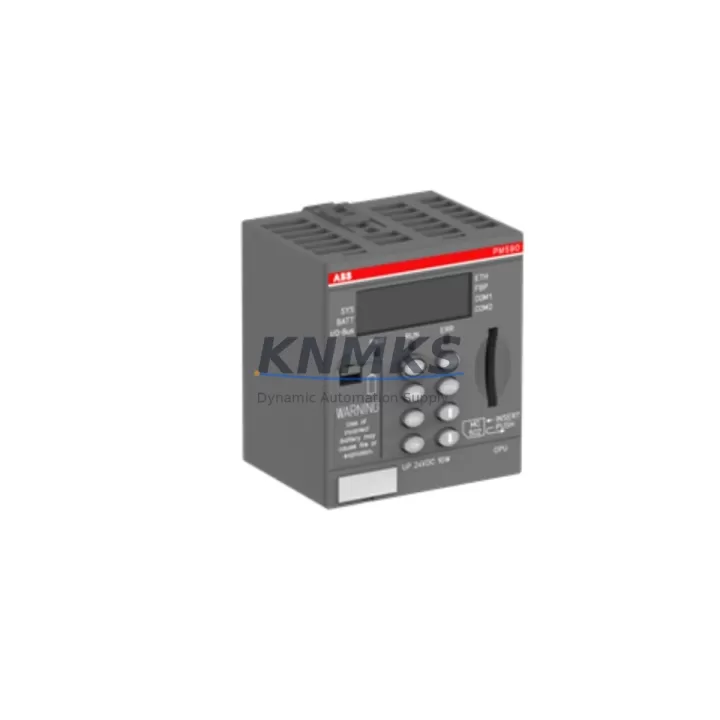
The ABB 1SAP150100R0100 is the PM554-T-ETH CPU module within ABB’s AC500 programmable logic controller platform — a widely deployed control architecture across process automation, machine building, water treatment, and energy management installations. As a central processing unit responsible for executing control logic, managing I/O communication, and maintaining Ethernet-based supervisory connectivity, the PM554-T-ETH is a mission-critical component in any AC500-based control cabinet. When this module fails or degrades, the entire production line or process loop is at risk of unplanned downtime. Maintaining a verified, pre-tested replacement unit in your spare parts inventory is the most reliable strategy for rapid fault recovery and sustained factory uptime.
This 1SAP150100R0100 spare unit is sourced as an original ABB component, fully compatible with the AC500 V2 and V3 hardware generations. It supports the standard AC500 backplane architecture, allowing direct slot-for-slot replacement without hardware modification. The integrated Ethernet port (ETH) enables seamless reconnection to SCADA systems, HMI panels, and engineering workstations running ABB Automation Builder or CoDeSys-based programming environments. Pre-shipment functional verification is performed on every unit prior to dispatch, and each module is covered by a support terms confirmed by quotation from the date of delivery.
For maintenance engineers managing aging AC500 installations, the 1SAP150100R0100 represents a cost-effective alternative to full panel replacement. The module retains full backward compatibility with existing I/O expansion modules, communication adapters, and field wiring — minimizing re-engineering effort during emergency replacement scenarios. Procurement engineers can rely on our multi-region stock availability and documented lead-time commitments to support annual maintenance planning, shutdown preparation, and critical spare parts programs.
Spare Maintenance Table
| Parameter | Specification |
|---|---|
| Part Number | 1SAP150100R0100 |
| Module Type | PM554-T-ETH CPU Module |
| Platform | ABB AC500 PLC Series |
| Communication Interface | Ethernet (ETH), onboard RJ45 |
| Programming Environment | ABB Automation Builder / CoDeSys |
| Supply Voltage | 24 VDC (via AC500 backplane) |
| Operating Temperature | 0°C to +60°C |
| Protection Rating | IP20 |
| Mounting | AC500 TB521/TB541/TB561 backplane compatible |
| Compatibility | AC500 V2 / V3 I/O expansion modules, CM/CP communication modules |
| Application Environment | Process automation, machine control, utilities, energy management |
| Condition | Original ABB, pre-shipment tested |
| Support terms | 12 Months from delivery date |
| Dispatch | Global express shipping, multi-region stock |
Maintenance Planning for Continuous Operation
Replacing the 1SAP150100R0100 CPU module in an AC500 control cabinet is rarely an isolated task. A thorough site inspection and coordinated spare parts review will significantly reduce the risk of repeat faults and secondary failures following CPU replacement.
Begin by verifying the 24 VDC power supply feeding the AC500 backplane — the ABB CP604 or CP605 power supply modules are common companions in AC500 panels and should be load-tested before the new CPU is commissioned. Inspect the TB521 or TB541 backplane terminal base for signs of connector wear, oxidation, or mechanical damage, as a degraded backplane can cause intermittent CPU faults even after module replacement.
Review all connected AC500 digital and analog I/O expansion modules (such as the DA501 or DC532) for firmware version alignment with the replacement CPU. Mismatched firmware between the CPU and I/O modules is a known source of post-replacement communication errors. If the installation uses CM589-PNIO or CM572-DP communication modules for PROFINET or PROFIBUS connectivity, confirm that the network configuration files are backed up and ready for re-download after CPU swap.
For panels with HMI integration, verify that the CP600 series HMI panel communication parameters (IP address, project version) are documented before the CPU is removed. Ethernet patch cables and RJ45 connectors at the CPU port should be inspected and replaced if there is any sign of physical damage or intermittent link loss. Additionally, check the 24 VDC fuse or circuit breaker protecting the CPU supply rail — a blown fuse is sometimes the root cause of apparent CPU failure and should always be ruled out before module replacement.
Where signal isolators or surge protection devices are installed on analog input channels, verify their output signal integrity after CPU replacement to ensure accurate process variable readings are restored. A structured pre-commissioning checklist covering all of these components will reduce the risk of extended downtime and support a clean, documented handover to operations.
Site Replacement Workflow
Step 1 — Backup and Documentation: Before powering down the control cabinet, use ABB Automation Builder to export the current PLC program, hardware configuration, and IP settings. Store the backup on a local engineering laptop and a network share. Document the current CPU firmware version and I/O module configuration.
Step 2 — Safe Isolation: Follow site LOTO (Lockout/Tagout) procedures. Isolate the 24 VDC supply to the AC500 backplane. Confirm zero-energy state with a calibrated voltage tester before opening the cabinet.
Step 3 — Module Removal: Release the CPU module locking mechanism on the TB521/TB541 terminal base. Slide the 1SAP150100R0100 module out of the backplane slot. Inspect the backplane connector pins for damage before inserting the replacement unit.
Step 4 — Replacement Installation: Insert the new 1SAP150100R0100 into the same backplane slot. Ensure the module is fully seated and the locking tab is engaged. Reconnect the Ethernet cable to the onboard RJ45 port.
Step 5 — Program Restore and Commissioning: Power up the backplane supply. Use ABB Automation Builder to download the backed-up program and hardware configuration to the new CPU. Verify I/O module recognition, communication link status, and HMI connectivity before returning the system to automatic mode.
Step 6 — Functional Verification: Confirm all process variables are reading correctly, all output channels are responding as expected, and the SCADA/HMI displays are updating normally. Log the replacement in the site maintenance record with the new module serial number and support terms start date.
Spare Parts Support FAQ
Q1: Is the 1SAP150100R0100 compatible with both AC500 V2 and V3 hardware generations?
Yes. The PM554-T-ETH is designed for use across AC500 V2 and V3 backplane generations (TB521, TB541, TB561). It is a direct slot-for-slot replacement in existing installations. Always verify the firmware version compatibility with your I/O expansion modules using the ABB Automation Builder hardware catalog before commissioning.
Q2: What pre-shipment testing is performed on each unit?
Every 1SAP150100R0100 unit undergoes functional power-on verification, Ethernet port connectivity testing, and visual inspection for connector and housing integrity before dispatch. Units that do not pass all checks are not shipped. A support terms confirmed by quotation is provided from the delivery date, covering manufacturing defects and functional failures under normal operating conditions.
Q3: How should we manage long-term supply risk for the PM554-T-ETH in aging AC500 installations?
For installations with 5 or more AC500 CPU modules, we recommend maintaining at least one verified spare unit on-site and establishing a scheduled replenishment agreement to ensure continuous availability. As the AC500 platform matures, sourcing lead times for original modules may extend — proactive inventory planning based on your MTBF data and annual maintenance schedule is the most effective risk mitigation strategy.
Q4: Can the replacement CPU retain the original program without re-downloading from an engineering workstation?
The PM554-T-ETH does not retain the user program in the replacement module — a program download from ABB Automation Builder is required after hardware replacement. This makes a current, verified program backup an essential prerequisite for any emergency replacement procedure. We recommend storing the backup both locally and on a network share, and verifying the backup integrity at each scheduled maintenance interval.
© 2026 KNMKS. All rights reserved.
Original Source: https://knmks.com
Contact: admin@knmks.com | +86 18359268345
Product Identification
- Brand / Ecosystem
-
ABB
ABB - Model / Series
-
1SAP150100R0100
AC500 Series - Product Family
- PLCs & Controllers
- Availability Status
- Available on request after model and quantity confirmation
- Inquiry Type
- B2B RFQ, replacement inquiry and project spare-part request
- Pre-Quote Check
- Exact SKU, brand, series, quantity, nameplate photos and destination country are checked before quotation
System Path
Where this product fits in the KNMKS automation structure.
Specification & Inquiry Focus
- Control platform
- PLC, PAC and modular controllers
- Common needs
- CPU, rack, power and I/O expansion
- Project support
- Replacement, cabinet build and maintenance
Buyer Confirmation
Information KNMKS checks before replying.
- Exact model
- 1SAP150100R0100
- Brand / ecosystem
- ABB
- Product family
- PLCs & Controllers
- Application note
- Replacement, maintenance, project build or spare-part list
- Useful photos
- Nameplate, installed unit, cabinet layout or connector side
- Delivery details
- Quantity, destination country and target schedule
Document Support
Files and notes can be confirmed during quotation.
- Product photos or nameplate confirmation when available
- Packing and delivery notes before quotation confirmation
- Support scope and delivery terms confirmed per inquiry
- Export document coordination for qualified B2B requests
Inquiry Support
- Model cross-checking before quotation
- CPU, power, rack and expansion module matching
- Support for replacement and project inquiry
What to Send Us
- Brand and exact model number: ABB 1SAP150100R0100
- Quantity and required delivery time
- Application, replacement requirement or nameplate photo
- Destination country and shipping preference
RFQ Preparation
This is a product inquiry page built for RFQ communication.
Fast Model Check
Send this model to KNMKS for confirmation.
Include quantity, destination country and photos if this is a maintenance replacement. The inquiry will be saved with a reference number after submission.
Brand & Compatibility Note
KNMKS displays automation product information for well-known industrial brand ecosystems and compatible replacement references. Brand names are used for product identification and compatibility reference only; final availability and commercial terms are confirmed per quotation.
 Manufacturing
 Machine Tools
 Packaging
 Energy & Power



 HMI & Displays
 Servo Systems
 Variable Frequency Drives
 Sensors