
Overview
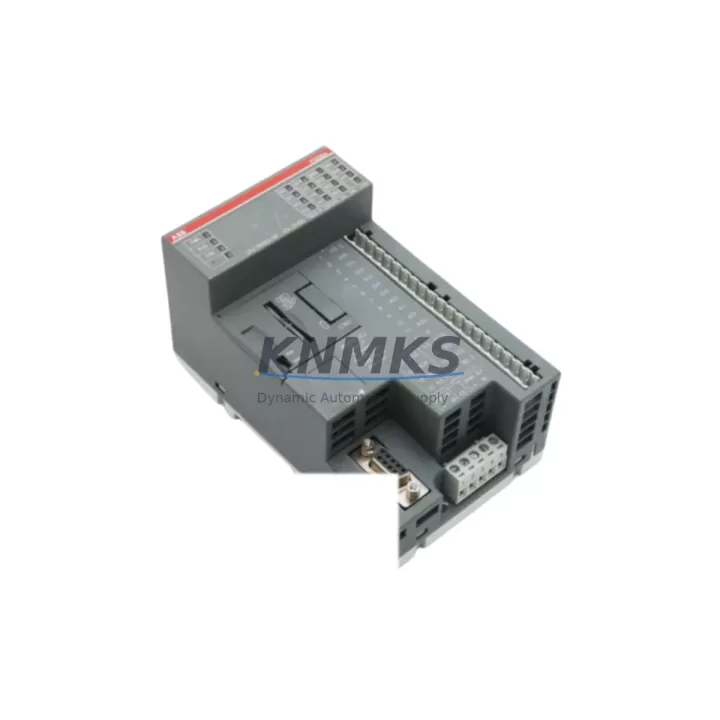
ABB 1SAP121000R0001 Maintenance-Proven Spare for AC500 PLC
The ABB 1SAP121000R0001 (PM564-RP) is a central processing unit module for the ABB AC500 programmable logic controller platform — one of the most widely deployed automation architectures in process industries, utilities, and discrete manufacturing. Sourced as an original ABB component, this spare is stocked, tested, and dispatched to support rapid site replacement, scheduled overhaul, and emergency recovery scenarios where control system downtime directly impacts production throughput and safety compliance.
Maintenance engineers managing AC500-based control cabinets understand that the PM564-RP CPU is the operational core of the rack: it executes the application program, manages I/O communication cycles, handles fieldbus coordination, and maintains the real-time clock for event logging. When this module degrades — through firmware corruption, capacitor aging, backplane connector wear, or power surge damage — the entire control loop is at risk. Holding a verified spare on-site or in a regional warehouse eliminates the lead-time gap that turns a two-hour fault into a two-week production loss.
This listing covers the 1SAP121000R0001 in original ABB specification, supplied with a support terms confirmed by quotation, pre-shipment functional verification, and full traceability documentation. Units are dispatched from bonded stock with export-compliant packaging suitable for air freight or sea consolidation.
Spare Maintenance Table
| Parameter | Specification |
|---|---|
| Part Number | 1SAP121000R0001 |
| Model | PM564-RP |
| Brand | ABB |
| Series | AC500 |
| Module Type | PLC CPU Module |
| Supply Voltage | 24 V DC (via backplane / TB521 terminal base) |
| Program Memory | 512 KB (user program) |
| Data Memory | 512 KB |
| Communication Ports | 2 × Ethernet (10/100 Mbps), 1 × RS-232/RS-485 COM port |
| Supported Fieldbus | PROFIBUS DP, Modbus RTU/TCP, CANopen (via CM modules) |
| I/O Expansion | Up to 10 I/O modules via local bus; remote I/O via fieldbus |
| Operating Temperature | -25 °C to +60 °C |
| Protection Class | IP20 (panel-mount installation) |
| Country of Origin | Germany |
| Compatibility | AC500 V2 / V3 racks with TB521, TB523 terminal bases |
| Certification | CE, UL, cUL, ATEX (zone 2 with appropriate enclosure) |
| Support terms | 12 Months — covers manufacturing defects and functional failure |
| Condition | Original ABB — new or refurbished-to-spec, pre-shipment tested |
| Delivery | Express air freight available; sea consolidation for bulk orders |
Maintenance Planning for Continuous Operation
Replacing the 1SAP121000R0001 CPU module is rarely an isolated task. A disciplined maintenance engineer will treat a CPU swap as a trigger for a broader cabinet inspection — because the conditions that degrade a CPU (power quality issues, thermal stress, vibration, or aging backplane connectors) typically affect adjacent components in the same rack and electrical circuit.
Begin with the TB521 or TB523 terminal base that seats the PM564-RP. Inspect the backplane connector pins for oxidation, mechanical deformation, or intermittent contact — a worn terminal base can cause the replacement CPU to exhibit the same fault codes as the failed unit. If the terminal base shows wear, replace it concurrently to avoid a repeat callout.
Next, audit the 24 V DC power supply rail feeding the AC500 rack. ABB recommends a dedicated, regulated 24 V DC source with ripple below 5%. Aging SMPS units — particularly those from the same installation vintage as the CPU — may deliver marginal voltage under load, causing soft resets or watchdog trips on the new module. Cross-check with a calibrated multimeter at the terminal base input before powering the replacement CPU.
Review the CM572-DP PROFIBUS communication module or equivalent fieldbus coupler installed in the same rack. A CPU replacement resets the fieldbus master configuration; verify that the GSD file and station address assignments are correctly restored from the backup project file. Fieldbus wiring termination resistors and cable shielding should also be inspected at this stage.
For plants running SM560-S safety modules or other functional safety I/O in the same AC500 rack, confirm that the safety program CRC and safety parameter checksums are validated after CPU restoration — this is a mandatory step under IEC 62061 and ISO 13849 compliance frameworks.
Check the CP600 HMI panel or equivalent operator interface connected via Ethernet or serial COM port. After CPU replacement, re-establish the communication link and verify that all tag mappings, alarm setpoints, and trend archives are intact. A corrupted HMI project or broken Ethernet cable can mask a successful CPU replacement and delay production restart.
Finally, inspect fuse holders and miniature circuit breakers on the 24 V DC distribution rail within the control cabinet. Surge events that damage a CPU module often leave thermal stress marks on fuse elements or MCB trip mechanisms. Replace any suspect protective devices before energizing the new CPU to prevent repeat damage.
Site Replacement Workflow
Step 1 — Backup and isolation: Export the current application program from the AC500 CPU using ABB Automation Builder (or PS501 Control Builder Plus for legacy installations). Save the project file, firmware version, IP configuration, and fieldbus parameter sets to a secure offline location. Isolate the control cabinet from the process by placing the system in manual/safe state per site LOTO procedures.
Step 2 — Module removal: De-energize the 24 V DC supply rail. Release the PM564-RP from the TB521/TB523 terminal base by pressing the release lever and sliding the module upward. Note the firmware label on the module face for version reference.
Step 3 — Replacement installation: Seat the 1SAP121000R0001 replacement module onto the terminal base, ensuring the backplane connector is fully engaged. Restore 24 V DC power. The CPU will boot to the default factory state — do not connect to the process until the application program is loaded.
Step 4 — Program restore and commissioning: Connect via Automation Builder, download the backed-up application program, and verify the firmware version matches the project requirements. Restore IP addresses, fieldbus configurations, and safety parameters. Perform a cold-start cycle and monitor the diagnostic LEDs (RUN, ERR, COM) for normal operation status.
Step 5 — Process handback: Confirm all I/O signals are reading correctly against field instruments. Release the system from manual/safe state in a controlled sequence. Document the replacement in the site maintenance log with the new module serial number and support terms start date.
This workflow is compatible with both like-for-like replacement of a failed 1SAP121000R0001 and migration from earlier AC500 V1 CPU variants, where the PM564-RP provides a direct functional upgrade path with backward-compatible I/O bus architecture.
Spare Parts Support FAQ
Q1: Is the 1SAP121000R0001 compatible with both AC500 V2 and V3 racks?
The PM564-RP is designed for the AC500 V2 platform. It is mechanically and electrically compatible with TB521 and TB523 terminal bases used in V2 rack configurations. For AC500 V3 installations, verify the terminal base part number and firmware compatibility via ABB’s product lifecycle documentation before ordering. Our technical team can assist with compatibility confirmation prior to dispatch.
Q2: What pre-shipment testing is performed on each unit?
Every 1SAP121000R0001 unit undergoes functional power-on verification, communication port continuity check, and visual inspection for connector integrity and label legibility before dispatch. Units supplied as refurbished-to-spec are additionally tested under load conditions and reset to factory default firmware. A test report is available upon request for critical infrastructure procurement.
Q3: Can you support blanket stock orders for long-term maintenance programs?
Yes. We support scheduled blanket orders with phased delivery, consignment stock arrangements, and annual supply agreements for maintenance teams managing multiple AC500 installations. Long-term supply contracts include price protection clauses and priority allocation during periods of market shortage — contact admin@knmks.com to discuss your program requirements.
Q4: What does the support terms confirmed by quotation cover, and how is a claim processed?
The support terms confirmed by quotation cover manufacturing defects, functional failure under normal operating conditions, and DOA (dead-on-arrival) units. It does not cover damage caused by incorrect installation voltage, ESD mishandling, or physical impact. To initiate a support terms claim, contact our support team with the order reference, module serial number, and a brief fault description. Replacement units are dispatched within 5 business days of claim approval, with return freight covered for confirmed support terms cases.
© 2026 KNMKS. All rights reserved.
Original Source: https://knmks.com
Contact: admin@knmks.com | +86 18359268345
Product Identification
- Brand / Ecosystem
-
ABB
ABB - Model / Series
-
1SAP121000R0001
AC500 Series - Product Family
- PLCs & Controllers
- Availability Status
- Available on request after model and quantity confirmation
- Inquiry Type
- B2B RFQ, replacement inquiry and project spare-part request
- Pre-Quote Check
- Exact SKU, brand, series, quantity, nameplate photos and destination country are checked before quotation
System Path
Where this product fits in the KNMKS automation structure.
Specification & Inquiry Focus
- Control platform
- PLC, PAC and modular controllers
- Common needs
- CPU, rack, power and I/O expansion
- Project support
- Replacement, cabinet build and maintenance
Buyer Confirmation
Information KNMKS checks before replying.
- Exact model
- 1SAP121000R0001
- Brand / ecosystem
- ABB
- Product family
- PLCs & Controllers
- Application note
- Replacement, maintenance, project build or spare-part list
- Useful photos
- Nameplate, installed unit, cabinet layout or connector side
- Delivery details
- Quantity, destination country and target schedule
Document Support
Files and notes can be confirmed during quotation.
- Product photos or nameplate confirmation when available
- Packing and delivery notes before quotation confirmation
- Support scope and delivery terms confirmed per inquiry
- Export document coordination for qualified B2B requests
Inquiry Support
- Model cross-checking before quotation
- CPU, power, rack and expansion module matching
- Support for replacement and project inquiry
What to Send Us
- Brand and exact model number: ABB 1SAP121000R0001
- Quantity and required delivery time
- Application, replacement requirement or nameplate photo
- Destination country and shipping preference
RFQ Preparation
This is a product inquiry page built for RFQ communication.
Fast Model Check
Send this model to KNMKS for confirmation.
Include quantity, destination country and photos if this is a maintenance replacement. The inquiry will be saved with a reference number after submission.
Brand & Compatibility Note
KNMKS displays automation product information for well-known industrial brand ecosystems and compatible replacement references. Brand names are used for product identification and compatibility reference only; final availability and commercial terms are confirmed per quotation.
 Manufacturing
 Machine Tools
 Packaging
 Energy & Power



 HMI & Displays
 Servo Systems
 Variable Frequency Drives
 Sensors