
Overview
ABB 1MRK000173-BEr03 Migration-Ready Binary I/O Module: Legacy System Retrofit and Compatibility Upgrade
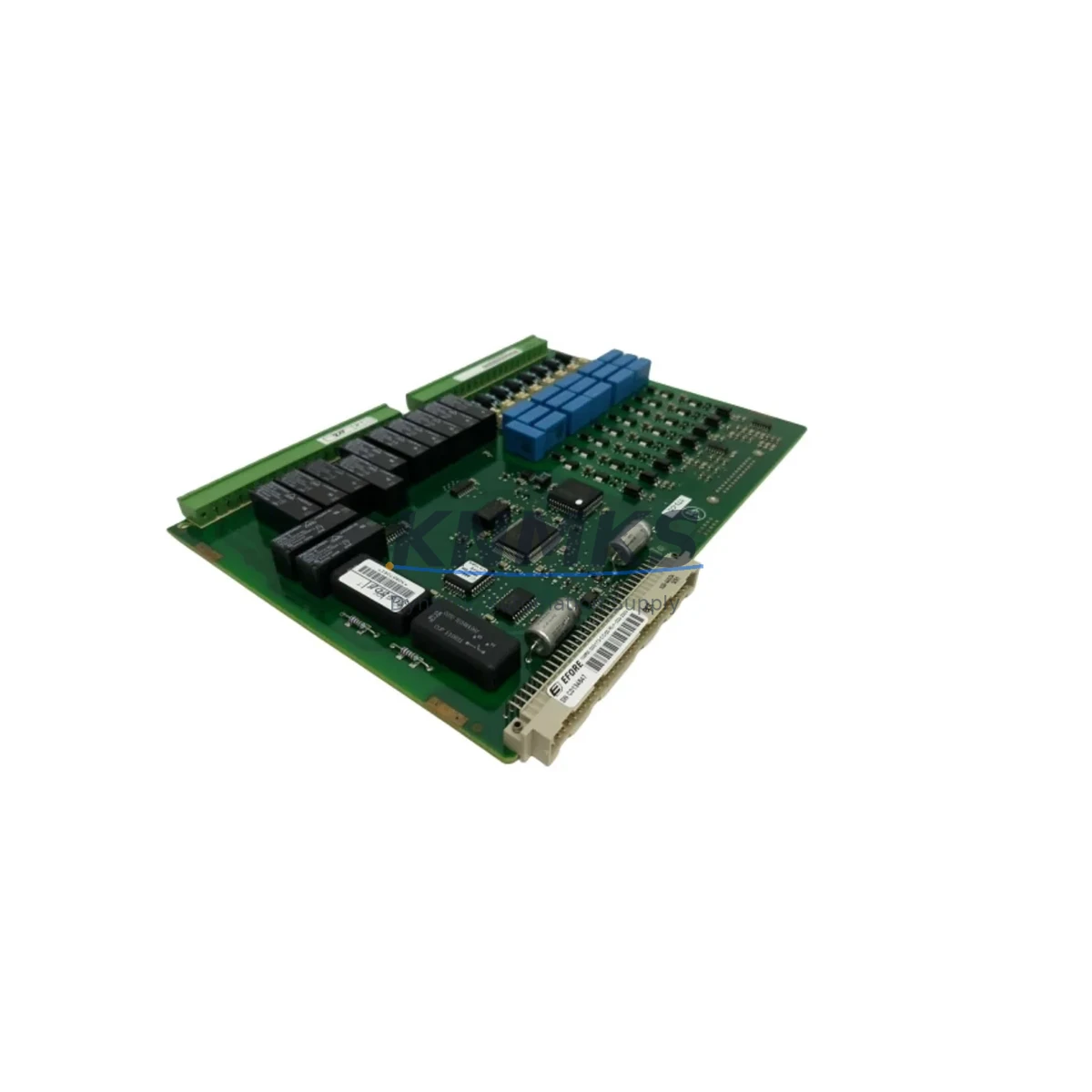
The ABB 1MRK000173-BEr03 is a Binary I/O Module designed for the REB500 protection and control platform — one of ABB’s most widely deployed substation automation systems across power utilities, industrial plants, and critical infrastructure worldwide. As the REB500 series approaches end-of-life support milestones, many facilities are facing the challenge of sourcing reliable spare parts, executing controlled system upgrades, or migrating to newer protection architectures without disrupting live operations. The 1MRK000173-BEr03 addresses this need directly: it is a verified drop-in replacement for the original binary input/output module, fully compatible with the REB500 backplane interface, and pre-shipment tested to confirm signal integrity and relay output performance before dispatch.
Whether your facility is managing a scheduled outage window, responding to an unexpected module failure, or planning a phased migration from legacy REB500 hardware to a modern protection relay platform, the 1MRK000173-BEr03 provides the electrical and functional compatibility required to restore or extend system operation with minimal engineering risk. Each unit ships with a support terms confirmed by quotation covering manufacturing defects and functional performance under normal operating conditions.
Migration Compatibility Table
| Parameter | Details |
|---|---|
| Compatible Platform | ABB REB500 Protection & Control System |
| Module Function | Binary Input / Output (I/O) Module |
| Backplane Interface | REB500 standard backplane connector — direct slot replacement |
| Communication Compatibility | Compatible with REB500 internal communication bus; supports IEC 60870-5-103 and LON-based substation communication where applicable |
| Terminal Wiring | Screw-terminal block; verify existing field wiring against terminal assignment drawing before installation |
| Power Supply Requirement | Powered via REB500 backplane; confirm rack power capacity before adding replacement modules |
| Installation Space | Standard REB500 module slot; no mechanical modification required for direct replacement |
| Firmware Compatibility | Compatible with existing REB500 firmware versions; confirm module address assignment in configuration tool after installation |
| Replacement Recommendation | Direct replacement for failed or end-of-life 1MRK000173-BEr03 units; verify relay output mapping in protection logic before energizing |
| Commissioning Notes | Re-assign module address via REB500 configuration software; validate binary input signal states and output relay operation during commissioning |
| Pre-Shipment Testing | Each unit tested for binary input response, relay output switching, and backplane communication prior to dispatch |
| Support terms | support terms confirmed by quotation — manufacturing defects and functional performance |
Retrofit Planning for Existing Automation Systems
Retrofitting a REB500-based protection system requires careful coordination across multiple hardware layers. The 1MRK000173-BEr03 Binary I/O Module is typically installed within a REB500 rack assembly alongside other functional modules, and a successful retrofit depends on confirming compatibility across the entire module set — not just the I/O card being replaced.
Before beginning a retrofit, engineers should audit the existing rack configuration to identify all installed modules. In a typical REB500 installation, the rack may include a central processing unit module, one or more binary I/O modules such as the 1MRK000173-BEr03, analog input modules for current and voltage measurement, and a communication interface module handling substation bus connectivity. The power supply module feeding the rack must be verified to have sufficient capacity to support the replacement module, particularly if the retrofit involves adding I/O capacity rather than a straight swap.
Terminal wiring is a critical checkpoint. The 1MRK000173-BEr03 uses a screw-terminal interface, and field cables connected to binary inputs — typically status contacts from circuit breakers, disconnectors, or auxiliary relays — must be mapped against the terminal assignment drawing for the replacement module. Any deviation in terminal numbering between module revisions must be resolved before re-energizing the field wiring. Similarly, relay output terminals driving trip coils, alarm annunciators, or interlock circuits must be verified for correct assignment in the protection logic configuration.
For facilities also managing HMI integration, the binary input and output states mapped in the 1MRK000173-BEr03 are typically reflected in the REB500 HMI display and SCADA system via the substation communication link. After module replacement, the HMI screen assignments and SCADA point mapping should be validated to confirm that signal names, states, and alarm conditions are correctly displayed. If the substation uses an IEC 60870-5-103 or LON communication link to a remote control center, the communication link should be tested end-to-end after commissioning to confirm that binary status and command signals are correctly transmitted.
In cases where the retrofit is part of a broader migration from REB500 to a newer protection relay platform — such as ABB’s REX640 or REC670 series — the 1MRK000173-BEr03 can serve as a bridge component, maintaining the existing REB500 installation in service while the new platform is configured and tested in parallel. This phased approach allows engineering teams to validate the new protection logic, I/O mapping, and communication configuration before cutting over, significantly reducing the risk of protection gaps during the transition period. A programming cable and the REB500 configuration software tool are required for any firmware-level configuration changes during this process.
Downtime Control During System Migration
Minimizing downtime during a Binary I/O module replacement in a live protection system requires a structured approach that begins well before the maintenance window opens. The first priority is to obtain a complete backup of the existing REB500 configuration, including the protection logic, I/O assignments, module addresses, and communication parameters. This backup serves as the reference for restoring the system to its pre-maintenance state if any issue arises during the replacement procedure.
The replacement module should be bench-tested before the maintenance window begins. For the 1MRK000173-BEr03, this means verifying binary input response to test signals and confirming relay output switching under controlled conditions. Each unit supplied by KNMKS undergoes pre-shipment functional testing, but a site-level bench test using the actual REB500 configuration tool provides an additional layer of confidence before the module is installed in the live rack.
During the maintenance window, the sequence of operations should follow the protection system’s approved switching procedure: isolate the protection zone, remove the failed or end-of-life module, install the replacement 1MRK000173-BEr03, assign the correct module address in the configuration software, download the configuration to the module, and perform a point-by-point I/O verification before restoring the protection zone to service. Binary input states should be verified by operating the associated field devices — circuit breaker auxiliary contacts, disconnector position switches — and confirming correct state display in the REB500 HMI and SCADA system. Relay output operation should be verified by initiating test commands from the configuration tool and confirming correct response at the field device terminals.
For facilities with redundant protection schemes, the replacement can often be performed with the primary protection system in service, further reducing operational risk. The support terms confirmed by quotation on each 1MRK000173-BEr03 unit provides additional assurance that the replacement module will perform reliably throughout the post-commissioning period.
Retrofit Support FAQ
Q: Is the 1MRK000173-BEr03 a direct replacement for the original ABB REB500 Binary I/O Module?
A: Yes. The 1MRK000173-BEr03 is designed as a direct slot replacement for the original module in the REB500 rack. The backplane connector and mechanical form factor are compatible with the standard REB500 module slot. Terminal wiring and module address assignment should be verified during installation using the REB500 configuration tool.
Q: What commissioning steps are required after installing the replacement module?
A: After physical installation, the module address must be assigned or confirmed in the REB500 configuration software. The protection logic configuration should be downloaded to the module, and a point-by-point I/O verification should be performed — confirming binary input states from field devices and relay output switching to field terminals — before the protection zone is returned to service.
Q: How do I confirm terminal wiring compatibility before installation?
A: Obtain the terminal assignment drawing for the 1MRK000173-BEr03 and compare it against the existing field wiring documentation for the module being replaced. Pay particular attention to binary input terminal numbers and relay output terminal assignments. If the replacement module revision differs from the original, any terminal numbering changes must be resolved in the field wiring before energizing.
Q: What does the support terms confirmed by quotation cover, and what inventory availability can I expect?
A: The support terms confirmed by quotation cover manufacturing defects and functional performance under normal operating conditions, including binary input response and relay output switching. KNMKS maintains stock of the 1MRK000173-BEr03 to support both emergency replacement and planned maintenance programs. Each unit is pre-shipment tested before dispatch. Contact admin@knmks.com or +86 18359268345 to confirm current stock levels and lead times for your project.
© 2026 KNMKS. All rights reserved.
Original Source: https://knmks.com
Contact: admin@knmks.com | +86 18359268345
Product Identification
- Brand / Ecosystem
-
ABB
ABB - Model / Series
- 1MRK000173-BEr03
- Product Family
- PLCs & Controllers
- Availability Status
- Available on request after model and quantity confirmation
- Inquiry Type
- B2B RFQ, replacement inquiry and project spare-part request
- Pre-Quote Check
- Exact SKU, brand, series, quantity, nameplate photos and destination country are checked before quotation
System Path
Where this product fits in the KNMKS automation structure.
Specification & Inquiry Focus
- Control platform
- PLC, PAC and modular controllers
- Common needs
- CPU, rack, power and I/O expansion
- Project support
- Replacement, cabinet build and maintenance
Buyer Confirmation
Information KNMKS checks before replying.
- Exact model
- 1MRK000173-BEr03
- Brand / ecosystem
- ABB
- Product family
- PLCs & Controllers
- Application note
- Replacement, maintenance, project build or spare-part list
- Useful photos
- Nameplate, installed unit, cabinet layout or connector side
- Delivery details
- Quantity, destination country and target schedule
Document Support
Files and notes can be confirmed during quotation.
- Product photos or nameplate confirmation when available
- Packing and delivery notes before quotation confirmation
- Support scope and delivery terms confirmed per inquiry
- Export document coordination for qualified B2B requests
Inquiry Support
- Model cross-checking before quotation
- CPU, power, rack and expansion module matching
- Support for replacement and project inquiry
What to Send Us
- Brand and exact model number: ABB 1MRK000173-BEr03
- Quantity and required delivery time
- Application, replacement requirement or nameplate photo
- Destination country and shipping preference
RFQ Preparation
This is a product inquiry page built for RFQ communication.
Fast Model Check
Send this model to KNMKS for confirmation.
Include quantity, destination country and photos if this is a maintenance replacement. The inquiry will be saved with a reference number after submission.
Brand & Compatibility Note
KNMKS displays automation product information for well-known industrial brand ecosystems and compatible replacement references. Brand names are used for product identification and compatibility reference only; final availability and commercial terms are confirmed per quotation.
 Manufacturing
 Machine Tools
 Packaging
 Energy & Power



 HMI & Displays
 Servo Systems
 Variable Frequency Drives
 Sensors