
Overview
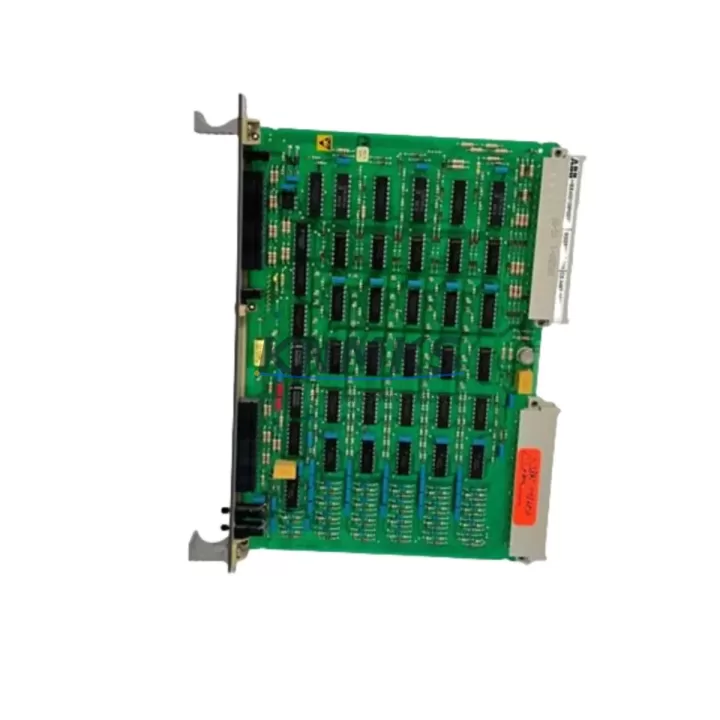
ABB 1MRB178009R0002 Maintenance-Proven Spare Part for Factory Uptime
The ABB 1MRB178009R0002, also identified as the 500PBIO01-TTL Binary Input/Output Module, is a critical spare component within the ABB PROCONTROL P13 and P14 Distributed Control System (DCS) platform. Designed for high-reliability industrial environments including power generation, chemical processing, and heavy manufacturing, this module manages binary signal acquisition and output switching across the DCS backplane. Maintaining a verified stock of the 1MRB178009R0002 is a fundamental requirement for any maintenance team operating legacy PROCONTROL systems, where unplanned downtime directly translates to production loss and costly emergency procurement.
At KNMKS, every 1MRB178009R0002 unit is sourced from verified supply channels, subjected to functional bench testing prior to dispatch, and backed by a support terms confirmed by quotation. Our global logistics infrastructure supports urgent air-freight delivery to minimize mean time to repair (MTTR) for critical plant assets. Whether you are building a preventive maintenance buffer stock, responding to an active fault, or executing a scheduled annual overhaul, we provide the supply continuity your operation demands.
Spare Maintenance Table
| Part Number | 1MRB178009R0002 |
| Alternate ID | 500PBIO01-TTL |
| Brand | ABB |
| Series | PROCONTROL P13 / P14 |
| Module Type | Binary Input/Output Module (TTL-level signaling) |
| Compatible DCS Platform | ABB PROCONTROL P13, P14 |
| Signal Type | Binary I/O, TTL-compatible |
| Backplane Interface | PROCONTROL P-series subrack / backplane |
| Operating Voltage | 24 VDC (nominal, per PROCONTROL P-series standard) |
| Operating Temperature | 0°C to +55°C (standard industrial enclosure) |
| Country of Origin | Germany |
| Condition | Original, tested before shipment |
| Support terms | 12 Months |
| Typical Application | Power plant DCS, chemical plant control, heavy industry automation |
| Maintenance Recommendation | Inspect every 12–24 months; replace proactively if signal errors or CRC faults are logged |
| Lead Time (Stock) | Ships within 3–5 business days; urgent air-freight available |
Maintenance Planning for Continuous Operation
When a PROCONTROL P13 or P14 system flags binary I/O faults or intermittent signal loss, the 1MRB178009R0002 is typically the first module to inspect and replace. However, experienced maintenance engineers know that a single-module fault is rarely an isolated event. A thorough site investigation should extend to the surrounding electrical and control infrastructure to prevent repeat failures and ensure a stable return to service.
Begin by verifying the 24 VDC power supply rail feeding the affected subrack. ABB PROCONTROL systems commonly use dedicated power supply modules such as the 1MRB178009R0001 or equivalent P-series power units; a degraded supply voltage can cause binary I/O modules to report spurious faults without the module itself being defective. Inspect the subrack backplane connectors for oxidation or mechanical damage, as poor backplane contact is a leading cause of intermittent binary signal errors in aging PROCONTROL installations.
Check the field wiring terminal blocks connected to the binary inputs and outputs. Loose or corroded terminals on the marshalling cabinet side can introduce signal noise that mimics module failure. If the system includes signal isolators between field devices and the DCS I/O, verify that the isolators — particularly any PROCONTROL-compatible galvanic isolators — are within their rated operating life. Aging isolators can degrade signal integrity and cause false binary state readings.
For systems with communication modules such as the 500PCOM01 or similar PROCONTROL communication cards, confirm that the module replacement does not require re-initialization of the communication configuration. Binary I/O modules in PROCONTROL P-series systems are addressed via the backplane slot position; swapping to a new slot without updating the engineering configuration will result in address conflicts. Always replace the 1MRB178009R0002 into the identical backplane slot as the failed unit.
Maintenance teams should also inspect associated relay output modules and fuse protection circuits within the same control cabinet. A blown fuse on a binary output channel is frequently misdiagnosed as a module failure. Keeping a stock of compatible PROCONTROL P-series relay output modules and standard 2A/4A glass fuses alongside the 1MRB178009R0002 ensures that the maintenance team can resolve the fault without a second procurement cycle. For plants running HMI systems connected to the PROCONTROL network, verify that the HMI tag mapping for the affected binary points is intact after module replacement to avoid operator display errors during the post-maintenance verification phase.
Site Replacement Workflow
Step 1 — Fault Isolation: Use the PROCONTROL P13/P14 diagnostic interface to identify the specific subrack and slot reporting the binary I/O fault. Document the slot address and channel assignments before any hardware intervention.
Step 2 — Safe Isolation: Follow your site’s lock-out/tag-out (LOTO) procedure for the affected subrack. Confirm that the binary outputs connected to field actuators are in a safe state before removing the module. Do not hot-swap unless the PROCONTROL engineering documentation explicitly permits it for this module type.
Step 3 — Module Removal: Disconnect field wiring connectors from the 1MRB178009R0002 front panel. Label each connector to ensure correct re-termination. Slide the module out of the backplane slot using the extraction handles.
Step 4 — Visual Inspection: Inspect the removed module for visible burn marks, capacitor swelling, or connector pin damage. Inspect the backplane slot for debris or bent pins before inserting the replacement unit.
Step 5 — Replacement Installation: Insert the new 1MRB178009R0002 into the identical backplane slot. Reconnect all field wiring connectors in the correct sequence. Restore power to the subrack.
Step 6 — Functional Verification: Use the PROCONTROL diagnostic tools to confirm that all binary input and output channels are reporting correctly. Perform a forced I/O test on critical channels before returning the system to automatic control mode.
Step 7 — Documentation: Update the plant maintenance log with the replacement date, module serial number, and post-replacement test results. Schedule the next inspection interval based on the system’s historical fault frequency.
Spare Parts Support FAQ
Q1: Is the 1MRB178009R0002 a direct drop-in replacement for the 500PBIO01-TTL?
Yes. The 1MRB178009R0002 is the ABB order number for the 500PBIO01-TTL Binary I/O Module. Both designations refer to the same hardware. When ordering, either reference number can be used to confirm compatibility with your PROCONTROL P13 or P14 system.
Q2: How do you verify compatibility before shipment?
Each unit is bench-tested for power-on functionality and binary I/O channel response prior to dispatch. We cross-reference the module’s hardware revision against known PROCONTROL P13/P14 compatibility matrices. If your system has a specific firmware or hardware revision requirement, please provide your existing module’s label information so we can confirm a match before shipping.
Q3: What is your lead time and can you support urgent plant shutdowns?
In-stock units ship within 3–5 business days under standard logistics. For emergency plant recovery situations, we offer priority air-freight dispatch with same-day or next-day shipping from our warehouse. Contact our sales team directly at admin@knmks.com or +86 18359268345 to arrange urgent delivery.
Q4: What does the support terms confirmed by quotation cover?
The support terms confirmed by quotation cover functional failure of the module under normal operating conditions consistent with ABB PROCONTROL P-series specifications. It does not cover damage resulting from incorrect installation, overvoltage events, or physical mishandling. In the event of a support terms claim, we arrange return logistics and provide a tested replacement unit to minimize your downtime.
© 2026 KNMKS. All rights reserved.
Original Source: https://knmks.com
Contact: admin@knmks.com | +86 18359268345
Product Identification
- Brand / Ecosystem
-
ABB
ABB - Model / Series
- 1MRB178009R0002
- Product Family
- PLCs & Controllers
- Availability Status
- Available on request after model and quantity confirmation
- Inquiry Type
- B2B RFQ, replacement inquiry and project spare-part request
- Pre-Quote Check
- Exact SKU, brand, series, quantity, nameplate photos and destination country are checked before quotation
System Path
Where this product fits in the KNMKS automation structure.
Specification & Inquiry Focus
- Control platform
- PLC, PAC and modular controllers
- Common needs
- CPU, rack, power and I/O expansion
- Project support
- Replacement, cabinet build and maintenance
Buyer Confirmation
Information KNMKS checks before replying.
- Exact model
- 1MRB178009R0002
- Brand / ecosystem
- ABB
- Product family
- PLCs & Controllers
- Application note
- Replacement, maintenance, project build or spare-part list
- Useful photos
- Nameplate, installed unit, cabinet layout or connector side
- Delivery details
- Quantity, destination country and target schedule
Document Support
Files and notes can be confirmed during quotation.
- Product photos or nameplate confirmation when available
- Packing and delivery notes before quotation confirmation
- Support scope and delivery terms confirmed per inquiry
- Export document coordination for qualified B2B requests
Inquiry Support
- Model cross-checking before quotation
- CPU, power, rack and expansion module matching
- Support for replacement and project inquiry
What to Send Us
- Brand and exact model number: ABB 1MRB178009R0002
- Quantity and required delivery time
- Application, replacement requirement or nameplate photo
- Destination country and shipping preference
RFQ Preparation
This is a product inquiry page built for RFQ communication.
Fast Model Check
Send this model to KNMKS for confirmation.
Include quantity, destination country and photos if this is a maintenance replacement. The inquiry will be saved with a reference number after submission.
Brand & Compatibility Note
KNMKS displays automation product information for well-known industrial brand ecosystems and compatible replacement references. Brand names are used for product identification and compatibility reference only; final availability and commercial terms are confirmed per quotation.
 Manufacturing
 Machine Tools
 Packaging
 Energy & Power



 HMI & Displays
 Servo Systems
 Variable Frequency Drives
 Sensors