
Overview
ABB 1MRB150004R0001 Maintenance-Proven Spare Part for Factory Uptime
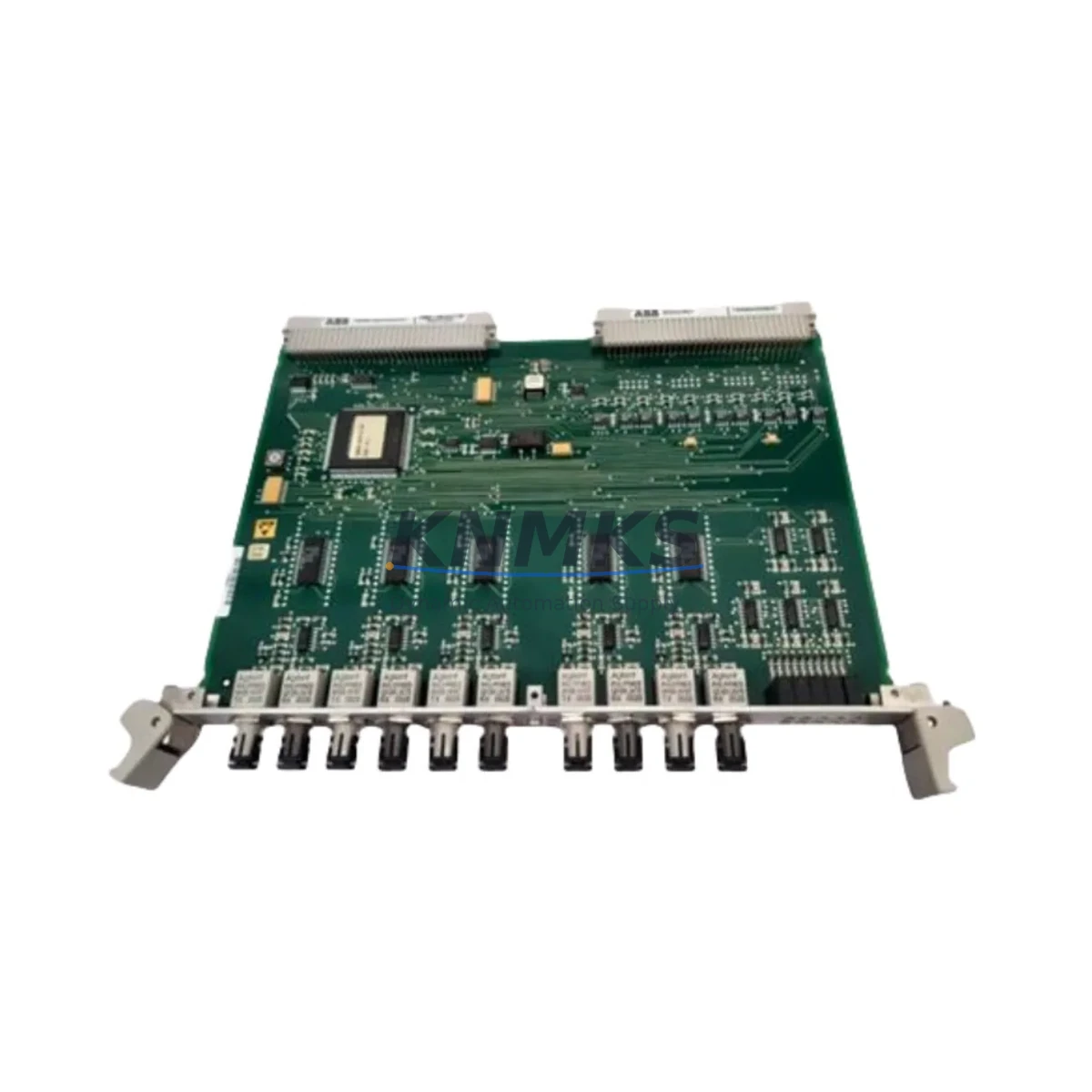
The ABB 1MRB150004R0001, also identified by its functional designation 500SCM01, is a DCS coupler module engineered for the ABB PROCONTROL P distributed control system platform. Designed and manufactured in Switzerland to ABB’s industrial-grade standards, this module serves as a critical communication and signal coupling interface within PROCONTROL P control cabinets. For maintenance engineers managing aging DCS infrastructure, securing a verified original spare of the 1MRB150004R0001 is a direct investment in plant uptime, fault isolation speed, and long-term system continuity.
Industrial facilities operating PROCONTROL P systems — including power generation, pulp and paper, chemical processing, and heavy manufacturing — frequently encounter the challenge of sourcing discontinued or allocation-constrained ABB modules. The 1MRB150004R0001 is a module where lead-time risk is real: delays in sourcing a replacement can extend unplanned downtime from hours into days. Maintaining at least one verified spare in your control room inventory is a standard recommendation for any site running PROCONTROL P as a primary control platform.
Each unit supplied by KNMKS is sourced from controlled channels, subject to pre-shipment functional inspection, and backed by a support terms confirmed by quotation covering manufacturing defects and operational failure under normal service conditions. We support both emergency replacement orders and planned annual maintenance procurement programs.
Spare Maintenance Table
| Parameter | Specification |
|---|---|
| Part Number | 1MRB150004R0001 |
| Functional Designation | 500SCM01 |
| Brand | ABB |
| Series / Platform | PROCONTROL P (500 Series) |
| Module Type | DCS Coupler Module |
| Country of Origin | Switzerland (CH) |
| Compatibility | ABB PROCONTROL P DCS; 500 Series control cabinets |
| Installation | Rack/backplane mount; PROCONTROL P standard slot |
| Application Environment | Industrial control rooms; power, chemical, pulp & paper, heavy manufacturing |
| Maintenance Role | Signal coupling, inter-module communication, DCS bus interface |
| Pre-Shipment Inspection | Functional test performed on each unit |
| Support terms | 12 Months from date of shipment |
| Weight | 500 g (approx.) |
| Supply Condition | Original ABB; refurbished-tested available on request |
Maintenance Planning for Continuous Operation
When a PROCONTROL P system triggers a coupler fault or communication alarm pointing to the 1MRB150004R0001 (500SCM01), the replacement workflow rarely ends with the module itself. Experienced maintenance engineers know that a coupler failure is often a symptom of broader stress in the control cabinet — and a thorough inspection of adjacent components is essential before returning the system to automatic control.
Start with the PROCONTROL P backplane and rack assembly: inspect connector pins, seating integrity, and bus termination resistors. A degraded backplane connection can cause repeated coupler faults even after module replacement. Next, verify the 24 VDC or 48 VDC power supply module feeding the rack — ABB PROCONTROL P power supply units such as the 1MRB150003R0001 series should be checked for output voltage stability and ripple, as undervoltage conditions accelerate coupler module wear.
Review the I/O modules connected downstream of the coupler — particularly any analog input modules (e.g., 500AIM01 / 1MRB150010R0001 series) and digital output modules that depend on the coupler’s signal path. A coupler fault can mask secondary I/O errors that only become visible after the coupler is restored. Inspect signal isolators and barriers on field signal loops routed through the affected coupler channel, especially in hazardous area installations where galvanic isolation is mandatory.
Check communication interface modules — if the PROCONTROL P system uses a dedicated PROCONTROL P communication processor or gateway module for MODBUS, PROFIBUS, or plant historian integration, verify that the gateway has not logged persistent communication errors during the coupler fault window. Inspect terminal blocks and field wiring terminations in the cabinet: loose or corroded terminals on the I/O side are a common root cause of intermittent coupler alarms. Finally, review the HMI operator station alarm logs for any pre-fault trend data that could indicate whether the coupler failure was sudden or progressive — this informs whether a single spare replacement is sufficient or whether a broader cabinet audit is warranted.
For sites with annual shutdown windows, we recommend pre-positioning one spare 1MRB150004R0001 alongside a spare power supply module and at least one I/O module set as part of a PROCONTROL P critical spares kit. This approach eliminates sourcing delays during planned outages and provides immediate swap capability for unplanned faults.
Site Replacement Workflow
Step 1 — Fault Confirmation: Confirm the fault is isolated to the 1MRB150004R0001 (500SCM01) via the PROCONTROL P diagnostic display or engineering workstation. Document the fault code and affected I/O channels before any intervention.
Step 2 — Safe Isolation: Follow your site’s lockout/tagout (LOTO) procedure for the affected rack. De-energize the rack power supply if required by your site safety protocol. Do not hot-swap unless the PROCONTROL P system configuration explicitly supports it for this module type.
Step 3 — Module Removal: Release the module locking mechanism, extract the 1MRB150004R0001 from its slot, and inspect the backplane connector for damage or contamination. Clean with appropriate contact cleaner if required.
Step 4 — Spare Installation: Insert the replacement 1MRB150004R0001 into the same slot. Verify firm seating and re-engage the locking mechanism. Confirm the module’s firmware revision is compatible with your PROCONTROL P system version — contact KNMKS if firmware verification support is needed.
Step 5 — System Restoration: Re-energize the rack and monitor the PROCONTROL P diagnostic display for module initialization confirmation. Verify all downstream I/O channels return to normal status. Clear fault logs and confirm with the control room operator before returning to automatic control.
Step 6 — Documentation: Record the replacement in your maintenance management system (CMMS), including the removed module’s serial number, replacement date, and post-replacement test results. Return the removed module to KNMKS for evaluation if support terms assessment is required.
Spare Parts Support FAQ
Q1: Is the 1MRB150004R0001 still in production, and how do you manage long-term supply?
The 1MRB150004R0001 is a mature PROCONTROL P component that may be subject to ABB lifecycle management changes. KNMKS maintains stock sourced from controlled channels including decommissioned plant buybacks and verified supply channel allocations. We actively monitor availability and can advise on last-time-buy quantities for sites planning multi-year maintenance programs. Contact our team to discuss blanket stock agreements.
Q2: How do you verify compatibility before shipment?
Each 1MRB150004R0001 unit is cross-referenced against the customer’s stated PROCONTROL P system version and rack configuration before dispatch. We perform a functional pre-shipment test and provide a test report on request. If you are unsure of your system’s exact module revision requirements, share your cabinet nameplate data or engineering drawing reference and our technical team will confirm compatibility.
Q3: What does the support terms confirmed by quotation cover, and what is the claims process?
The support terms confirmed by quotation cover manufacturing defects and operational failure under normal industrial service conditions from the date of shipment. It does not cover damage resulting from incorrect installation, overvoltage events, or physical mishandling. To initiate a support terms claim, contact admin@knmks.com with your order reference, fault description, and site installation details. We will arrange return logistics and provide a replacement or credit within an agreed timeframe.
Q4: Can KNMKS support emergency same-day or next-day dispatch for unplanned outages?
Yes. KNMKS maintains ready stock of high-demand PROCONTROL P spares including the 1MRB150004R0001 to support emergency dispatch requirements. Contact us directly at +86 18359268345 or admin@knmks.com with your urgency level and shipping destination. We will confirm stock availability and the fastest available shipping option within one business hour during working hours.
© 2026 KNMKS. All rights reserved.
Original Source: https://knmks.com
Contact: admin@knmks.com | +86 18359268345
Product Identification
- Brand / Ecosystem
-
ABB
ABB - Model / Series
- 1MRB150004R0001 (500SCM01)
- Product Family
- PLCs & Controllers
- Availability Status
- Available on request after model and quantity confirmation
- Inquiry Type
- B2B RFQ, replacement inquiry and project spare-part request
- Pre-Quote Check
- Exact SKU, brand, series, quantity, nameplate photos and destination country are checked before quotation
System Path
Where this product fits in the KNMKS automation structure.
Specification & Inquiry Focus
- Control platform
- PLC, PAC and modular controllers
- Common needs
- CPU, rack, power and I/O expansion
- Project support
- Replacement, cabinet build and maintenance
Buyer Confirmation
Information KNMKS checks before replying.
- Exact model
- 1MRB150004R0001 (500SCM01)
- Brand / ecosystem
- ABB
- Product family
- PLCs & Controllers
- Application note
- Replacement, maintenance, project build or spare-part list
- Useful photos
- Nameplate, installed unit, cabinet layout or connector side
- Delivery details
- Quantity, destination country and target schedule
Document Support
Files and notes can be confirmed during quotation.
- Product photos or nameplate confirmation when available
- Packing and delivery notes before quotation confirmation
- Support scope and delivery terms confirmed per inquiry
- Export document coordination for qualified B2B requests
Inquiry Support
- Model cross-checking before quotation
- CPU, power, rack and expansion module matching
- Support for replacement and project inquiry
What to Send Us
- Brand and exact model number: ABB 1MRB150004R0001 (500SCM01)
- Quantity and required delivery time
- Application, replacement requirement or nameplate photo
- Destination country and shipping preference
RFQ Preparation
This is a product inquiry page built for RFQ communication.
Fast Model Check
Send this model to KNMKS for confirmation.
Include quantity, destination country and photos if this is a maintenance replacement. The inquiry will be saved with a reference number after submission.
Brand & Compatibility Note
KNMKS displays automation product information for well-known industrial brand ecosystems and compatible replacement references. Brand names are used for product identification and compatibility reference only; final availability and commercial terms are confirmed per quotation.
 Manufacturing
 Machine Tools
 Packaging
 Energy & Power



 HMI & Displays
 Servo Systems
 Variable Frequency Drives
 Sensors