
Overview
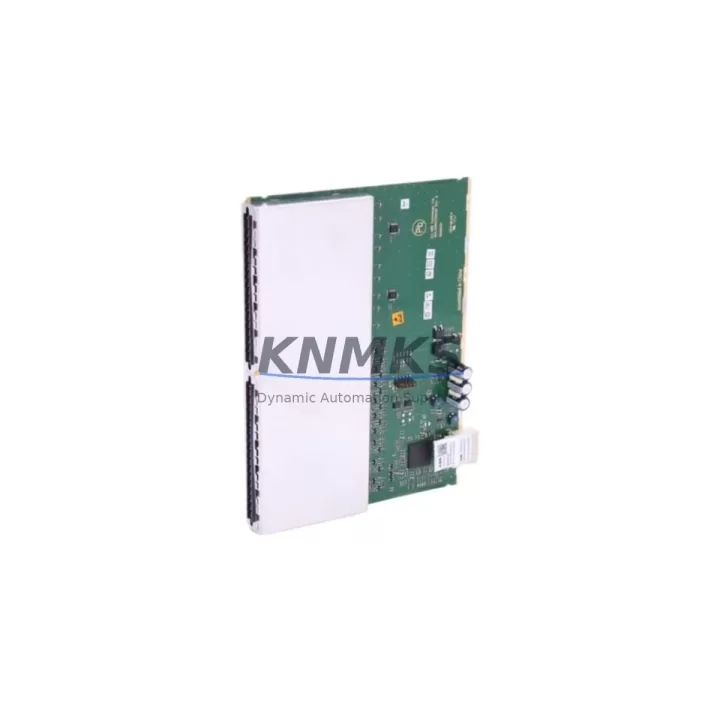
ABB 1KHL178013R0001M BIO01 Maintenance-Proven Spare Part for Factory Uptime
The ABB 1KHL178013R0001M BIO01 is a digital I/O module designed for the ABB AC500 PLC platform — one of the most widely deployed automation controllers in process industries, utilities, and discrete manufacturing. When this module fails or degrades, the impact is immediate: I/O signal loss, unplanned line stoppages, and extended diagnostic cycles that drain maintenance budgets. Stocking a verified replacement is the single most effective way to compress mean time to repair (MTTR) and protect production continuity.
At KNMKS, every 1KHL178013R0001M BIO01 unit is sourced as an original ABB component, subjected to pre-shipment functional testing, and dispatched with a support terms confirmed by quotation. Whether you are managing a scheduled annual overhaul, responding to an emergency fault, or building a long-term spare parts inventory for a multi-site AC500 installation, this module ships ready to install.
Spare Maintenance Table
| Parameter | Specification |
|---|---|
| Part Number | 1KHL178013R0001M |
| Module Designation | BIO01 |
| Platform | ABB AC500 PLC Series |
| Module Type | Digital I/O Module |
| Origin | Germany (DE) |
| Supply Voltage | 24 V DC (nominal, per AC500 backplane) |
| Digital Inputs | 8 DI channels (24 V DC, IEC 61131-2 Type 1/3) |
| Digital Outputs | 8 DO channels (transistor, 0.5 A per channel) |
| Backplane Interface | AC500 internal bus (TB5xx / TB6xx compatible) |
| Operating Temperature | -25 °C to +60 °C |
| Protection Class | IP20 |
| Mounting | DIN rail via AC500 terminal base |
| Compatibility | AC500 PM5xx / PM5xx-ETH / PM5xx-2ETH CPUs |
| Certification | CE, UL, cUL (per ABB AC500 platform) |
| Condition | Original, pre-shipment tested |
| Support terms | 12 Months |
| Shipping | Global express, ESD-safe packaging |
Maintenance Planning for Continuous Operation
Replacing the 1KHL178013R0001M BIO01 in an AC500 control cabinet is rarely an isolated task. Maintenance engineers working on AC500 systems should treat this module replacement as a trigger for a broader cabinet inspection to prevent secondary failures and ensure the restored system operates reliably through the next maintenance interval.
Begin with the AC500 terminal base (TB5xx or TB6xx series) that the BIO01 plugs into. Terminal bases accumulate contact wear and vibration fatigue over time; if the module has failed due to intermittent contact, the base itself may need replacement. Next, verify the AC500 CPU module (PM5xx series) — confirm firmware version compatibility with the replacement BIO01 and check for any pending diagnostic flags in the CPU’s event log that may indicate upstream I/O bus errors.
Inspect the 24 V DC power supply module feeding the AC500 rack. Voltage ripple or transient spikes are a leading cause of I/O module degradation; use a calibrated meter to verify output is within ±1% of nominal under load. If the installation includes an AC500 communication module (CM5xx series) — such as PROFIBUS, PROFINET, or Modbus TCP variants — confirm that the I/O map and GSD/GSDML configuration files are consistent with the replacement module’s channel count and addressing.
For cabinets with mixed signal types, check any signal isolators or signal conditioners on the BIO01’s input channels. Sensor-side faults can back-feed into I/O modules and cause premature failure; isolators protect the module and should be tested for correct isolation resistance. Review terminal block wiring and ferrule crimps on all 16 I/O channels — loose connections generate heat and intermittent faults that are often misdiagnosed as module failures. Finally, inspect any miniature circuit breakers or fuse terminals protecting the 24 V field wiring circuits; a blown fuse on an output channel is a common companion fault when a BIO01 output transistor has failed short-circuit.
For sites running ABB CP600 or CP400 HMI panels connected to the AC500 network, verify that the HMI tag database reflects the correct I/O addresses after module replacement, particularly if the BIO01 was swapped into a different slot position. Documenting the as-built slot configuration in the site maintenance log is a best practice that reduces diagnostic time during future interventions.
Site Replacement Workflow
Step 1 — Isolation and lockout: Apply LOTO to the AC500 rack power supply. Confirm 24 V DC bus is de-energized at the terminal base before removing the BIO01. The AC500 hot-swap capability varies by CPU firmware version; consult the AC500 system manual (document 3ADR010066) before attempting live removal.
Step 2 — Module extraction: Release the BIO01 locking lever on the terminal base and slide the module upward to disengage the backplane connector. Inspect the connector pins for corrosion or mechanical damage before inserting the replacement unit.
Step 3 — Replacement insertion: Align the 1KHL178013R0001M BIO01 with the terminal base guide rails and press firmly until the locking lever engages. Verify the module LED status indicators illuminate correctly on power-up (RUN green, ERR off).
Step 4 — Configuration verification: In Automation Builder (or CoDeSys 2.3 for legacy projects), confirm the I/O configuration matches the replacement module’s hardware revision. Download the project if required and perform a forced I/O test on all 16 channels before returning the system to automatic mode.
Step 5 — Documentation: Record the replacement date, module serial number, and test results in the site maintenance management system (CMMS). Update the spare parts inventory to trigger reorder of a replacement stock unit.
This workflow applies equally to planned annual overhauls and emergency breakdown recoveries. For sites managing multiple AC500 racks across production lines, maintaining a minimum of one BIO01 per rack in on-site stock is the recommended inventory posture to eliminate lead-time risk during unplanned outages.
Spare Parts Support FAQ
Q1: Is the 1KHL178013R0001M BIO01 compatible with all AC500 CPU generations?
The BIO01 module is designed for the ABB AC500 platform and is compatible with PM5xx series CPUs when used with the appropriate TB5xx or TB6xx terminal base. Compatibility with specific CPU firmware versions should be verified against the ABB AC500 hardware compatibility matrix. KNMKS technical support can assist with compatibility confirmation prior to order.
Q2: What pre-shipment testing is performed on each unit?
Every 1KHL178013R0001M BIO01 dispatched by KNMKS undergoes functional verification including backplane communication check, digital input channel response test, and digital output channel load test. Units that do not pass all test criteria are quarantined and not shipped. Test records are available on request.
Q3: Can KNMKS support long-term supply agreements for AC500 spare parts?
Yes. KNMKS offers 12–36 month supply agreements for AC500 I/O modules and related components, including scheduled delivery, reserved stock allocation, and priority dispatch for emergency orders. Long-term agreements are available for single-site and multi-site customers. Contact admin@knmks.com to discuss terms.
Q4: What is the support terms coverage and return process?
All units carry a support terms confirmed by quotation from the date of dispatch, covering manufacturing defects and functional failure under normal operating conditions. In the event of a support terms claim, KNMKS will arrange collection, inspection, and replacement dispatch within 5 business days of claim confirmation. Support requests are initiated via admin@knmks.com with the original order reference and a brief fault description.
© 2026 KNMKS. All rights reserved.
Original Source: https://knmks.com
Contact: admin@knmks.com | +86 18359268345
Product Identification
- Brand / Ecosystem
-
ABB
ABB - Model / Series
-
1KHL178013R0001M BIO01
AC500 Series - Product Family
- PLCs & Controllers
- Availability Status
- Available on request after model and quantity confirmation
- Inquiry Type
- B2B RFQ, replacement inquiry and project spare-part request
- Pre-Quote Check
- Exact SKU, brand, series, quantity, nameplate photos and destination country are checked before quotation
System Path
Where this product fits in the KNMKS automation structure.
Specification & Inquiry Focus
- Control platform
- PLC, PAC and modular controllers
- Common needs
- CPU, rack, power and I/O expansion
- Project support
- Replacement, cabinet build and maintenance
Buyer Confirmation
Information KNMKS checks before replying.
- Exact model
- 1KHL178013R0001M BIO01
- Brand / ecosystem
- ABB
- Product family
- PLCs & Controllers
- Application note
- Replacement, maintenance, project build or spare-part list
- Useful photos
- Nameplate, installed unit, cabinet layout or connector side
- Delivery details
- Quantity, destination country and target schedule
Document Support
Files and notes can be confirmed during quotation.
- Product photos or nameplate confirmation when available
- Packing and delivery notes before quotation confirmation
- Support scope and delivery terms confirmed per inquiry
- Export document coordination for qualified B2B requests
Inquiry Support
- Model cross-checking before quotation
- CPU, power, rack and expansion module matching
- Support for replacement and project inquiry
What to Send Us
- Brand and exact model number: ABB 1KHL178013R0001M BIO01
- Quantity and required delivery time
- Application, replacement requirement or nameplate photo
- Destination country and shipping preference
RFQ Preparation
This is a product inquiry page built for RFQ communication.
Fast Model Check
Send this model to KNMKS for confirmation.
Include quantity, destination country and photos if this is a maintenance replacement. The inquiry will be saved with a reference number after submission.
Brand & Compatibility Note
KNMKS displays automation product information for well-known industrial brand ecosystems and compatible replacement references. Brand names are used for product identification and compatibility reference only; final availability and commercial terms are confirmed per quotation.
 Manufacturing
 Machine Tools
 Packaging
 Energy & Power



 HMI & Displays
 Servo Systems
 Variable Frequency Drives
 Sensors