
Overview
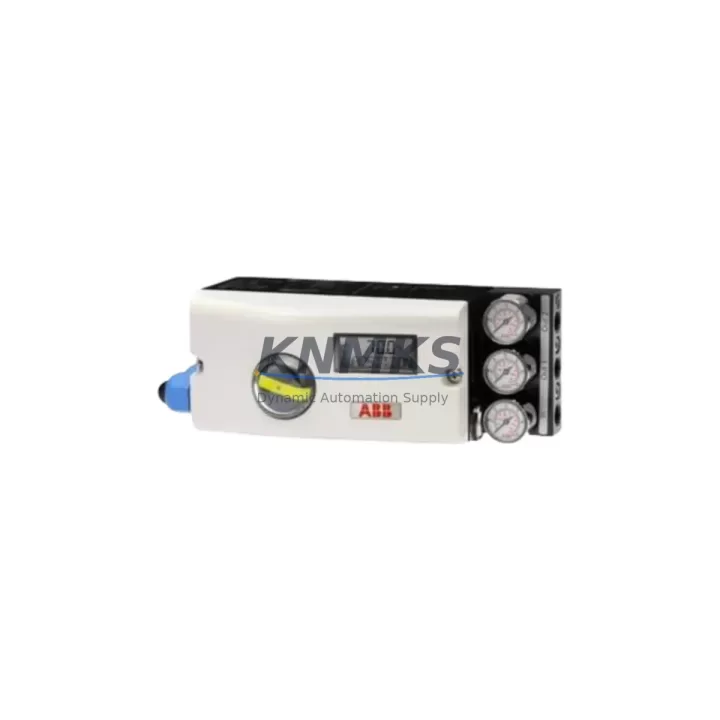
ABB 18345-1010521001 Migration-Ready I/O Module for Legacy Control Systems
The ABB 18345-1010521001 is a migration-ready digital I/O module designed for the ABB AC500 PLC platform, widely deployed across process automation, power distribution, and discrete manufacturing environments. As legacy AC500 configurations age beyond their supported lifecycle, maintenance engineers and system integrators increasingly face the challenge of sourcing discontinued I/O modules that maintain full backward compatibility with existing rack infrastructure, field wiring, and control logic. The 18345-1010521001 addresses this challenge directly — offering a tested, in-stock replacement that preserves original terminal assignments, backplane communication protocols, and module addressing without requiring program re-compilation or HMI screen redesign.
This module is engineered for drop-in installation within the AC500 modular rack system. It retains the same physical form factor and connector pinout as the original, allowing field engineers to complete a hot-swap or planned-outage replacement with minimal intervention. Before installation, engineers should verify the rack’s power supply capacity — particularly when replacing multiple I/O modules simultaneously — to ensure the PM5xx or PM5xx-ETH CPU module and associated communication modules such as the CM572-DP PROFIBUS master or CM589-PNIO PROFINET adapter remain within rated load margins. Terminal block wiring from the original module can be transferred directly, provided the field cable insulation and ferrule crimping are inspected during the replacement window.
For sites running Automation Builder or PS501 Control Builder, the 18345-1010521001 is recognized by the existing hardware configuration without requiring a new GSD or EDS file import. Module address settings configured via DIP switch or software parameterization on the original unit should be documented prior to removal and replicated exactly on the replacement module to avoid I/O mapping conflicts in the PLC program. Where the original module’s firmware version differs from the replacement unit’s factory firmware, a firmware update via the AC500 service interface may be required to maintain compatibility with the CPU’s communication cycle.
Sites operating mixed-generation AC500 racks — combining older SM5xx signal modules with newer generation hardware — should confirm backplane slot compatibility before ordering. The 18345-1010521001 is compatible with standard AC500 expansion racks and terminal units, and does not require a dedicated TB5xx terminal block adapter in most configurations. However, if the installation includes a TB521-ETH or TB523 terminal base, the module seating and locking mechanism should be verified against the terminal base revision to ensure secure electrical contact.
Migration Compatibility Table
| Parameter | Details |
|---|---|
| SKU / Part Number | 18345-1010521001 |
| Brand / Series | ABB / AC500 |
| Module Type | Digital I/O Module (PLC) |
| Backplane Interface | AC500 standard backplane bus; compatible with standard expansion racks |
| Terminal / Wiring | Direct terminal block transfer from original module; verify ferrule condition |
| Communication Compatibility | Compatible with PROFIBUS (CM572-DP), PROFINET (CM589-PNIO), and Modbus TCP configurations |
| CPU Compatibility | PM5xx / PM5xx-ETH series; verify firmware revision alignment |
| Programming Environment | ABB Automation Builder / PS501 Control Builder — no new hardware import required |
| Module Addressing | Replicate original DIP switch or software address settings before commissioning |
| Installation Space | Same form factor as original; standard AC500 rack slot — no mechanical modification required |
| Firmware | Update via AC500 service interface if factory firmware differs from site revision |
| Replacement Type | Drop-in replacement for discontinued / end-of-life AC500 I/O modules |
| Pre-shipment Testing | Function-tested prior to dispatch |
| Support terms | support terms confirmed by quotation |
| Origin | China (CN) |
| Stock Status | availability confirmed by RFQ — available for immediate dispatch |
Retrofit Planning for Existing Automation Systems
A successful retrofit of the ABB 18345-1010521001 into an existing AC500 control system requires a structured pre-outage assessment. Begin by auditing the current rack configuration: document each occupied slot, the module type installed, its I/O address range, and the field signal assignments mapped in the PLC program. This baseline prevents address conflicts when the replacement module is inserted and ensures the HMI tag database — whether running on a CP600 panel or a SCADA workstation connected via OPC-DA — continues to resolve correctly after the swap.
Power budget verification is a critical step often overlooked during single-module replacements. The AC500 rack’s internal bus draws power from the PS501 or PS560 power supply module; adding or replacing I/O modules changes the aggregate current draw on the 24 VDC backplane rail. Engineers should calculate the updated load against the power supply’s rated output before proceeding. If the existing power supply is operating near capacity, a PS560 high-capacity power supply module may need to be staged as part of the retrofit scope.
For sites with active PROFIBUS DP networks, the CM572-DP communication module’s slave address table should be reviewed to confirm the 18345-1010521001 does not conflict with existing node assignments. Similarly, on PROFINET-enabled racks using the CM589-PNIO adapter, the device name and IP address assignment for the replacement module must be configured in the network topology before the module is brought online. Signal isolators installed between the field instruments and the I/O module terminals — particularly on analog-adjacent channels — should be inspected for correct range configuration to avoid signal scaling errors after the module swap.
Where the retrofit scope extends beyond a single module replacement to include rack expansion or control cabinet reconfiguration, the installation footprint of the 18345-1010521001 should be confirmed against available DIN rail space and cabinet thermal ratings. If the upgrade path includes migrating from an older AC31 or AC100 platform to the AC500 architecture, a programming cable such as the TK501 USB programming cable and a full I/O remapping exercise in Automation Builder will be required to translate legacy IL or FBD logic into the IEC 61131-3 structured environment.
Downtime Control During System Migration
Minimizing unplanned downtime during an AC500 I/O module replacement requires preparation that begins well before the maintenance window opens. The most effective approach is to pre-configure the replacement 18345-1010521001 offline — setting module addresses, verifying firmware revision, and confirming terminal block labeling — so that the physical swap can be completed within a single planned outage window, typically 30 to 90 minutes for a single-module replacement in an accessible control cabinet.
Before powering down the rack, export the current PLC program from the PM5xx CPU using Automation Builder and archive it to a secure location. This backup preserves the original I/O mapping, PID tuning parameters, and communication configuration, providing a recovery baseline if the commissioning of the replacement module reveals unexpected behavior. For critical process loops — such as those controlling motor drives, valve actuators, or safety interlocks — coordinate with the operations team to place the affected control loops in manual mode or bypass prior to the module swap, maintaining field control continuity during the transition.
After installing the 18345-1010521001, perform a channel-by-channel I/O verification using the Automation Builder force function or a dedicated I/O test routine before returning the system to automatic control. Confirm that all field signals — digital inputs, digital outputs, and any shared analog-adjacent channels — respond correctly to forced states. Verify communication link status on the CM572-DP or CM589-PNIO adapter to confirm the replacement module has been recognized by the network master. Document the commissioning results and update the site’s as-built drawings and spare parts register to reflect the new module revision.
Retrofit Support FAQ
Q1: Is the ABB 18345-1010521001 a direct replacement for the original AC500 I/O module without program changes?
Yes. The 18345-1010521001 is designed as a drop-in replacement that maintains the same backplane interface, terminal pinout, and module address structure as the original AC500 I/O module. In most cases, no PLC program modification or HMI screen redesign is required. Engineers should verify module address settings and firmware revision alignment before commissioning to ensure seamless integration.
Q2: What commissioning steps are required after installing the replacement module?
After physical installation, replicate the original module’s address configuration (DIP switch or software parameterization), update firmware if the factory revision differs from the site standard, and perform a channel-by-channel I/O verification using Automation Builder’s force function. Confirm communication link status on the associated PROFIBUS or PROFINET adapter before returning the system to automatic control.
Q3: How is the module tested before shipment, and what does the support terms confirmed by quotation cover?
Every ABB 18345-1010521001 unit is function-tested prior to dispatch to verify I/O channel integrity, backplane communication, and power consumption within rated specifications. The support terms confirmed by quotation cover manufacturing defects and functional failures under normal operating conditions. Units that fail during the confirmed support period are replaced or repaired at no additional cost. Contact admin@knmks.com to initiate a support terms claim.
Q4: Is stock available for immediate dispatch, and can bulk orders be accommodated?
Yes. The 18345-1010521001 is held availability confirmed by RFQ and available for immediate dispatch. Bulk orders and blanket stock programs for maintenance teams managing multiple AC500 installations can be arranged — contact admin@knmks.com or call +86 18359268345 to discuss volume pricing, lead time commitments, and regional warehouse allocation.
© 2026 KNMKS. All rights reserved.
Original Source: https://knmks.com
Contact: admin@knmks.com | +86 18359268345
Product Identification
- Brand / Ecosystem
-
ABB
ABB - Model / Series
-
18345-1010521001
AC500 Series - Product Family
- PLCs & Controllers
- Availability Status
- Available on request after model and quantity confirmation
- Inquiry Type
- B2B RFQ, replacement inquiry and project spare-part request
- Pre-Quote Check
- Exact SKU, brand, series, quantity, nameplate photos and destination country are checked before quotation
System Path
Where this product fits in the KNMKS automation structure.
Specification & Inquiry Focus
- Control platform
- PLC, PAC and modular controllers
- Common needs
- CPU, rack, power and I/O expansion
- Project support
- Replacement, cabinet build and maintenance
Buyer Confirmation
Information KNMKS checks before replying.
- Exact model
- 18345-1010521001
- Brand / ecosystem
- ABB
- Product family
- PLCs & Controllers
- Application note
- Replacement, maintenance, project build or spare-part list
- Useful photos
- Nameplate, installed unit, cabinet layout or connector side
- Delivery details
- Quantity, destination country and target schedule
Document Support
Files and notes can be confirmed during quotation.
- Product photos or nameplate confirmation when available
- Packing and delivery notes before quotation confirmation
- Support scope and delivery terms confirmed per inquiry
- Export document coordination for qualified B2B requests
Inquiry Support
- Model cross-checking before quotation
- CPU, power, rack and expansion module matching
- Support for replacement and project inquiry
What to Send Us
- Brand and exact model number: ABB 18345-1010521001
- Quantity and required delivery time
- Application, replacement requirement or nameplate photo
- Destination country and shipping preference
RFQ Preparation
This is a product inquiry page built for RFQ communication.
Fast Model Check
Send this model to KNMKS for confirmation.
Include quantity, destination country and photos if this is a maintenance replacement. The inquiry will be saved with a reference number after submission.
Brand & Compatibility Note
KNMKS displays automation product information for well-known industrial brand ecosystems and compatible replacement references. Brand names are used for product identification and compatibility reference only; final availability and commercial terms are confirmed per quotation.
 Manufacturing
 Machine Tools
 Packaging
 Energy & Power



 HMI & Displays
 Servo Systems
 Variable Frequency Drives
 Sensors