
Overview
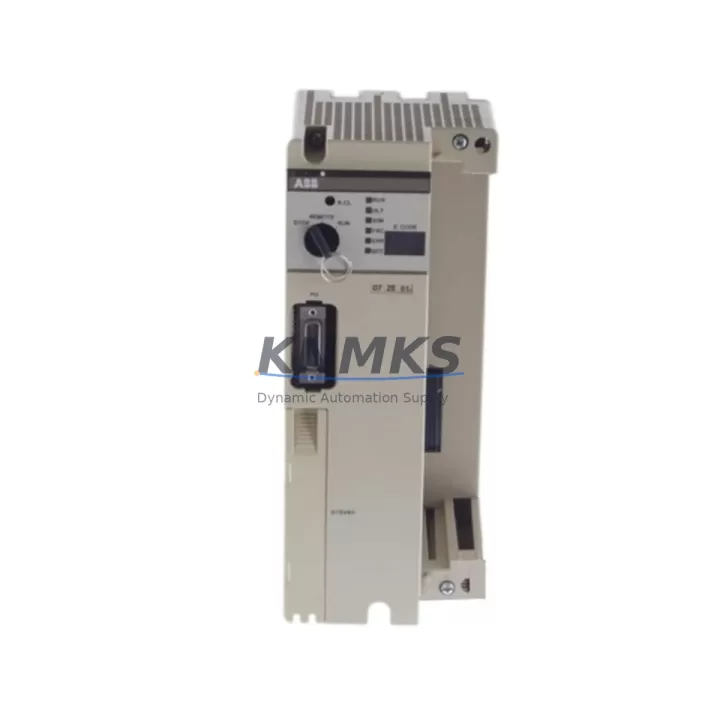
ABB 07ZE61R302 Maintenance-Proven Spare Part for Factory Uptime
The ABB 07ZE61R302 (alternate part number GJV3074321R302) is an original CPU module designed for the ABB AC500 programmable logic controller platform — one of the most widely deployed automation architectures in process manufacturing, utilities, and discrete production environments. Sourced directly from verified supply channels, this unit is pre-tested, inspection-tagged, and ready for immediate field deployment. Whether you are managing a scheduled annual overhaul, responding to an unplanned line stoppage, or building a strategic spare parts buffer for a critical control cabinet, the 07ZE61R302 delivers the compatibility and reliability that maintenance and procurement engineers depend on.
The AC500 series CPU module serves as the central processing unit of the control system, executing ladder logic, function block diagrams, and structured text programs while managing I/O communication across the backplane. A failed or degraded CPU is one of the highest-impact failure modes in any PLC-based system — it can bring an entire production line to a halt within seconds. Keeping a verified spare of the 07ZE61R302 on the shelf is a fundamental risk mitigation strategy for any facility running AC500-based automation.
Every unit shipped from our inventory undergoes functional verification, visual inspection for connector integrity, and packaging review to ensure it arrives in field-ready condition. We support support terms confirmed by quotation coverage on all spare parts, with documented test records available upon request for quality-critical applications.
Spare Maintenance Table
| Parameter | Specification |
|---|---|
| Part Number | 07ZE61R302 |
| Alternate Part Number | GJV3074321R302 |
| Brand | ABB |
| Series | AC500 |
| Module Type | PLC CPU Module |
| Origin | Germany (DE) |
| Compatible Platform | ABB AC500 PLC System |
| Communication Interface | CS31 Bus / Ethernet (series-dependent) |
| Programming Standard | IEC 61131-3 |
| Operating Temperature | 0°C to +60°C |
| Mounting | DIN Rail / Backplane Slot |
| Weight | Approx. 800 g |
| Condition | Original, Tested, Field-Ready |
| Support terms | 12 Months |
| Shipping | Inspected & Tested Before Dispatch |
Maintenance Planning for Continuous Operation
When replacing the 07ZE61R302 CPU module in an AC500 control cabinet, a disciplined maintenance engineer will not stop at the CPU alone. The surrounding electrical environment must be evaluated to prevent repeat failures and ensure the replacement module operates within its rated parameters from day one.
Begin with the AC500 power supply module (such as the PM571 or PM591 series) — verify output voltage stability under load, check for ripple or thermal stress indicators, and confirm the supply rail is within tolerance before powering the new CPU. A marginal power supply is a leading cause of premature CPU failure and intermittent faults that are difficult to diagnose in the field.
Next, inspect the backplane and expansion bus connectors. The AC500 modular backplane carries both power and communication signals between the CPU and attached I/O modules. Oxidized or mechanically stressed connectors can introduce signal integrity issues that manifest as sporadic communication errors after replacement. Clean and reseat all backplane connections as part of the swap procedure.
Review the digital and analog I/O modules installed in the same rack — modules such as the DC532 digital input or DA501 analog output. A shorted field device connected to an I/O channel can generate transient voltages that propagate to the CPU bus. Isolate and test each I/O channel before restoring full system operation.
Check communication modules and network interfaces, including any CM572-DP PROFIBUS or CM589-PNIO PROFINET adapters installed in the system. Firmware version compatibility between the CPU and communication modules should be verified, particularly if the replacement CPU carries a different firmware revision than the failed unit.
Inspect 24VDC field wiring, terminal blocks, and fuse protection on all I/O circuits. Blown fuses or loose terminal connections are frequently overlooked during emergency replacements and can cause the new CPU to report false fault states during commissioning. Replace any suspect fuses and torque all terminal screws to specification.
Finally, if the system includes an HMI panel — such as an ABB CP600 series operator panel — verify that the HMI communication link to the CPU is re-established after replacement and that all screen tags are mapping correctly to the new CPU’s data registers. A brief functional test of all HMI alarm and control screens before returning the line to production is strongly recommended.
Site Replacement Workflow
The 07ZE61R302 is a direct replacement for the same part number and its GJV3074321R302 variant within the AC500 platform. No hardware modification is required for like-for-like substitution. The replacement procedure follows standard ABB AC500 CPU swap guidelines:
1. Backup the application program from the existing CPU using ABB Automation Builder or the legacy Control Builder Plus software before powering down. If the CPU is non-responsive, retrieve the last known program backup from your site documentation archive.
2. Power down the control cabinet following your site’s lockout/tagout (LOTO) procedure. Discharge any residual capacitance on the power supply rail before handling the CPU module.
3. Remove the failed CPU by releasing the backplane locking mechanism and sliding the module out of its slot. Note the slot position and any jumper or DIP switch settings on the original unit and replicate them on the replacement.
4. Install the 07ZE61R302 replacement into the same backplane slot. Ensure the module is fully seated and the locking tab is engaged. Reconnect any front-panel communication cables (Ethernet, serial, or CS31 bus) that were disconnected during removal.
5. Restore power and download the application program to the new CPU. Verify that the program executes without errors, all I/O modules are recognized, and communication with field devices and HMI panels is restored before releasing the system to production.
This workflow minimizes downtime and ensures system compatibility is maintained without requiring re-engineering of the control architecture.
Spare Parts Support FAQ
Q: Is the 07ZE61R302 compatible with all AC500 system configurations?
A: The 07ZE61R302 is designed for the ABB AC500 PLC platform. Compatibility depends on the specific AC500 variant (AC500 V1 vs. AC500 V2/eCo) and the firmware version of the system. We recommend confirming your existing system’s CPU variant and firmware level before ordering. Our technical team can assist with compatibility verification based on your system’s nameplate data.
Q: What testing is performed before shipment?
A: Each 07ZE61R302 unit undergoes visual inspection for physical damage, connector integrity check, and functional power-on verification prior to dispatch. Test records are available upon request. All units are shipped with anti-static packaging and are covered by a support terms confirmed by quotation from the date of delivery.
Q: Can you support long-term or repeat supply of this part?
A: Yes. We maintain ongoing inventory of AC500 series CPU modules and associated components to support facilities with multi-year maintenance contracts or large installed bases. Contact us to discuss blanket order arrangements, lead time commitments, and volume pricing for strategic spare parts programs.
Q: What should I do if the replacement CPU does not initialize correctly after installation?
A: First, verify that the application program has been successfully downloaded and that all I/O modules are recognized on the backplane. Check that the power supply voltage is within specification and that no I/O channel faults are present. If the issue persists, contact our technical support team with the CPU’s firmware version and a description of the fault indicators — we will assist with diagnosis and, if necessary, arrange a replacement unit under support terms.
—
© 2026 KNMKS. All rights reserved.
Original Source: https://knmks.com
Contact: admin@knmks.com | +86 18359268345
Product Identification
- Brand / Ecosystem
-
ABB
ABB - Model / Series
-
07ZE61R302 GJV3074321R302
AC500 Series - Product Family
- PLCs & Controllers
- Availability Status
- Available on request after model and quantity confirmation
- Inquiry Type
- B2B RFQ, replacement inquiry and project spare-part request
- Pre-Quote Check
- Exact SKU, brand, series, quantity, nameplate photos and destination country are checked before quotation
System Path
Where this product fits in the KNMKS automation structure.
Specification & Inquiry Focus
- Control platform
- PLC, PAC and modular controllers
- Common needs
- CPU, rack, power and I/O expansion
- Project support
- Replacement, cabinet build and maintenance
Buyer Confirmation
Information KNMKS checks before replying.
- Exact model
- 07ZE61R302 GJV3074321R302
- Brand / ecosystem
- ABB
- Product family
- PLCs & Controllers
- Application note
- Replacement, maintenance, project build or spare-part list
- Useful photos
- Nameplate, installed unit, cabinet layout or connector side
- Delivery details
- Quantity, destination country and target schedule
Document Support
Files and notes can be confirmed during quotation.
- Product photos or nameplate confirmation when available
- Packing and delivery notes before quotation confirmation
- Support scope and delivery terms confirmed per inquiry
- Export document coordination for qualified B2B requests
Inquiry Support
- Model cross-checking before quotation
- CPU, power, rack and expansion module matching
- Support for replacement and project inquiry
What to Send Us
- Brand and exact model number: ABB 07ZE61R302 GJV3074321R302
- Quantity and required delivery time
- Application, replacement requirement or nameplate photo
- Destination country and shipping preference
RFQ Preparation
This is a product inquiry page built for RFQ communication.
Fast Model Check
Send this model to KNMKS for confirmation.
Include quantity, destination country and photos if this is a maintenance replacement. The inquiry will be saved with a reference number after submission.
Brand & Compatibility Note
KNMKS displays automation product information for well-known industrial brand ecosystems and compatible replacement references. Brand names are used for product identification and compatibility reference only; final availability and commercial terms are confirmed per quotation.
 Manufacturing
 Machine Tools
 Packaging
 Energy & Power



 HMI & Displays
 Servo Systems
 Variable Frequency Drives
 Sensors