
Overview
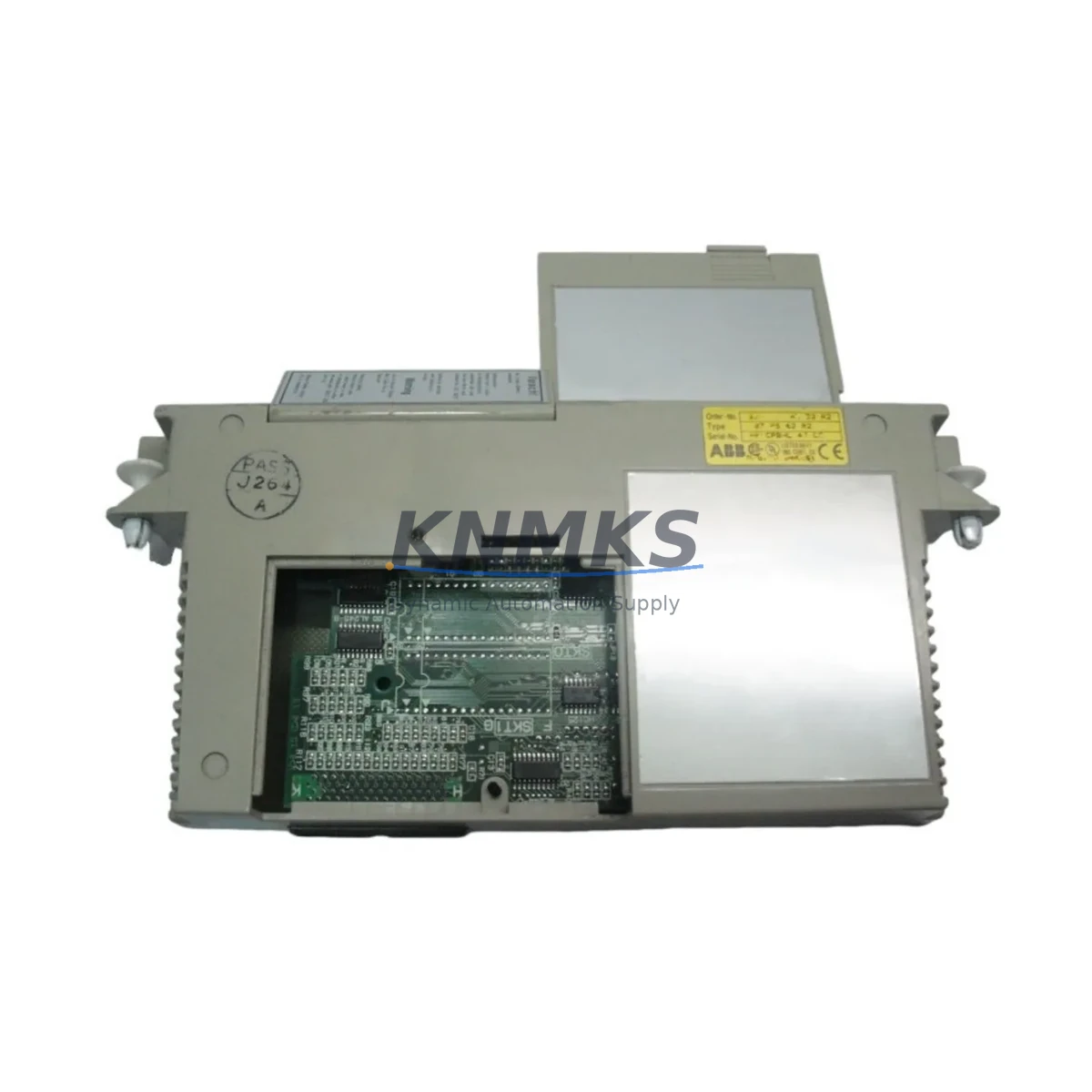
ABB 07PS62R2 Migration-Ready Program Memory for Legacy CS31 Control Systems
The ABB 07PS62R2 is a program memory module engineered for the PROCONTIC CS31 distributed I/O and control platform — one of ABB’s most widely deployed legacy automation architectures across process industries, machine building, and infrastructure control. As CS31-based systems approach end-of-life and original spare parts become increasingly scarce, the 07PS62R2 serves as a critical enabler for both direct replacement and structured migration projects. Whether you are restoring a failed control node, extending the operational life of an existing CS31 network, or planning a phased upgrade to a modern ABB AC500 platform, this module provides the program retention and compatibility foundation your project requires.
The 07PS62R2 retains the user application program stored in the CS31 CPU — typically the 07KR91, 07KT92, or 07KT93 central processing units — and is designed to be swapped without requiring a full program reload from an engineering workstation in most configurations. Before replacement, engineers should verify the firmware revision of the host CPU, confirm that the memory module format matches the installed software version, and ensure that the CS31 bus address assignments and I/O mapping remain consistent with the existing program logic. Mismatched firmware between the CPU and the replacement memory module is the most common source of startup faults during retrofit operations.
Migration Compatibility Table
| Parameter | Details |
|---|---|
| Compatible CPUs | ABB 07KR91, 07KT92, 07KT93 (PROCONTIC CS31 series) |
| Communication Protocol | CS31 serial bus (ABB proprietary); not directly compatible with Modbus or PROFIBUS without gateway |
| Installation Interface | Direct plug-in to CPU memory slot; no tools required |
| Firmware Compatibility | Must match host CPU firmware revision; verify before installation |
| Replacement Recommendation | Direct drop-in for failed or corrupted 07PS62R2 units; confirm program backup before swap |
| Commissioning Notes | Verify CS31 bus address, I/O mapping, and HMI tag references post-installation |
| Mounting | DIN rail via host CPU chassis; no additional mounting hardware |
| Origin | Germany (DE) |
| Support terms | support terms confirmed by quotation — functional test performed prior to shipment |
Retrofit Planning for Existing Automation Systems
A successful CS31 retrofit begins well before the replacement module arrives on site. Engineers should extract and archive the current program from the 07KR91 or 07KT92 CPU using ABB’s CS31 programming tool or a compatible backup utility. This archived program serves as the recovery baseline if the new 07PS62R2 does not initialize correctly. In parallel, document the existing CS31 bus topology: the number of remote I/O stations, their bus addresses, and the cable lengths between nodes. CS31 bus timing is sensitive to total cable length and termination resistance, and any changes to the physical layout during a cabinet upgrade can introduce communication faults that are unrelated to the memory module itself.
When the retrofit scope extends beyond a single module swap — for example, when upgrading a control cabinet that also includes the 07CS61 power supply module, the 07DI92 digital input modules, or the 07DO92 digital output modules — the sequence of replacement matters. Power supply capacity must be recalculated if additional I/O modules are added to the rack. The 07CS61 and similar CS31 power supply units have defined current budgets per rail, and exceeding these limits causes intermittent resets that are difficult to diagnose without a power audit. If the retrofit also involves replacing the operator interface, verify that the HMI tag database — whether running on an ABB CP600 panel or a third-party SCADA system — correctly references the new memory addresses after the program is reloaded.
For projects that include communication protocol migration — for instance, bridging the legacy CS31 bus to a PROFIBUS DP or Modbus TCP network — a CS31 gateway module such as the 07KP62 or a compatible third-party coupler must be configured before the new memory module is commissioned. The gateway’s node address and baud rate settings must align with both the CS31 master and the upstream PLC or DCS. Signal isolators may also be required at the interface between the CS31 I/O layer and any new 4–20 mA analog input cards if the field wiring is being reused from the legacy system.
Downtime Control During System Migration
Minimizing unplanned downtime during a CS31 memory module replacement requires a structured pre-outage checklist. Before taking the system offline, confirm that a verified program backup exists and is accessible from the engineering workstation. Label all terminal wiring on the CPU rack before disconnection — CS31 CPUs share a common terminal block layout across generations, but individual wire positions must be confirmed against the as-built drawings, not assumed from the module label. If the control system is managing a continuous process, coordinate the replacement window with operations to align with a scheduled maintenance stop or a low-production period.
During the swap, avoid powering the CPU rack while the memory module is partially seated. The 07PS62R2 is a non-volatile memory device, but incomplete insertion during power-on can corrupt the stored program. After full insertion, apply power and observe the CPU status LEDs: a steady RUN indicator confirms successful program load, while a flashing FAULT LED typically indicates a firmware mismatch or a bus configuration error. If the CPU enters fault mode, connect the programming cable — typically a 07SK90 or USB-to-serial adapter — and read the diagnostic buffer before attempting a forced restart. This preserves the fault record and accelerates root-cause analysis.
Once the CPU is running, perform a structured I/O check: cycle each digital output manually from the programming tool and verify the field response, then confirm that all analog input values are within expected engineering unit ranges. If an HMI is connected, navigate through each process screen to verify that tag values are updating correctly and that no communication alarms are active. Document the commissioning results and update the as-built records before returning the system to automatic operation. Total replacement time for an experienced technician, including program verification and I/O check, is typically 2–4 hours for a single CS31 CPU node.
Retrofit Support FAQ
Q: Can the ABB 07PS62R2 replace a failed memory module without reloading the program from a PC?
A: In most cases, yes — provided the replacement module was previously programmed with the same application and firmware version as the original. If the module is blank or carries a different program version, a reload from the engineering workstation is required. Always maintain an up-to-date program backup to avoid dependency on the physical module as the sole program source.
Q: What wiring changes are required when replacing the 07PS62R2?
A: The 07PS62R2 is a plug-in memory module with no external wiring connections. No terminal rewiring is required for the module itself. However, if the replacement is part of a broader CPU swap, verify that the CPU rack terminal assignments match the existing field wiring before powering up.
Q: How do I confirm compatibility between the 07PS62R2 and my installed CS31 CPU firmware?
A: Connect the programming tool to the CPU and read the firmware version from the CPU diagnostic menu. Cross-reference this version against the memory module compatibility matrix in the ABB CS31 system manual (document 1SAC101001D0201 or equivalent). If the versions are mismatched, contact your ABB distributor or our sales team for guidance on the correct module variant.
Q: What does the support terms confirmed by quotation cover, and is pre-shipment testing performed?
A: Every 07PS62R2 unit is functionally tested prior to shipment to verify program retention and interface integrity. The support terms confirmed by quotation cover defects in materials and workmanship under normal operating conditions. Units damaged by incorrect installation, overvoltage, or environmental exposure outside the specified ratings are not covered. Replacement or refund is processed within 5 business days of confirmed fault diagnosis.
© 2026 KNMKS. All rights reserved.
Original Source: https://knmks.com
Contact: admin@knmks.com | +86 18359268345
Product Identification
- Brand / Ecosystem
-
ABB
ABB - Model / Series
- 07PS62R2
- Product Family
- PLCs & Controllers
- Availability Status
- Available on request after model and quantity confirmation
- Inquiry Type
- B2B RFQ, replacement inquiry and project spare-part request
- Pre-Quote Check
- Exact SKU, brand, series, quantity, nameplate photos and destination country are checked before quotation
System Path
Where this product fits in the KNMKS automation structure.
Specification & Inquiry Focus
- Control platform
- PLC, PAC and modular controllers
- Common needs
- CPU, rack, power and I/O expansion
- Project support
- Replacement, cabinet build and maintenance
Buyer Confirmation
Information KNMKS checks before replying.
- Exact model
- 07PS62R2
- Brand / ecosystem
- ABB
- Product family
- PLCs & Controllers
- Application note
- Replacement, maintenance, project build or spare-part list
- Useful photos
- Nameplate, installed unit, cabinet layout or connector side
- Delivery details
- Quantity, destination country and target schedule
Document Support
Files and notes can be confirmed during quotation.
- Product photos or nameplate confirmation when available
- Packing and delivery notes before quotation confirmation
- Support scope and delivery terms confirmed per inquiry
- Export document coordination for qualified B2B requests
Inquiry Support
- Model cross-checking before quotation
- CPU, power, rack and expansion module matching
- Support for replacement and project inquiry
What to Send Us
- Brand and exact model number: ABB 07PS62R2
- Quantity and required delivery time
- Application, replacement requirement or nameplate photo
- Destination country and shipping preference
RFQ Preparation
This is a product inquiry page built for RFQ communication.
Fast Model Check
Send this model to KNMKS for confirmation.
Include quantity, destination country and photos if this is a maintenance replacement. The inquiry will be saved with a reference number after submission.
Brand & Compatibility Note
KNMKS displays automation product information for well-known industrial brand ecosystems and compatible replacement references. Brand names are used for product identification and compatibility reference only; final availability and commercial terms are confirmed per quotation.
 Manufacturing
 Machine Tools
 Packaging
 Energy & Power



 HMI & Displays
 Servo Systems
 Variable Frequency Drives
 Sensors