
Overview
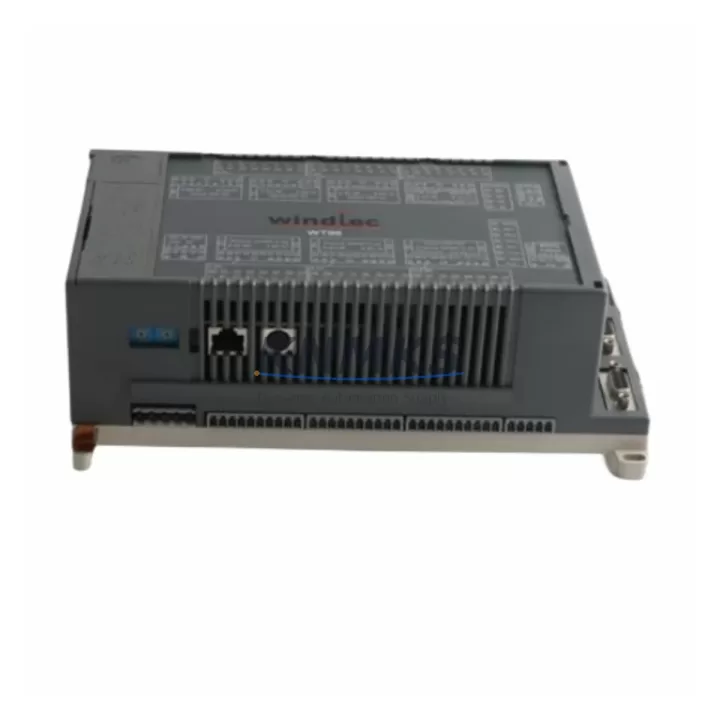
ABB 07KT98 GJR5253100R0270 Maintenance-Proven Spare Part for Factory Uptime
The ABB 07KT98 (part number GJR5253100R0270) is a CPU module for the ABB AC500 programmable logic controller platform — one of the most widely deployed modular PLC families in process automation, machine control, and critical infrastructure applications. As production lines age and OEM support windows close, maintaining a verified spare of the 07KT98 is a front-line strategy for reducing mean time to repair (MTTR) and protecting continuous operation. Each unit supplied by KNMKS is sourced from authorized channels, subjected to pre-shipment functional testing, and backed by a support terms confirmed by quotation covering manufacturing defects and operational failure under normal industrial conditions.
Spare Maintenance Table
| SKU | 07KT98 / WT98 |
| Part Number | GJR5253100R0270 |
| Brand | ABB |
| Series | AC500 |
| Product Type | PLC CPU Module |
| Communication | Ethernet (onboard), CS31 bus |
| Programming Standard | IEC 61131-3 (CoDeSys-based) |
| Supply Voltage | 24 V DC (via PM5xx power supply module) |
| Operating Temperature | 0 °C to +60 °C |
| Protection Rating | IP20 (panel-mount, DIN rail) |
| Country of Origin | Germany |
| Weight | 880 g |
| Compatibility | AC500 V2/V3 backplane; PM5xx power modules; TU5xx terminal units |
| Installation | DIN rail, snap-fit onto AC500 backplane; no tools required for module swap |
| Pre-Shipment Test | Power-on, communication link, I/O scan verification |
| Support terms | 12 Months — covers manufacturing defects and operational failure under normal use |
Maintenance Planning for Continuous Operation
When the 07KT98 CPU is flagged during a routine control cabinet inspection or fails during a production shift, the replacement window is rarely limited to the CPU alone. A disciplined maintenance engineer will use the downtime opportunity to audit the surrounding AC500 rack components before restoring power. The PM581 or PM590 power supply module feeding the CPU backplane should be checked for output voltage stability and capacitor aging — a marginal power supply is a common root cause of intermittent CPU faults that are misdiagnosed as CPU failure. The TU515 or TU516 terminal unit beneath the CPU should be inspected for contact oxidation and secure DIN rail seating.
On the I/O side, any DC532 digital input/output modules or AI523 analog input modules sharing the same backplane should be verified for correct addressing and signal integrity after the CPU swap, as backplane communication errors can persist if a neighboring I/O module has a loose connector. If the AC500 system communicates upstream via CM572-DP PROFIBUS DP master module or a CM589-PNIO PROFINET I/O module, the communication link should be re-established and verified in the engineering tool (Automation Builder) before returning the line to production.
For sites running legacy CS31 field bus segments, the 07KR51 CS31 remote I/O coupler should be confirmed as operational, since a CPU replacement resets the bus master state. Additionally, inspect panel-level 24 V DC fuse holders and miniature circuit breakers protecting the CPU supply rail — these are frequently overlooked during emergency replacements and can cause repeat failures if a transient overcurrent event was the original trigger. Maintaining one 07KT98 unit in bonded warehouse stock, alongside a PM5xx power module and a set of TU5xx terminal units, provides a complete rapid-recovery kit for AC500-based control systems.
Site Replacement Workflow
Step 1 — Backup: Before powering down, use ABB Automation Builder to export the full project backup (CPU program, configuration, and I/O mapping) to a secure engineering laptop. Confirm the backup file timestamp matches the last known-good production configuration.
Step 2 — Safe Isolation: De-energize the control cabinet following site LOTO (Lockout/Tagout) procedures. Verify 0 V on the CPU supply rail with a calibrated multimeter before touching any module.
Step 3 — Module Removal: Release the 07KT98 from the TU5xx terminal unit by pressing the release lever and sliding the module upward. Label all field wiring on the terminal unit before disconnection if a full terminal unit swap is also planned.
Step 4 — Replacement Installation: Seat the new 07KT98 onto the terminal unit, confirm the locking tab engages, and restore power. The CPU will boot and display its status via onboard LEDs — RUN (green), ERR (red), and COM (yellow) indicators confirm normal startup.
Step 5 — Program Restore: Download the backed-up project from Automation Builder. Verify I/O scan, communication links (Ethernet, PROFIBUS, or CS31 as applicable), and HMI connectivity before releasing the line.
Step 6 — Functional Verification: Run a supervised production cycle at reduced speed to confirm all I/O signals, interlocks, and safety functions respond correctly before returning to full automatic mode.
This workflow minimizes unplanned downtime to under 60 minutes for a prepared maintenance team and eliminates the risk of configuration loss that extends outages when no backup exists.
Spare Parts Support FAQ
Q1: Is the 07KT98 GJR5253100R0270 compatible with both AC500 V2 and V3 backplanes?
The 07KT98 is designed for the AC500 V2 platform. Compatibility with V3 backplanes depends on firmware revision and hardware stepping. KNMKS recommends confirming your existing backplane generation (TB5xx series) before ordering. Our technical team can assist with compatibility verification based on your existing rack part numbers.
Q2: What pre-shipment testing is performed on each unit?
Every 07KT98 unit is powered on, communication ports are verified (Ethernet link establishment, CS31 bus response), and basic I/O scan functionality is confirmed before packaging. A test report is available on request. Units are shipped in anti-static packaging with humidity indicators.
Q3: What does the support terms confirmed by quotation cover?
The support terms confirmed by quotation cover manufacturing defects and operational failure under normal industrial operating conditions (24 V DC supply within specification, operating temperature 0–60 °C, IP20 environment). It does not cover damage from incorrect installation, overvoltage events, or physical impact. Support requests are processed within 5 business days of receipt of the returned unit.
Q4: Can KNMKS support long-term supply commitments for AC500 spare parts?
Yes. KNMKS maintains bonded stock programs for end-of-life and long-lead ABB AC500 components. For maintenance contracts requiring guaranteed availability of the 07KT98 and associated modules (PM5xx, TU5xx, DC532, AI523), contact our procurement team to discuss annual blanket orders and reserved inventory arrangements.
© 2026 KNMKS. All rights reserved.
Original Source: https://knmks.com
Contact: admin@knmks.com | +86 18359268345
Product Identification
- Brand / Ecosystem
-
ABB
ABB - Model / Series
-
07KT98 WT98 GJR5253100R0270
AC500 Series - Product Family
- PLCs & Controllers
- Availability Status
- Available on request after model and quantity confirmation
- Inquiry Type
- B2B RFQ, replacement inquiry and project spare-part request
- Pre-Quote Check
- Exact SKU, brand, series, quantity, nameplate photos and destination country are checked before quotation
System Path
Where this product fits in the KNMKS automation structure.
Specification & Inquiry Focus
- Control platform
- PLC, PAC and modular controllers
- Common needs
- CPU, rack, power and I/O expansion
- Project support
- Replacement, cabinet build and maintenance
Buyer Confirmation
Information KNMKS checks before replying.
- Exact model
- 07KT98 WT98 GJR5253100R0270
- Brand / ecosystem
- ABB
- Product family
- PLCs & Controllers
- Application note
- Replacement, maintenance, project build or spare-part list
- Useful photos
- Nameplate, installed unit, cabinet layout or connector side
- Delivery details
- Quantity, destination country and target schedule
Document Support
Files and notes can be confirmed during quotation.
- Product photos or nameplate confirmation when available
- Packing and delivery notes before quotation confirmation
- Support scope and delivery terms confirmed per inquiry
- Export document coordination for qualified B2B requests
Inquiry Support
- Model cross-checking before quotation
- CPU, power, rack and expansion module matching
- Support for replacement and project inquiry
What to Send Us
- Brand and exact model number: ABB 07KT98 WT98 GJR5253100R0270
- Quantity and required delivery time
- Application, replacement requirement or nameplate photo
- Destination country and shipping preference
RFQ Preparation
This is a product inquiry page built for RFQ communication.
Fast Model Check
Send this model to KNMKS for confirmation.
Include quantity, destination country and photos if this is a maintenance replacement. The inquiry will be saved with a reference number after submission.
Brand & Compatibility Note
KNMKS displays automation product information for well-known industrial brand ecosystems and compatible replacement references. Brand names are used for product identification and compatibility reference only; final availability and commercial terms are confirmed per quotation.
 Manufacturing
 Machine Tools
 Packaging
 Energy & Power



 HMI & Displays
 Servo Systems
 Variable Frequency Drives
 Sensors