
Overview
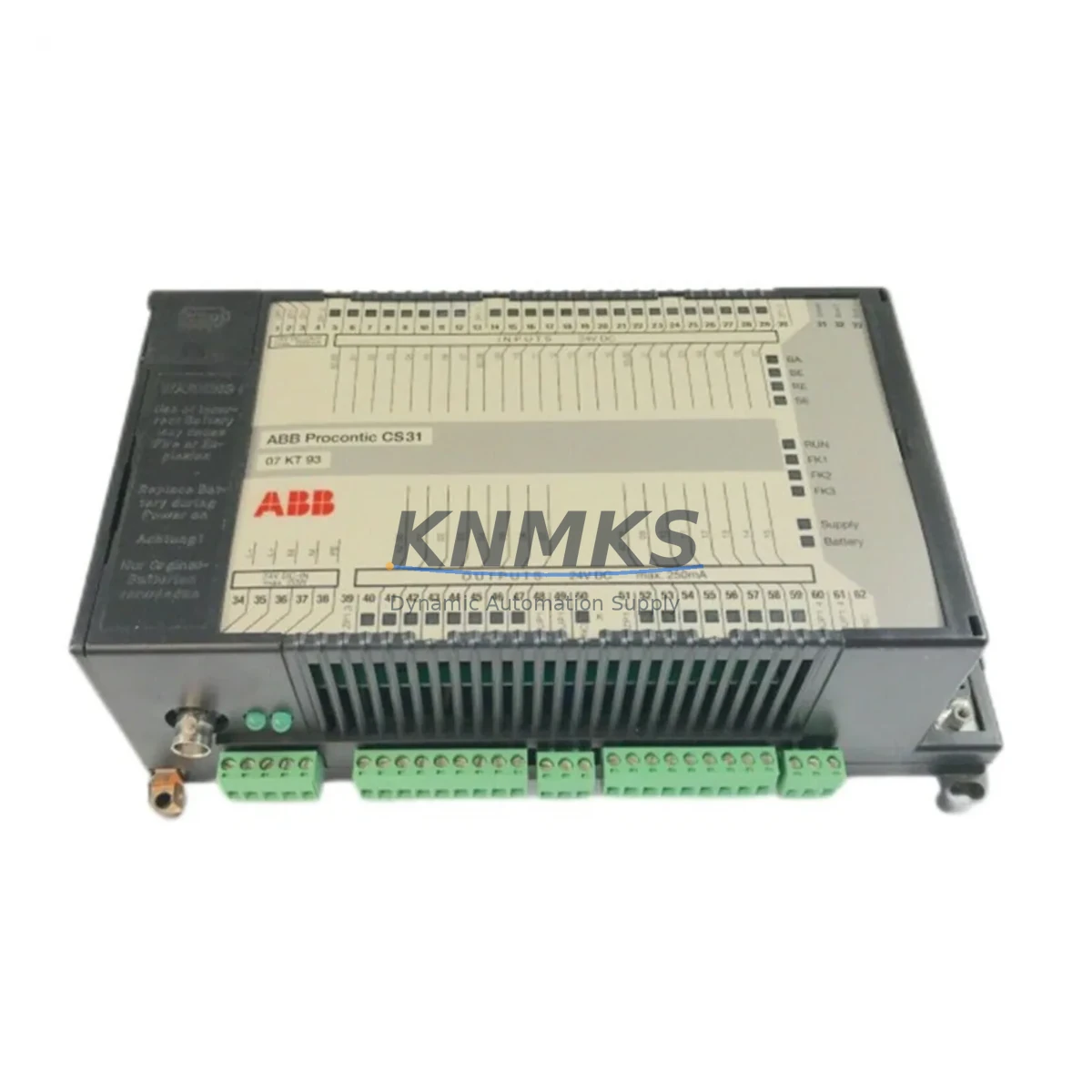
ABB 07KT93 GJR5251300R0171 Maintenance-Proven Spare for AC31
The ABB 07KT93 (part number GJR5251300R0171) is a CPU module designed for the ABB AC31 series programmable logic controller platform — one of ABB’s most widely deployed automation architectures in process control, machine automation, and utility infrastructure. For maintenance engineers managing aging AC31 installations, securing a verified, tested spare of the 07KT93 CPU is a foundational step in any uptime protection strategy. This module serves as the central processing unit of the AC31 rack, executing the control program, managing I/O communication, and coordinating all connected modules within the backplane. When this CPU fails or degrades, the entire control loop is interrupted — making rapid, compatible replacement the single most critical factor in minimizing production downtime.
KNMKS supplies the ABB 07KT93 GJR5251300R0171 as an original spare part, sourced through verified industrial channels, pre-tested before shipment, and backed by a support terms confirmed by quotation. Each unit undergoes functional verification to confirm processor integrity, memory stability, and communication readiness prior to dispatch. Whether you are responding to an unplanned CPU fault, executing a scheduled overhaul, or building a strategic spare parts buffer for a critical AC31 line, this module ships ready for direct installation.
Spare Maintenance Table
| Part Number | 07KT93 |
| Full Reference | GJR5251300R0171 |
| Brand | ABB |
| Series | AC31 (Advant Controller 31) |
| Module Type | PLC CPU Module |
| Origin | Germany (DE) |
| Compatibility | ABB AC31 series racks and backplanes; compatible with AC31 I/O expansion modules, communication modules, and power supply units within the AC31 ecosystem |
| Installation | Direct slot replacement on AC31 backplane; no hardware modification required for same-series swap |
| Application Environment | Industrial automation, process control, utility infrastructure, machine control panels, DCS hybrid architectures |
| Maintenance Recommendation | Inspect CPU status LEDs, verify program checksum after replacement, re-establish communication with HMI and SCADA; confirm I/O module addressing post-swap |
| Pre-Shipment Testing | Functional verification performed on each unit before dispatch |
| Support terms | 12 Months |
| Condition | Original spare, new or refurbished-to-spec |
| Lead Time | Contact sales for current stock availability |
Maintenance Planning for Continuous Operation
Replacing the 07KT93 CPU module in an AC31 system is rarely an isolated task. Experienced maintenance engineers know that a CPU fault is often a symptom of broader electrical stress within the control cabinet — and that a thorough replacement procedure must account for the health of every connected component in the same power and signal chain.
Begin with the AC31 power supply module (such as the ABB 07AC91 or equivalent rack PSU). A degraded or under-rated power supply is one of the most common root causes of CPU instability and premature failure. Verify output voltage stability under load before commissioning the replacement CPU. Alongside the power supply, inspect the backplane bus connector and rack chassis for oxidation, mechanical damage, or loose seating — a poor backplane connection can cause intermittent CPU faults that are difficult to diagnose without physical inspection.
Next, audit the AC31 digital and analog I/O modules installed in the same rack. Modules such as the ABB 07DI92 digital input or 07AI91 analog input cards should be checked for correct addressing and signal integrity after the CPU swap. A CPU replacement resets the internal program state, so all I/O module parameters must be re-verified against the original configuration backup. If the system uses AC31 communication modules for PROFIBUS, Modbus, or serial fieldbus connectivity, confirm that the communication parameters are correctly restored and that the new CPU establishes handshake with all downstream devices.
For systems with an operator panel or HMI connected to the AC31 CPU — whether a local panel or a remote SCADA interface — re-establish the communication link and verify that all display variables and alarm setpoints are correctly mapped after the CPU replacement. In cabinets where signal isolators or loop-powered transmitters feed analog inputs to the AC31, check that 4–20 mA signal integrity is maintained and that no ground loops have been introduced during the maintenance window.
Finally, review the fuse and circuit protection for the CPU supply rail. A blown or weakened fuse on the 24 VDC control circuit is a common finding during CPU replacement work and should be replaced as a matter of course. Documenting all findings in the maintenance log — including the replaced 07KT93 serial number, firmware version, and post-replacement test results — supports long-term reliability tracking and simplifies future audits.
Site Replacement Workflow
Step 1 — Preparation: Before removing the failed 07KT93, back up the existing PLC program and configuration data from the CPU memory or from the engineering workstation. Confirm that the replacement GJR5251300R0171 unit matches the hardware revision and firmware baseline required by your application. If the system has been running a specific firmware version for compatibility with connected I/O or communication modules, verify that the replacement unit can be loaded with the same firmware.
Step 2 — Safe Isolation: Follow your site’s lockout/tagout (LOTO) procedure. De-energize the AC31 rack power supply and confirm zero voltage on the backplane before handling the CPU module. The 07KT93 is a backplane-mounted module; removal requires releasing the module locking mechanism and sliding the card out of its slot without applying lateral force to the bus connector.
Step 3 — Module Swap: Insert the replacement 07KT93 into the same slot position. Ensure the module is fully seated and the locking tab is engaged. Re-energize the rack and observe the CPU status LEDs during the boot sequence. A normal startup sequence will indicate processor initialization, memory self-test, and I/O scan readiness.
Step 4 — Program Restore and Verification: Download the backed-up control program to the new CPU. Perform a full I/O scan and verify that all digital and analog signals are reading correctly. Test all critical control loops in manual mode before returning the system to automatic operation. Document the replacement in the site maintenance record.
This workflow minimizes downtime, preserves system compatibility, and ensures that the replacement 07KT93 is fully validated before production resumes. KNMKS recommends maintaining at least one 07KT93 GJR5251300R0171 unit in your on-site spare parts inventory for any facility operating AC31-based control systems.
Spare Parts Support FAQ
Q1: Is the 07KT93 GJR5251300R0171 still available as a new spare part?
The ABB AC31 series has reached end-of-active-production, but original spare parts including the 07KT93 CPU module remain available through specialist industrial spare parts suppliers. KNMKS maintains stock of verified original units to support ongoing maintenance of installed AC31 systems. Contact our sales team for current availability and lead times.
Q2: How do I confirm compatibility before ordering?
The 07KT93 is identified by its full part reference GJR5251300R0171. Confirm the part number from the module label on your existing CPU or from your system’s bill of materials. If you are replacing a different AC31 CPU variant, contact KNMKS with your existing module’s full reference number so we can confirm cross-compatibility or identify the correct replacement.
Q3: What testing is performed before shipment?
Every 07KT93 GJR5251300R0171 unit supplied by KNMKS undergoes functional verification prior to dispatch. This includes processor power-on testing, memory integrity checks, and communication port validation. Units that do not pass functional testing are not shipped. All units are covered by a support terms confirmed by quotation from the date of shipment.
Q4: Can KNMKS support long-term supply for ongoing maintenance programs?
Yes. KNMKS specializes in long-term spare parts supply for legacy and end-of-life industrial automation platforms including the ABB AC31 series. We can support scheduled procurement programs, blanket orders, and emergency stock replenishment. Contact admin@knmks.com or +86 18359268345 to discuss your maintenance inventory requirements.
© 2026 KNMKS. All rights reserved.
Original Source: https://knmks.com
Contact: admin@knmks.com | +86 18359268345
Product Identification
- Brand / Ecosystem
-
ABB
ABB - Model / Series
- 07KT93 GJR5251300R0171
- Product Family
- PLCs & Controllers
- Availability Status
- Available on request after model and quantity confirmation
- Inquiry Type
- B2B RFQ, replacement inquiry and project spare-part request
- Pre-Quote Check
- Exact SKU, brand, series, quantity, nameplate photos and destination country are checked before quotation
System Path
Where this product fits in the KNMKS automation structure.
Specification & Inquiry Focus
- Control platform
- PLC, PAC and modular controllers
- Common needs
- CPU, rack, power and I/O expansion
- Project support
- Replacement, cabinet build and maintenance
Buyer Confirmation
Information KNMKS checks before replying.
- Exact model
- 07KT93 GJR5251300R0171
- Brand / ecosystem
- ABB
- Product family
- PLCs & Controllers
- Application note
- Replacement, maintenance, project build or spare-part list
- Useful photos
- Nameplate, installed unit, cabinet layout or connector side
- Delivery details
- Quantity, destination country and target schedule
Document Support
Files and notes can be confirmed during quotation.
- Product photos or nameplate confirmation when available
- Packing and delivery notes before quotation confirmation
- Support scope and delivery terms confirmed per inquiry
- Export document coordination for qualified B2B requests
Inquiry Support
- Model cross-checking before quotation
- CPU, power, rack and expansion module matching
- Support for replacement and project inquiry
What to Send Us
- Brand and exact model number: ABB 07KT93 GJR5251300R0171
- Quantity and required delivery time
- Application, replacement requirement or nameplate photo
- Destination country and shipping preference
RFQ Preparation
This is a product inquiry page built for RFQ communication.
Fast Model Check
Send this model to KNMKS for confirmation.
Include quantity, destination country and photos if this is a maintenance replacement. The inquiry will be saved with a reference number after submission.
Brand & Compatibility Note
KNMKS displays automation product information for well-known industrial brand ecosystems and compatible replacement references. Brand names are used for product identification and compatibility reference only; final availability and commercial terms are confirmed per quotation.
 Manufacturing
 Machine Tools
 Packaging
 Energy & Power



 HMI & Displays
 Servo Systems
 Variable Frequency Drives
 Sensors