
Overview
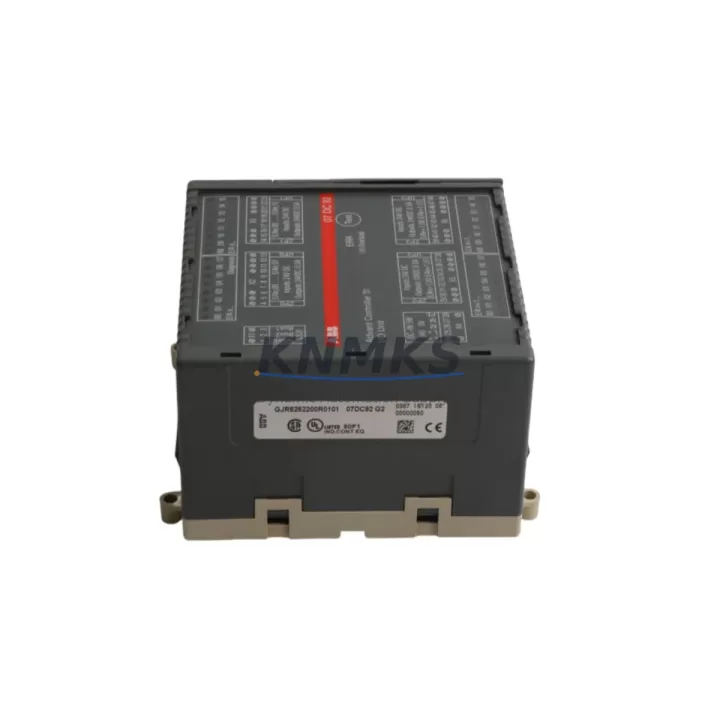
ABB 07DC92 GJR5252200R0101 Maintenance-Proven Spare Part for Factory Uptime
The ABB 07DC92 (GJR5252200R0101) is a central processing unit module for the ABB AC500 PLC series — one of the most widely deployed programmable logic controller platforms in industrial automation, process control, and discrete manufacturing. As production lines age and OEM support windows narrow, maintaining a verified stock of the 07DC92 CPU module is a frontline strategy for maintenance engineers who cannot afford unplanned downtime. This listing provides an original, pre-shipment tested 07DC92 with a support terms confirmed by quotation, sourced to support both emergency replacement and planned annual maintenance cycles.
The AC500 platform is engineered for demanding environments: wide temperature tolerance, modular I/O expansion, and deterministic scan-cycle performance make it a preferred controller in water treatment, power distribution, material handling, and machine automation. When the 07DC92 CPU fails — whether from firmware corruption, capacitor aging, backplane communication faults, or surge damage — restoring the control cabinet to operational status requires a verified replacement that retains program compatibility and I/O mapping without re-engineering the rack configuration.
Spare Maintenance Table
| Parameter | Specification |
|---|---|
| Part Number | 07DC92 |
| Order Code | GJR5252200R0101 |
| Brand | ABB |
| Series | AC500 |
| Module Type | PLC CPU Module |
| Origin | Germany (DE) |
| Supply Voltage | 24 V DC (via AC500 backplane) |
| Communication Interfaces | ETHERNET, serial (CS31 bus compatible) |
| Program Memory | Onboard flash; SD card slot for program backup |
| I/O Expansion | Compatible with AC500 S500 I/O modules via backplane |
| Operating Temperature | 0 °C to +60 °C |
| Mounting | DIN rail via AC500 terminal base (TB5xx series) |
| Compatibility | AC500 V2 / V3 system; TB511, TB521, TB541 terminal bases |
| Condition | Original, pre-shipment tested |
| Support terms | 12 months from shipment date |
| Application | Process automation, machine control, power distribution, water/wastewater |
Maintenance Planning for Continuous Operation
Replacing the 07DC92 CPU module is rarely an isolated task. A disciplined maintenance engineer treats a CPU swap as an opportunity to audit the entire control cabinet for latent faults that could trigger the next unplanned stop. Before commissioning the replacement 07DC92, inspect the AC500 terminal base (TB511 / TB521 / TB541) for corrosion on the backplane connector pins — a degraded terminal base can cause intermittent CPU communication errors that are difficult to diagnose after the fact.
Verify the 24 V DC power supply module feeding the AC500 rack. Voltage sag or ripple outside the ±5% tolerance is a common root cause of CPU resets and memory corruption; if the power supply is original to the installation and has not been replaced in the past five years, treat it as a co-replacement candidate. Similarly, check the AC500 S500 digital and analog I/O modules (such as the DI524, DO524, or AI523 series) for blown channel fuses and degraded terminal connections — a CPU replacement that returns the system to service only to reveal a failed I/O module wastes a second maintenance window.
For installations using PROFIBUS DP or Modbus RTU communication, inspect the CM572-DP or CM577-ETH communication modules seated in the AC500 rack. Network topology faults — termination resistor failures, cable shield breaks, or address conflicts — can prevent the new CPU from establishing master-slave communication and delay restart. If the site uses CS31 remote I/O bus, verify the bus cable continuity and termination at both ends before powering up the replacement CPU.
HMI panels connected to the AC500 via Ethernet or serial link — such as the ABB CP600 series operator panels — should be checked for firmware version compatibility with the replacement CPU firmware. A firmware mismatch can cause HMI communication timeouts that appear as CPU faults. Finally, review the 24 V DC branch circuit fuses and miniature circuit breakers in the control cabinet; a nuisance trip on the CPU supply rail is often the first symptom of an aging power distribution board that will cause repeat failures if not addressed during the same maintenance window.
Site Replacement Workflow
Step 1 — Program Backup: Before removing the existing 07DC92, use ABB Automation Builder or the onboard SD card slot to export a full program backup including hardware configuration, I/O mapping, and retain-variable data. Confirm the backup file is readable on a separate device before proceeding.
Step 2 — Power Down and Isolation: Isolate the control cabinet from all supply voltages following site LOTO (Lockout/Tagout) procedures. Discharge any UPS or capacitor banks supplying the CPU rack before handling modules.
Step 3 — Module Removal: Release the 07DC92 from the terminal base by pressing the release lever and sliding the module upward. Inspect the terminal base connector for bent pins or contamination before inserting the replacement unit.
Step 4 — Replacement and Program Restore: Seat the new 07DC92 firmly into the terminal base until the locking lever clicks. Restore the program from the SD card backup or via Automation Builder over Ethernet. Verify hardware configuration matches the physical I/O rack before enabling outputs.
Step 5 — Functional Verification: Power up the cabinet and confirm all I/O modules report healthy status in the CPU diagnostic screen. Test all critical output channels under controlled conditions before returning the line to production. Document the replacement date, firmware version, and serial number of the new module in the site maintenance log.
This workflow minimizes downtime to a single planned window and eliminates the risk of configuration drift that occurs when replacement CPUs are programmed from memory rather than verified backups. For sites running legacy AC500 V1 hardware, confirm terminal base compatibility before ordering — the TB5xx series bases are not interchangeable with older TB4xx bases without a rack modification.
Spare Parts Support FAQ
Q1: Is the 07DC92 GJR5252200R0101 compatible with both AC500 V2 and V3 systems?
The 07DC92 with order code GJR5252200R0101 is designed for the AC500 V2 platform. AC500 V3 introduced a revised CPU lineup with updated order codes. Before ordering, confirm your terminal base part number and existing CPU firmware version. If your site runs a mixed V2/V3 rack, contact our sales team at admin@knmks.com for compatibility verification before purchase.
Q2: What pre-shipment testing is performed on each unit?
Every 07DC92 unit is powered up and subjected to a functional communication test prior to shipment. We verify CPU boot sequence, Ethernet port activity, and backplane communication integrity. Units that do not pass all test points are not shipped. A test record is available on request. All units are covered by a support terms confirmed by quotation from the shipment date.
Q3: Can you support long-term supply agreements for the 07DC92?
Yes. KNMKS supports 12–36 month supply agreements for the 07DC92 and related AC500 spare parts. Long-term agreements include reserved stock allocation, priority shipment, and fixed pricing to protect against market volatility. Contact admin@knmks.com or call +86 18359268345 to discuss volume and lead-time requirements.
Q4: What is the recommended spare parts holding strategy for AC500-based control systems?
For production-critical AC500 installations, we recommend holding a minimum of one 07DC92 CPU module per three installed units as a site cold spare. For high-availability lines, a hot-standby spare stored in the control room — pre-programmed with the current production firmware — reduces mean time to repair (MTTR) to under 30 minutes. Pair the CPU spare with at least one matched terminal base and a verified power supply module to cover the most common failure modes in a single maintenance kit.
© 2026 KNMKS. All rights reserved.
Original Source: https://knmks.com
Contact: admin@knmks.com | +86 18359268345
Product Identification
- Brand / Ecosystem
-
ABB
ABB - Model / Series
-
07DC92 GJR5252200R0101
AC500 Series - Product Family
- PLCs & Controllers
- Availability Status
- Available on request after model and quantity confirmation
- Inquiry Type
- B2B RFQ, replacement inquiry and project spare-part request
- Pre-Quote Check
- Exact SKU, brand, series, quantity, nameplate photos and destination country are checked before quotation
System Path
Where this product fits in the KNMKS automation structure.
Specification & Inquiry Focus
- Control platform
- PLC, PAC and modular controllers
- Common needs
- CPU, rack, power and I/O expansion
- Project support
- Replacement, cabinet build and maintenance
Buyer Confirmation
Information KNMKS checks before replying.
- Exact model
- 07DC92 GJR5252200R0101
- Brand / ecosystem
- ABB
- Product family
- PLCs & Controllers
- Application note
- Replacement, maintenance, project build or spare-part list
- Useful photos
- Nameplate, installed unit, cabinet layout or connector side
- Delivery details
- Quantity, destination country and target schedule
Document Support
Files and notes can be confirmed during quotation.
- Product photos or nameplate confirmation when available
- Packing and delivery notes before quotation confirmation
- Support scope and delivery terms confirmed per inquiry
- Export document coordination for qualified B2B requests
Inquiry Support
- Model cross-checking before quotation
- CPU, power, rack and expansion module matching
- Support for replacement and project inquiry
What to Send Us
- Brand and exact model number: ABB 07DC92 GJR5252200R0101
- Quantity and required delivery time
- Application, replacement requirement or nameplate photo
- Destination country and shipping preference
RFQ Preparation
This is a product inquiry page built for RFQ communication.
Fast Model Check
Send this model to KNMKS for confirmation.
Include quantity, destination country and photos if this is a maintenance replacement. The inquiry will be saved with a reference number after submission.
Brand & Compatibility Note
KNMKS displays automation product information for well-known industrial brand ecosystems and compatible replacement references. Brand names are used for product identification and compatibility reference only; final availability and commercial terms are confirmed per quotation.
 Manufacturing
 Machine Tools
 Packaging
 Energy & Power



 HMI & Displays
 Servo Systems
 Variable Frequency Drives
 Sensors