
Overview
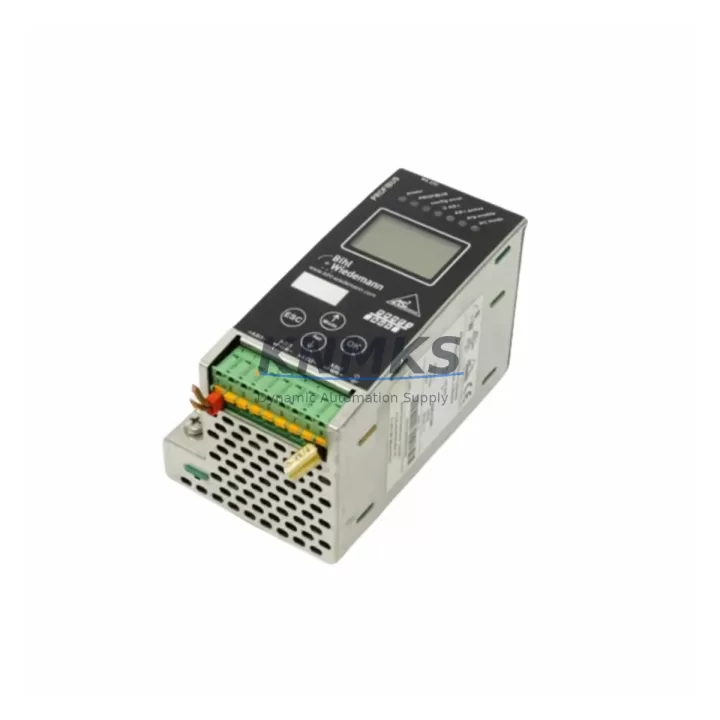
WIEDERMANN BWU1568 Migration-Ready Gateway for Legacy AS-I Systems
The WIEDERMANN BWU1568 is a migration-ready AS-Interface 3.0 gateway designed to replace end-of-life and discontinued AS-I master modules in legacy control architectures. Engineered for drop-in compatibility with existing AS-I 2.1 and AS-I 3.0 field networks, the BWU1568 supports BIH1 (Bus Interface Host 1) topology and is pre-tested prior to shipment to ensure immediate commissioning readiness. For automation engineers managing aging distributed I/O systems, sensor networks, or safety-rated AS-Interface segments, the BWU1568 provides a reliable, support terms-backed path to system continuity without full PLC replacement.
Whether you are replacing a failed gateway in an emergency shutdown scenario or executing a planned migration from an obsolete AS-I master to a current-generation fieldbus architecture, the BWU1568 is stocked for fast global dispatch with a support terms confirmed by quotation covering all pre-shipment tested units.
Migration Compatibility Table
| Parameter | BWU1568 Specification | Retrofit Notes |
|---|---|---|
| AS-Interface Version | AS-I 3.0 (backward compatible with AS-I 2.1) | Verify existing slave addressing before swap |
| Bus Interface | BIH1 (Bus Interface Host 1) | Confirm host interface type on existing master |
| Power Supply | AS-I bus powered (30 V DC nominal) | Check AS-I power supply capacity; BWU1568 draws standard bus current |
| Terminal Wiring | Standard AS-I flat cable / screw terminals | No rewiring required for standard AS-I flat cable installations |
| Slave Capacity | Up to 62 AS-I slaves (AS-I 3.0 extended addressing) | Validate slave count and address map before commissioning |
| Communication Protocol | AS-Interface 3.0 master protocol | Protocol migration from AS-I 2.1 requires slave firmware review |
| Mounting | DIN rail, standard 35 mm | Confirm available DIN rail space in control cabinet |
| Firmware Compatibility | Factory-loaded, field-upgradeable | Verify firmware version against existing HMI and SCADA configuration |
| Replacement Path | Direct replacement for BWU1568-series and compatible AS-I 3.0 masters | Cross-reference OEM part number before ordering |
| Support terms | 12 months from shipment date | All units pre-tested; support terms covers manufacturing defects |
Retrofit Planning for Existing Automation Systems
Integrating the BWU1568 into an existing automation environment requires a structured pre-migration assessment. Begin by auditing the current AS-I master’s slave address table and confirming that all field devices — including AS-I safety slaves, standard I/O slaves, and analog slaves — are mapped correctly before the replacement unit is installed. In many legacy installations, the AS-I power supply module (such as a WIEDERMANN BWU2693 or equivalent 30 V AS-I power supply) may be operating near its rated current capacity; adding a new master with extended addressing capability can expose latent power budget issues that must be resolved before commissioning.
For control cabinets running a Siemens S7-300 or S7-400 PLC with an AS-Interface CP module (e.g., CP 343-2 or CP 443-2), the BWU1568 gateway must be validated against the existing DP/AS-I Link or direct AS-I master configuration in STEP 7 or TIA Portal. If the upstream controller uses a PROFIBUS DP or PROFINET interface to communicate with the AS-I segment, confirm that the GSD or GSDML device description file for the BWU1568 is imported and the I/O mapping is preserved. Similarly, installations using a Schneider Electric Modicon M340 or Premium PLC with an AS-Interface scanner card should verify the I/O image table alignment before going live.
In distributed control architectures where the AS-I segment feeds into a Beckhoff EtherCAT coupler or a Phoenix Contact Inline controller, the BWU1568’s cyclic data exchange timing must be confirmed against the master cycle time to avoid I/O jitter on safety-critical outputs. For installations with AS-I safety monitors (e.g., WIEDERMANN BWU3038 or equivalent AS-I Safety at Work monitor), the safety slave address configuration and safety code sequence must be re-validated after gateway replacement — this is a mandatory step that cannot be skipped even in like-for-like swaps.
Where the existing installation uses a WIEDERMANN BWU1568-compatible programming cable or USB-to-AS-I diagnostic interface, retain this tool for post-installation address verification and bus diagnostics. The AS-I address programming device is essential for re-addressing any slave that lost its address during the gateway swap, particularly in older installations where slave address retention is not guaranteed across power cycles.
Downtime Control During System Migration
Minimizing unplanned downtime during an AS-Interface gateway replacement requires a disciplined pre-outage preparation protocol. Before the maintenance window opens, export the full slave address list and I/O configuration from the existing master using the available diagnostic software or HMI historian. If the upstream PLC — whether a Siemens S7-300, ABB AC500, or Schneider Modicon — stores the AS-I configuration in its project file, create a verified backup of the program and force table before any hardware is disturbed.
During the physical swap, label all AS-I flat cable connections and document the terminal block wiring sequence. The BWU1568 uses standard AS-I flat cable topology, so no rewiring is required in most installations; however, confirm that the AS-I power supply is de-energized before disconnecting the master to protect both the field devices and the replacement unit. After mounting the BWU1568 on the DIN rail and reconnecting the AS-I cable, power up the AS-I segment and allow the master to complete its automatic address detection cycle before enabling the upstream PLC scan.
Validate the I/O image in the PLC’s online monitor before releasing the system to production. Check that all expected slaves appear in the active slave list, that no address conflicts are reported, and that safety slaves have completed their safety code handshake. If the installation includes an HMI (e.g., Siemens TP700 Comfort or Weintek cMT series) with AS-I status displays, verify that all field device status indicators reflect the correct operational state before closing the maintenance window. A structured commissioning checklist — covering power-up sequence, slave detection, I/O verification, safety validation, and HMI confirmation — is the most reliable method for controlling downtime and preventing repeat call-outs.
Retrofit Support FAQ
Q1: Is the BWU1568 a direct drop-in replacement for my existing AS-I 3.0 master?
In most cases, yes. The BWU1568 is designed for direct replacement of compatible AS-I 3.0 BIH1 masters. Before ordering, cross-reference your existing master’s part number and confirm the bus interface type (BIH1), slave capacity, and power supply compatibility. All units are pre-tested prior to shipment to verify correct AS-I master protocol operation.
Q2: What wiring changes are required during installation?
For standard AS-I flat cable installations, no rewiring is required. The BWU1568 uses the same AS-I flat cable connection and DIN rail mounting as the original master. If your installation uses custom terminal blocks or non-standard cable routing, document the existing wiring before removal and replicate it on the replacement unit.
Q3: How do I verify compatibility with my existing PLC and HMI configuration?
Import the BWU1568 GSD or GSDML device description file into your PLC programming environment (STEP 7, TIA Portal, Unity Pro, or equivalent) and compare the I/O mapping against your existing configuration. For HMI screens that display AS-I slave status, verify that the data block addresses and tag mappings remain consistent after the gateway swap. Contact our technical team at admin@knmks.com if you require configuration support.
Q4: What does the support terms confirmed by quotation cover, and what is your stock availability?
All BWU1568 units supplied by KNMKS carry a support terms confirmed by quotation from the shipment date, covering manufacturing defects and pre-shipment test failures. We maintain multi-region stock for fast global dispatch, including emergency replacement orders. Lead time for in-stock units is typically 1–3 business days. For volume orders or long-term supply agreements, contact admin@knmks.com or call +86 18359268345.
© 2026 KNMKS. All rights reserved.
Original Source: https://knmks.com
Contact: admin@knmks.com | +86 18359268345
Product Identification
- Brand / Ecosystem
-
Other Brands
Assorted Brands - Model / Series
-
BWU1568 AS-I 3.0
Assorted Series - Product Family
- Relays & Interface
- Availability Status
- Available on request after model and quantity confirmation
- Inquiry Type
- B2B RFQ, replacement inquiry and project spare-part request
- Pre-Quote Check
- Exact SKU, brand, series, quantity, nameplate photos and destination country are checked before quotation
System Path
Where this product fits in the KNMKS automation structure.
Specification & Inquiry Focus
- Interface range
- Relays, isolation and signal modules
- Common needs
- Coil voltage and contact rating
- Project support
- Panel wiring and signal protection
Buyer Confirmation
Information KNMKS checks before replying.
- Exact model
- BWU1568 AS-I 3.0
- Brand / ecosystem
- Other Brands
- Product family
- Relays & Interface
- Application note
- Replacement, maintenance, project build or spare-part list
- Useful photos
- Nameplate, installed unit, cabinet layout or connector side
- Delivery details
- Quantity, destination country and target schedule
Document Support
Files and notes can be confirmed during quotation.
- Product photos or nameplate confirmation when available
- Packing and delivery notes before quotation confirmation
- Support scope and delivery terms confirmed per inquiry
- Export document coordination for qualified B2B requests
Inquiry Support
- Relay base and module matching
- Signal isolation and protection options
- Panel accessory inquiry support
What to Send Us
- Brand and exact model number: Other Brands BWU1568 AS-I 3.0
- Quantity and required delivery time
- Application, replacement requirement or nameplate photo
- Destination country and shipping preference
RFQ Preparation
This is a product inquiry page built for RFQ communication.
Fast Model Check
Send this model to KNMKS for confirmation.
Include quantity, destination country and photos if this is a maintenance replacement. The inquiry will be saved with a reference number after submission.
Brand & Compatibility Note
KNMKS displays automation product information for well-known industrial brand ecosystems and compatible replacement references. Brand names are used for product identification and compatibility reference only; final availability and commercial terms are confirmed per quotation.
 Manufacturing
 Machine Tools
 Packaging
 Energy & Power
 PLCs & Controllers
 HMI & Displays
 Servo Systems
 Variable Frequency Drives