
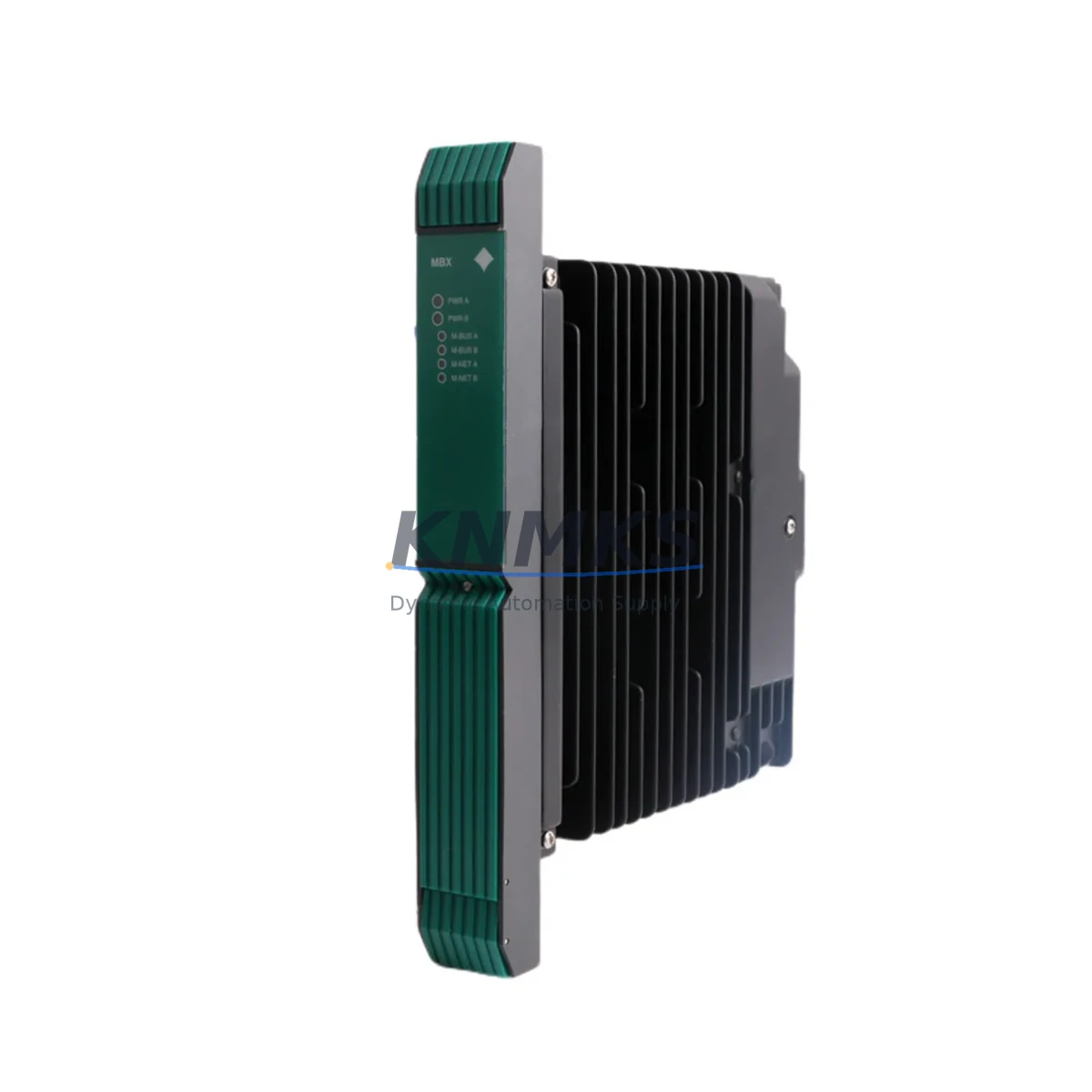
Overview
Siemens PSMBXNAN 16180-500 MBX Bus Expansion Spare: Maintenance-Proven for Factory Uptime
The Siemens PSMBXNAN 16180-500 is an original MBX Modulbus bus expansion module engineered for continuous industrial operation. Designed for integration within Siemens MBX-series automation architectures, this spare part is a critical component for maintenance engineers managing distributed I/O systems, process control cabinets, and legacy automation lines that depend on uninterrupted bus communication. Whether you are executing a planned annual overhaul, responding to an unscheduled line stoppage, or building a strategic spare parts inventory, the PSMBXNAN 16180-500 delivers the compatibility, reliability, and traceability that industrial procurement demands.
At KNMKS, every PSMBXNAN 16180-500 unit is sourced from verified supply channels, individually tested prior to shipment, and backed by a support terms confirmed by quotation. Our global logistics network supports delivery details confirmed by RFQ to minimize production downtime and restore system availability as quickly as possible.
Spare Maintenance Table
| Parameter | Specification |
|---|---|
| Part Number / SKU | PSMBXNAN 16180-500 |
| Brand | Siemens |
| Series | MBX Modulbus |
| Product Type | Bus Expansion Module |
| Country of Origin | Germany |
| Weight | 2020 g (approx.) |
| Bus Interface | MBX Modulbus (proprietary Siemens backplane bus) |
| Compatibility | Siemens MBX-series control systems; compatible with associated MBX I/O modules and power supply units |
| Installation | DIN rail / backplane slot mounting per MBX system guidelines |
| Operating Environment | Industrial control cabinet; standard IEC 61131-2 environmental conditions |
| Maintenance Recommendation | Inspect bus connectors and backplane contacts during annual overhaul; replace if bus communication errors are logged |
| Support terms | 12 months from date of shipment |
| Pre-shipment Testing | Functional test performed on every unit before dispatch |
Maintenance Planning for Continuous Operation
Effective maintenance of an MBX Modulbus system requires a holistic view of the control cabinet. When replacing or inspecting the PSMBXNAN 16180-500 bus expansion module, maintenance engineers should simultaneously evaluate the condition of adjacent components to prevent cascading failures and avoid repeat downtime events.
Begin with the MBX power supply module feeding the bus segment — a degraded or undersized power supply is a common root cause of intermittent bus communication faults that are often misattributed to the expansion module itself. Verify output voltage stability under load before reinstalling the new PSMBXNAN 16180-500. Next, inspect the MBX backplane and bus connectors: oxidized or mechanically stressed backplane contacts can introduce signal integrity issues that persist even after a module swap.
On the I/O side, check each MBX digital and analog I/O module seated on the expanded bus segment. A bus expansion fault can mask underlying I/O module failures; confirm that all I/O modules report correctly after the expansion module is replaced. If the system includes MBX communication modules — such as PROFIBUS DP or Modbus interfaces — verify that bus termination resistors are correctly set and that communication parameters are intact after the replacement.
For systems with signal isolators or signal conditioners on analog I/O channels, inspect isolation barriers for drift or degradation, particularly in high-temperature or high-humidity environments. Additionally, review the 24 VDC field wiring terminal blocks and associated fuse protection for the I/O circuits on the expanded bus segment — loose terminals and blown fuses are frequently overlooked during emergency replacements and can cause post-repair faults. Finally, if an HMI or operator panel is connected to the MBX system, confirm that the HMI communication link is re-established and that all process values are displaying correctly after the bus expansion module is restored to service.
Site Replacement Workflow
The PSMBXNAN 16180-500 is a direct replacement for the original Siemens MBX bus expansion module of the same part number. No firmware re-flashing or parameter reconfiguration is required in standard replacement scenarios, which significantly reduces mean time to repair (MTTR) and allows maintenance teams to restore production without specialist programming support.
Step 1 — Isolation: De-energize the affected MBX bus segment following your site LOTO (Lockout/Tagout) procedure. Do not hot-swap the bus expansion module unless your system documentation explicitly permits it.
Step 2 — Documentation: Photograph the existing module position, wiring, and any DIP switch or jumper settings before removal. Record any active fault codes from the PLC or DCS diagnostic log.
Step 3 — Removal: Carefully disengage the module from the backplane slot. Inspect the backplane connector pins for damage or contamination before inserting the replacement unit.
Step 4 — Installation: Seat the PSMBXNAN 16180-500 firmly into the backplane slot. Verify that all locking mechanisms are engaged and that the module is flush with adjacent modules.
Step 5 — Verification: Re-energize the bus segment and confirm that the bus expansion module status indicator shows normal operation. Clear any latched fault codes and verify I/O communication across the expanded segment from the PLC or DCS engineering station.
Maintaining a minimum of one PSMBXNAN 16180-500 unit in your on-site spare parts inventory is strongly recommended for any facility operating MBX-series automation systems, particularly where production continuity is critical and lead times for new procurement may exceed acceptable downtime windows.
Spare Parts Support FAQ
Q1: Is the PSMBXNAN 16180-500 compatible with all MBX Modulbus system configurations?
The PSMBXNAN 16180-500 is designed for Siemens MBX Modulbus architectures. Compatibility should be verified against your specific system configuration, backplane revision, and power budget before installation. KNMKS technical support can assist with compatibility confirmation based on your system documentation.
Q2: What pre-shipment testing is performed on each unit?
Every PSMBXNAN 16180-500 unit dispatched by KNMKS undergoes functional testing prior to shipment to verify module integrity and basic operational parameters. A test report is available upon request. All units are covered by a support terms confirmed by quotation from the date of shipment.
Q3: Can KNMKS support long-term or repeat supply of this spare part?
Yes. KNMKS maintains ongoing sourcing relationships for Siemens MBX-series components and can support scheduled procurement programs, blanket orders, and emergency supply requests. Contact our sales team to discuss inventory reservation and long-term supply agreements.
Q4: What should I do if the replacement module does not resolve the bus communication fault?
If bus communication faults persist after replacing the PSMBXNAN 16180-500, the root cause is likely in an adjacent component — most commonly the MBX power supply, backplane connector integrity, bus termination settings, or a faulty I/O module on the same segment. KNMKS technical support can provide fault isolation guidance based on your system’s diagnostic data.
© 2026 KNMKS. All rights reserved.
Original Source: https://knmks.com
Contact: admin@knmks.com | +86 18359268345
Product Identification
- Brand / Ecosystem
-
SIEMENS
Siemens - Model / Series
- PSMBXNAN 16180-500
- Product Family
- PLCs & Controllers
- Availability Status
- Available on request after model and quantity confirmation
- Inquiry Type
- B2B RFQ, replacement inquiry and project spare-part request
- Pre-Quote Check
- Exact SKU, brand, series, quantity, nameplate photos and destination country are checked before quotation
System Path
Where this product fits in the KNMKS automation structure.
Specification & Inquiry Focus
- Control platform
- PLC, PAC and modular controllers
- Common needs
- CPU, rack, power and I/O expansion
- Project support
- Replacement, cabinet build and maintenance
Buyer Confirmation
Information KNMKS checks before replying.
- Exact model
- PSMBXNAN 16180-500
- Brand / ecosystem
- SIEMENS
- Product family
- PLCs & Controllers
- Application note
- Replacement, maintenance, project build or spare-part list
- Useful photos
- Nameplate, installed unit, cabinet layout or connector side
- Delivery details
- Quantity, destination country and target schedule
Document Support
Files and notes can be confirmed during quotation.
- Product photos or nameplate confirmation when available
- Packing and delivery notes before quotation confirmation
- Support scope and delivery terms confirmed per inquiry
- Export document coordination for qualified B2B requests
Inquiry Support
- Model cross-checking before quotation
- CPU, power, rack and expansion module matching
- Support for replacement and project inquiry
What to Send Us
- Brand and exact model number: SIEMENS PSMBXNAN 16180-500
- Quantity and required delivery time
- Application, replacement requirement or nameplate photo
- Destination country and shipping preference
RFQ Preparation
This is a product inquiry page built for RFQ communication.
Fast Model Check
Send this model to KNMKS for confirmation.
Include quantity, destination country and photos if this is a maintenance replacement. The inquiry will be saved with a reference number after submission.
Brand & Compatibility Note
KNMKS displays automation product information for well-known industrial brand ecosystems and compatible replacement references. Brand names are used for product identification and compatibility reference only; final availability and commercial terms are confirmed per quotation.
 Manufacturing
 Machine Tools
 Packaging
 Energy & Power



 HMI & Displays
 Servo Systems
 Variable Frequency Drives
 Sensors