
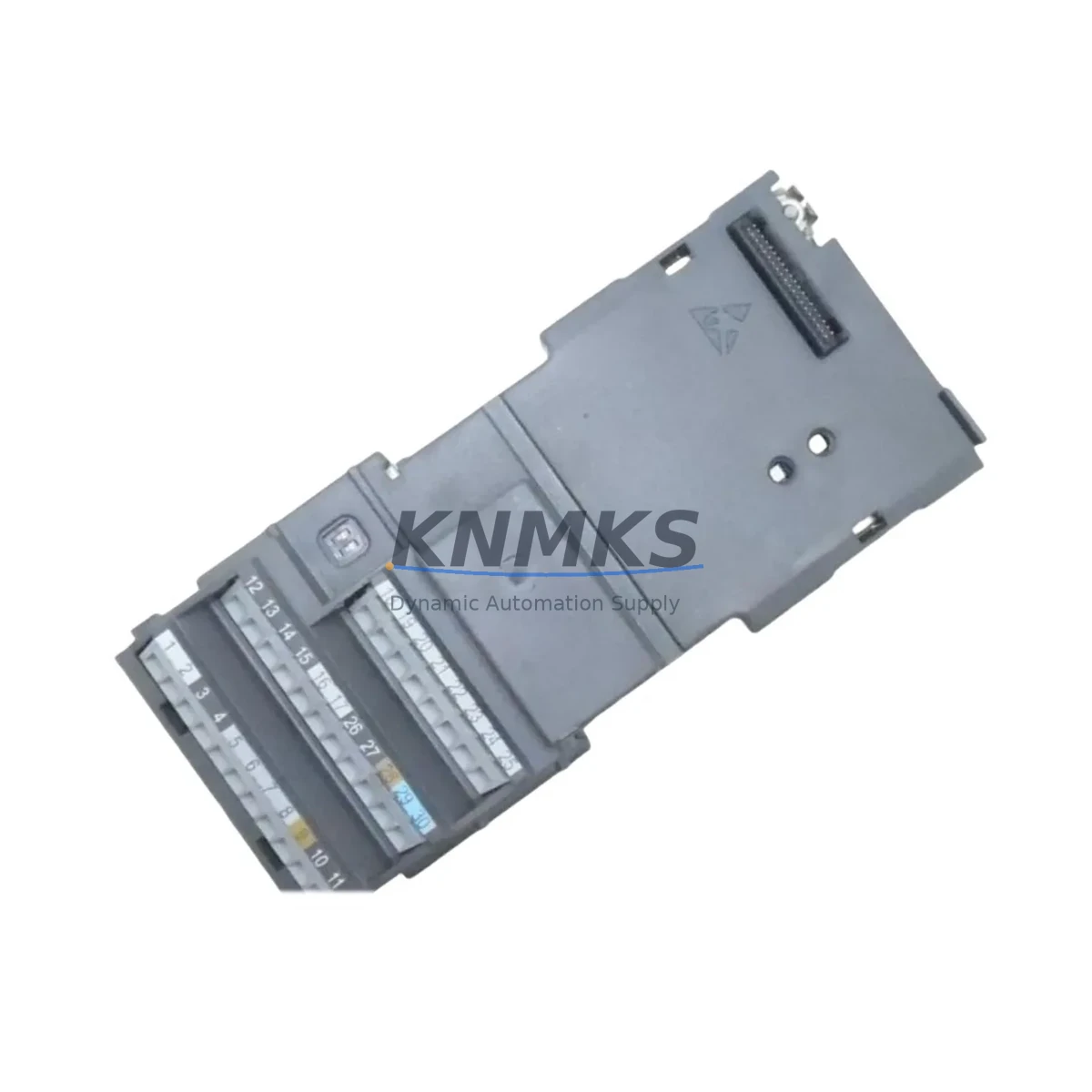
Overview
Siemens A5E35041626 Migration-Ready Digital Input for ET 200SP: Legacy System Retrofit & Compatibility Upgrade
The Siemens A5E35041626 is a digital input module designed for the ET 200SP distributed I/O system, widely deployed across manufacturing, process control, and machine automation environments. As legacy control architectures age and original spare parts reach end-of-life, the A5E35041626 serves as a verified drop-in replacement for discontinued DI modules within the ET 200SP platform — enabling engineers to extend the operational life of existing control cabinets without committing to a full system overhaul.
For facilities running SIMATIC S7-1500 or S7-300 controllers with ET 200SP remote I/O stations, sourcing a compatible digital input module is a critical step in any retrofit or unplanned maintenance scenario. The A5E35041626 maintains the same backplane interface, terminal block wiring layout, and module addressing scheme as its predecessors, which significantly reduces the risk of configuration errors during hot-swap replacement. Before installation, engineers should confirm the BaseUnit type — typically a BU15-P16+A0+2D or equivalent — to ensure the module seats correctly on the existing rack without requiring additional hardware changes.
Migration Compatibility Table
| Parameter | Details |
|---|---|
| SKU / Part Number | A5E35041626 |
| Series / Platform | Siemens ET 200SP Distributed I/O |
| Module Type | Digital Input (DI) |
| Compatible Controllers | SIMATIC S7-1500, S7-300 (via IM interface), ET 200SP IM 155-6 PN |
| Backplane Interface | ET 200SP BaseUnit slot (BU15-P16+A0+2D or equivalent) |
| Wiring Compatibility | Push-in terminal block; existing field wiring reusable without re-termination |
| Communication Protocol | PROFINET (via IM 155-6 PN interface module) |
| Module Addressing | Slot-based automatic addressing; no manual DIP switch configuration required |
| Firmware Compatibility | Verify IM firmware version ≥ V3.0 for full feature support; update via TIA Portal if required |
| Installation Space | Standard ET 200SP module width; no additional rail space required for direct replacement |
| Replacement Recommendation | Direct drop-in for discontinued ET 200SP DI modules with identical BaseUnit type |
| Commissioning Notes | Re-download hardware configuration via TIA Portal; verify I/O mapping in PLC program before restart |
| Support terms | 12 Months from date of shipment |
Retrofit Planning for Existing Automation Systems
A successful retrofit involving the A5E35041626 typically begins well before the module arrives on-site. Engineers working on legacy ET 200SP stations should audit the full I/O rack configuration, noting the position of each module, its BaseUnit type, and the current hardware configuration stored in TIA Portal. In many retrofit projects, the digital input module is just one component in a broader upgrade that may also involve replacing the IM 155-6 PN interface module — the communication gateway that connects the ET 200SP station to the PROFINET network — particularly if the existing interface module is running an outdated firmware version that limits diagnostic capability or PROFINET conformance class support.
Power budget verification is another mandatory step. The ET 200SP backplane distributes both load voltage and electronic module supply across all installed modules. When adding or replacing DI modules, engineers must recalculate the total current draw against the capacity of the installed PM-E power module to avoid overloading the supply rail. In high-density racks, it is common to insert an additional PM-E power module mid-rack to segment the load distribution and maintain stable operation across all I/O channels.
For systems that include analog signal conditioning alongside digital inputs, the retrofit plan should also account for the AI module positions within the same ET 200SP station. Analog input modules in the ET 200SP family share the same backplane bus and must be included in the hardware configuration to avoid slot assignment conflicts. Similarly, if the control cabinet includes a CP 1542SP-1 IRC communications processor for redundant PROFINET or PROFIBUS DP bridging, the module order and slot assignments must be preserved exactly as configured in the original TIA Portal project to prevent communication faults after restart.
Where the retrofit extends to HMI integration, engineers should verify that the SIMATIC HMI panel — whether a KTP700 Basic or a TP1200 Comfort — has its tag connections mapped to the correct PLC data blocks. A module replacement that shifts I/O addresses, even by a single slot, can cause HMI alarm displays and process value indicators to read incorrect data until the tag table is updated and the HMI project is re-downloaded. Scheduling this HMI update as part of the pre-commissioning checklist prevents post-restart confusion on the plant floor.
If the existing system uses a SIMATIC S7-300 CPU with a distributed ET 200SP station connected via PROFINET, the retrofit may also require updating the GSD file in the TIA Portal hardware catalog to ensure the A5E35041626 is recognized correctly. In older projects migrated from STEP 7 Classic, the hardware catalog entry for the replacement module must be verified against the current GSDML file version available from Siemens Industry Online Support before the configuration is compiled and downloaded.
Downtime Control During System Migration
Minimizing unplanned downtime is the primary concern in any live production environment undergoing a control system retrofit. For the A5E35041626 replacement, the recommended approach is to prepare the TIA Portal hardware configuration offline — with the replacement module already inserted into the project — and perform a full compilation and simulation pass before the scheduled maintenance window begins. This allows the engineering team to identify any slot conflicts, address mapping changes, or firmware incompatibilities in advance, rather than discovering them during a live system restart.
During the physical swap, the ET 200SP station should be powered down at the PM-E power module level rather than at the main cabinet breaker, where possible, to preserve the state of other field devices connected to separate power segments. The A5E35041626 can be removed and reinserted without tools using the standard ET 200SP module release mechanism, and the push-in terminal block transfers with the module, keeping field wiring intact and eliminating re-termination time.
After the module is seated and the station is powered back up, the IM 155-6 PN interface module will automatically detect the new DI module and report its presence to the S7-1500 CPU via PROFINET. If the hardware configuration has been pre-loaded, the CPU will accept the module without a configuration mismatch fault. Engineers should monitor the diagnostic buffer in TIA Portal for the first 60 seconds after restart to confirm that all I/O channels are reporting correctly and that no channel-level faults are active. A pre-prepared test routine — cycling each digital input channel through a known signal source — provides a fast, structured verification that the replacement module is functioning correctly before production is resumed.
For facilities that cannot tolerate any interruption to the PROFINET network, a media redundancy protocol (MRP) ring topology — if already configured on the network — will maintain communication to other ET 200SP stations during the brief power cycle of the affected station, further limiting the blast radius of the maintenance event.
Retrofit Support FAQ
Q1: Is the A5E35041626 a direct replacement for older ET 200SP digital input modules?
Yes. The A5E35041626 is designed as a drop-in replacement for compatible ET 200SP DI modules sharing the same BaseUnit type. The push-in terminal block and backplane connector are mechanically and electrically compatible, allowing existing field wiring to be reused without modification. Confirm the BaseUnit part number before ordering to ensure full mechanical compatibility.
Q2: What commissioning steps are required after installing the A5E35041626?
After physical installation, open the TIA Portal project and verify the hardware configuration reflects the A5E35041626 in the correct slot position. Compile and download the updated configuration to the S7-1500 CPU. Perform a channel-by-channel I/O test using the TIA Portal online diagnostic view to confirm all 16 input channels are reading correctly. Check the IM 155-6 PN diagnostic LEDs for any residual fault indicators before returning the station to automatic mode.
Q3: Has the module been tested before shipment, and what support terms is provided?
Every A5E35041626 unit is function-tested prior to shipment to verify channel integrity, backplane communication, and power consumption within specification. The module is supplied with a support terms confirmed by quotation from the date of shipment, covering manufacturing defects and functional failures under normal operating conditions. Support requests are supported by our technical team at admin@knmks.com.
Q4: What is the typical lead time, and do you maintain stock?
We maintain ready stock of the A5E35041626 to support urgent replacement and planned retrofit projects. Standard orders ship within 1–3 business days. For large-quantity blanket orders or long-term supply agreements to support multi-site retrofit programs, contact our sales team directly to discuss inventory reservation and pricing. Stock levels are updated regularly to reflect current availability.
© 2026 KNMKS. All rights reserved.
Original Source: https://knmks.com
Contact: admin@knmks.com | +86 18359268345
Product Identification
- Brand / Ecosystem
-
SIEMENS
Siemens - Model / Series
- A5E35041626
- Product Family
- PLCs & Controllers
- Availability Status
- Available on request after model and quantity confirmation
- Inquiry Type
- B2B RFQ, replacement inquiry and project spare-part request
- Pre-Quote Check
- Exact SKU, brand, series, quantity, nameplate photos and destination country are checked before quotation
System Path
Where this product fits in the KNMKS automation structure.
Specification & Inquiry Focus
- Control platform
- PLC, PAC and modular controllers
- Common needs
- CPU, rack, power and I/O expansion
- Project support
- Replacement, cabinet build and maintenance
Buyer Confirmation
Information KNMKS checks before replying.
- Exact model
- A5E35041626
- Brand / ecosystem
- SIEMENS
- Product family
- PLCs & Controllers
- Application note
- Replacement, maintenance, project build or spare-part list
- Useful photos
- Nameplate, installed unit, cabinet layout or connector side
- Delivery details
- Quantity, destination country and target schedule
Document Support
Files and notes can be confirmed during quotation.
- Product photos or nameplate confirmation when available
- Packing and delivery notes before quotation confirmation
- Support scope and delivery terms confirmed per inquiry
- Export document coordination for qualified B2B requests
Inquiry Support
- Model cross-checking before quotation
- CPU, power, rack and expansion module matching
- Support for replacement and project inquiry
What to Send Us
- Brand and exact model number: SIEMENS A5E35041626
- Quantity and required delivery time
- Application, replacement requirement or nameplate photo
- Destination country and shipping preference
RFQ Preparation
This is a product inquiry page built for RFQ communication.
Fast Model Check
Send this model to KNMKS for confirmation.
Include quantity, destination country and photos if this is a maintenance replacement. The inquiry will be saved with a reference number after submission.
Brand & Compatibility Note
KNMKS displays automation product information for well-known industrial brand ecosystems and compatible replacement references. Brand names are used for product identification and compatibility reference only; final availability and commercial terms are confirmed per quotation.
 Manufacturing
 Machine Tools
 Packaging
 Energy & Power



 HMI & Displays
 Servo Systems
 Variable Frequency Drives
 Sensors