
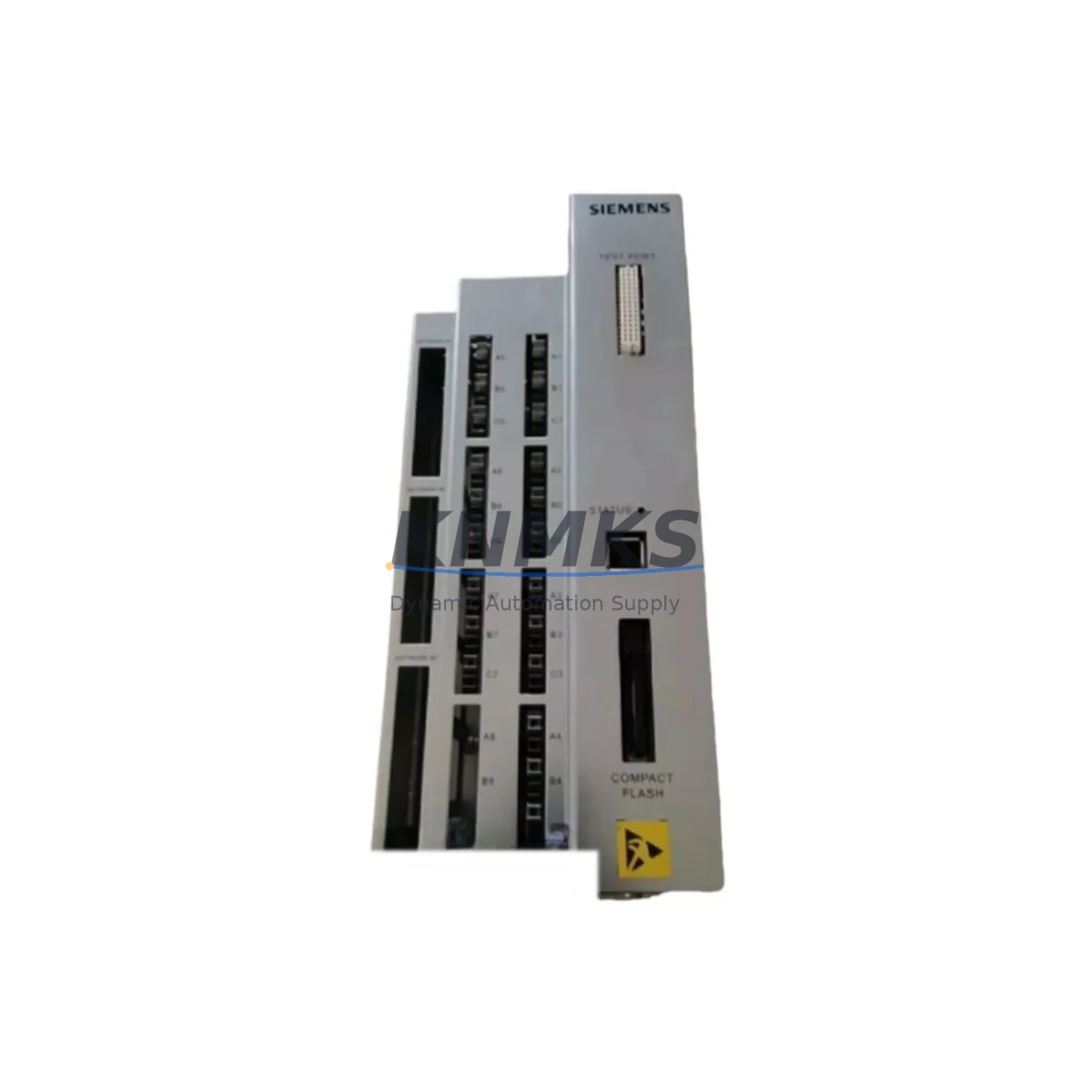
Overview
Siemens A5E33032458 Maintenance-Proven Spare for Factory Uptime
The Siemens A5E33032458 is an original spare part module designed for SIMATIC S7-300 and S7-400 automation systems — one of the most widely deployed PLC platforms in global manufacturing, energy, petrochemical, and infrastructure facilities. For maintenance engineers managing aging control cabinets or executing planned annual overhauls, having a verified, tested A5E33032458 availability confirmed by RFQ is a direct line of defense against unplanned downtime. This module is sourced from authorized supply channels, individually tested prior to shipment, and backed by a support terms confirmed by quotation, making it a reliable choice for both emergency replacement and long-term spare parts inventory planning.
Whether you are responding to a fault alarm at 2 AM or building a preventive maintenance BOM for next quarter’s scheduled shutdown, the A5E33032458 delivers the compatibility, traceability, and supply continuity that industrial procurement teams require. KNMKS maintains stock of this module to support rapid dispatch and reduce lead-time risk for critical automation assets.
Spare Maintenance Table
| Parameter | Specification |
|---|---|
| Part Number / SKU | A5E33032458 |
| Brand | Siemens |
| Series | SIMATIC S7-300 / S7-400 |
| Product Type | PLC Module (Spare Part) |
| Country of Origin | Germany |
| Compatibility | SIMATIC S7-300, S7-400 automation systems; standard DIN rail mounting |
| Application Environment | Industrial automation, process control, energy, manufacturing, petrochemical |
| Installation | Direct slot replacement; no hardware modification required for compatible racks |
| Pre-Shipment Testing | Functional test performed on each unit before dispatch |
| Support terms | 12 Months |
| Supply Condition | Original, new or refurbished-to-spec; clearly stated at order confirmation |
| Lead Time | In-stock units ship within 1–3 business days |
| Long-Term Supply | Ongoing procurement commitment; suitable for multi-year maintenance contracts |
Maintenance Planning for Continuous Operation
Replacing the A5E33032458 in a live SIMATIC S7 control cabinet is rarely an isolated task. Experienced maintenance engineers know that a module fault is often a symptom of broader electrical stress in the rack or power distribution circuit. Before or during replacement, a thorough site inspection should cover the following associated components:
Power Supply Module (e.g., Siemens PS 307 series): Verify output voltage stability under load. A degraded power supply is a leading cause of premature module failure in S7-300 racks. Measure DC bus voltage at the backplane connector before inserting the replacement A5E33032458.
Backplane Bus Connector: Inspect the U-connector or bus connector strip for oxidation, mechanical damage, or bent pins. A faulty bus connector can cause intermittent communication errors that mimic module failure and will damage a new spare if not replaced first.
Digital I/O Modules (e.g., SM 321 / SM 322 series): Check adjacent I/O modules for blown output channels or input signal anomalies. Field wiring faults — particularly short circuits or inductive load spikes — can propagate damage across the rack. Verify terminal block torque and insulation resistance on field cables.
Signal Isolation Barriers and Relay Output Modules: For process signals feeding into the S7 rack, confirm that signal isolators and interposing relays are within specification. Degraded isolation can introduce ground loops that stress module input circuits over time.
Communication Modules (e.g., CP 343-1 / CP 443-1 for PROFINET/PROFIBUS): If the A5E33032458 is part of a networked rack, verify that communication modules are operating without CRC errors or bus timeouts. A network fault can trigger watchdog resets that appear as module faults in diagnostics.
Fuse and Circuit Protection: Inspect 24 VDC supply fuses, miniature circuit breakers, and surge protection devices in the control cabinet. Overcurrent events that tripped protection devices are a strong indicator of the root cause behind the original module failure.
Documenting findings from each of these checks during the replacement event creates a maintenance record that supports future predictive maintenance scheduling and reduces repeat failures. KNMKS can assist procurement teams in sourcing companion components from the same SIMATIC S7 ecosystem to support a complete cabinet refresh or annual maintenance kit.
Site Replacement Workflow
The A5E33032458 is designed for direct slot replacement within compatible SIMATIC S7-300 and S7-400 racks, minimizing the engineering effort required during a production stoppage. Follow this workflow to ensure a safe, efficient, and fully documented replacement:
Step 1 — Pre-Replacement Verification: Confirm the exact slot position and rack address of the failed module using STEP 7 or TIA Portal hardware configuration. Cross-reference the order number and firmware version of the A5E33032458 against the project hardware catalog to confirm compatibility before powering down.
Step 2 — Controlled Power-Down: Follow your site’s lockout/tagout (LOTO) procedure. De-energize the rack segment containing the faulty module. For hot-swap capable configurations, consult the system documentation before attempting live replacement.
Step 3 — Physical Replacement: Remove the failed module by releasing the front connector and sliding the module out of the rack. Insert the A5E33032458 into the same slot. Reconnect the front connector and verify that the bus connector is fully seated.
Step 4 — Power-Up and Diagnostics: Restore power and observe the module’s LED status indicators. Use STEP 7 or TIA Portal online diagnostics to confirm the module is recognized, configured correctly, and communicating on the backplane bus without errors.
Step 5 — Functional Test: Execute a controlled I/O test or process simulation to verify that all associated field signals are operating correctly. Confirm with the process operator that the controlled system has returned to normal operation before releasing the line.
Step 6 — Documentation: Record the replacement in your CMMS or maintenance log, including the failed module’s serial number, replacement date, technician name, and any associated findings from the cabinet inspection. Retain the failed module for root cause analysis if required.
This workflow is applicable to both emergency corrective maintenance and planned preventive replacement cycles. For facilities operating legacy S7-300 systems beyond their standard product lifecycle, KNMKS recommends maintaining at least one A5E33032458 as a dedicated on-site cold spare to eliminate procurement lead time from the critical path of any future failure event.
Spare Parts Support FAQ
Q1: Is the A5E33032458 compatible with both S7-300 and S7-400 racks?
The A5E33032458 is primarily associated with the SIMATIC S7-300 and S7-400 product families. Compatibility depends on the specific rack configuration and hardware revision of your system. We recommend verifying the module’s order number against your STEP 7 or TIA Portal hardware catalog before installation. Our technical team can assist with compatibility confirmation prior to order.
Q2: What pre-shipment testing is performed on each unit?
Every A5E33032458 dispatched by KNMKS undergoes a functional test to verify basic electrical operation and communication integrity before shipment. Units are inspected for physical condition, connector integrity, and firmware version where applicable. A test report can be provided upon request for quality-critical procurement processes.
Q3: What does the support terms confirmed by quotation cover, and how is a support terms claim handled?
The support terms confirmed by quotation cover manufacturing defects and functional failures under normal operating conditions. It does not cover damage resulting from incorrect installation, overvoltage events, or environmental conditions outside the module’s rated specifications. To initiate a support terms claim, contact admin@knmks.com with your order number, a description of the fault, and any available diagnostic data. Replacement or repair will be arranged promptly.
Q4: Can KNMKS support long-term or recurring supply of the A5E33032458 for multi-site maintenance programs?
Yes. KNMKS supports long-term supply agreements for maintenance teams managing multiple facilities or extended asset lifecycles. We can reserve stock, provide scheduled delivery, and issue blanket purchase order arrangements to simplify procurement administration. Contact admin@knmks.com or call +86 18359268345 to discuss your supply requirements.
© 2026 KNMKS. All rights reserved.
Original Source: https://knmks.com
Contact: admin@knmks.com | +86 18359268345
Product Identification
- Brand / Ecosystem
-
Siemens
Siemens - Model / Series
- A5E33032458
- Product Family
- PLCs & Controllers
- Availability Status
- Available on request after model and quantity confirmation
- Inquiry Type
- B2B RFQ, replacement inquiry and project spare-part request
- Pre-Quote Check
- Exact SKU, brand, series, quantity, nameplate photos and destination country are checked before quotation
System Path
Where this product fits in the KNMKS automation structure.
Specification & Inquiry Focus
- Control platform
- PLC, PAC and modular controllers
- Common needs
- CPU, rack, power and I/O expansion
- Project support
- Replacement, cabinet build and maintenance
Buyer Confirmation
Information KNMKS checks before replying.
- Exact model
- A5E33032458
- Brand / ecosystem
- Siemens
- Product family
- PLCs & Controllers
- Application note
- Replacement, maintenance, project build or spare-part list
- Useful photos
- Nameplate, installed unit, cabinet layout or connector side
- Delivery details
- Quantity, destination country and target schedule
Document Support
Files and notes can be confirmed during quotation.
- Product photos or nameplate confirmation when available
- Packing and delivery notes before quotation confirmation
- Support scope and delivery terms confirmed per inquiry
- Export document coordination for qualified B2B requests
Inquiry Support
- Model cross-checking before quotation
- CPU, power, rack and expansion module matching
- Support for replacement and project inquiry
What to Send Us
- Brand and exact model number: Siemens A5E33032458
- Quantity and required delivery time
- Application, replacement requirement or nameplate photo
- Destination country and shipping preference
RFQ Preparation
This is a product inquiry page built for RFQ communication.
Fast Model Check
Send this model to KNMKS for confirmation.
Include quantity, destination country and photos if this is a maintenance replacement. The inquiry will be saved with a reference number after submission.
Brand & Compatibility Note
KNMKS displays automation product information for well-known industrial brand ecosystems and compatible replacement references. Brand names are used for product identification and compatibility reference only; final availability and commercial terms are confirmed per quotation.
 Manufacturing
 Machine Tools
 Packaging
 Energy & Power



 HMI & Displays
 Servo Systems
 Variable Frequency Drives
 Sensors