
Overview
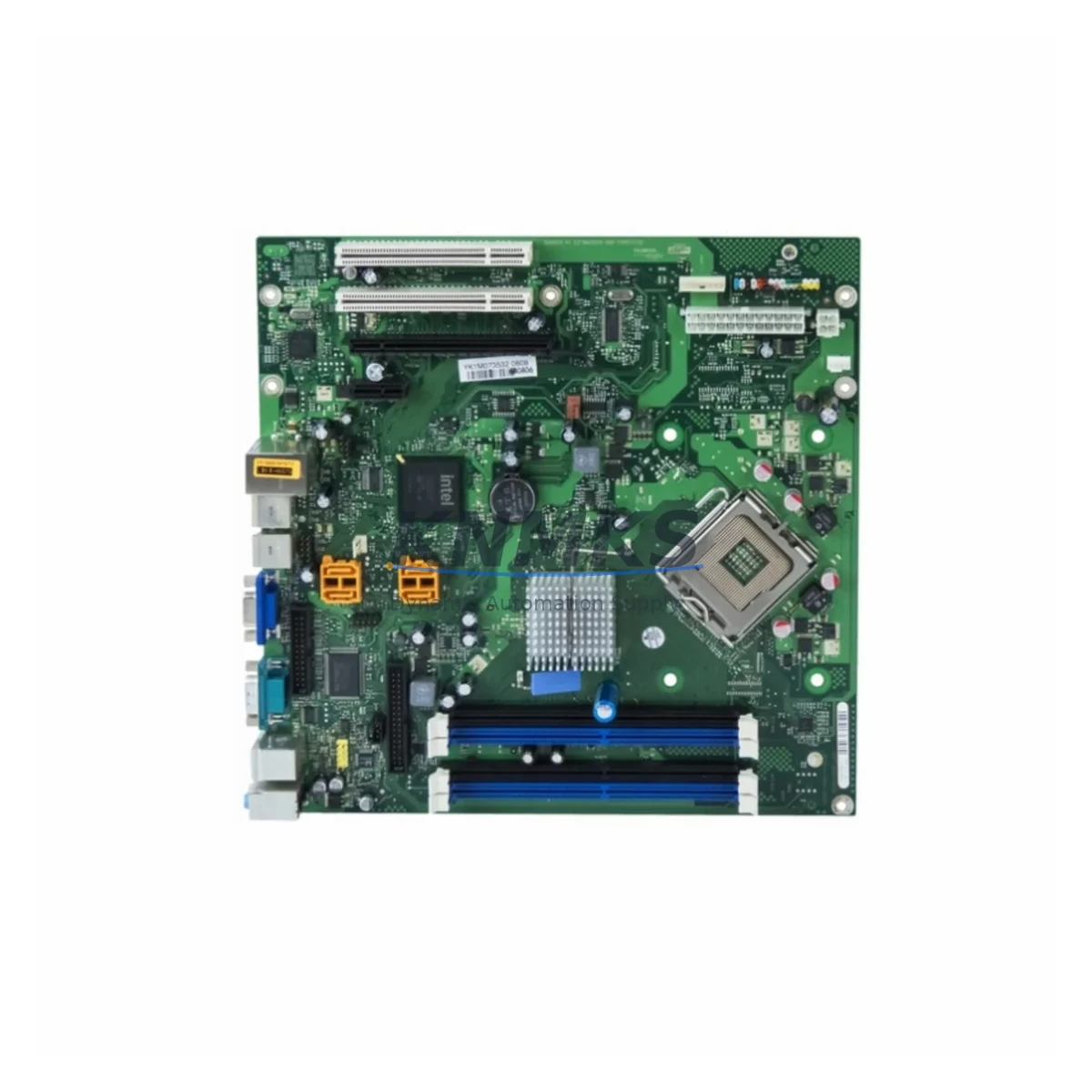
Siemens A5E03383663 Migration-Ready CPU Motherboard for Legacy Control Systems
The Siemens A5E03383663 is a CPU motherboard engineered for the SIMATIC S7-400 platform — one of the most widely deployed high-availability PLC families in process automation, power generation, and heavy manufacturing. As legacy S7-400 systems approach end-of-support milestones, the A5E03383663 serves as a critical migration-ready replacement that allows engineering teams to restore full CPU functionality without committing to a full control system overhaul. This board is sourced from verified supply channels, pre-shipment tested, and backed by a support terms confirmed by quotation, making it a reliable choice for both emergency breakdown recovery and planned retrofit programs.
Facilities running aging SIMATIC S7-400 racks — particularly those built around CPU 414, CPU 416, or CPU 417 processor modules — frequently encounter motherboard-level failures caused by capacitor degradation, power surge damage, or long-term thermal cycling. In these scenarios, replacing the A5E03383663 CPU motherboard is significantly faster and more cost-effective than sourcing a complete CPU module assembly. The board retains compatibility with existing backplane interfaces, rack mounting geometry, and the S7-400 bus architecture, allowing engineers to restore the original program logic without rewriting PLC code or reconfiguring the hardware configuration in STEP 7 or TIA Portal.
Before installation, engineers should verify the power supply module — typically a PS 407 or PS 405 series unit — is delivering stable 24 VDC and 5 VDC rails within tolerance, as CPU motherboard failures are sometimes symptomatic of upstream power irregularities. Terminal wiring on the front connector and backplane slot addressing should be confirmed against the original hardware configuration file to prevent address conflicts after the board swap. Firmware version compatibility between the replacement A5E03383663 and the installed CPU module version must also be validated; mismatched firmware can prevent the CPU from entering RUN mode or cause communication faults on the MPI/PROFIBUS DP network.
In multi-rack S7-400 installations, the A5E03383663 replacement process must account for the IM 460 / IM 461 interface modules that link the central rack to expansion racks. Disrupting the CPU motherboard without properly documenting the rack topology and I/O module addressing can result in extended commissioning time. Engineers are advised to export the full hardware configuration from STEP 7 prior to any board-level intervention and to retain a backup of the CPU memory card contents. Where the system includes CP 443 communication processors for Industrial Ethernet or PROFINET connectivity, the network parameters and device names should be documented before the retrofit begins to ensure seamless re-integration after the board replacement.
For facilities planning a broader migration from S7-400 to S7-1500 or PCS 7 v9.x, the A5E03383663 provides a cost-effective bridge solution that extends the operational life of the existing control cabinet while the migration project is scoped and budgeted. This approach is particularly valuable in continuous-process environments — such as chemical plants, oil and gas facilities, and water treatment stations — where unplanned downtime carries significant operational and safety consequences. By stabilizing the existing S7-400 CPU with a verified replacement motherboard, engineering teams gain the runway needed to execute a structured, phased migration without emergency pressure.
Migration Compatibility Table
| Parameter | Details |
|---|---|
| SKU / Part Number | A5E03383663 |
| Compatible Platform | SIMATIC S7-400 (CPU 414, CPU 416, CPU 417 series) |
| Backplane Interface | S7-400 P-bus / K-bus compatible |
| Communication Compatibility | MPI, PROFIBUS DP, Industrial Ethernet (via CP 443) |
| Rack Mounting | UR1 / UR2 universal rack; standard S7-400 slot geometry |
| Power Requirements | 5 VDC / 24 VDC via PS 407 or PS 405 power supply module |
| Firmware Compatibility | Verify CPU firmware version before installation; update via STEP 7 / TIA Portal if required |
| Programming Environment | STEP 7 v5.x, TIA Portal V15.1+ (with legacy support) |
| Replacement Recommendation | Direct board-level replacement; no rack modification required |
| Installation Space | Standard S7-400 CPU slot; no additional clearance required |
| Pre-Shipment Testing | Yes — functional and burn-in tested before dispatch |
| Support terms | 12 Months |
| Origin | Germany |
| Dispatch | Global express shipping; same-day or next-day dispatch available |
Retrofit Planning for Existing Automation Systems
A successful A5E03383663 retrofit begins with a thorough audit of the existing S7-400 control cabinet. Engineers should document the slot assignments of all installed modules — including the CPU module, PS 407 power supply, CP 443-1 Ethernet communication processor, FM 455 function modules, and any SM 421 / SM 422 digital I/O modules — before removing the faulty motherboard. This documentation ensures that module addresses and I/O channel assignments are preserved exactly during reassembly, preventing the need for a full hardware reconfiguration cycle in STEP 7.
Where the S7-400 system interfaces with a WinCC or PCS 7 HMI station, the HMI project’s hardware configuration must be cross-referenced against the CPU’s MPI address and PROFIBUS DP network parameters. After the A5E03383663 board replacement, the CPU should be brought online in STOP mode first, with the HMI communication link verified before switching to RUN. In systems using redundant CPU configurations — such as H-system setups with two CPU 417-H modules — the standby CPU should remain active during the primary CPU board replacement to maintain process continuity. The IM 460-3 / IM 461-3 interface modules connecting expansion racks should be left undisturbed throughout the procedure to avoid I/O bus interruptions.
For sites migrating from older S5-series controllers to S7-400, the A5E03383663 replacement is often part of a broader modernization that also involves updating the programming cable from a PC adapter to a USB-MPI adapter or PROFIBUS USB interface, and converting legacy S5 ladder logic to STL or FBD in STEP 7. In these scenarios, the CPU motherboard replacement is the hardware foundation upon which the software migration is built.
Downtime Control During System Migration
Minimizing downtime during a CPU motherboard replacement on an S7-400 system requires careful pre-staging and a disciplined execution sequence. Before the maintenance window opens, the replacement A5E03383663 board should be on-site and verified against the original part number. A full backup of the CPU program — including the OB, FB, FC, and DB blocks — should be saved to the memory card and to an offline STEP 7 project on the engineering workstation. This ensures that if the replacement board requires a fresh program load, the upload can be completed within minutes rather than hours.
During the swap, the CPU should be placed in STOP mode and the PS 407 power supply switched off before any board-level work begins. The memory card should be transferred from the original CPU to the replacement board to preserve the loaded program and retain the CPU’s configured MPI address and PROFIBUS DP parameters. After power-up, the CPU should be observed through STEP 7’s online diagnostics to confirm that all I/O modules are recognized, no hardware faults are logged, and the PROFIBUS DP network is operating without bus errors. Communication with the CP 443-1 Ethernet module and any connected HMI or SCADA stations should be verified before the CPU is released to RUN mode.
In facilities where process continuity is critical, the replacement should be scheduled during a planned maintenance window with the process safely isolated. Where hot-standby redundancy is available via an H-system configuration, the switchover to the standby CPU should be tested prior to the maintenance window to confirm that automatic failover is functioning correctly. This approach reduces the effective downtime of the replacement procedure to near zero for the controlled process, with only the CPU board swap itself requiring a brief interruption to the primary controller.
Retrofit Support FAQ
Q: Is the A5E03383663 a direct replacement for the original Siemens S7-400 CPU motherboard?
A: Yes. The A5E03383663 is a board-level replacement compatible with the SIMATIC S7-400 CPU platform. It fits the standard S7-400 CPU slot geometry and interfaces with the existing backplane without rack modification. The original memory card and hardware configuration are retained, minimizing reconfiguration effort.
Q: What commissioning steps are required after installing the A5E03383663?
A: After installation, power up the CPU in STOP mode and use STEP 7 or TIA Portal to perform an online hardware comparison. Verify that all I/O modules, communication processors, and function modules are recognized without faults. Confirm PROFIBUS DP and MPI network integrity, then transfer the program from the memory card and switch to RUN mode. HMI communication should be verified as the final step before returning the system to production.
Q: How is the A5E03383663 tested before shipment?
A: Every A5E03383663 unit undergoes functional testing and burn-in verification prior to dispatch. Units are inspected for physical integrity, board-level component condition, and electrical performance. A support terms confirmed by quotation is provided from the date of shipment, covering manufacturing defects and functional failures under normal operating conditions.
Q: What is the typical lead time and stock availability?
A: The A5E03383663 is maintained availability confirmed by RFQ for immediate dispatch. Global express shipping is available, with same-day or next-day dispatch for confirmed orders. For large-quantity requirements or long-term supply agreements, please contact the sales team directly to discuss availability and scheduling.
© 2026 KNMKS. All rights reserved.
Original Source: https://knmks.com
Contact: admin@knmks.com | +86 18359268345
Product Identification
- Brand / Ecosystem
-
Siemens
Siemens - Model / Series
- A5E03383663
- Product Family
- PLCs & Controllers
- Availability Status
- Available on request after model and quantity confirmation
- Inquiry Type
- B2B RFQ, replacement inquiry and project spare-part request
- Pre-Quote Check
- Exact SKU, brand, series, quantity, nameplate photos and destination country are checked before quotation
System Path
Where this product fits in the KNMKS automation structure.
Specification & Inquiry Focus
- Control platform
- PLC, PAC and modular controllers
- Common needs
- CPU, rack, power and I/O expansion
- Project support
- Replacement, cabinet build and maintenance
Buyer Confirmation
Information KNMKS checks before replying.
- Exact model
- A5E03383663
- Brand / ecosystem
- Siemens
- Product family
- PLCs & Controllers
- Application note
- Replacement, maintenance, project build or spare-part list
- Useful photos
- Nameplate, installed unit, cabinet layout or connector side
- Delivery details
- Quantity, destination country and target schedule
Document Support
Files and notes can be confirmed during quotation.
- Product photos or nameplate confirmation when available
- Packing and delivery notes before quotation confirmation
- Support scope and delivery terms confirmed per inquiry
- Export document coordination for qualified B2B requests
Inquiry Support
- Model cross-checking before quotation
- CPU, power, rack and expansion module matching
- Support for replacement and project inquiry
What to Send Us
- Brand and exact model number: Siemens A5E03383663
- Quantity and required delivery time
- Application, replacement requirement or nameplate photo
- Destination country and shipping preference
RFQ Preparation
This is a product inquiry page built for RFQ communication.
Fast Model Check
Send this model to KNMKS for confirmation.
Include quantity, destination country and photos if this is a maintenance replacement. The inquiry will be saved with a reference number after submission.
Brand & Compatibility Note
KNMKS displays automation product information for well-known industrial brand ecosystems and compatible replacement references. Brand names are used for product identification and compatibility reference only; final availability and commercial terms are confirmed per quotation.
 Manufacturing
 Machine Tools
 Packaging
 Energy & Power



 HMI & Displays
 Servo Systems
 Variable Frequency Drives
 Sensors