
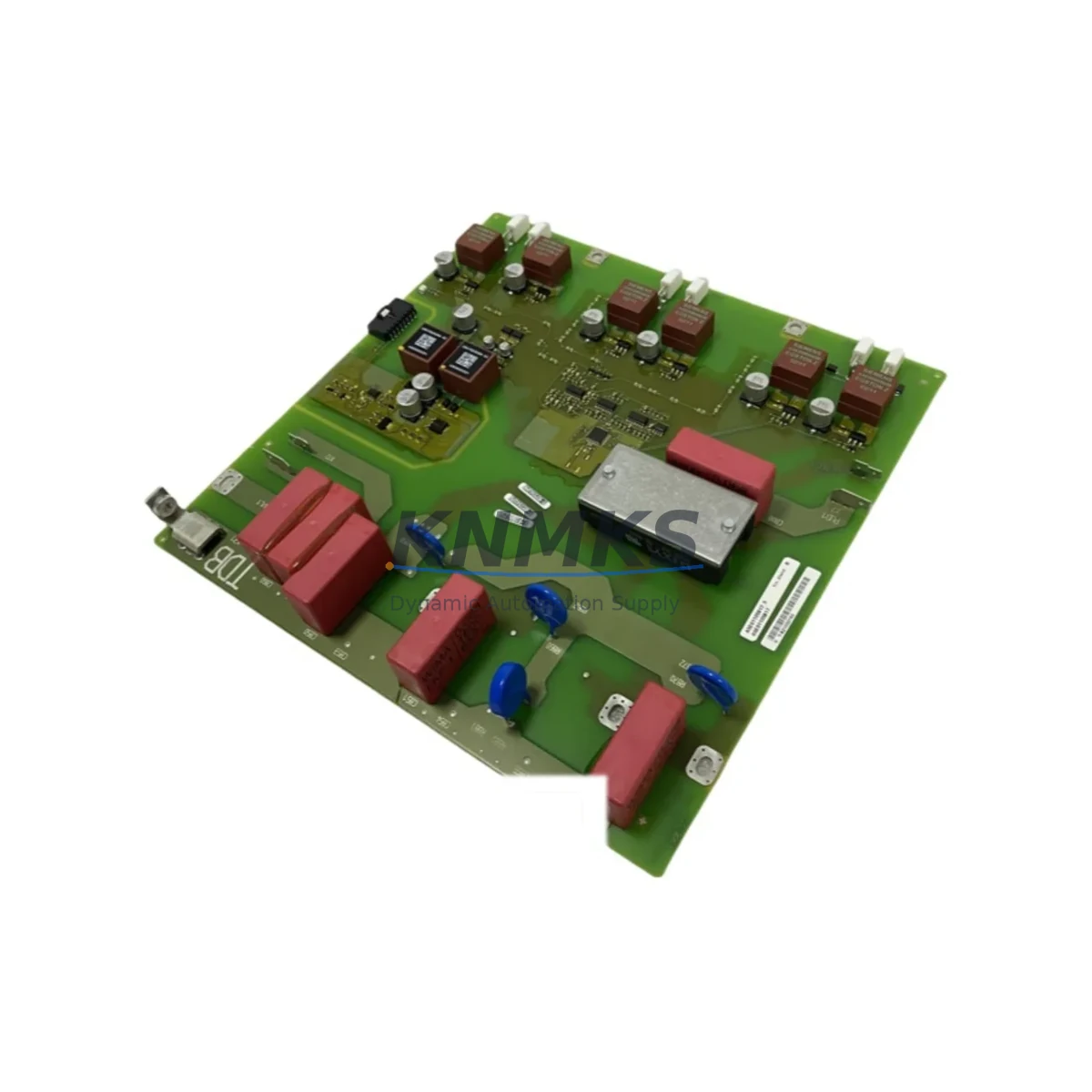
Overview
Siemens A5E00677657 Migration-Ready Power Supply for Legacy Control Systems
The Siemens A5E00677657 is a migration-ready power supply module engineered for engineers and maintenance teams managing the transition from aging SIMATIC S7-300 and S7-400 control architectures to modernized automation platforms. As legacy Siemens power supply modules reach end-of-life and original spare parts become increasingly scarce, the A5E00677657 provides a verified drop-in replacement path that preserves existing rack geometry, terminal wiring layouts, and backplane power distribution — dramatically reducing the engineering effort required during a live system retrofit.
When planning a retrofit around the A5E00677657, the first checkpoint is always power budget verification. The module must be confirmed against the total current draw of all installed I/O modules, communication processors, and interface modules sharing the same S7-300 rack. In multi-rack configurations using IM 360 / IM 361 expansion interfaces, the power supply’s output capacity must account for the aggregate load across all connected expansion racks. Failure to validate this before cutover is one of the most common causes of unexpected shutdowns during commissioning.
Terminal wiring compatibility is the next critical step. The A5E00677657 uses the standard Siemens S7-300 24 VDC input terminal arrangement. Before disconnecting the legacy unit, technicians should photograph and document all existing wire labels, ferrule sizes, and torque specifications. In older installations, terminal blocks may have been modified or extended with third-party DIN rail accessories — these must be re-evaluated for compatibility with the replacement module’s housing depth and connector pitch.
Backplane slot addressing is handled automatically by the S7-300 rack architecture, so no manual module address reconfiguration is required when swapping the power supply. However, if the retrofit is part of a broader migration that also involves replacing CPU modules — for example, moving from a CPU 315-2 DP to a CPU 317-2 PN/DP — the program block structure, OB interrupt assignments, and hardware configuration in STEP 7 or TIA Portal must be re-validated. The A5E00677657 itself does not affect PLC program logic, but any simultaneous CPU swap will require a full hardware configuration download and a cold restart sequence.
Communication link continuity is another area requiring careful pre-migration planning. In systems where PROFIBUS DP networks are managed through CP 342-5 or CP 343-1 communication processors installed in the same rack, the power supply replacement window must be coordinated with the network master to avoid unintended DP slave dropouts. Similarly, if the control cabinet includes an ET 200M distributed I/O station connected via IM 153-2 interface modules, the power supply swap should be scheduled during a planned maintenance window with the PROFIBUS master placed in STOP mode to prevent spurious fault alarms propagating to the SCADA or HMI layer.
HMI screen validation is often overlooked during power supply retrofits. If the installation includes a SIMATIC TP or MP series operator panel communicating via MPI or PROFIBUS, the panel’s connection parameters and PLC address assignments should be verified post-restart to confirm that the HMI project’s variable tables remain correctly mapped after the power cycle. In some legacy installations, HMI projects were compiled against older hardware configurations that may not reflect the current rack layout — this is the right moment to audit and update those projects.
Installation space confirmation is straightforward for the A5E00677657, as it occupies the standard PS 307 form factor used across the S7-300 family. However, in densely populated control cabinets where cable management trays, terminal marshalling blocks, and adjacent frequency inverters or safety relays have been added over time, the physical extraction and re-insertion of the power supply module may require temporary removal of adjacent wiring harnesses. Planning for this access constraint in advance prevents damage to neighboring components during the swap.
Firmware compatibility is not a concern for the A5E00677657 as a power supply module — it contains no user-programmable firmware. However, if the retrofit is being performed alongside a CPU firmware update or a STEP 7 / TIA Portal project migration, the sequence of operations matters: complete the power supply swap and verify stable DC bus output before initiating any CPU firmware update to avoid compounding fault conditions.
Pre-shipment testing is performed on every A5E00677657 unit prior to dispatch. Each module is powered up, output voltage and ripple are measured under load, and the 24 VDC output is verified against Siemens factory specifications. Units are shipped with protective packaging to prevent connector damage in transit. A support terms confirmed by quotation cover all verified defects in materials and workmanship from the date of delivery.
Migration Compatibility Table
| Parameter | Details |
|---|---|
| Compatible Rack | SIMATIC S7-300 standard rail (DIN EN 50022) |
| Input Voltage | 120/230 VAC, 50/60 Hz (auto-ranging) |
| Output Voltage | 24 VDC regulated |
| Backplane Interface | S7-300 standard backplane bus connector |
| Communication Compatibility | MPI, PROFIBUS DP (via CPU/CP modules in same rack) |
| Replaces Legacy Models | 6ES7307-1BA01-0AA0, 6ES7307-1EA01-0AA0 (verify output current rating) |
| Installation Form Factor | PS 307 standard — no rack modification required |
| Firmware | None (hardware module, no user firmware) |
| Commissioning Requirement | Cold restart after installation; verify DC bus voltage before CPU RUN |
| Support terms | 12 months from delivery date |
| Pre-Shipment Test | Output voltage, ripple, and load test performed on every unit |
| Country of Origin | Germany |
Retrofit Planning for Existing Automation Systems
A successful retrofit built around the A5E00677657 rarely involves the power supply in isolation. In most legacy S7-300 installations, the power supply replacement is the trigger point for a broader system health audit. Maintenance teams frequently discover that aging SM 321 digital input modules or SM 331 analog input modules in the same rack have accumulated contact wear or calibration drift that warrants simultaneous replacement. Addressing these I/O modules during the same maintenance window avoids a second planned outage within a short interval.
In control cabinets where the S7-300 rack shares enclosure space with a SINAMICS G120 or MICROMASTER 440 variable frequency drive, the power supply swap must account for conducted interference on the 24 VDC bus. Proper PE bonding and shielded cable routing between the power supply output terminals and the CPU module’s power input should be verified and re-torqued during the retrofit. If the cabinet also houses a SITOP PSU100S power supply for auxiliary 24 VDC loads — such as solenoid valves, indicator lamps, or safety relay coils — the load distribution between the PLC power supply and the SITOP unit should be re-documented to reflect any load changes introduced during the upgrade.
For systems where the retrofit scope extends to communication infrastructure, replacing or upgrading a CP 343-1 Lean Ethernet communication processor in the same rack during the A5E00677657 swap is a common efficiency measure. This allows the team to perform a single hardware configuration download in TIA Portal covering both the new power supply rack layout and the updated CP module parameters, rather than scheduling two separate download windows. Similarly, if the installation uses a TS Adapter II or PC Adapter USB for programming cable access, confirming that the adapter firmware is compatible with the TIA Portal version in use prevents last-minute commissioning delays.
Signal isolators and marshalling panels between field instruments and the S7-300 I/O modules should also be inspected during the retrofit window. In older installations, PHOENIX CONTACT or Pepperl+Fuchs signal conditioning modules may have been installed in intermediate terminal cabinets to adapt 4–20 mA field signals to the S7-300’s analog input range. These isolators have their own service life and should be evaluated for replacement if the overall system is being modernized.
Downtime Control During System Migration
Minimizing unplanned downtime during a power supply retrofit requires a structured pre-migration checklist executed before the first terminal is disconnected. The most effective approach is to perform a full CPU memory backup — uploading the current program blocks, data blocks, and hardware configuration from the CPU to a programming device — immediately before the maintenance window begins. This backup serves as the recovery baseline if any unexpected issue arises during the swap.
The physical swap of the A5E00677657 should be performed with the rack de-energized and the 24 VDC output bus fully discharged. After installation, the DC bus output voltage should be measured at the CPU module’s power input terminals before the CPU is switched to RUN mode. A stable 24.0–24.5 VDC reading confirms correct installation. If the voltage is outside this range, the cause must be identified and resolved before proceeding — common causes include loose terminal connections, incorrect input voltage tap selection, or an overloaded output bus.
Once the CPU is in RUN mode and the PROFIBUS DP network has re-established all slave connections, the HMI operator panel should be checked for correct variable display and alarm status. In installations where the S7-300 communicates with a WinCC or WinCC flexible SCADA system, the SCADA server’s OPC connection to the PLC should be verified to confirm that all process values are updating correctly before the maintenance window is formally closed.
Documenting the completed retrofit — including the replaced module’s serial number, installation date, terminal torque values, and post-installation test results — creates a traceable maintenance record that supports future audits and support requests. This documentation is particularly important in regulated industries such as pharmaceuticals, food processing, and energy, where equipment change records are subject to compliance review.
Retrofit Support FAQ
Q: Is the A5E00677657 a direct drop-in replacement for my existing S7-300 power supply?
A: In most S7-300 rack configurations, yes. The A5E00677657 uses the standard PS 307 form factor and backplane connector, so no rack modification is required. You should verify the output current rating matches or exceeds your existing module’s specification to ensure adequate power budget for all installed I/O and communication modules.
Q: What commissioning steps are required after installation?
A: After physically installing the module and reconnecting all terminals, measure the 24 VDC output at the CPU power input before switching the CPU to RUN. Confirm all PROFIBUS DP slaves reconnect successfully, verify HMI variable displays, and check SCADA OPC connections if applicable. No program download is required unless a simultaneous CPU or hardware configuration change is being made.
Q: How is the unit tested before shipment?
A: Every A5E00677657 unit undergoes a pre-shipment functional test covering output voltage accuracy, ripple measurement, and load verification against Siemens factory specifications. Test results are reviewed before the unit is packaged and dispatched. A support terms confirmed by quotation covering materials and workmanship defects applies from the delivery date.
Q: What is the lead time and stock availability?
A: Units are held availability confirmed by RFQ and are available for immediate dispatch. Standard lead time from order confirmation to shipment is 1–3 business days. For urgent retrofit requirements or bulk orders, please contact our sales team directly to confirm current inventory levels and expedited shipping options.
© 2026 KNMKS. All rights reserved.
Original Source: https://knmks.com
Contact: admin@knmks.com | +86 18359268345
Product Identification
- Brand / Ecosystem
-
Siemens
Siemens - Model / Series
- A5E00677657
- Product Family
- Power Supplies
- Availability Status
- Available on request after model and quantity confirmation
- Inquiry Type
- B2B RFQ, replacement inquiry and project spare-part request
- Pre-Quote Check
- Exact SKU, brand, series, quantity, nameplate photos and destination country are checked before quotation
System Path
Where this product fits in the KNMKS automation structure.
Specification & Inquiry Focus
- Power range
- DIN rail and switching power supplies
- Common needs
- Voltage, current and mounting style
- Project support
- Control cabinet and panel-builder inquiries
Buyer Confirmation
Information KNMKS checks before replying.
- Exact model
- A5E00677657
- Brand / ecosystem
- Siemens
- Product family
- Power Supplies
- Application note
- Replacement, maintenance, project build or spare-part list
- Useful photos
- Nameplate, installed unit, cabinet layout or connector side
- Delivery details
- Quantity, destination country and target schedule
Document Support
Files and notes can be confirmed during quotation.
- Product photos or nameplate confirmation when available
- Packing and delivery notes before quotation confirmation
- Support scope and delivery terms confirmed per inquiry
- Export document coordination for qualified B2B requests
Inquiry Support
- 24VDC and cabinet power selection support
- Stable power support for PLC and HMI systems
- Batch inquiry support for panel builders
What to Send Us
- Brand and exact model number: Siemens A5E00677657
- Quantity and required delivery time
- Application, replacement requirement or nameplate photo
- Destination country and shipping preference
RFQ Preparation
This is a product inquiry page built for RFQ communication.
Fast Model Check
Send this model to KNMKS for confirmation.
Include quantity, destination country and photos if this is a maintenance replacement. The inquiry will be saved with a reference number after submission.
Brand & Compatibility Note
KNMKS displays automation product information for well-known industrial brand ecosystems and compatible replacement references. Brand names are used for product identification and compatibility reference only; final availability and commercial terms are confirmed per quotation.
 Manufacturing
 Machine Tools
 Packaging
 Energy & Power
 PLCs & Controllers
 HMI & Displays
 Servo Systems
 Variable Frequency Drives