
Overview
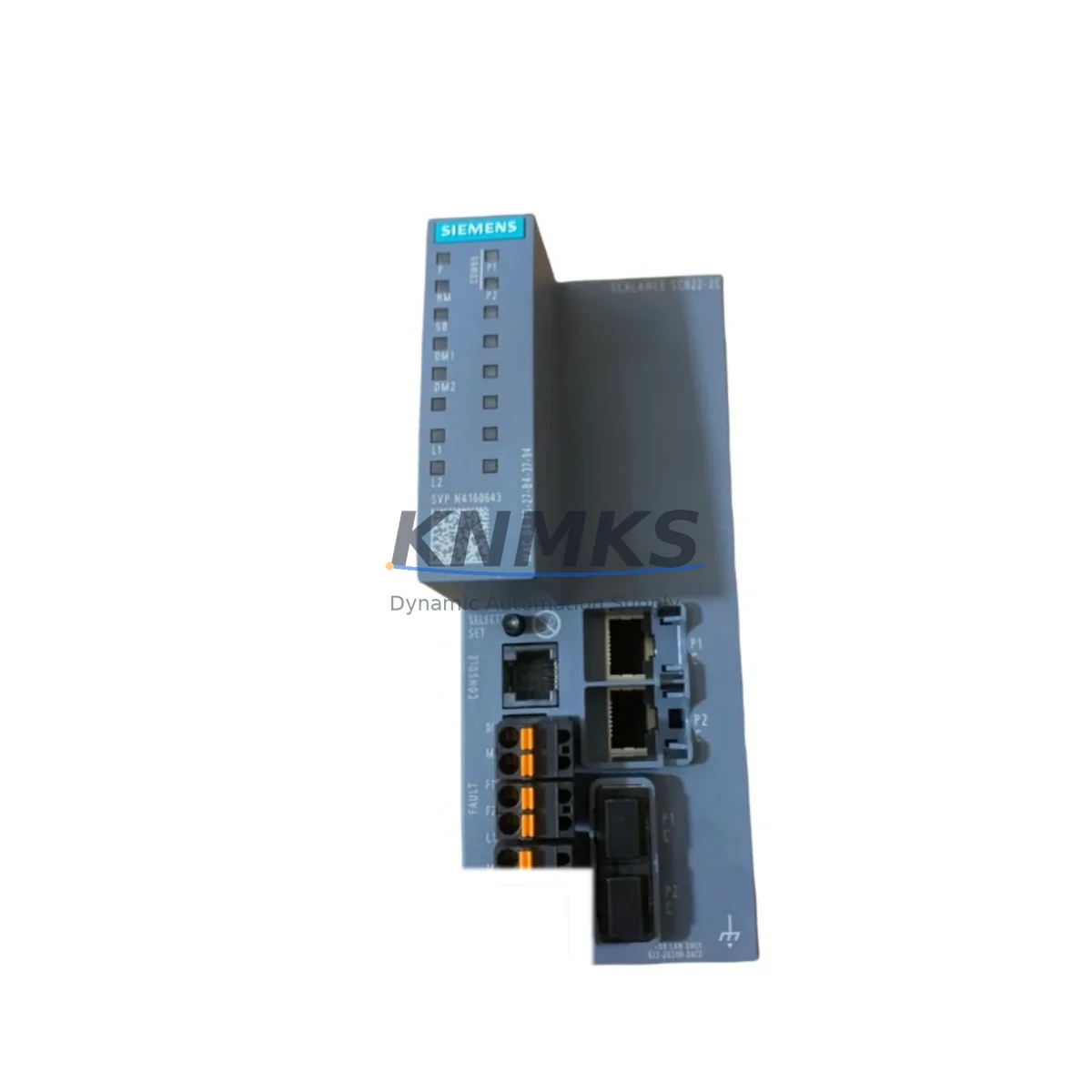
Siemens 6GK5646-2GS00-2AC2 Maintenance-Proven Spare Part for Factory Uptime
The Siemens 6GK5646-2GS00-2AC2 is a managed industrial Ethernet switch from the SCALANCE XC-200 series, engineered for demanding automation environments where network reliability directly determines production continuity. As a maintenance-proven spare part, this module supports rapid fault recovery in PROFINET, PROFIBUS-over-Ethernet, and general industrial LAN architectures. Maintenance engineers and procurement teams managing aging SIMATIC, SINUMERIK, or SIMOTION control systems rely on this switch to sustain uptime when the primary unit fails or degrades.
The 6GK5646-2GS00-2AC2 provides 24 x 10/100 Mbit/s RJ45 ports and 2 x 1000 Mbit/s SFP combo ports, making it suitable for backbone and edge network roles in control cabinets, machine cells, and plant-wide Ethernet rings. Its managed feature set — including VLAN, RSTP/MRP ring redundancy, SNMP, and port mirroring — ensures that replacement does not require network redesign. The unit operates on a 24 VDC supply rail, compatible with standard SIMATIC ET 200 and S7-300/400/1500 cabinet power distributions.
For facilities running continuous processes — chemical, pharmaceutical, food and beverage, automotive assembly, or utilities — unplanned network switch failure can cascade into full line stoppages. Stocking the 6GK5646-2GS00-2AC2 as a certified spare eliminates the 4–12 week lead time risk associated with new procurement during an emergency. Each unit shipped by KNMKS is function-tested prior to dispatch and covered by a support terms confirmed by quotation, giving maintenance planners a reliable, audit-ready replacement path.
Spare Maintenance Table
| Part Number | 6GK5646-2GS00-2AC2 |
| Brand | Siemens |
| Series | SCALANCE XC-200 |
| Product Type | Managed Industrial Ethernet Switch |
| Port Configuration | 24 x 10/100 Mbit/s RJ45 + 2 x 1000 Mbit/s SFP Combo |
| Supply Voltage | 24 VDC (18–32 VDC operating range) |
| Redundancy Protocol | RSTP, MRP (Media Redundancy Protocol) |
| Management | SNMP v1/v2c/v3, Web UI, CLI, PROFINET IO Device |
| Mounting | DIN rail, 35 mm |
| Protection Rating | IP30 |
| Operating Temperature | -40 °C to +70 °C |
| Origin | Germany |
| Compatibility | SIMATIC S7-300/400/1500, ET 200, SINUMERIK, SIMOTION, PROFINET networks |
| Support terms | 12 Months — Tested & Verified Before Shipment |
| Shipping | Global Express — DHL / FedEx / UPS |
Maintenance Planning for Continuous Operation
When a 6GK5646-2GS00-2AC2 is flagged for replacement during a scheduled cabinet inspection or after a network fault event, the maintenance scope should extend beyond the switch itself. A thorough site assessment reduces the risk of repeat failures and ensures the restored network segment performs reliably through the next maintenance cycle.
Begin by verifying the 24 VDC power supply rail feeding the switch — units such as the Siemens SITOP PSU100S or equivalent 24 VDC DIN rail power supplies should be load-tested and inspected for output ripple or thermal stress. A degraded power supply is a common root cause of intermittent switch faults that are misdiagnosed as switch hardware failure.
Inspect all RJ45 patch cables and SFP fiber transceivers connected to the switch. Industrial Ethernet cables rated for flex-cycle or drag-chain applications (e.g., SIMATIC NET IE FC TP Standard Cable GP 2×2) should be checked for continuity and shielding integrity. SFP modules — particularly 1000BASE-SX or 1000BASE-LX types used on the combo ports — should be verified for Siemens compatibility to avoid autonegotiation issues post-replacement.
For cabinets integrating PROFINET IO controllers such as the SIMATIC S7-1500 CPU or ET 200SP distributed I/O, confirm that the replacement switch is correctly configured as a PROFINET IO device with the same device name and IP address as the failed unit. Failure to replicate the PROFINET device identity will cause the PLC to report topology errors and halt I/O communication.
Review the terminal blocks and grounding connections on the switch’s power input. Loose PE (protective earth) connections or corroded terminal contacts on Phoenix Contact or Weidmüller-style terminal strips can introduce ground loops that degrade Ethernet signal quality. Torque all terminals to specification and apply anti-corrosion contact spray where appropriate.
If the cabinet includes a SCALANCE S security module or a SCALANCE W wireless access point on the same network segment, verify that firewall rules and VLAN assignments are preserved after the switch swap. Managed switch configurations should be backed up via the web interface or SINEMA Remote Connect before the replacement is performed, enabling a one-step configuration restore.
For plants using SIMATIC WinCC or TIA Portal-based SCADA/HMI systems, confirm that the HMI server can re-establish its Ethernet connection to the PLC and field devices within the expected timeout window. Network topology changes introduced by the switch replacement — even minor ones — can trigger alarm floods if HMI communication watchdog timers are not adjusted accordingly.
Site Replacement Workflow
Step 1 — Pre-replacement backup: Export the switch configuration via the SCALANCE XC-200 web interface (System > Load & Save > Export). Store the configuration file on a maintenance laptop or USB drive. Record the current IP address, subnet mask, device name, and VLAN table.
Step 2 — Safe isolation: Coordinate with the control room to place the affected PLC or DCS segment in a safe hold state. Disconnect the 24 VDC power supply to the switch. Label and photograph all cable connections before removal.
Step 3 — Physical swap: Remove the failed 6GK5646-2GS00-2AC2 from the DIN rail. Install the replacement unit. Reconnect all RJ45 and SFP cables in the documented port sequence. Reconnect the 24 VDC power terminals.
Step 4 — Configuration restore: Power on the replacement switch. Access the web interface via the default IP (192.168.1.1) or via SINEMA Network Manager. Import the saved configuration file. Verify that the device name, IP address, VLAN settings, and MRP ring role are correctly restored.
Step 5 — Network validation: Confirm PROFINET IO communication is re-established on the PLC. Check SNMP trap logs for any port errors. Verify MRP ring closure if the switch participates in a redundant ring topology. Resume normal production only after all network diagnostics are clear.
Step 6 — Documentation: Update the maintenance log with the replacement date, serial number of the new unit, and configuration file version. Schedule the next cabinet inspection within 6 months to verify thermal performance of the replacement unit under load.
Spare Parts Support FAQ
Q1: Is the 6GK5646-2GS00-2AC2 a direct drop-in replacement for older SCALANCE XC-200 variants?
Yes. The 6GK5646-2GS00-2AC2 is backward-compatible with earlier SCALANCE XC-200 firmware versions and maintains the same DIN rail footprint, port layout, and power connector pinout. Configuration files from predecessor units can typically be imported directly, minimizing commissioning time during emergency replacements.
Q2: How does KNMKS verify the unit before shipment?
Each 6GK5646-2GS00-2AC2 undergoes a functional test covering power-on self-test, port link negotiation, management interface access, and VLAN configuration verification. Units that fail any test stage are quarantined and not shipped. A test report is available upon request for quality-critical procurement processes.
Q3: What is the recommended stocking quantity for a plant with 10–20 SCALANCE XC-200 switches?
Industry best practice for managed industrial Ethernet switches in continuous-process environments is a 10–15% spare ratio. For a fleet of 10–20 units, maintaining 2–3 spare 6GK5646-2GS00-2AC2 modules on-site eliminates lead-time exposure during unplanned failures. KNMKS supports blanket-stock agreements for multi-unit procurement with staggered delivery schedules.
Q4: What is covered under the support terms confirmed by quotation?
The support terms confirmed by quotation cover hardware defects, port failure, power input faults, and management interface malfunctions under normal operating conditions. Support requests are processed within 5 business days. KNMKS provides advance replacement shipping for critical-process customers to minimize downtime during the support terms claim process. Contact admin@knmks.com for support terms registration and claim procedures.
© 2026 KNMKS. All rights reserved.
Original Source: https://knmks.com
Contact: admin@knmks.com | +86 18359268345
Product Identification
- Brand / Ecosystem
-
Siemens
Siemens - Model / Series
-
6GK5646-2GS00-2AC2
SIMATIC Series - Product Family
- Sensors
- Availability Status
- Available on request after model and quantity confirmation
- Inquiry Type
- B2B RFQ, replacement inquiry and project spare-part request
- Pre-Quote Check
- Exact SKU, brand, series, quantity, nameplate photos and destination country are checked before quotation
System Path
Where this product fits in the KNMKS automation structure.
Specification & Inquiry Focus
- Sensor range
- Photoelectric, proximity and process sensors
- Common needs
- Output type, distance and connector
- Project support
- Machine detection and replacement inquiry
Buyer Confirmation
Information KNMKS checks before replying.
- Exact model
- 6GK5646-2GS00-2AC2
- Brand / ecosystem
- Siemens
- Product family
- Sensors
- Application note
- Replacement, maintenance, project build or spare-part list
- Useful photos
- Nameplate, installed unit, cabinet layout or connector side
- Delivery details
- Quantity, destination country and target schedule
Document Support
Files and notes can be confirmed during quotation.
- Product photos or nameplate confirmation when available
- Packing and delivery notes before quotation confirmation
- Support scope and delivery terms confirmed per inquiry
- Export document coordination for qualified B2B requests
Inquiry Support
- NPN/PNP, analog and digital output checking
- Connector and cable compatibility review
- Fast inquiry support for maintenance teams
What to Send Us
- Brand and exact model number: Siemens 6GK5646-2GS00-2AC2
- Quantity and required delivery time
- Application, replacement requirement or nameplate photo
- Destination country and shipping preference
RFQ Preparation
This is a product inquiry page built for RFQ communication.
Fast Model Check
Send this model to KNMKS for confirmation.
Include quantity, destination country and photos if this is a maintenance replacement. The inquiry will be saved with a reference number after submission.
Brand & Compatibility Note
KNMKS displays automation product information for well-known industrial brand ecosystems and compatible replacement references. Brand names are used for product identification and compatibility reference only; final availability and commercial terms are confirmed per quotation.
 Manufacturing
 Machine Tools
 Packaging
 Energy & Power
 PLCs & Controllers
 HMI & Displays
 Servo Systems
 Variable Frequency Drives