
Overview
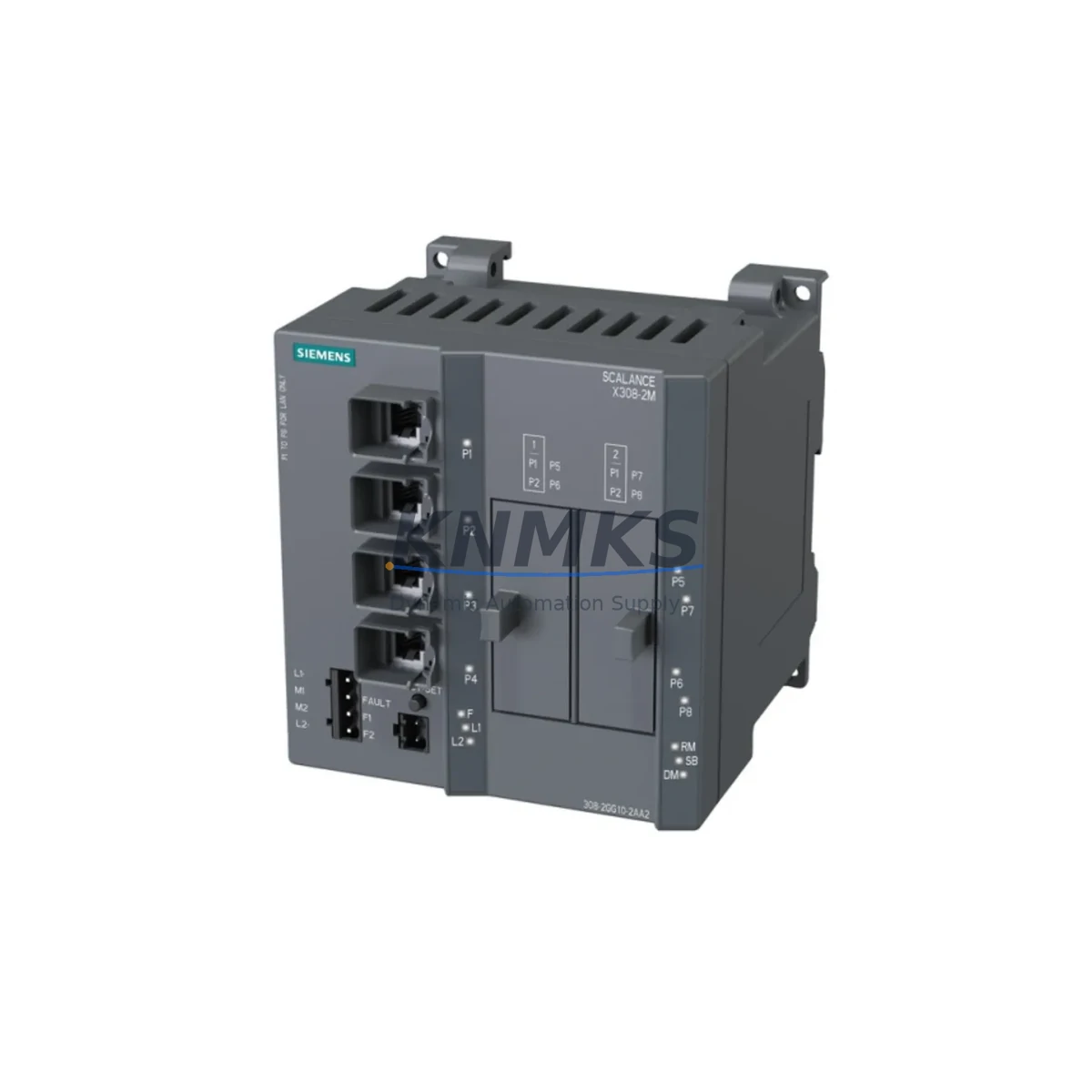
Siemens 6GK5308-2GG10-2AA2 Spare Part for Factory Uptime
The Siemens 6GK5308-2GG10-2AA2 is a managed industrial Ethernet switch from the SCALANCE X308-2 series, engineered for high-availability automation networks in demanding manufacturing, process, and infrastructure environments. As a maintenance-proven spare part, this unit supports PROFINET, PROFIBUS-adjacent topologies, and ring redundancy configurations that are critical to continuous production. Whether you are managing a scheduled annual overhaul, responding to an unplanned network fault, or building a strategic spare parts inventory for a multi-line facility, the 6GK5308-2GG10-2AA2 delivers the compatibility, reliability, and long-term supply assurance that maintenance and procurement engineers depend on.
Each unit dispatched from our warehouse undergoes pre-shipment functional testing, covering port integrity, power input verification, and firmware boot validation. This ensures that the replacement switch arrives site-ready, minimizing the time between fault identification and system restoration. With a support terms confirmed by quotation and confirmed global stock, this spare is suitable for emergency replacement orders as well as planned procurement cycles.
Spare Maintenance Table
| Parameter | Specification |
|---|---|
| Part Number | 6GK5308-2GG10-2AA2 |
| Product Series | SCALANCE X308-2 |
| Brand | Siemens |
| Product Type | Managed Industrial Ethernet Switch |
| Number of Ports | 8 × RJ45 (10/100/1000 Mbps) + 2 × SFP Combo |
| Network Protocols | PROFINET IO, SNMP, RSTP, MRP (Media Redundancy Protocol) |
| Redundancy Support | Ring topology, MRP, RSTP |
| Power Supply Input | 24 V DC (18–32 V DC operating range) |
| Power Consumption | Approx. 12 W (typical load) |
| Operating Temperature | -40 °C to +70 °C |
| Protection Rating | IP30 (DIN rail mount) |
| Mounting | DIN rail (35 mm) |
| Certifications | CE, UL, ATEX Zone 2 (variant-dependent) |
| Country of Origin | Germany |
| Compatibility | SIMATIC S7-300, S7-400, S7-1500, ET 200SP, ET 200M, PCS 7 |
| Firmware Management | SINEMA Server, STEP 7, TIA Portal |
| Support terms | 12 Months — Pre-Shipment Tested |
| Dispatch | Global Express Shipping Available |
Maintenance Planning for Continuous Operation
When replacing the 6GK5308-2GG10-2AA2 in a live automation network, a structured inspection of the surrounding electrical and communication infrastructure is essential to prevent repeat faults and ensure a stable restoration. Maintenance engineers should begin by verifying the 24 V DC power supply feeding the switch — a degraded or undersized power supply unit (PSU), such as a Siemens SITOP PSU100S or equivalent 24 V rail-mount supply, can cause intermittent switch resets that mimic hardware failure. Confirm input voltage is within the 18–32 V DC operating range before powering the replacement unit.
Inspect the SFP fiber modules installed in the combo ports. Dirty or aged SFP transceivers — particularly in long-distance fiber runs between control cabinets — are a common source of link instability that may have contributed to the original fault. Cleaning or replacing the SFP modules alongside the switch is a recommended best practice during any unplanned outage.
Review the PROFINET IO device table in TIA Portal or STEP 7 to confirm that the replacement switch retains the same IP address, device name, and port assignment as the failed unit. Mismatched PROFINET device names will prevent IO controllers such as the SIMATIC S7-1500 or S7-300 CPU from re-establishing communication after the swap. If the facility uses SINEMA Remote Connect or SINEMA Server for network monitoring, update the device inventory to reflect the replacement unit’s MAC address.
For facilities running Media Redundancy Protocol (MRP) ring topologies, verify that the replacement switch is configured as the correct MRP role — either Ring Manager or Ring Client — before connecting it to the ring. An incorrect MRP role assignment can cause a broadcast storm that disrupts the entire network segment. Additionally, inspect the terminal blocks and 24 V wiring at the switch’s power connector for signs of corrosion or loose terminations, as these are frequent causes of intermittent power faults in high-vibration environments.
Procurement engineers building a spare parts list for SCALANCE X-series infrastructure should also consider stocking the SCALANCE X204-2 for lower-density segments, the SCALANCE XR324-4M for rack-mount backbone applications, and the SCALANCE W700 series for wireless PROFINET extensions. Maintaining at least one cold spare of the 6GK5308-2GG10-2AA2 per production zone significantly reduces mean time to repair (MTTR) during unplanned network outages.
Site Replacement Workflow
The 6GK5308-2GG10-2AA2 is a direct replacement for earlier SCALANCE X308-2 variants and is backward-compatible with existing DIN rail mounting hardware, 24 V DC wiring, and SFP modules used in previous generations. The replacement workflow is as follows:
Step 1 — Isolation: Notify the control room and place the affected network segment in maintenance mode. If the switch is part of an MRP ring, the ring will automatically reconfigure to a linear topology upon switch removal, maintaining communication on the remaining segment.
Step 2 — Documentation: Before disconnecting the failed unit, photograph or record the port-to-cable mapping, IP address, subnet mask, VLAN assignments, and MRP role from the existing configuration. If accessible, export the switch configuration via SINEMA Server or the web interface.
Step 3 — Hardware Swap: Remove the failed switch from the DIN rail. Install the replacement 6GK5308-2GG10-2AA2, reconnect the 24 V DC power wiring, and reinstall all Ethernet and SFP connections per the documented port mapping.
Step 4 — Configuration Restore: Import the saved configuration file via TIA Portal, STEP 7, or the switch’s web interface. Confirm the PROFINET device name, IP address, and MRP role match the original settings. Power on and verify all port link indicators are active.
Step 5 — Validation: Confirm PROFINET IO communication is re-established on the connected controllers. Check SINEMA Server or the network diagnostic tool for any residual alarms. Resume normal production and document the replacement in the maintenance log.
This workflow is applicable to SIMATIC PCS 7, TIA Portal V15 and above, and legacy STEP 7 V5.x environments, ensuring compatibility across both modern and aging control system architectures.
Spare Parts Support FAQ
Q1: Is the 6GK5308-2GG10-2AA2 a new original unit or a refurbished spare?
All units are sourced as original Siemens spare parts. Each unit undergoes pre-shipment functional testing covering power-on, port link verification, and firmware boot confirmation. A support terms confirmed by quotation is provided from the date of dispatch, covering manufacturing defects and functional failures under normal operating conditions.
Q2: How do I confirm compatibility with my existing SCALANCE X308-2 installation?
The 6GK5308-2GG10-2AA2 is compatible with all standard SCALANCE X308-2 mounting hardware, 24 V DC power wiring, and SFP modules. Verify the firmware version required by your SINEMA Server or TIA Portal project. If your installation uses a specific firmware baseline, contact our technical team before ordering to confirm the shipped firmware version.
Q3: What is the lead time and can you support emergency replacement orders?
Stock is maintained across multiple warehouse locations to support both planned procurement and emergency dispatch. Express global shipping is available for critical downtime situations. Contact our sales team at admin@knmks.com or +86 18359268345 to confirm current stock availability and lead time for your region.
Q4: Can you supply the 6GK5308-2GG10-2AA2 on a long-term or blanket order basis?
Yes. We support long-term supply agreements for facilities managing multi-year maintenance contracts or phase-out risk for legacy SCALANCE X-series infrastructure. Blanket orders with scheduled releases are available to ensure consistent stock availability without requiring repeated procurement cycles. Reach out to discuss volume pricing and supply terms.
© 2026 KNMKS. All rights reserved.
Original Source: https://knmks.com
Contact: admin@knmks.com | +86 18359268345
Product Identification
- Brand / Ecosystem
-
Siemens
Siemens - Model / Series
-
6GK5308-2GG10-2AA2
SIMATIC Series - Product Family
- Sensors
- Availability Status
- Available on request after model and quantity confirmation
- Inquiry Type
- B2B RFQ, replacement inquiry and project spare-part request
- Pre-Quote Check
- Exact SKU, brand, series, quantity, nameplate photos and destination country are checked before quotation
System Path
Where this product fits in the KNMKS automation structure.
Specification & Inquiry Focus
- Sensor range
- Photoelectric, proximity and process sensors
- Common needs
- Output type, distance and connector
- Project support
- Machine detection and replacement inquiry
Buyer Confirmation
Information KNMKS checks before replying.
- Exact model
- 6GK5308-2GG10-2AA2
- Brand / ecosystem
- Siemens
- Product family
- Sensors
- Application note
- Replacement, maintenance, project build or spare-part list
- Useful photos
- Nameplate, installed unit, cabinet layout or connector side
- Delivery details
- Quantity, destination country and target schedule
Document Support
Files and notes can be confirmed during quotation.
- Product photos or nameplate confirmation when available
- Packing and delivery notes before quotation confirmation
- Support scope and delivery terms confirmed per inquiry
- Export document coordination for qualified B2B requests
Inquiry Support
- NPN/PNP, analog and digital output checking
- Connector and cable compatibility review
- Fast inquiry support for maintenance teams
What to Send Us
- Brand and exact model number: Siemens 6GK5308-2GG10-2AA2
- Quantity and required delivery time
- Application, replacement requirement or nameplate photo
- Destination country and shipping preference
RFQ Preparation
This is a product inquiry page built for RFQ communication.
Fast Model Check
Send this model to KNMKS for confirmation.
Include quantity, destination country and photos if this is a maintenance replacement. The inquiry will be saved with a reference number after submission.
Brand & Compatibility Note
KNMKS displays automation product information for well-known industrial brand ecosystems and compatible replacement references. Brand names are used for product identification and compatibility reference only; final availability and commercial terms are confirmed per quotation.
 Manufacturing
 Machine Tools
 Packaging
 Energy & Power
 PLCs & Controllers
 HMI & Displays
 Servo Systems
 Variable Frequency Drives