
Overview
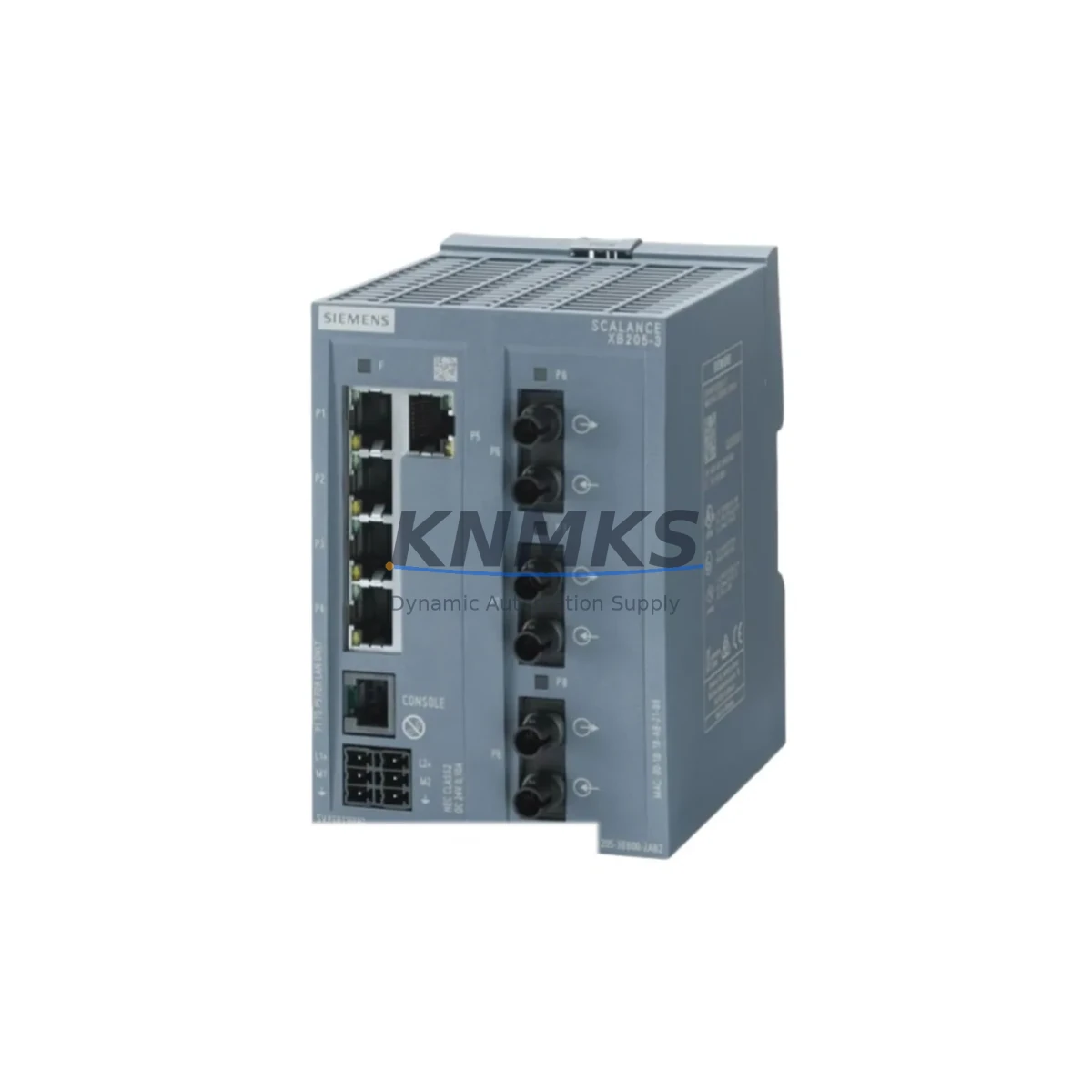
SIEMENS 6GK5205-3BB00-2AB2 Maintenance-Proven Spare Part for Factory Uptime
The SIEMENS 6GK5205-3BB00-2AB2 is a managed Industrial Ethernet switch from the SCALANCE X205-3 series, engineered for demanding automation environments where network reliability directly determines production continuity. As a critical communication backbone component in SIMATIC, PROFINET, and distributed I/O architectures, this switch is a high-priority spare for any maintenance engineer managing Siemens-based control cabinets, machine lines, or plant-wide Ethernet segments. KNMKS maintains verified stock of the 6GK5205-3BB00-2AB2 with full pre-shipment testing, support terms confirmed by quotation coverage, and long-term supply commitment to support both emergency replacement and planned annual maintenance cycles.
Spare Maintenance Table
| SKU / Part Number | 6GK5205-3BB00-2AB2 |
| Brand | SIEMENS |
| Series | SCALANCE X205-3 |
| Product Type | Managed Industrial Ethernet Switch |
| Port Configuration | 5 × RJ45 (10/100 Mbps) + 3 × SFP (100 Mbps fiber) |
| Network Protocol | PROFINET, SNMP, RSTP, VLAN (IEEE 802.1Q) |
| Supply Voltage | 24 V DC (SELV/PELV) |
| Power Consumption | Approx. 6.5 W (typical) |
| Operating Temperature | -40 °C to +70 °C |
| Protection Rating | IP30 |
| Mounting | DIN rail (35 mm) |
| Dimensions (W×H×D) | Approx. 60 × 125 × 124 mm |
| Weight | Approx. 425 g |
| Origin | Germany |
| Compatibility | SIMATIC S7-300/400/1200/1500, ET 200SP/MP, PROFINET IO systems, TIA Portal |
| Certifications | CE, UL, ATEX (Zone 2), IEC 61850-3 |
| Support terms | 12 Months — Covered by KNMKS from date of shipment |
| Condition | Original, New or Tested Surplus |
| Lead Time | availability confirmed by RFQ — Ships within 1–3 business days |
Maintenance Planning for Continuous Operation
In PROFINET-based production environments, the 6GK5205-3BB00-2AB2 typically sits at the field-level network layer, interconnecting SIMATIC PLCs, distributed I/O stations, drives, and HMI panels. When this switch is flagged for replacement during a scheduled cabinet inspection or after a network fault event, maintenance engineers should treat the intervention as an opportunity to audit the full communication and power chain within the same cabinet or ring segment.
Begin by verifying the 24 V DC supply rail feeding the switch. A degraded SITOP PSU100S or SITOP modular power supply unit can cause intermittent switch resets that mimic port failures — replacing the switch without addressing an unstable supply will result in repeat faults. Check the input voltage under load and inspect the terminal blocks (such as Weidmüller or Phoenix Contact PTFIX series) for oxidation or loose crimps on the 24 V feed lines.
Next, inspect the SFP fiber modules installed in the three SFP slots. The 6GK5205-3BB00-2AB2 supports 100 Mbps SFP transceivers; contaminated or end-of-life SFP modules (such as the SIEMENS 6GK5991-1AB00-8AA0 or compatible third-party 100BASE-FX units) are a common source of intermittent link loss that is often misattributed to the switch itself. Clean fiber connectors and verify optical power levels before condemning the switch.
For PROFINET IO systems, also review the PROFINET device configuration in TIA Portal. After installing the replacement 6GK5205-3BB00-2AB2, confirm the device name assignment and IP address via the “Accessible Devices” function. If the switch is part of an MRP (Media Redundancy Protocol) ring, verify ring manager and client roles are correctly reassigned. Failure to do so can leave the ring in an open state, eliminating redundancy protection.
During annual maintenance shutdowns, it is best practice to simultaneously inspect the SIMATIC ET 200SP or ET 200MP I/O modules connected downstream of this switch, as well as any CP 1543-1 or CP 343-1 communication processors that rely on this network segment. Signal isolators (such as SIEMENS SITRANS or Phoenix Contact MACX series) on analog I/O loops connected to the same cabinet should also be checked for drift. Fuse holders and miniature circuit breakers protecting the 24 V DC distribution should be tested for contact resistance. Maintaining a spare 6GK5205-3BB00-2AB2 alongside a spare SITOP power supply and a set of SFP modules in the local spare parts cabinet is the most effective strategy for minimizing mean time to repair (MTTR) on this network node.
Site Replacement Workflow
Step 1 — Pre-replacement documentation: Before powering down, capture the current switch configuration using STEP 7 or TIA Portal’s “Upload from device” function, or export the configuration via the switch’s web interface. Record all port assignments, VLAN settings, RSTP priorities, and MRP role configuration. This backup is essential if the replacement unit requires manual reconfiguration.
Step 2 — Safe isolation: Notify the control room of the planned network interruption. Isolate the 24 V DC supply to the switch using the dedicated MCB or fuse in the distribution panel. Do not disconnect fiber or copper cables under live power to avoid transient damage to connected PROFINET devices.
Step 3 — Physical swap: Remove the faulty 6GK5205-3BB00-2AB2 from the DIN rail. Transfer SFP modules carefully, inspecting each for physical damage. Mount the replacement unit, reconnect all cables in the original port sequence, and restore 24 V DC power.
Step 4 — Commissioning and verification: Assign the device name and IP address via TIA Portal or the switch’s integrated web server. Verify all PROFINET IO devices on the downstream segment come online without fault. Confirm MRP ring closure if applicable. Run a 15-minute observation period monitoring the PROFINET diagnostic buffer for any CRC errors, port flaps, or topology change notifications before returning the line to production.
Step 5 — Spare parts log update: Record the replacement in the maintenance management system (CMMS), update the spare parts inventory, and initiate a replenishment order for the consumed 6GK5205-3BB00-2AB2 unit to maintain buffer stock levels.
Spare Parts Support FAQ
Q1: Is the 6GK5205-3BB00-2AB2 a direct drop-in replacement for older SCALANCE X200 series switches?
The SCALANCE X205-3 (6GK5205-3BB00-2AB2) is backward-compatible with PROFINET IO systems configured for earlier SCALANCE X200 switches in most applications. Port count, SFP slot availability, and management features are equivalent or superior. However, if the original switch was configured with specific VLAN, QoS, or MRP settings, these must be manually restored on the replacement unit. KNMKS recommends verifying the TIA Portal hardware catalog entry and firmware version compatibility before installation in safety-critical segments.
Q2: What pre-shipment testing does KNMKS perform on the 6GK5205-3BB00-2AB2?
Every unit shipped by KNMKS undergoes power-on verification, port link-up testing on all RJ45 and SFP interfaces, and a functional check of the web management interface. Units are inspected for physical damage, connector integrity, and DIN rail clip condition. A test report is available upon request. All units are covered by a support terms confirmed by quotation from the date of shipment.
Q3: Can KNMKS support long-term or blanket order supply of the 6GK5205-3BB00-2AB2?
Yes. KNMKS supports blanket purchase orders and scheduled release agreements for customers managing multi-site maintenance programs or aging SCALANCE X200 infrastructure. Contact admin@knmks.com to discuss volume pricing, reserved stock allocation, and delivery scheduling. Long-term supply agreements are available to ensure continuity for systems where the 6GK5205-3BB00-2AB2 is no longer available through standard distribution channels.
Q4: How should the 6GK5205-3BB00-2AB2 be stored as a spare part?
Store in original anti-static packaging in a dry environment at 0 °C to +40 °C with relative humidity below 95% (non-condensing). Avoid storage near strong electromagnetic fields or corrosive atmospheres. Inspect stored units annually for connector oxidation and ESD bag integrity. KNMKS recommends rotating spare stock every 3–5 years to ensure units remain in optimal condition for emergency deployment.
© 2026 KNMKS. All rights reserved.
Original Source: https://knmks.com
Contact: admin@knmks.com | +86 18359268345
Product Identification
- Brand / Ecosystem
-
SIEMENS
Siemens - Model / Series
-
6GK5205-3BB00-2AB2
SIMATIC Series - Product Family
- Sensors
- Availability Status
- Available on request after model and quantity confirmation
- Inquiry Type
- B2B RFQ, replacement inquiry and project spare-part request
- Pre-Quote Check
- Exact SKU, brand, series, quantity, nameplate photos and destination country are checked before quotation
System Path
Where this product fits in the KNMKS automation structure.
Specification & Inquiry Focus
- Sensor range
- Photoelectric, proximity and process sensors
- Common needs
- Output type, distance and connector
- Project support
- Machine detection and replacement inquiry
Buyer Confirmation
Information KNMKS checks before replying.
- Exact model
- 6GK5205-3BB00-2AB2
- Brand / ecosystem
- SIEMENS
- Product family
- Sensors
- Application note
- Replacement, maintenance, project build or spare-part list
- Useful photos
- Nameplate, installed unit, cabinet layout or connector side
- Delivery details
- Quantity, destination country and target schedule
Document Support
Files and notes can be confirmed during quotation.
- Product photos or nameplate confirmation when available
- Packing and delivery notes before quotation confirmation
- Support scope and delivery terms confirmed per inquiry
- Export document coordination for qualified B2B requests
Inquiry Support
- NPN/PNP, analog and digital output checking
- Connector and cable compatibility review
- Fast inquiry support for maintenance teams
What to Send Us
- Brand and exact model number: SIEMENS 6GK5205-3BB00-2AB2
- Quantity and required delivery time
- Application, replacement requirement or nameplate photo
- Destination country and shipping preference
RFQ Preparation
This is a product inquiry page built for RFQ communication.
Fast Model Check
Send this model to KNMKS for confirmation.
Include quantity, destination country and photos if this is a maintenance replacement. The inquiry will be saved with a reference number after submission.
Brand & Compatibility Note
KNMKS displays automation product information for well-known industrial brand ecosystems and compatible replacement references. Brand names are used for product identification and compatibility reference only; final availability and commercial terms are confirmed per quotation.
 Manufacturing
 Machine Tools
 Packaging
 Energy & Power
 PLCs & Controllers
 HMI & Displays
 Servo Systems
 Variable Frequency Drives