
Overview
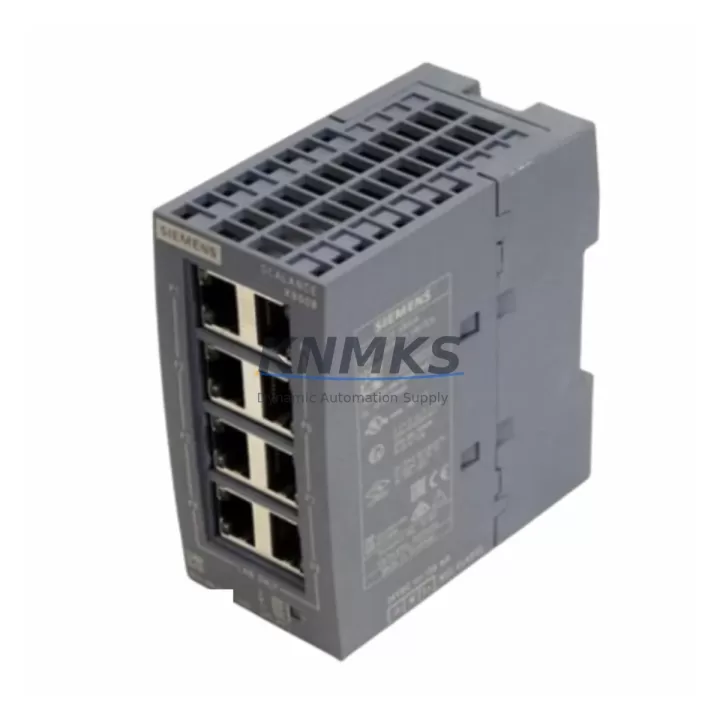
Siemens 6GK5008-0BA00-1AB2 Maintenance Spare SCALANCE X008: Reliable Ethernet Switching for Continuous Factory Uptime
The Siemens 6GK5008-0BA00-1AB2 is an 8-port unmanaged Industrial Ethernet switch from the SCALANCE X008 series, engineered for demanding factory floor environments where network continuity directly impacts production uptime. As a maintenance-proven spare part, this module is a critical component in PROFINET-based automation networks, control cabinet Ethernet backbones, and distributed I/O communication rings. Sourced as an original Siemens component, it is fully compatible with existing SCALANCE X-series infrastructure and integrates seamlessly into legacy and current-generation SIMATIC control architectures.
For maintenance engineers managing aging automation systems, having a verified spare of the 6GK5008-0BA00-1AB2 on the shelf is a fundamental risk mitigation strategy. Ethernet switch failures in a PROFINET ring or star topology can cascade into full line shutdowns within minutes. This unit supports 10/100 Mbps auto-negotiation on all eight RJ45 ports, operates on a 24 VDC supply rail, and is rated for industrial ambient temperatures — making it a direct drop-in replacement without reconfiguration overhead.
Spare Maintenance Table
| Parameter | Specification |
|---|---|
| Part Number / SKU | 6GK5008-0BA00-1AB2 |
| Series | SCALANCE X008 |
| Brand / Manufacturer | Siemens |
| Product Type | Industrial Ethernet Switch (Unmanaged) |
| Number of Ports | 8 × RJ45 (10/100 Mbps, Auto-Negotiation) |
| Supply Voltage | 24 VDC (SELV) |
| Protocol Compatibility | PROFINET, Industrial Ethernet (IEEE 802.3) |
| Topology Support | Star, Line |
| Operating Temperature | 0 °C to +60 °C |
| Protection Class | IP20 |
| Mounting | DIN Rail (35 mm) |
| Country of Origin | Germany |
| Compatibility | SIMATIC S7-300, S7-400, S7-1200, S7-1500, ET 200 distributed I/O |
| Maintenance Application | Direct replacement for failed SCALANCE X008 units in PROFINET networks |
| Support terms | 12 Months from shipment date |
| Condition | Original Siemens, tested before dispatch |
Maintenance Planning for Continuous Operation
When replacing a failed 6GK5008-0BA00-1AB2 in a live control cabinet, a disciplined maintenance engineer does not stop at the switch itself. The surrounding electrical and communication infrastructure must be inspected concurrently to prevent repeat failures and ensure the restored network segment performs reliably.
Begin by verifying the 24 VDC power supply rail feeding the switch — a degraded SITOP PSU100S or equivalent power supply unit can deliver voltage spikes that stress switch ports over time. Check the SIMATIC S7-1500 or S7-300 CPU module PROFINET interface for error logs that may indicate the switch failure was preceded by communication timeouts. Inspect all RJ45 patch cables and industrial Ethernet connectors (IE FC RJ45 Plug 2×2 or 4×2 types) for bent pins, moisture ingress, or cable sheath damage — these are frequent root causes of intermittent port failures that are misdiagnosed as switch faults.
If the cabinet houses a SCALANCE X204 or X208 managed switch upstream, review its port statistics and SNMP logs for CRC errors or excessive collisions on the segment connected to the replaced X008. For systems using CP 343-1 or CP 443-1 communication processors, confirm that the PROFINET device name and IP address assignment are correctly re-established after the swap. In distributed I/O architectures with ET 200SP or ET 200M remote I/O stations, verify that all I/O modules return to RUN state and that no diagnostic alarms persist in the SIMATIC engineering tool.
Additionally, inspect terminal blocks and DIN rail grounding straps within the cabinet for corrosion or loose connections that could introduce ground loops affecting Ethernet signal integrity. Where signal isolation is required between network segments, confirm that any installed SITOP SEL1200 or equivalent signal isolators are functioning within specification. Fuse protection on the 24 VDC bus feeding the switch should also be verified — a correctly rated miniature circuit breaker or fuse holder protects the replacement unit from upstream fault currents.
Site Replacement Workflow
The 6GK5008-0BA00-1AB2 is designed for minimal-downtime replacement. Because it is an unmanaged switch, there is no firmware to upload, no IP address to configure, and no PROFINET device name to assign — the unit is plug-and-play within its network segment. Follow this field-proven sequence to minimize line stoppage:
1. Isolate and document: Before removal, photograph the existing cable layout and label each RJ45 port connection. Note which port connects to the upstream managed switch or CPU PROFINET port, and which ports serve downstream devices such as drives, HMI panels, or remote I/O stations.
2. Power down safely: Switch off the 24 VDC supply to the SCALANCE X008 via the cabinet isolator. Do not hot-swap unless your site procedures explicitly permit it for this device class.
3. Mechanical swap: Release the DIN rail clip, remove the failed unit, and mount the replacement 6GK5008-0BA00-1AB2. Reconnect all cables in the documented port order.
4. Power-on and verify: Restore 24 VDC supply. Observe the port LEDs — all active ports should show link (green) within 5 seconds. From the SIMATIC engineering station, confirm that all PROFINET devices on the segment return to cyclic data exchange without alarms.
5. Log and close: Record the replacement in the maintenance log with the new unit’s serial number, date, and technician ID. Update the spare parts inventory to trigger a replenishment order for the next standby unit.
This workflow is compatible with legacy SIMATIC S7-300 systems as well as current S7-1500 architectures, ensuring the 6GK5008-0BA00-1AB2 serves as a long-term, cross-generation spare that extends the operational life of installed automation systems without requiring engineering rework.
Spare Parts Support FAQ
Q1: Is the 6GK5008-0BA00-1AB2 compatible with both SIMATIC S7-300 and S7-1500 PROFINET networks?
Yes. As an unmanaged IEEE 802.3 compliant switch, the SCALANCE X008 operates transparently within any PROFINET or standard Industrial Ethernet network regardless of the PLC generation. It has been validated in S7-300, S7-400, S7-1200, and S7-1500 environments.
Q2: What testing is performed before shipment?
Each unit undergoes power-on functional verification, port link integrity testing, and visual inspection for physical damage prior to dispatch. Units are shipped in anti-static packaging with a test confirmation record. The support terms confirmed by quotation cover manufacturing defects and functional failures under normal operating conditions from the shipment date.
Q3: How should I manage long-term spare parts inventory for the SCALANCE X008?
For production lines with more than four SCALANCE X008 units installed, we recommend maintaining a minimum of one standby unit per eight installed switches. Given Siemens’ product lifecycle policies, securing buffer stock of the 6GK5008-0BA00-1AB2 now mitigates procurement risk during end-of-life or allocation periods. Annual inventory reviews aligned with planned shutdowns are best practice.
Q4: Can this unit replace older SCALANCE X008 variants with different order suffixes?
The 1AB2 hardware revision is the current production standard and is backward compatible with earlier SCALANCE X008 hardware revisions in the same product family. Physical dimensions, DIN rail mounting, port count, and electrical interface are identical, enabling direct substitution without cabinet modification. Always confirm the supply voltage and port configuration match your installation before final commissioning.
© 2026 KNMKS. All rights reserved.
Original Source: https://knmks.com
Contact: admin@knmks.com | +86 18359268345
Product Identification
- Brand / Ecosystem
-
Siemens
Siemens - Model / Series
-
6GK5008-0BA00-1AB2
SIMATIC Series - Product Family
- Sensors
- Availability Status
- Available on request after model and quantity confirmation
- Inquiry Type
- B2B RFQ, replacement inquiry and project spare-part request
- Pre-Quote Check
- Exact SKU, brand, series, quantity, nameplate photos and destination country are checked before quotation
System Path
Where this product fits in the KNMKS automation structure.
Specification & Inquiry Focus
- Sensor range
- Photoelectric, proximity and process sensors
- Common needs
- Output type, distance and connector
- Project support
- Machine detection and replacement inquiry
Buyer Confirmation
Information KNMKS checks before replying.
- Exact model
- 6GK5008-0BA00-1AB2
- Brand / ecosystem
- Siemens
- Product family
- Sensors
- Application note
- Replacement, maintenance, project build or spare-part list
- Useful photos
- Nameplate, installed unit, cabinet layout or connector side
- Delivery details
- Quantity, destination country and target schedule
Document Support
Files and notes can be confirmed during quotation.
- Product photos or nameplate confirmation when available
- Packing and delivery notes before quotation confirmation
- Support scope and delivery terms confirmed per inquiry
- Export document coordination for qualified B2B requests
Inquiry Support
- NPN/PNP, analog and digital output checking
- Connector and cable compatibility review
- Fast inquiry support for maintenance teams
What to Send Us
- Brand and exact model number: Siemens 6GK5008-0BA00-1AB2
- Quantity and required delivery time
- Application, replacement requirement or nameplate photo
- Destination country and shipping preference
RFQ Preparation
This is a product inquiry page built for RFQ communication.
Fast Model Check
Send this model to KNMKS for confirmation.
Include quantity, destination country and photos if this is a maintenance replacement. The inquiry will be saved with a reference number after submission.
Brand & Compatibility Note
KNMKS displays automation product information for well-known industrial brand ecosystems and compatible replacement references. Brand names are used for product identification and compatibility reference only; final availability and commercial terms are confirmed per quotation.
 Manufacturing
 Machine Tools
 Packaging
 Energy & Power
 PLCs & Controllers
 HMI & Displays
 Servo Systems
 Variable Frequency Drives