
Overview
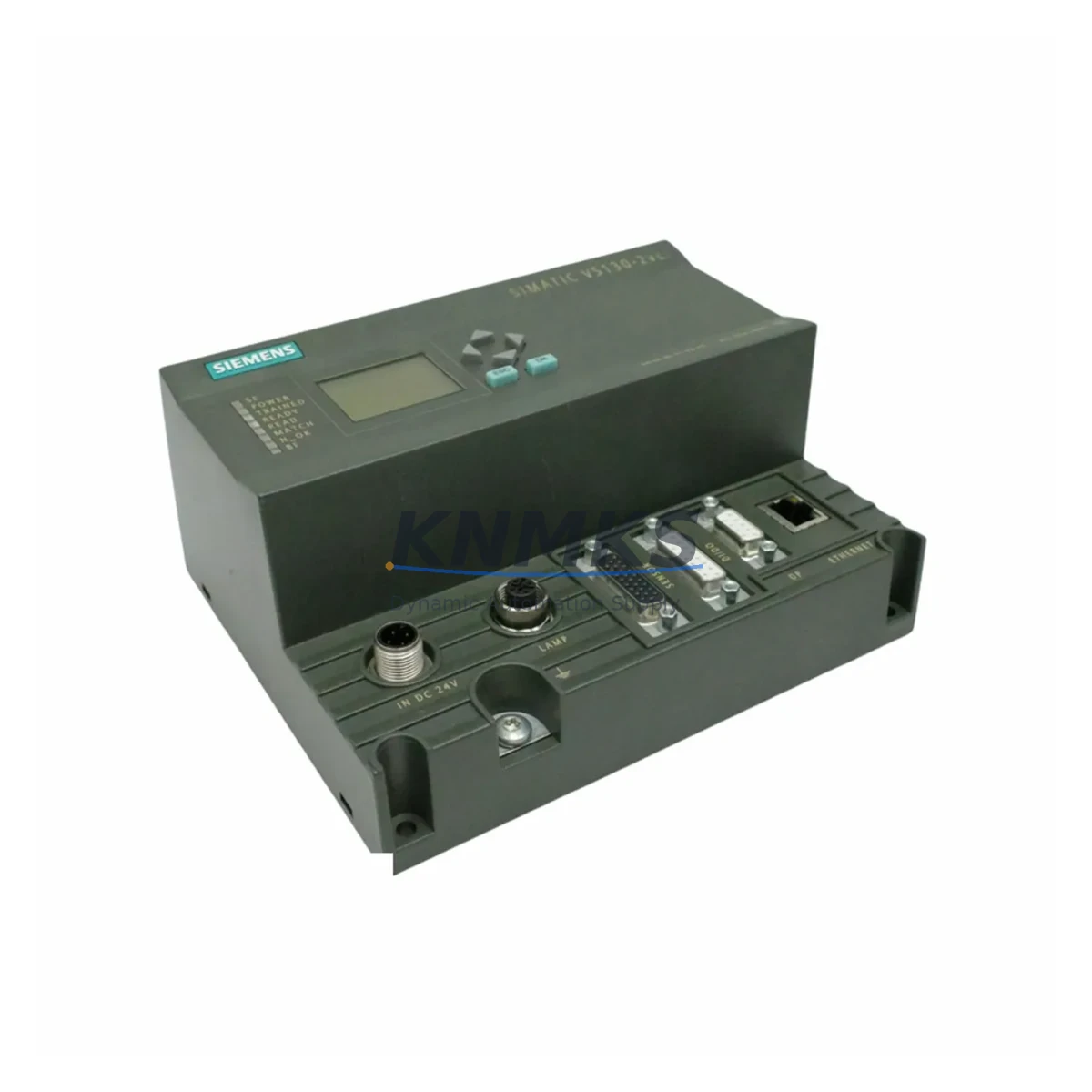
Siemens 6GF1018-3BA01 Migration-Ready Vericode Evaluation Unit for Legacy Control Systems
The Siemens 6GF1018-3BA01 is a Vericode Evaluation Unit designed for SIMATIC Ident identification systems, widely deployed across automotive assembly lines, pharmaceutical track-and-trace installations, and discrete manufacturing environments. As legacy SIMATIC Ident infrastructure reaches end-of-support milestones, the 6GF1018-3BA01 has become a critical spare part and migration anchor for engineers tasked with sustaining barcode-based identification workflows without triggering full-system replacements.
This unit interfaces directly with SIMATIC S7 controllers via the PROFIBUS DP communication protocol, enabling seamless integration into existing S7-300 and S7-400 rack architectures. When planning a retrofit, engineers must verify the PROFIBUS DP address assignment on the existing backplane, confirm that the GSD file version loaded in STEP 7 or TIA Portal matches the firmware revision of the replacement unit, and validate that the existing CP 342-5 or CP 443-5 communication processor remains compatible with the updated module configuration. Mismatched GSD files are the most common source of commissioning delays during module-level replacements in SIMATIC Ident environments.
Terminal wiring for the 6GF1018-3BA01 follows the standard SIMATIC Ident connector pinout. Before disconnecting the legacy unit, document the existing 24 VDC supply wiring, the RS-422 or RS-232 reader interface connections, and the trigger/gate signal lines. The replacement unit accepts the same connector form factor, but field teams should measure supply voltage at the terminal block under load to confirm it remains within the 20.4–28.8 VDC operating range. Power budget verification is especially important in older control cabinets where multiple identification modules share a single PS 307 or PS 405 power supply module — adding a replacement unit without recalculating the total current draw can cause intermittent resets across the entire rack.
For installations where the 6GF1018-3BA01 operates alongside SIMATIC RF300 or RF600 RFID readers on a shared identification network, the migration plan must account for coexistence of barcode and RFID data streams within the same SIMATIC Ident controller logic. The ASM 456 or ASM 475 interface modules used in these hybrid topologies require updated function block libraries (FB 45, FB 55 series) to correctly route Vericode evaluation results alongside RFID tag data. Confirm that the PLC program’s OB1 and OB35 interrupt routines have sufficient cycle time headroom after the module swap to avoid watchdog faults during high-throughput scanning cycles.
Installation space confirmation is a non-negotiable step before ordering. The 6GF1018-3BA01 occupies a standard SIMATIC S7-300 module slot and requires a minimum of 40 mm clearance above and below for cable routing. In compact control cabinets where ET 200M distributed I/O racks are used as remote identification nodes, verify that the IM 153-x interface module firmware supports the identification module’s data record structure before committing to the replacement. Incompatible IM firmware versions can prevent the module from being recognized during the hardware configuration download.
All units supplied by KNMKS undergo pre-shipment functional testing against a live PROFIBUS DP test bench, verifying communication establishment, data record read/write integrity, and diagnostic buffer reporting. Each 6GF1018-3BA01 is dispatched with a support terms confirmed by quotation covering manufacturing defects and functional failures under normal operating conditions. Stock is maintained across multiple regional warehouses to support emergency replacement scenarios with rapid global dispatch.
Migration Compatibility Table
| Parameter | Details |
|---|---|
| SKU / Part Number | 6GF1018-3BA01 |
| Brand / Series | Siemens / SIMATIC Ident |
| Module Function | Vericode Evaluation Unit — barcode identification processing |
| Communication Interface | PROFIBUS DP |
| Compatible Controllers | SIMATIC S7-300, S7-400; ET 200M (via IM 153-x) |
| Power Supply Requirement | 24 VDC (20.4–28.8 VDC); verify cabinet power budget before installation |
| Reader Interface | RS-422 / RS-232 (confirm existing cable pinout before swap) |
| GSD File Compatibility | Verify GSD version in STEP 7 / TIA Portal matches unit firmware revision |
| Installation Footprint | Standard S7-300 module slot; 40 mm cable clearance required |
| Replacement Recommendation | Direct drop-in for same-series legacy units; confirm PROFIBUS DP address before swap |
| Commissioning Focus | GSD file version, DP address, power budget, RS-422 wiring, OB cycle time |
| Support terms | support terms confirmed by quotation — covers manufacturing defects and functional failures |
| Pre-Shipment Testing | PROFIBUS DP communication, data record integrity, diagnostic buffer verification |
| Origin | Germany |
Retrofit Planning for Existing Automation Systems
A successful retrofit centered on the 6GF1018-3BA01 typically involves coordinating several interdependent components within the same control cabinet or distributed I/O network. The PS 307 10A power supply module must be assessed for available current headroom before the identification module is installed, particularly in racks that also host analog I/O modules with high quiescent current draw. In distributed topologies, the IM 153-2 interface module connecting the ET 200M rack to the main PROFIBUS DP segment must be confirmed as firmware-compatible with the identification module’s data record length.
Where the existing installation uses a CP 342-5 PROFIBUS DP master for identification network management, engineers should export the current hardware configuration from STEP 7 before making any physical changes. This preserves the original DP slave address table and module parameter assignments, which serve as the rollback baseline if the new unit requires re-parameterization. For sites running TIA Portal V15 or later, the hardware catalog must include the correct GSDML entry for the 6GF1018-3BA01 to enable online diagnostics after commissioning.
In control cabinets where the identification system coexists with SIMATIC HMI panels (TP700 Comfort or MP377 series), the HMI screen logic referencing identification status bits must be reviewed after the module swap. If the replacement unit reports diagnostic data at a different DB address than the legacy unit, HMI alarm screens and trend displays linked to those data blocks will require corresponding updates in WinCC Flexible or TIA Portal HMI configuration. Scheduling this HMI review as part of the pre-commissioning checklist prevents unexpected alarm floods during the first production run after the retrofit.
Signal isolation between the Vericode reader and the evaluation unit is another area requiring attention in electrically noisy environments. Where the existing installation uses signal isolators or surge protection modules on the RS-422 reader lines, confirm that the isolator’s bandwidth specification supports the Vericode reader’s data rate. Undersized isolators can introduce bit errors that manifest as intermittent read failures — a fault mode that is difficult to diagnose without an oscilloscope on the reader interface lines.
Downtime Control During System Migration
Minimizing production downtime during a 6GF1018-3BA01 replacement requires a structured pre-swap preparation sequence. Before the maintenance window opens, upload the current PLC program from the S7-300 or S7-400 CPU to an offline backup using STEP 7 or TIA Portal. Capture a memory card image if the CPU uses a flash-based program storage card, and document the current PROFIBUS DP diagnostic buffer state to establish a pre-swap baseline for fault comparison after the module is replaced.
During the swap, the PROFIBUS DP segment should be placed in a controlled stop state rather than allowing the master to detect a slave failure organically. An uncontrolled slave dropout on a live PROFIBUS segment can trigger cascading OB86 fault interrupts across other slaves on the same segment, potentially causing unintended shutdowns of adjacent process equipment. Using the CP 342-5 or the S7 CPU’s built-in DP master to issue a controlled deactivation of the identification slave address before physical removal eliminates this risk.
After physical installation of the replacement 6GF1018-3BA01, perform a hardware configuration download to the CPU before restarting the PROFIBUS segment. This ensures the CPU’s internal module parameter table matches the physical hardware state. Verify the identification module’s green RUN LED and confirm absence of BF (Bus Fault) and SF (System Fault) LEDs before releasing the line back to production. A structured commissioning checklist covering these steps typically reduces total downtime for a single module replacement to under two hours, even in complex multi-rack installations.
Retrofit Support FAQ
Q: Is the 6GF1018-3BA01 a direct replacement for earlier SIMATIC Ident Vericode evaluation units?
A: Yes, the 6GF1018-3BA01 is designed as a drop-in replacement for same-series legacy Vericode evaluation units within the SIMATIC Ident product family. Confirm the PROFIBUS DP slave address and GSD file version match before installation to avoid re-parameterization requirements.
Q: What wiring checks are required before swapping the module?
A: Document and verify the 24 VDC supply terminal connections, RS-422/RS-232 reader interface wiring, and trigger/gate signal lines. Measure supply voltage under load at the terminal block to confirm it is within the 20.4–28.8 VDC operating range. Check cabinet power budget if multiple modules share the same power supply.
Q: How is compatibility with TIA Portal and STEP 7 confirmed?
A: Ensure the correct GSD or GSDML file for the 6GF1018-3BA01 is installed in your engineering software. For STEP 7, verify the hardware catalog entry matches the unit’s firmware revision. For TIA Portal V15+, import the GSDML file and perform an online hardware comparison after the configuration download to confirm the module is recognized without faults.
Q: What does the support terms confirmed by quotation cover, and is pre-shipment testing performed?
A: Every 6GF1018-3BA01 supplied by KNMKS is tested on a live PROFIBUS DP bench prior to dispatch, verifying communication establishment, data record integrity, and diagnostic buffer operation. The support terms confirmed by quotation cover manufacturing defects and functional failures under normal operating conditions. Stock is available for immediate dispatch to support emergency replacement requirements.
© 2026 KNMKS. All rights reserved.
Original Source: https://knmks.com
Contact: admin@knmks.com | +86 18359268345
Product Identification
- Brand / Ecosystem
-
Siemens
Siemens - Model / Series
- 6GF1018-3BA01
- Product Family
- PLCs & Controllers
- Availability Status
- Available on request after model and quantity confirmation
- Inquiry Type
- B2B RFQ, replacement inquiry and project spare-part request
- Pre-Quote Check
- Exact SKU, brand, series, quantity, nameplate photos and destination country are checked before quotation
System Path
Where this product fits in the KNMKS automation structure.
Specification & Inquiry Focus
- Control platform
- PLC, PAC and modular controllers
- Common needs
- CPU, rack, power and I/O expansion
- Project support
- Replacement, cabinet build and maintenance
Buyer Confirmation
Information KNMKS checks before replying.
- Exact model
- 6GF1018-3BA01
- Brand / ecosystem
- Siemens
- Product family
- PLCs & Controllers
- Application note
- Replacement, maintenance, project build or spare-part list
- Useful photos
- Nameplate, installed unit, cabinet layout or connector side
- Delivery details
- Quantity, destination country and target schedule
Document Support
Files and notes can be confirmed during quotation.
- Product photos or nameplate confirmation when available
- Packing and delivery notes before quotation confirmation
- Support scope and delivery terms confirmed per inquiry
- Export document coordination for qualified B2B requests
Inquiry Support
- Model cross-checking before quotation
- CPU, power, rack and expansion module matching
- Support for replacement and project inquiry
What to Send Us
- Brand and exact model number: Siemens 6GF1018-3BA01
- Quantity and required delivery time
- Application, replacement requirement or nameplate photo
- Destination country and shipping preference
RFQ Preparation
This is a product inquiry page built for RFQ communication.
Fast Model Check
Send this model to KNMKS for confirmation.
Include quantity, destination country and photos if this is a maintenance replacement. The inquiry will be saved with a reference number after submission.
Brand & Compatibility Note
KNMKS displays automation product information for well-known industrial brand ecosystems and compatible replacement references. Brand names are used for product identification and compatibility reference only; final availability and commercial terms are confirmed per quotation.
 Manufacturing
 Machine Tools
 Packaging
 Energy & Power



 HMI & Displays
 Servo Systems
 Variable Frequency Drives
 Sensors