
Overview
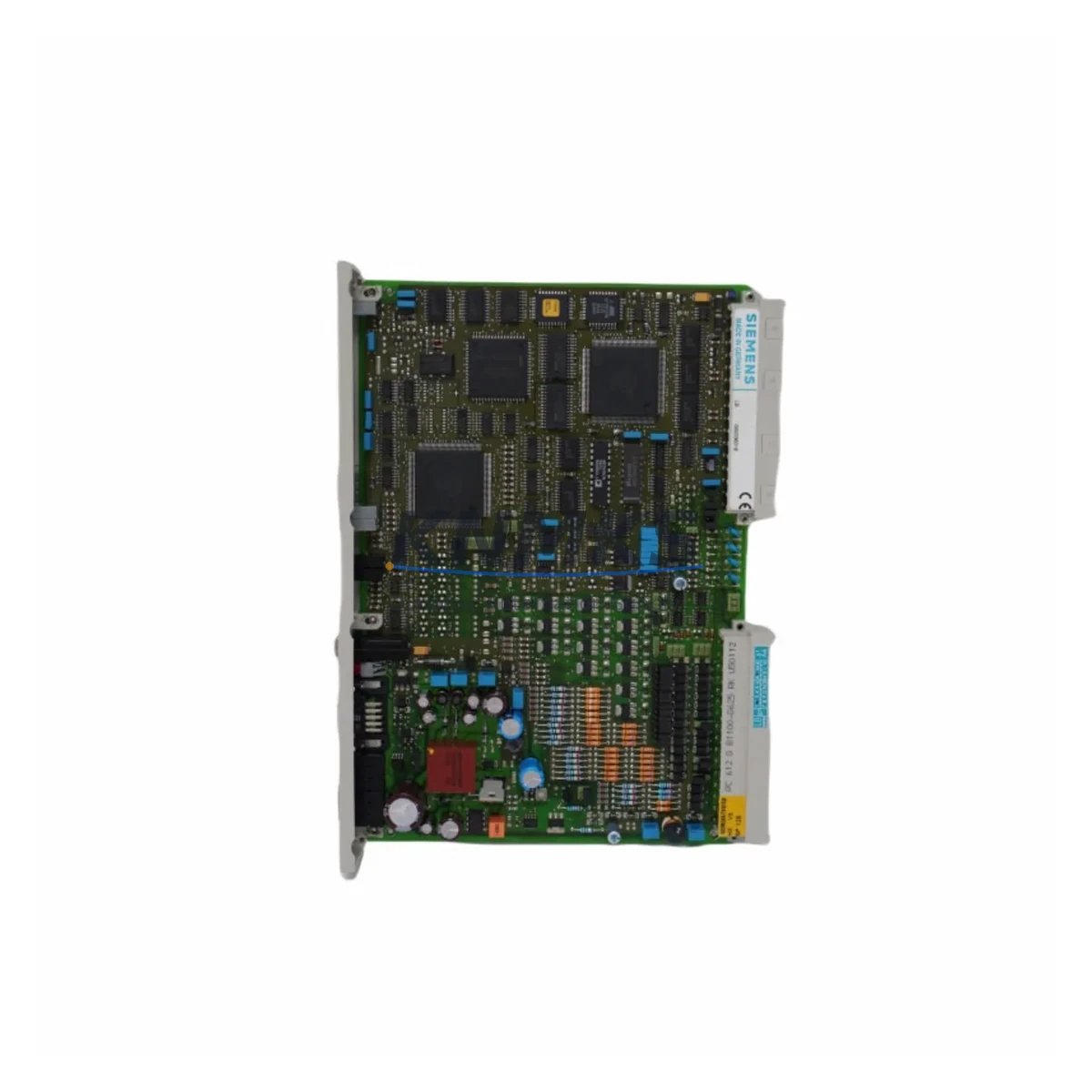
Siemens 6DS1723-8BL Maintenance-Proven Spare Part for Factory Uptime
The Siemens 6DS1723-8BL is an original I/O module designed for the TELEPERM M distributed control system (DCS) — one of Siemens’ most enduring process automation platforms, widely deployed in chemical, petrochemical, power generation, and heavy industrial facilities. For maintenance engineers managing aging TELEPERM M installations, sourcing a verified, tested replacement for the 6DS1723-8BL is critical to minimizing unplanned downtime and sustaining safe, continuous plant operation.
At KNMKS, every 6DS1723-8BL unit is sourced from verified supply channels, subjected to pre-shipment functional testing, and backed by a support terms confirmed by quotation. Whether you are responding to an emergency fault, building a preventive spare parts inventory, or executing a scheduled annual overhaul, this module ships ready for immediate installation.
Spare Maintenance Table
| Parameter | Specification / Details |
|---|---|
| Part Number / SKU | 6DS1723-8BL |
| Brand | Siemens |
| Series / Platform | TELEPERM M DCS |
| Module Type | DCS I/O Module |
| Origin | Germany (DE) |
| Compatible Systems | Siemens TELEPERM M automation cabinets and I/O racks |
| Application Environment | Process industries: chemical, petrochemical, power, utilities |
| Installation | Direct slot replacement in TELEPERM M I/O rack; no hardware modification required |
| Pre-Shipment Testing | Functional verification performed before dispatch |
| Support terms | 12 Months |
| Supply Condition | Original spare, refurbished-to-spec or new-old-stock as available |
| Lead Time | Contact sales for current stock availability |
| Maintenance Recommendation | Inspect backplane connectors, bus termination, and adjacent I/O modules during replacement |
Maintenance Planning for Continuous Operation
When a 6DS1723-8BL I/O module fails or is flagged during a routine control cabinet inspection, the fault rarely exists in isolation. Experienced maintenance engineers know that a single I/O module fault can be symptomatic of broader issues within the same rack or electrical loop. A disciplined replacement workflow should therefore extend beyond the module itself.
Begin by verifying the TELEPERM M backplane bus and rack power distribution. A degraded backplane connector or intermittent bus fault can cause repeated I/O module failures and must be ruled out before the new 6DS1723-8BL is commissioned. Check the 24 VDC power supply module feeding the I/O rack — voltage ripple or under-voltage conditions accelerate module wear and can damage a replacement unit within weeks of installation.
Inspect all field terminal blocks and wiring harnesses connected to the affected I/O channels. Corroded terminals, loose ferrules, or damaged cable insulation are common root causes of I/O module faults in long-running TELEPERM M systems. While the rack is de-energized for module swap, this is the optimal moment to torque-check all terminal connections and replace any suspect wiring.
For systems with signal isolators or barriers on intrinsically safe loops, verify that the isolator output is within specification — a failing isolator can present as an I/O module fault and will damage the replacement module if not addressed. Similarly, check any fuse holders and protection fuses on the I/O loop; blown or weakened fuses are a leading indicator of transient overcurrent events that may have caused the original module failure.
If the TELEPERM M system includes a communication processor or bus coupler module in the same cabinet, confirm that the bus communication is stable and error-free after the I/O module replacement. Communication errors logged against the new module may indicate a bus configuration issue rather than a module defect. For facilities running TELEPERM M alongside a supervisory HMI or SCADA system, validate that the I/O channel mapping and tag assignments are correctly restored after the swap to prevent process variable misreads at the operator station.
Procurement engineers should note that the 6DS1723-8BL is a long-discontinued Siemens part. Maintaining a minimum stock of two to three units per critical control loop is strongly recommended for facilities that cannot tolerate extended lead times. Pairing this module in your spare parts inventory with compatible TELEPERM M power supply modules (e.g., 6DS1700-series) and I/O rack bus terminators ensures that a complete cabinet restoration can be executed without waiting for multiple sourcing cycles.
Site Replacement Workflow
Step 1 — Fault Isolation: Confirm the 6DS1723-8BL as the failed component using TELEPERM M diagnostic tools or fault LEDs. Document the slot address and channel assignments before removal.
Step 2 — Safe Isolation: Follow your site’s lockout/tagout (LOTO) procedure. De-energize the I/O rack section. Verify zero voltage at the module connector before proceeding.
Step 3 — Module Removal: Disconnect field wiring at the terminal block (label all connections if not already documented). Release the module retention latch and extract the 6DS1723-8BL from the backplane slot.
Step 4 — Backplane Inspection: Inspect the backplane connector pins for damage, oxidation, or debris. Clean with appropriate contact cleaner if required. Verify rack power rail voltage is within specification.
Step 5 — Replacement Installation: Insert the new 6DS1723-8BL firmly into the slot until the retention latch engages. Reconnect field wiring per the original documentation. Restore power to the rack section.
Step 6 — Commissioning Verification: Confirm module status LEDs indicate normal operation. Verify all I/O channel readings at the TELEPERM M operator station or engineering workstation. Log the replacement in your maintenance management system (CMMS) with the new module’s serial number and installation date.
Step 7 — Post-Replacement Monitoring: Monitor the replaced module and adjacent I/O channels for 24–48 hours post-restart to confirm stable operation before returning the loop to full automatic control.
Spare Parts Support FAQ
Q1: Is the 6DS1723-8BL a direct drop-in replacement for the original Siemens module?
Yes. The 6DS1723-8BL supplied by KNMKS is an original Siemens spare or verified equivalent that installs directly into the TELEPERM M I/O rack without hardware modification. Compatibility is confirmed against the original Siemens part number prior to shipment.
Q2: What testing is performed before the module is shipped?
Every 6DS1723-8BL undergoes pre-shipment functional testing to verify electrical integrity and I/O channel operation. A test report is available upon request. The module is shipped with protective packaging to prevent ESD damage and physical shock during transit.
Q3: How should I manage long-term spare parts inventory for TELEPERM M systems?
Given that TELEPERM M is a legacy platform with no new production from Siemens, we recommend maintaining a minimum of two replacement units per critical I/O module type on-site. KNMKS offers long-term supply agreements and can reserve stock for customers with ongoing maintenance contracts, ensuring availability when emergency replacements are needed.
Q4: What is covered under the support terms confirmed by quotation?
The support terms confirmed by quotation cover manufacturing defects and functional failures under normal operating conditions. It does not cover damage resulting from incorrect installation, overvoltage events, or physical mishandling. KNMKS provides direct technical support for support requests, with replacement or repair turnaround coordinated to minimize your plant downtime.
© 2026 KNMKS. All rights reserved.
Original Source: https://knmks.com
Contact: admin@knmks.com | +86 18359268345
Product Identification
- Brand / Ecosystem
-
Siemens
Siemens - Model / Series
- 6DS1723-8BL
- Product Family
- PLCs & Controllers
- Availability Status
- Available on request after model and quantity confirmation
- Inquiry Type
- B2B RFQ, replacement inquiry and project spare-part request
- Pre-Quote Check
- Exact SKU, brand, series, quantity, nameplate photos and destination country are checked before quotation
System Path
Where this product fits in the KNMKS automation structure.
Specification & Inquiry Focus
- Control platform
- PLC, PAC and modular controllers
- Common needs
- CPU, rack, power and I/O expansion
- Project support
- Replacement, cabinet build and maintenance
Buyer Confirmation
Information KNMKS checks before replying.
- Exact model
- 6DS1723-8BL
- Brand / ecosystem
- Siemens
- Product family
- PLCs & Controllers
- Application note
- Replacement, maintenance, project build or spare-part list
- Useful photos
- Nameplate, installed unit, cabinet layout or connector side
- Delivery details
- Quantity, destination country and target schedule
Document Support
Files and notes can be confirmed during quotation.
- Product photos or nameplate confirmation when available
- Packing and delivery notes before quotation confirmation
- Support scope and delivery terms confirmed per inquiry
- Export document coordination for qualified B2B requests
Inquiry Support
- Model cross-checking before quotation
- CPU, power, rack and expansion module matching
- Support for replacement and project inquiry
What to Send Us
- Brand and exact model number: Siemens 6DS1723-8BL
- Quantity and required delivery time
- Application, replacement requirement or nameplate photo
- Destination country and shipping preference
RFQ Preparation
This is a product inquiry page built for RFQ communication.
Fast Model Check
Send this model to KNMKS for confirmation.
Include quantity, destination country and photos if this is a maintenance replacement. The inquiry will be saved with a reference number after submission.
Brand & Compatibility Note
KNMKS displays automation product information for well-known industrial brand ecosystems and compatible replacement references. Brand names are used for product identification and compatibility reference only; final availability and commercial terms are confirmed per quotation.
 Manufacturing
 Machine Tools
 Packaging
 Energy & Power



 HMI & Displays
 Servo Systems
 Variable Frequency Drives
 Sensors