
Overview
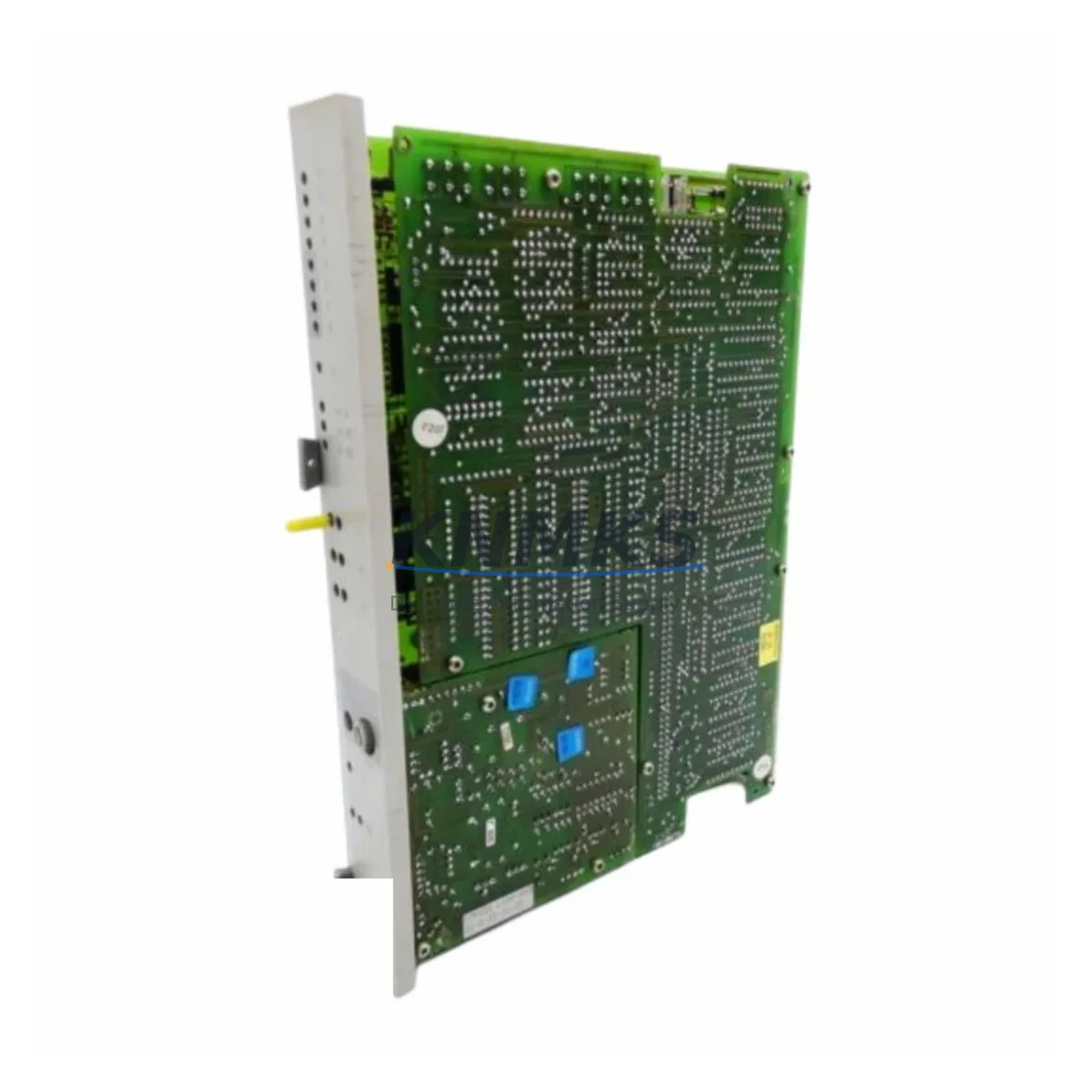
SIEMENS 6DS1618-8CA Maintenance-Proven Spare Part for Factory Uptime
The SIEMENS 6DS1618-8CA is a 48-channel Binary Input Module engineered for the TELEPERM M Distributed Control System (DCS) — Siemens’ proven process automation platform widely deployed across petrochemical, power generation, water treatment, and heavy manufacturing facilities. As TELEPERM M installations continue to operate well beyond their original design life, maintaining a verified inventory of original spare modules such as the 6DS1618-8CA is a cornerstone strategy for maintenance engineers and procurement teams committed to plant continuity and unplanned downtime prevention.
KNMKS supplies the 6DS1618-8CA as an original, pre-shipment tested spare with a support terms confirmed by quotation, ready for immediate deployment in emergency breakdown scenarios and scheduled annual maintenance shutdowns. Every unit undergoes functional verification before dispatch to eliminate the risk of introducing a secondary fault during a critical replacement event.
Spare Maintenance Table
| Part Number | 6DS1618-8CA |
| Manufacturer | SIEMENS |
| Series / Platform | TELEPERM M DCS |
| Module Type | Binary Input Module (48-channel) |
| Input Channels | 48 binary (digital) input channels |
| Signal Type | Discrete / binary field signals (24 VDC typical) |
| Origin | Germany (DE) |
| Mounting | Rack-mounted, TELEPERM M backplane compatible |
| Operating Temperature | 0 °C to +60 °C (standard industrial cabinet environment) |
| Application Environment | DCS marshalling cabinets, process control rooms, field junction panels |
| Compatibility | TELEPERM M DCS racks; compatible with 6DS16xx series I/O modules |
| Maintenance Role | Acquisition of binary field signals (limit switches, valve position, motor status) for DCS logic processing |
| Recommended Inspection Interval | Annual shutdown or upon binary input group fault alarm |
| Pre-Shipment Testing | Functional verification performed on every unit |
| Support terms | 12 Months from date of shipment |
| Supply Lead Time | In-stock units available for same-week dispatch |
Maintenance Planning for Continuous Operation
When a TELEPERM M system registers a binary input group fault or begins reporting incorrect field signal states, the 6DS1618-8CA is a primary candidate for isolation and replacement. However, experienced maintenance engineers know that a binary input module failure rarely occurs in isolation — a thorough site inspection of the surrounding system is essential to prevent repeat failures and ensure a complete, durable recovery.
Start by verifying the 24 VDC field supply rail feeding the binary input circuits. Voltage sags or intermittent supply interruptions are a frequent root cause of spurious binary input faults and can damage replacement modules if not corrected before installation. Inspect the associated TELEPERM M backplane for contamination, bent connector pins, or signs of arcing at the module slot — physical damage to the backplane will cause recurring faults regardless of how many 6DS1618-8CA units are replaced.
Check the field terminal assemblies and marshalling terminal strips connected to the binary input channels. Loose terminations, corroded contacts, or damaged cable insulation on field wiring are common contributors to binary input signal errors that can be misdiagnosed as module failure. Inspect signal isolators and optocoupler barriers on critical binary input loops — degraded isolation can introduce ground loops or leakage currents that cause false input states at the DCS level.
For cabinets housing the 6DS1618-8CA alongside 6DS1332 I/O Bus Control Modules and 6DS1601 power supply modules, verify that the bus control module is reporting healthy status and that the rack power supply is within specification. A degraded power supply module can cause multiple I/O modules to report faults simultaneously, making it appear that the binary input module itself has failed.
Procurement engineers should consider maintaining a parallel spare for the 6DS1618-8CA alongside related modules such as the 6DS1628 Binary Output Module and 6DS1638 Analog Input Module used in the same control cabinet. A pre-staged spare kit covering both input and output modules reduces mean time to repair (MTTR) from hours to minutes during an unplanned outage, directly protecting production throughput and avoiding costly emergency freight charges.
For aging TELEPERM M installations approaching end-of-support milestones, KNMKS recommends a structured spare parts audit covering all 6DS16xx series I/O modules, bus control components, power distribution assemblies, and field wiring termination hardware. Proactive inventory management is the most cost-effective strategy for extending the operational life of legacy DCS systems without committing to a full platform migration.
Site Replacement Workflow
Step 1 — Isolate and document: Before removing the 6DS1618-8CA, capture the current system status from the operator station. Record all active alarms, binary input group assignments, channel-to-field signal mappings, and any DIP switch or jumper settings on the existing module. Photograph the module position and wiring connections at the terminal assembly.
Step 2 — Power down the affected rack: Follow your site’s lockout/tagout (LOTO) procedure for the specific TELEPERM M rack. Confirm that the rack power supply is de-energized before extracting the module. Avoid hot-swapping binary input modules unless your system revision explicitly supports it.
Step 3 — Inspect the slot and backplane: Before inserting the replacement 6DS1618-8CA, visually inspect the backplane connector for contamination, bent pins, or signs of arcing. Clean with appropriate electronics-grade contact cleaner if required. Verify that the terminal assembly wiring is intact and correctly labeled.
Step 4 — Install and configure: Insert the replacement module firmly into the rack slot. Verify that any DIP switch or jumper settings on the 6DS1618-8CA match the original configuration documented in Step 1. Restore rack power and observe the module status indicators during initialization.
Step 5 — Verify system recovery: Confirm that all 48 binary input channels are reporting correctly at the operator station. Perform a functional check by cycling representative field devices (limit switches, valve position feedback) to verify end-to-end signal integrity before returning the system to automatic operation.
Step 6 — Update maintenance records: Log the replacement event, including the serial number of the removed module, the replacement unit details, and the date of installation. Return the removed module to KNMKS for evaluation if a support terms claim or root-cause analysis is required.
Spare Parts Support FAQ
Q1: Is the 6DS1618-8CA supplied by KNMKS an original Siemens module or a third-party replacement?
All 6DS1618-8CA units supplied by KNMKS are original Siemens manufactured modules sourced from verified industrial supply channels. We do not supply counterfeit, refurbished-without-disclosure, or third-party compatible substitutes. Each unit is accompanied by documentation confirming its origin and pre-shipment test status.
Q2: What support terms coverage applies to the 6DS1618-8CA, and what does it include?
KNMKS provides a support terms confirmed by quotation from the date of shipment. The support terms covers functional failure under normal operating conditions and includes replacement or refund at KNMKS’s discretion. Support requests require the return of the defective unit for inspection. Physical damage caused by incorrect installation, overvoltage, or environmental contamination is excluded from support terms coverage.
Q3: Can the 6DS1618-8CA be used as a direct replacement for other modules in the 6DS1618 series?
The 6DS1618-8CA carries a specific hardware revision suffix (-8CA) that may indicate a particular firmware version, hardware modification level, or channel configuration. Before substituting with an alternative suffix variant, consult your TELEPERM M system documentation or contact KNMKS technical support to confirm compatibility with your specific rack revision and software version. Using an incompatible variant may result in channel mapping errors or reduced input capacity.
Q4: How quickly can KNMKS dispatch the 6DS1618-8CA for an emergency breakdown situation?
In-stock units are available for same-week dispatch from our warehouse. For emergency breakdown orders, contact our sales team directly at admin@knmks.com or +86 18359268345 to confirm stock availability and arrange priority shipping. We support international freight via DHL, FedEx, and UPS with full export documentation for customs clearance.
© 2026 KNMKS. All rights reserved.
Original Source: https://knmks.com
Contact: admin@knmks.com | +86 18359268345
Product Identification
- Brand / Ecosystem
-
SIEMENS
Siemens - Model / Series
- 6DS1618-8CA
- Product Family
- PLCs & Controllers
- Availability Status
- Available on request after model and quantity confirmation
- Inquiry Type
- B2B RFQ, replacement inquiry and project spare-part request
- Pre-Quote Check
- Exact SKU, brand, series, quantity, nameplate photos and destination country are checked before quotation
System Path
Where this product fits in the KNMKS automation structure.
Specification & Inquiry Focus
- Control platform
- PLC, PAC and modular controllers
- Common needs
- CPU, rack, power and I/O expansion
- Project support
- Replacement, cabinet build and maintenance
Buyer Confirmation
Information KNMKS checks before replying.
- Exact model
- 6DS1618-8CA
- Brand / ecosystem
- SIEMENS
- Product family
- PLCs & Controllers
- Application note
- Replacement, maintenance, project build or spare-part list
- Useful photos
- Nameplate, installed unit, cabinet layout or connector side
- Delivery details
- Quantity, destination country and target schedule
Document Support
Files and notes can be confirmed during quotation.
- Product photos or nameplate confirmation when available
- Packing and delivery notes before quotation confirmation
- Support scope and delivery terms confirmed per inquiry
- Export document coordination for qualified B2B requests
Inquiry Support
- Model cross-checking before quotation
- CPU, power, rack and expansion module matching
- Support for replacement and project inquiry
What to Send Us
- Brand and exact model number: SIEMENS 6DS1618-8CA
- Quantity and required delivery time
- Application, replacement requirement or nameplate photo
- Destination country and shipping preference
RFQ Preparation
This is a product inquiry page built for RFQ communication.
Fast Model Check
Send this model to KNMKS for confirmation.
Include quantity, destination country and photos if this is a maintenance replacement. The inquiry will be saved with a reference number after submission.
Brand & Compatibility Note
KNMKS displays automation product information for well-known industrial brand ecosystems and compatible replacement references. Brand names are used for product identification and compatibility reference only; final availability and commercial terms are confirmed per quotation.
 Manufacturing
 Machine Tools
 Packaging
 Energy & Power



 HMI & Displays
 Servo Systems
 Variable Frequency Drives
 Sensors