
Overview
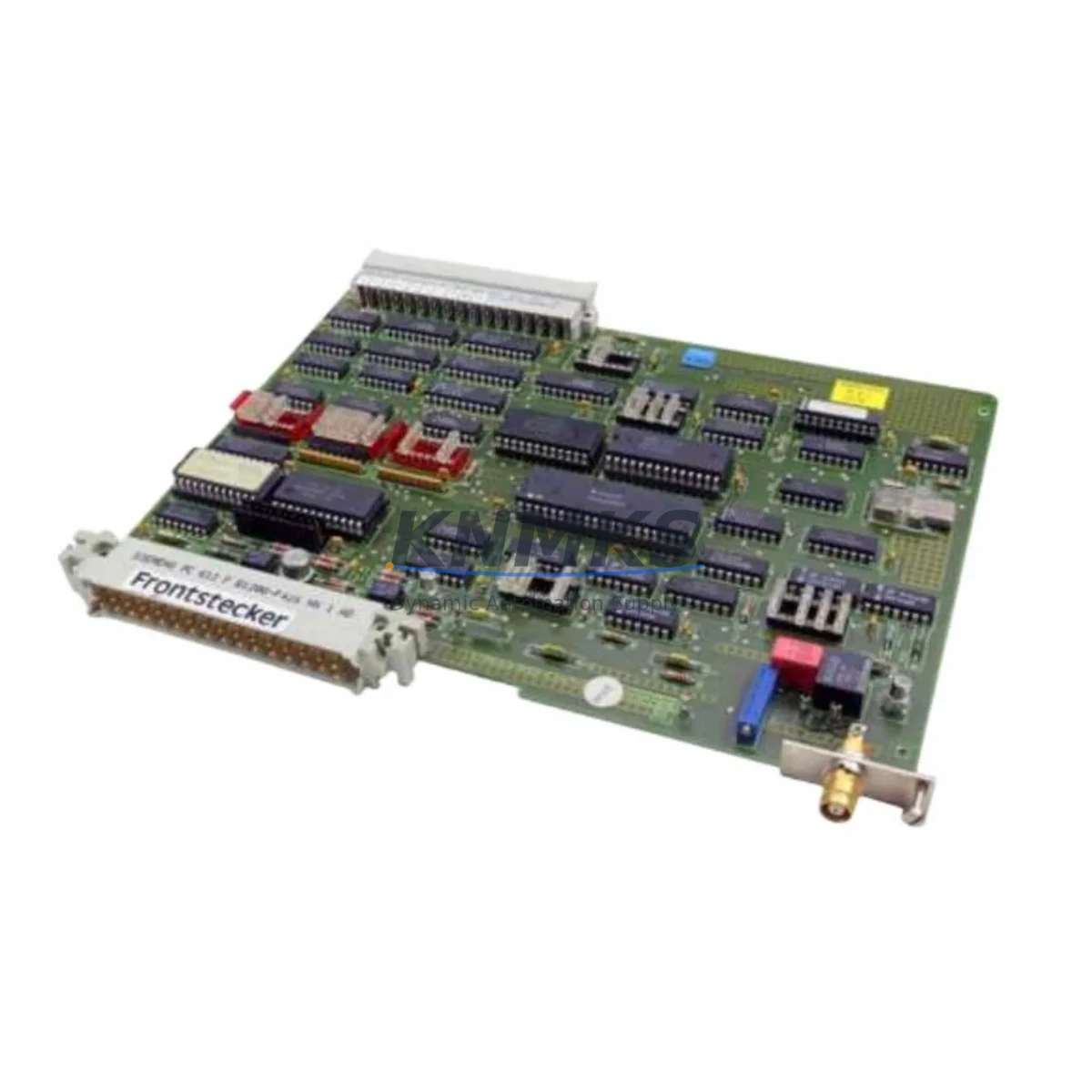
Siemens 6DS1300-8AB Migration-Ready Monitor Interface for Legacy TELEPERM M Control Systems
The Siemens 6DS1300-8AB is a monitor keyboard interface module designed for the TELEPERM M distributed control system (DCS) platform — one of Siemens’ most widely deployed process automation architectures in the chemical, petrochemical, power generation, and heavy manufacturing industries. As TELEPERM M reaches end-of-life and spare parts become increasingly scarce, the 6DS1300-8AB remains a critical component for facilities that must maintain operational continuity while planning a phased migration to modern control platforms such as SIMATIC PCS 7 or SIMATIC S7-400.
This module serves as the communication bridge between the operator workstation and the TELEPERM M central controller, handling monitor output signals, keyboard input routing, and display synchronization. For plants still running legacy TELEPERM M cabinets, sourcing a verified, tested 6DS1300-8AB is often the fastest path to restoring system availability without committing to a full DCS overhaul — a process that can take months of engineering, validation, and shutdown planning.
At KNMKS, every 6DS1300-8AB unit is inspected, function-tested, and shipped with a support terms confirmed by quotation. In-stock inventory is maintained to support urgent breakdown replacements and planned retrofit projects alike.
Migration Compatibility Table
| Parameter | 6DS1300-8AB Specification | Retrofit Notes |
|---|---|---|
| Compatible Platform | TELEPERM M DCS | Direct drop-in for existing TELEPERM M racks |
| Interface Type | Monitor / Keyboard Interface | Verify terminal block wiring against original layout drawing |
| Installation | Standard TELEPERM M backplane slot | Confirm slot address and rack position before insertion |
| Communication Protocol | TELEPERM M internal bus | No protocol conversion required for same-platform swap |
| Power Supply | 24 VDC via backplane | Verify backplane PSU capacity; check 6DS1702-8AA or equivalent power module |
| Firmware Compatibility | Compatible with standard TELEPERM M firmware revisions | Confirm firmware version with site documentation before replacement |
| Replacement Recommendation | Direct replacement for failed or degraded 6DS1300-8AB units | No software reconfiguration required for identical swap |
| Commissioning Focus | Display sync, keyboard response, alarm acknowledgment | Test all operator interface functions post-installation |
| Support terms | 12 Months | Covered from date of shipment; includes functional defects |
Retrofit Planning for Existing Automation Systems
Replacing the 6DS1300-8AB within a live TELEPERM M environment requires careful coordination across multiple system layers. Before pulling the failed module, engineers should document the current rack configuration — including the slot assignments of adjacent modules such as the 6DS1702-8AA power supply module and any 6DS1600-series analog input/output modules installed in the same cabinet. These modules share the backplane bus, and any disturbance to the rack during replacement must be managed to avoid cascading faults.
Terminal wiring on the 6DS1300-8AB connects to the operator station cabling harness. Technicians should photograph or sketch the existing wiring before disconnection, cross-referencing against the original cabinet wiring diagram. In many aging installations, as-built drawings may differ from the original engineering documentation, so field verification is essential. The replacement module should be inserted with the rack powered down where possible, or with the affected display circuit isolated if a hot-swap procedure is approved by the site’s safety management system.
For facilities planning a broader migration from TELEPERM M to SIMATIC PCS 7, the 6DS1300-8AB replacement is often a bridge measure that buys time for a structured cutover. During this transition period, the existing TELEPERM M OS (Operator Station) software, historian connections, and alarm management configurations must remain intact. Engineers frequently need to maintain parallel operation of the legacy TELEPERM M network alongside newly commissioned SIMATIC ET 200M remote I/O stations or PROFIBUS DP segments, which requires careful attention to network addressing and communication load balancing.
In control cabinets where space is constrained, the physical dimensions of the 6DS1300-8AB must be confirmed against the available rack slot. TELEPERM M racks use a proprietary form factor, and any mechanical damage to the backplane connector or guide rails must be repaired before installing the replacement module. If the rack itself is damaged, sourcing a compatible TELEPERM M rack assembly may be necessary before the module swap can proceed.
Signal isolation requirements should also be reviewed during retrofit planning. In plants where the TELEPERM M system interfaces with field instruments via 4–20 mA loops, signal isolators or barriers installed upstream of the I/O modules must be verified for compatibility with the replacement module’s input impedance. Any changes to the I/O configuration — even a module swap — can affect loop calibration and should be followed by a full loop check before returning the system to automatic control.
Downtime Control During System Migration
Minimizing unplanned downtime is the primary concern when replacing a 6DS1300-8AB in a running process plant. The recommended approach is to pre-stage the replacement module at the site before the scheduled maintenance window, with all required tools, wiring documentation, and test equipment ready. A pre-replacement functional test of the new module — using a bench test rack if available — eliminates the risk of installing a second defective unit under time pressure.
During the replacement window, the original control program logic stored in the TELEPERM M central controller (AS 235 or AS 488/TM) is not affected by a monitor interface module swap, provided the replacement is performed correctly and no backplane damage occurs. The operator station display configuration, including process graphics, trend displays, and alarm group assignments, should be backed up to removable media before the work begins. This protects against the unlikely event of a display configuration loss during the module exchange.
After installation, the commissioning sequence should include a systematic check of all operator interface functions: display refresh, keyboard input response, alarm acknowledgment, and any hardwired interlock signals routed through the operator station. If the plant uses a SIMATIC WinCC or legacy COROS LS-B operator interface connected to the TELEPERM M system, the communication link between the OPC server and the TELEPERM M AS should be verified as part of the post-replacement checkout. Restoring the system to automatic control should only proceed after all interface functions have been confirmed operational and the shift supervisor has signed off on the commissioning record.
For sites with redundant TELEPERM M configurations, the replacement can often be performed on the standby channel while the active channel maintains process control, further reducing the risk of a process upset during the maintenance activity.
Retrofit Support FAQ
Q: Is the 6DS1300-8AB a direct drop-in replacement for the original module?
A: Yes. The 6DS1300-8AB is a direct replacement for the same part number installed in TELEPERM M racks. No software changes or address reconfiguration are required for an identical swap. Wiring should be verified against the original cabinet drawings before installation.
Q: Has the unit been tested before shipment?
A: Every 6DS1300-8AB supplied by KNMKS undergoes functional testing prior to shipment. Test records are available on request. The unit is shipped with a support terms confirmed by quotation covering functional defects from the date of shipment.
Q: What should I verify before installing the replacement module?
A: Confirm the rack slot address, backplane power supply capacity, terminal wiring layout, and firmware revision of the TELEPERM M system. Photograph existing wiring before disconnection and cross-reference against as-built drawings. Ensure the backplane connector and guide rails are undamaged before insertion.
Q: Do you maintain stock for urgent breakdown replacements?
A: Yes. KNMKS maintains in-stock inventory of the 6DS1300-8AB to support both planned retrofit projects and emergency breakdown replacements. Contact our team for current availability and lead time. Express shipping options are available for critical plant situations.
© 2026 KNMKS. All rights reserved.
Original Source: https://knmks.com
Contact: admin@knmks.com | +86 18359268345
Product Identification
- Brand / Ecosystem
-
Siemens
Siemens - Model / Series
- 6DS1300-8AB
- Product Family
- PLCs & Controllers
- Availability Status
- Available on request after model and quantity confirmation
- Inquiry Type
- B2B RFQ, replacement inquiry and project spare-part request
- Pre-Quote Check
- Exact SKU, brand, series, quantity, nameplate photos and destination country are checked before quotation
System Path
Where this product fits in the KNMKS automation structure.
Specification & Inquiry Focus
- Control platform
- PLC, PAC and modular controllers
- Common needs
- CPU, rack, power and I/O expansion
- Project support
- Replacement, cabinet build and maintenance
Buyer Confirmation
Information KNMKS checks before replying.
- Exact model
- 6DS1300-8AB
- Brand / ecosystem
- Siemens
- Product family
- PLCs & Controllers
- Application note
- Replacement, maintenance, project build or spare-part list
- Useful photos
- Nameplate, installed unit, cabinet layout or connector side
- Delivery details
- Quantity, destination country and target schedule
Document Support
Files and notes can be confirmed during quotation.
- Product photos or nameplate confirmation when available
- Packing and delivery notes before quotation confirmation
- Support scope and delivery terms confirmed per inquiry
- Export document coordination for qualified B2B requests
Inquiry Support
- Model cross-checking before quotation
- CPU, power, rack and expansion module matching
- Support for replacement and project inquiry
What to Send Us
- Brand and exact model number: Siemens 6DS1300-8AB
- Quantity and required delivery time
- Application, replacement requirement or nameplate photo
- Destination country and shipping preference
RFQ Preparation
This is a product inquiry page built for RFQ communication.
Fast Model Check
Send this model to KNMKS for confirmation.
Include quantity, destination country and photos if this is a maintenance replacement. The inquiry will be saved with a reference number after submission.
Brand & Compatibility Note
KNMKS displays automation product information for well-known industrial brand ecosystems and compatible replacement references. Brand names are used for product identification and compatibility reference only; final availability and commercial terms are confirmed per quotation.
 Manufacturing
 Machine Tools
 Packaging
 Energy & Power



 HMI & Displays
 Servo Systems
 Variable Frequency Drives
 Sensors