
Overview
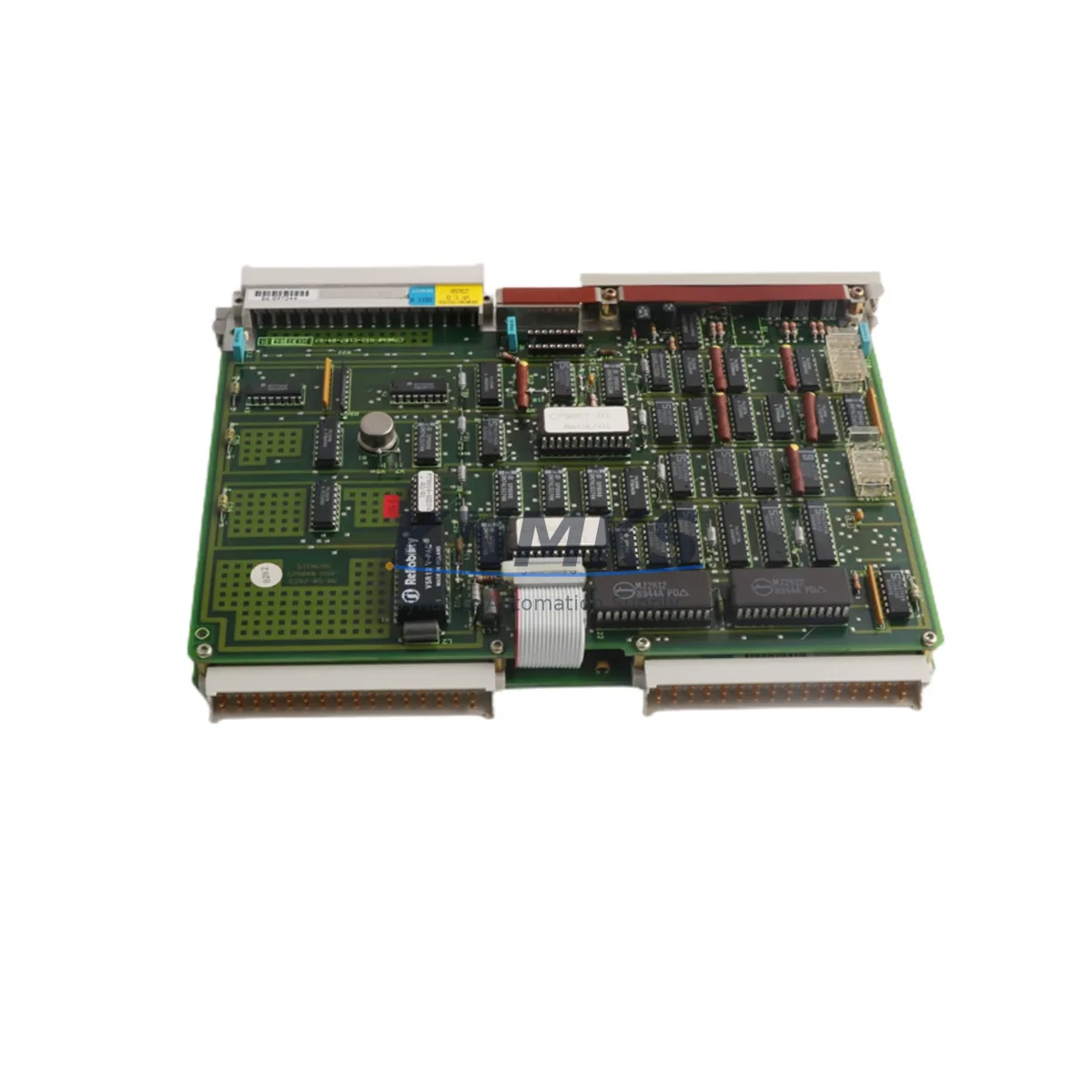
Siemens 6DS1200-8BA Maintenance-Proven Spare Part for Factory Uptime
The Siemens 6DS1200-8BA is an original enable bus module designed for the TELEPERM M distributed control system (DCS) platform — one of Siemens’ most enduring process automation architectures deployed across chemical, petrochemical, power generation, and heavy manufacturing facilities worldwide. As aging TELEPERM M installations continue to operate well beyond their original design life, maintaining a reliable inventory of critical bus-level components like the 6DS1200-8BA is essential for any maintenance team responsible for plant continuity and unplanned downtime prevention.
This module serves as the enable bus interface within the TELEPERM M backplane architecture, coordinating signal authorization and bus communication between automation stations including the AS230, AS235, and AS488 series. Its role is foundational: without a functioning enable bus module, the automation station cannot properly arbitrate control signals, which can result in process shutdowns, spurious trips, or loss of supervisory control. For maintenance engineers managing legacy DCS infrastructure, the 6DS1200-8BA is a non-negotiable line item on any critical spare parts list.
Spare Maintenance Table
| Part Number | 6DS1200-8BA |
| Brand | Siemens |
| Series | TELEPERM M |
| Module Type | Enable Bus Module |
| Compatible Systems | AS230, AS235, AS488 Automation Stations |
| Origin | Germany |
| Weight | 720 g |
| Installation | Backplane slot-mount, TELEPERM M rack |
| Application Environment | Industrial process control, DCS cabinet, climate-controlled panel room |
| Condition | Original Siemens spare, tested before shipment |
| Support terms | 12 Months |
| Lead Time | Fast dispatch; contact for stock confirmation |
| Maintenance Recommendation | Inspect bus connectors and backplane contacts during annual shutdown; replace proactively if intermittent faults are logged |
Maintenance Planning for Continuous Operation
When scheduling replacement or inspection of the 6DS1200-8BA enable bus module, experienced maintenance engineers know that bus-level faults rarely occur in isolation. A thorough site assessment should extend to the surrounding control cabinet and associated signal chain to prevent repeat failures and ensure full system restoration after the module swap.
Begin by verifying the 24 VDC backplane power supply feeding the TELEPERM M rack — a degraded or undersized power module is a common root cause of intermittent bus errors that are misdiagnosed as module failures. Siemens 6DS1703-8AA or equivalent rack power supply units should be inspected for output voltage stability and ripple under load. Simultaneously, check the 6DS1201-8BA bus coupler module adjacent to the enable bus position, as coupling faults can propagate enable signal errors across multiple automation stations.
For I/O integrity, audit the analog and digital I/O sub-modules connected downstream of the AS230/AS235 station. Loose terminal connections on I/O marshalling panels are a frequent source of nuisance alarms that coincide with bus module degradation. Inspect terminal blocks and cable shields for corrosion, particularly in humid or chemically aggressive environments.
Communication continuity should also be validated: confirm that the SINEC H1 or TELEPERM M plant bus interface is operating within specification, as bus module replacement can sometimes expose latent communication faults that were masked by the previous module’s error-handling behavior. If the installation includes a 6DS1703-8RB operator station interface or legacy HMI panel, verify that supervisory communication is re-established cleanly after module reinsertion.
Finally, inspect the backplane connector and rack guide rails for mechanical wear or oxidation. A worn backplane connector can cause the replacement 6DS1200-8BA to seat improperly, leading to intermittent contact faults that are difficult to diagnose without careful physical inspection. Protective fuses on the 24 VDC bus rail should also be checked and replaced as part of the maintenance cycle to ensure the new module is protected from transient overcurrent events during system restart.
Site Replacement Workflow
Replacing the Siemens 6DS1200-8BA on a live TELEPERM M system requires careful sequencing to minimize process disruption and ensure safe, compatible reinstatement of automation control.
Step 1 — Pre-Replacement Verification: Confirm the exact slot position of the 6DS1200-8BA within the TELEPERM M rack using the system’s hardware configuration documentation or the AS station’s slot assignment map. Verify that the replacement module’s hardware revision is compatible with the installed firmware version of the automation station. Siemens TELEPERM M systems can be sensitive to hardware revision mismatches at the bus module level.
Step 2 — Safe Isolation: Place the affected automation station in manual or fallback mode via the operator station before removing the module. Do not hot-swap the enable bus module without confirming that the process loop is in a safe hold state. Coordinate with the control room operator to acknowledge any alarms generated during the swap.
Step 3 — Physical Replacement: Remove the faulty 6DS1200-8BA by releasing the front panel locking mechanism and sliding the module from the backplane slot. Inspect the backplane connector pins for damage before inserting the replacement unit. Seat the new module firmly and re-engage the locking mechanism.
Step 4 — System Restart and Validation: Power-cycle the automation station and monitor the enable bus status indicators. Confirm that all downstream I/O modules report correctly and that no residual bus fault codes remain in the AS station’s diagnostic log. Re-enable automatic control mode from the operator station only after full diagnostic confirmation.
Step 5 — Documentation: Record the replacement date, module serial number, and post-replacement diagnostic results in the plant maintenance management system. Update the critical spare parts inventory to trigger reorder of a replacement 6DS1200-8BA to maintain minimum stock levels.
Spare Parts Support FAQ
Q1: Is the 6DS1200-8BA still available as a new original Siemens spare?
The TELEPERM M product line has reached end-of-life status with Siemens, meaning new production has ceased. However, original unused and tested surplus stock of the 6DS1200-8BA remains available through specialist industrial spare parts suppliers. All units supplied by KNMKS are original Siemens components, individually tested before shipment, and covered by a support terms confirmed by quotation.
Q2: How do I confirm compatibility between the 6DS1200-8BA and my installed AS station version?
Compatibility is primarily determined by the automation station type (AS230, AS235, or AS488) and the rack hardware revision. Provide your AS station model number and rack configuration details when placing an inquiry, and our technical team will cross-reference against known compatibility matrices to confirm fitment before shipment.
Q3: What is the recommended spare parts stocking strategy for TELEPERM M systems?
For facilities operating TELEPERM M systems beyond their original design life, industry best practice recommends maintaining a minimum of one spare unit per installed 6DS1200-8BA position, plus additional buffer stock proportional to the number of automation stations on site. Given the end-of-life status of the platform, procurement engineers should prioritize securing multi-year inventory now to avoid supply gaps during critical maintenance windows.
Q4: What testing is performed before shipment of the 6DS1200-8BA?
Each 6DS1200-8BA unit undergoes functional verification prior to dispatch, including bus interface continuity checks and visual inspection of connector integrity and PCB condition. Units are packaged in anti-static protective packaging suitable for long-term storage. A support terms confirmed by quotation is provided from the date of shipment, covering manufacturing defects and functional failures under normal operating conditions.
© 2026 KNMKS. All rights reserved.
Original Source: https://knmks.com
Contact: admin@knmks.com | +86 18359268345
Product Identification
- Brand / Ecosystem
-
SIEMENS
Siemens - Model / Series
- 6DS1200-8BA
- Product Family
- PLCs & Controllers
- Availability Status
- Available on request after model and quantity confirmation
- Inquiry Type
- B2B RFQ, replacement inquiry and project spare-part request
- Pre-Quote Check
- Exact SKU, brand, series, quantity, nameplate photos and destination country are checked before quotation
System Path
Where this product fits in the KNMKS automation structure.
Specification & Inquiry Focus
- Control platform
- PLC, PAC and modular controllers
- Common needs
- CPU, rack, power and I/O expansion
- Project support
- Replacement, cabinet build and maintenance
Buyer Confirmation
Information KNMKS checks before replying.
- Exact model
- 6DS1200-8BA
- Brand / ecosystem
- SIEMENS
- Product family
- PLCs & Controllers
- Application note
- Replacement, maintenance, project build or spare-part list
- Useful photos
- Nameplate, installed unit, cabinet layout or connector side
- Delivery details
- Quantity, destination country and target schedule
Document Support
Files and notes can be confirmed during quotation.
- Product photos or nameplate confirmation when available
- Packing and delivery notes before quotation confirmation
- Support scope and delivery terms confirmed per inquiry
- Export document coordination for qualified B2B requests
Inquiry Support
- Model cross-checking before quotation
- CPU, power, rack and expansion module matching
- Support for replacement and project inquiry
What to Send Us
- Brand and exact model number: SIEMENS 6DS1200-8BA
- Quantity and required delivery time
- Application, replacement requirement or nameplate photo
- Destination country and shipping preference
RFQ Preparation
This is a product inquiry page built for RFQ communication.
Fast Model Check
Send this model to KNMKS for confirmation.
Include quantity, destination country and photos if this is a maintenance replacement. The inquiry will be saved with a reference number after submission.
Brand & Compatibility Note
KNMKS displays automation product information for well-known industrial brand ecosystems and compatible replacement references. Brand names are used for product identification and compatibility reference only; final availability and commercial terms are confirmed per quotation.
 Manufacturing
 Machine Tools
 Packaging
 Energy & Power



 HMI & Displays
 Servo Systems
 Variable Frequency Drives
 Sensors