
Overview
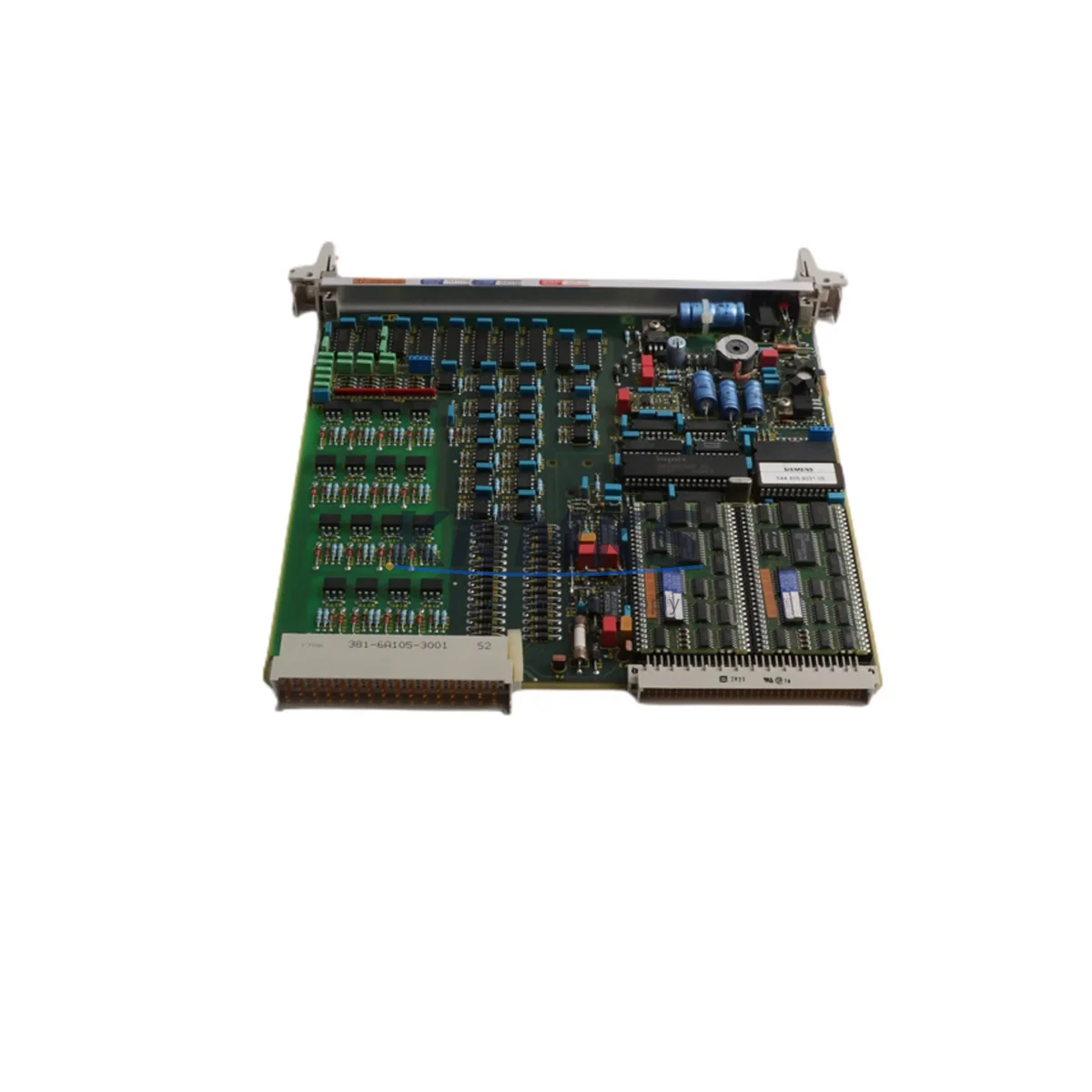
Siemens 6DP1900-8AA Maintenance-Proven Spare Part for Factory Uptime
The Siemens 6DP1900-8AA is a critical communication module within the SIMATIC SYS900 DCS platform, widely deployed in continuous process industries including chemical, petrochemical, power generation, and heavy manufacturing. As a direct original spare, this module supports uninterrupted data exchange between field devices and the central control system. Maintaining a verified stock of the 6DP1900-8AA is a fundamental element of any proactive maintenance strategy for SYS900-based control architectures.
For maintenance engineers managing aging DCS infrastructure, the 6DP1900-8AA represents a high-priority line item on the critical spare parts list. Communication failures at the DCS backbone level can cascade rapidly into full production shutdowns. Having a tested, ready-to-install replacement on the shelf eliminates the lead time risk that often extends unplanned downtime from hours into days. Procurement engineers sourcing this module should verify the firmware revision compatibility with the installed SYS900 bus coupler and central processing unit before committing to a purchase order.
Each unit supplied by KNMKS undergoes pre-shipment functional verification, is packaged in anti-static protective materials, and ships with a support terms confirmed by quotation covering manufacturing defects and operational failures under normal industrial service conditions. Long-term supply continuity is supported through established sourcing channels, ensuring repeat orders can be fulfilled without extended delays.
Spare Maintenance Table
| Part Number | 6DP1900-8AA |
| Brand | Siemens |
| Series | SIMATIC SYS900 DCS |
| Product Type | DCS Communication Module |
| Function | Process bus communication interface for SYS900 distributed control system |
| Compatibility | Siemens SYS900 DCS platform; verify bus coupler and CPU firmware revision before installation |
| Supply Voltage | 24 V DC (nominal, from backplane power rail) |
| Operating Temperature | 0 °C to +60 °C |
| Mounting | SYS900 backplane slot installation |
| Origin | Germany |
| Weight | 460 g |
| Condition | Original spare; tested before shipment |
| Support terms | 12 months from date of shipment |
| Shipping | Fast global dispatch; anti-static packaging |
Maintenance Planning for Continuous Operation
When scheduling a planned replacement or responding to an unplanned failure of the 6DP1900-8AA, a thorough inspection of the surrounding control cabinet components is essential to prevent repeat failures and confirm system integrity before returning the line to service.
Begin with the SYS900 backplane and bus coupler. A degraded backplane connector or a failing bus coupler can cause intermittent communication errors that mimic a faulty 6DP1900-8AA. Inspect the backplane slot contacts for corrosion or mechanical damage before seating the replacement module. Simultaneously, verify the 24 V DC power supply module feeding the DCS rack — voltage ripple or marginal output under load is a common root cause of communication module failures in long-running installations.
Check the SYS900 central processing unit (CPU) for active fault codes and confirm that the firmware version is compatible with the replacement 6DP1900-8AA. In multi-drop bus configurations, inspect the process bus termination resistors at both ends of the cable run; incorrect termination impedance causes signal reflections that degrade communication reliability across all nodes on the segment.
For field wiring connected through the DCS I/O subsystem, inspect the associated I/O modules and terminal blocks for loose connections, insulation breakdown, or moisture ingress — particularly in installations near heat exchangers or cooling towers. Where signal integrity is critical, signal isolators between field transmitters and DCS input channels should be tested for drift or failure, as a faulty isolator can produce erratic process values that are incorrectly attributed to a communication module fault.
Review the cabinet fusing and circuit protection for the DCS power distribution rail. A blown fuse or a tripped miniature circuit breaker upstream of the rack power supply is frequently overlooked during emergency fault isolation. If the installation includes a Siemens OP or TP series HMI panel connected to the SYS900 network, verify that the HMI communication parameters and node address configuration remain consistent after the module swap. Finally, inspect any PROFIBUS or serial communication cables connecting the SYS900 to remote I/O stations or third-party field devices for physical damage, correct shielding termination, and connector integrity.
Site Replacement Workflow
Step 1 — Pre-replacement verification: Confirm the replacement 6DP1900-8AA part number and firmware revision match the installed unit. Document the existing module’s slot position, address settings, and any DIP switch or jumper configurations before removal.
Step 2 — Safe isolation: Follow site lock-out/tag-out (LOTO) procedures. Place the affected DCS node in manual or safe-state mode at the operator station before removing the module from the backplane. Do not hot-swap unless the SYS900 configuration explicitly supports it for this slot type.
Step 3 — Physical replacement: Remove the faulty module, inspect the backplane slot contacts, and seat the replacement 6DP1900-8AA firmly. Replicate all address and configuration settings from the documentation captured in Step 1.
Step 4 — System restart and verification: Power up the rack and monitor the DCS engineering station for fault-free communication status. Confirm that all I/O channels associated with this communication node are reporting correctly and that process values are within expected ranges before returning the loop to automatic control.
Step 5 — Documentation and spare replenishment: Log the replacement event in the site maintenance management system (CMMS). Immediately initiate a purchase order to replenish the consumed spare, maintaining the minimum stock level defined in the site critical spare parts register.
Spare Parts Support FAQ
Q: What is the support terms coverage for the 6DP1900-8AA supplied by KNMKS?
A: All units carry a support terms confirmed by quotation from the date of shipment, covering manufacturing defects and operational failures under normal industrial service conditions. Support requests are supported by our technical team with replacement or refund options.
Q: How do I confirm compatibility before ordering?
A: Provide your SYS900 system configuration details — including the CPU part number, bus coupler model, and installed firmware revision — to our sales team at admin@knmks.com. We will verify compatibility before processing your order to eliminate the risk of an incorrect spare being installed on site.
Q: Is the 6DP1900-8AA tested before shipment?
A: Yes. Every unit undergoes functional verification prior to dispatch. Test records are available upon request for quality-critical procurement processes. Units are shipped in anti-static packaging to prevent electrostatic discharge damage during transit.
Q: Can KNMKS support long-term or repeat supply of this module?
A: Yes. KNMKS maintains established sourcing channels for Siemens SYS900 series components to support ongoing maintenance programs, annual shutdown kits, and critical spare registers. Contact us to discuss blanket order arrangements or consignment stock options for high-priority spares.
© 2026 KNMKS. All rights reserved.
Original Source: https://knmks.com
Contact: admin@knmks.com | +86 18359268345
Product Identification
- Brand / Ecosystem
-
SIEMENS
Siemens - Model / Series
- 6DP1900-8AA
- Product Family
- PLCs & Controllers
- Availability Status
- Available on request after model and quantity confirmation
- Inquiry Type
- B2B RFQ, replacement inquiry and project spare-part request
- Pre-Quote Check
- Exact SKU, brand, series, quantity, nameplate photos and destination country are checked before quotation
System Path
Where this product fits in the KNMKS automation structure.
Specification & Inquiry Focus
- Control platform
- PLC, PAC and modular controllers
- Common needs
- CPU, rack, power and I/O expansion
- Project support
- Replacement, cabinet build and maintenance
Buyer Confirmation
Information KNMKS checks before replying.
- Exact model
- 6DP1900-8AA
- Brand / ecosystem
- SIEMENS
- Product family
- PLCs & Controllers
- Application note
- Replacement, maintenance, project build or spare-part list
- Useful photos
- Nameplate, installed unit, cabinet layout or connector side
- Delivery details
- Quantity, destination country and target schedule
Document Support
Files and notes can be confirmed during quotation.
- Product photos or nameplate confirmation when available
- Packing and delivery notes before quotation confirmation
- Support scope and delivery terms confirmed per inquiry
- Export document coordination for qualified B2B requests
Inquiry Support
- Model cross-checking before quotation
- CPU, power, rack and expansion module matching
- Support for replacement and project inquiry
What to Send Us
- Brand and exact model number: SIEMENS 6DP1900-8AA
- Quantity and required delivery time
- Application, replacement requirement or nameplate photo
- Destination country and shipping preference
RFQ Preparation
This is a product inquiry page built for RFQ communication.
Fast Model Check
Send this model to KNMKS for confirmation.
Include quantity, destination country and photos if this is a maintenance replacement. The inquiry will be saved with a reference number after submission.
Brand & Compatibility Note
KNMKS displays automation product information for well-known industrial brand ecosystems and compatible replacement references. Brand names are used for product identification and compatibility reference only; final availability and commercial terms are confirmed per quotation.
 Manufacturing
 Machine Tools
 Packaging
 Energy & Power



 HMI & Displays
 Servo Systems
 Variable Frequency Drives
 Sensors