
Overview
Siemens 6DP1210-8BB Spare Part for Factory Uptime
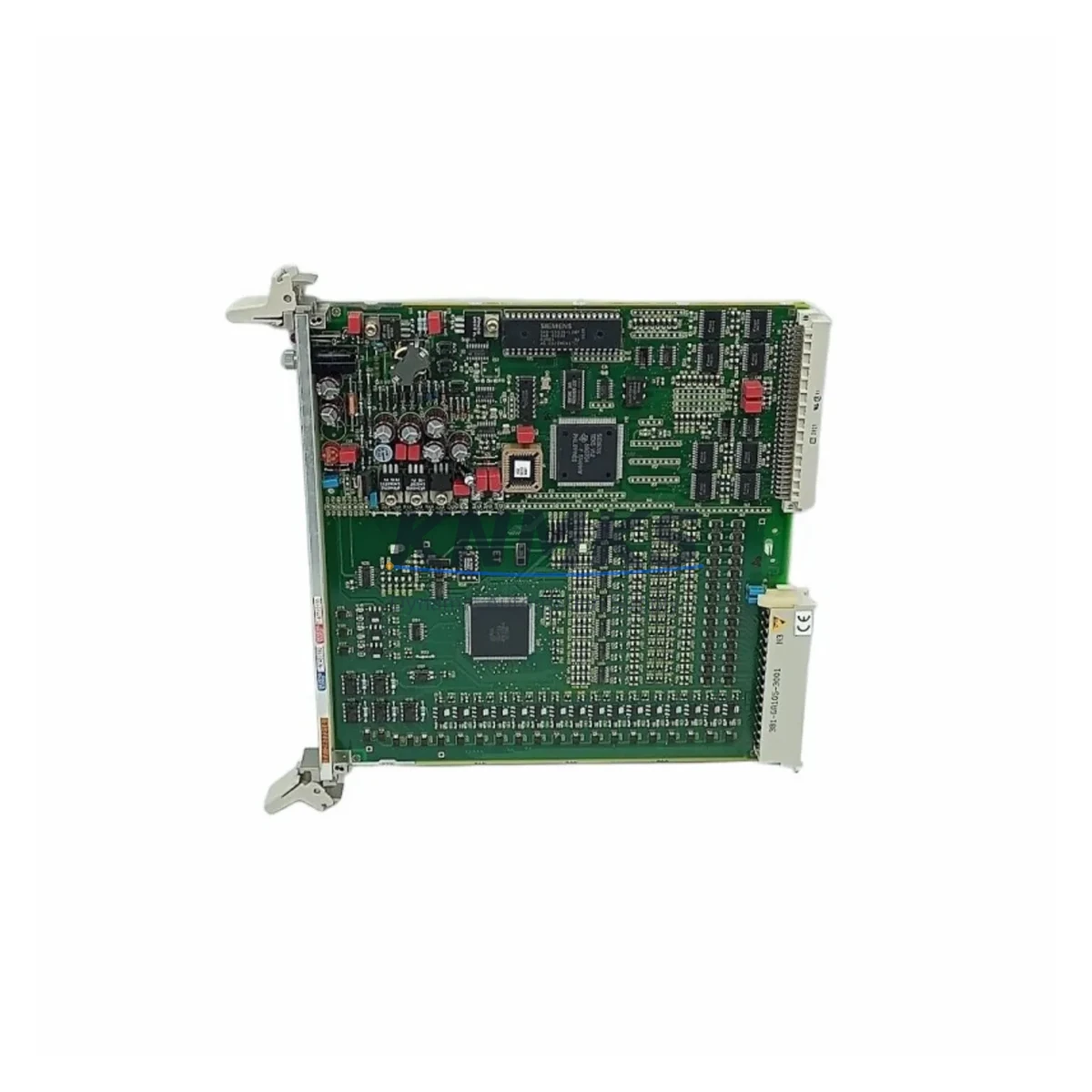
The Siemens 6DP1210-8BB (FUM210) is a Binary I/O Module designed for TELEPERM M and SIMATIC TDC distributed control systems. As a maintenance-proven spare part, it supports continuous factory operation by enabling fast field replacement of failed or degraded binary I/O channels without requiring system reconfiguration or extended downtime. Sourced from original production stock, each unit is pre-shipment tested and backed by a support terms confirmed by quotation, making it a reliable choice for maintenance engineers managing legacy DCS infrastructure.
In process industries — including chemical, petrochemical, power generation, and heavy manufacturing — TELEPERM M systems remain in active service well beyond their original design life. Securing a verified spare such as the 6DP1210-8BB is a critical element of any long-term maintenance strategy. Whether you are responding to an unplanned fault, executing a scheduled annual overhaul, or building a strategic spare parts inventory, this module provides the compatibility and reliability required to restore control system functionality with minimal disruption.
Procurement engineers sourcing this module should confirm the firmware revision and backplane slot assignment with the site maintenance team before ordering. The 6DP1210-8BB is compatible with the TELEPERM M rack architecture and integrates directly with the system bus without additional adapters. Pre-shipment functional testing is performed on every unit shipped, and full traceability documentation is available on request.
Spare Maintenance Table
| Part Number | 6DP1210-8BB |
| Module Designation | FUM210 Binary I/O Module |
| Compatible Systems | TELEPERM M, SIMATIC TDC |
| Module Type | Binary Input/Output |
| Mounting | TELEPERM M Rack / Backplane |
| Signal Type | Digital Binary I/O |
| Country of Origin | Germany |
| Weight | 400 g |
| Condition | Original, Pre-Shipment Tested |
| Application Environment | Industrial DCS, Process Control Cabinets |
| Maintenance Role | Binary I/O channel restoration, fault isolation, scheduled replacement |
| Support terms | 12 Months from shipment date |
| Delivery | From stock — global delivery details confirmed by RFQ available |
Maintenance Planning for Continuous Operation
When replacing the 6DP1210-8BB in a TELEPERM M control cabinet, a thorough inspection of adjacent components is essential to prevent repeat failures and ensure system stability. Maintenance engineers should verify the condition of the 24 VDC power supply module feeding the I/O rack — a degraded power rail is a common root cause of binary I/O module faults and should be ruled out before the replacement module is commissioned.
The backplane and rack bus connectors should be inspected for oxidation, mechanical damage, or loose seating. In systems where the 6DP1210-8BB interfaces with field devices through terminal blocks, the wiring integrity and terminal torque values should be confirmed. Signal isolation barriers or signal conditioners in the I/O loop should also be checked, as these components can degrade independently and cause intermittent binary signal errors that are often misdiagnosed as module failures.
For sites running TELEPERM M alongside SIMATIC TDC communication modules, the inter-system data exchange paths should be verified after any I/O module replacement. Relay output modules connected to the same control loop should be inspected for contact wear, particularly in high-cycle applications. Fuse protection for the I/O circuits — typically located in the marshalling cabinet or field junction boxes — should be tested and replaced as part of the corrective maintenance procedure.
Annual maintenance schedules for TELEPERM M systems should include a review of the HMI operator station connections and any PROFIBUS or proprietary communication links that depend on binary status signals from this module. Keeping a minimum of one 6DP1210-8BB in on-site spare inventory, alongside compatible power supply modules and communication interface cards, significantly reduces mean time to repair (MTTR) during unplanned outages.
Site Replacement Workflow
Step 1 — Fault Isolation: Use the TELEPERM M diagnostic interface or system alarm log to confirm the 6DP1210-8BB as the failed module. Document the slot address, channel assignments, and current configuration before proceeding.
Step 2 — Safe Isolation: Follow site lock-out/tag-out (LOTO) procedures. De-energize the affected I/O rack section. Confirm zero voltage on the module terminals before removal.
Step 3 — Module Removal: Disconnect field wiring at the terminal block or front connector. Remove the module from the backplane slot. Inspect the backplane connector for damage or contamination.
Step 4 — Replacement Installation: Insert the pre-tested 6DP1210-8BB into the correct slot. Reconnect field wiring per the original wiring diagram. Confirm terminal torque and cable routing.
Step 5 — System Recommissioning: Re-energize the rack. Verify binary I/O channel status via the DCS operator station. Confirm all field device signals are correctly reflected in the control system. Clear any latched alarms and document the replacement in the site maintenance log.
Step 6 — Post-Replacement Verification: Monitor the replaced module for a minimum of one full production cycle before returning the system to unattended operation. Update the spare parts inventory record.
Spare Parts Support FAQ
Q: Is the 6DP1210-8BB compatible with both TELEPERM M and SIMATIC TDC systems?
A: Yes. The FUM210 Binary I/O Module is designed for use in TELEPERM M racks and is also referenced in SIMATIC TDC system configurations. Always confirm the rack type, slot assignment, and firmware version with your site documentation before installation.
Q: What pre-shipment testing is performed on each unit?
A: Every 6DP1210-8BB is functionally tested prior to shipment to verify binary I/O channel operation, backplane interface integrity, and power consumption within specification. Test records are available on request.
Q: What does the support terms confirmed by quotation cover?
A: The support terms confirmed by quotation cover manufacturing defects and functional failures under normal operating conditions from the date of shipment. It does not cover damage resulting from incorrect installation, overvoltage events, or unauthorized modification.
Q: Can long-term supply be arranged for ongoing maintenance programs?
A: Yes. For sites with recurring demand for TELEPERM M spare parts, long-term supply agreements and reserved inventory arrangements are available. Contact our sales team to discuss volume requirements and lead time commitments.
© 2026 KNMKS. All rights reserved.
Original Source: https://knmks.com
Contact: admin@knmks.com | +86 18359268345
Product Identification
- Brand / Ecosystem
-
Siemens
Siemens - Model / Series
- 6DP1210-8BB
- Product Family
- PLCs & Controllers
- Availability Status
- Available on request after model and quantity confirmation
- Inquiry Type
- B2B RFQ, replacement inquiry and project spare-part request
- Pre-Quote Check
- Exact SKU, brand, series, quantity, nameplate photos and destination country are checked before quotation
System Path
Where this product fits in the KNMKS automation structure.
Specification & Inquiry Focus
- Control platform
- PLC, PAC and modular controllers
- Common needs
- CPU, rack, power and I/O expansion
- Project support
- Replacement, cabinet build and maintenance
Buyer Confirmation
Information KNMKS checks before replying.
- Exact model
- 6DP1210-8BB
- Brand / ecosystem
- Siemens
- Product family
- PLCs & Controllers
- Application note
- Replacement, maintenance, project build or spare-part list
- Useful photos
- Nameplate, installed unit, cabinet layout or connector side
- Delivery details
- Quantity, destination country and target schedule
Document Support
Files and notes can be confirmed during quotation.
- Product photos or nameplate confirmation when available
- Packing and delivery notes before quotation confirmation
- Support scope and delivery terms confirmed per inquiry
- Export document coordination for qualified B2B requests
Inquiry Support
- Model cross-checking before quotation
- CPU, power, rack and expansion module matching
- Support for replacement and project inquiry
What to Send Us
- Brand and exact model number: Siemens 6DP1210-8BB
- Quantity and required delivery time
- Application, replacement requirement or nameplate photo
- Destination country and shipping preference
RFQ Preparation
This is a product inquiry page built for RFQ communication.
Fast Model Check
Send this model to KNMKS for confirmation.
Include quantity, destination country and photos if this is a maintenance replacement. The inquiry will be saved with a reference number after submission.
Brand & Compatibility Note
KNMKS displays automation product information for well-known industrial brand ecosystems and compatible replacement references. Brand names are used for product identification and compatibility reference only; final availability and commercial terms are confirmed per quotation.
 Manufacturing
 Machine Tools
 Packaging
 Energy & Power



 HMI & Displays
 Servo Systems
 Variable Frequency Drives
 Sensors