
Overview
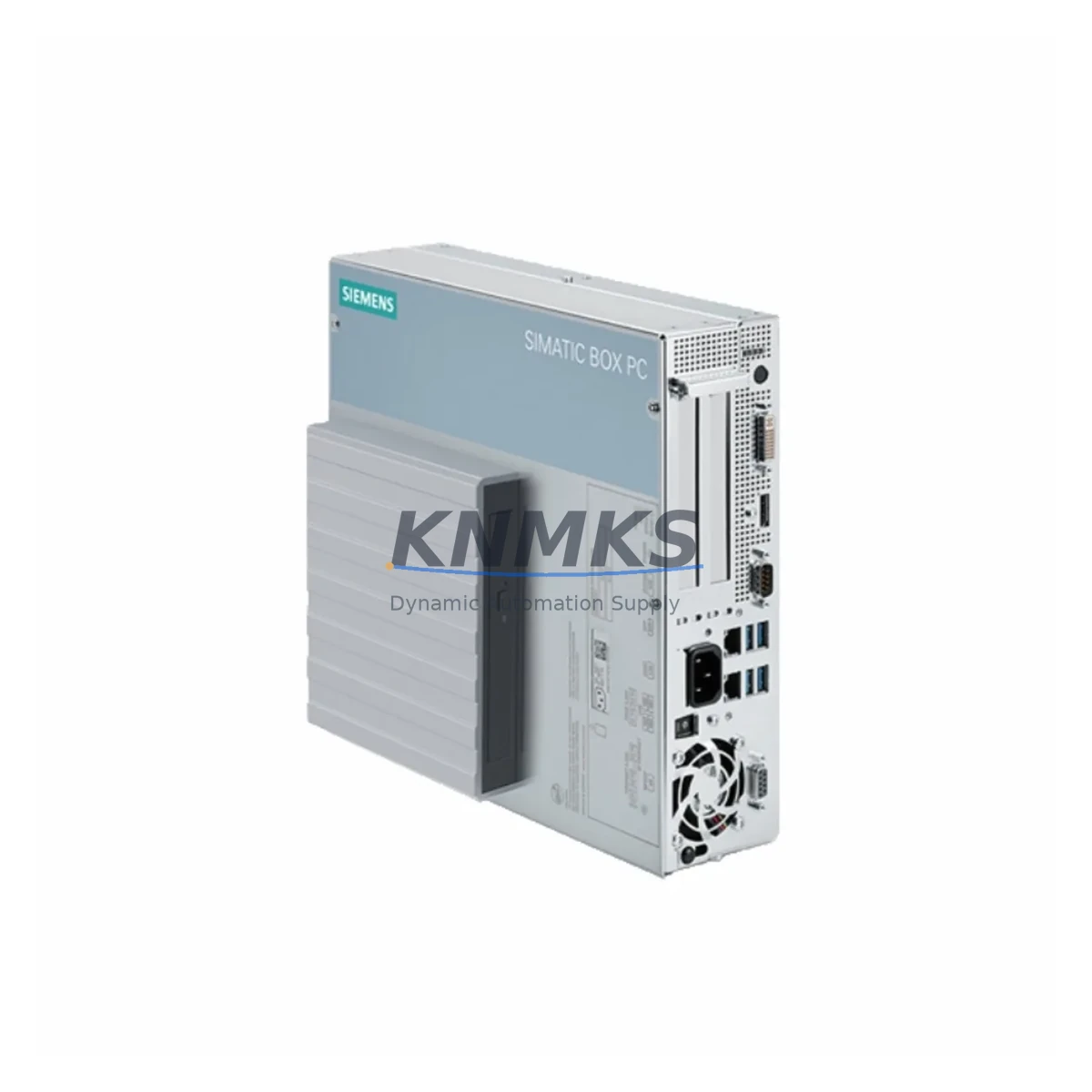
Siemens 6BK1000-6AA00-0XX0 Maintenance-Proven Spare Part for Factory Uptime
The Siemens 6BK1000-6AA00-0XX0 is a critical spare component for the SIMATIC IPC627D industrial PC platform — one of Siemens’ most widely deployed embedded computing solutions in process automation, machine control, and SCADA environments. Designed for continuous operation in demanding industrial settings, this unit supports factory uptime by enabling rapid board-level replacement without system reconfiguration or extended downtime.
For maintenance engineers managing aging SIMATIC IPC627D installations, sourcing a verified, original-grade 6BK1000-6AA00-0XX0 spare is essential to sustaining production continuity. This component is pre-shipment tested, ships with a support terms confirmed by quotation, and is stocked for emergency dispatch — making it a reliable choice for both planned annual overhauls and unplanned fault recovery scenarios.
Procurement engineers will find this spare suitable for long-term inventory planning. With legacy IPC627D systems still active across automotive, chemical, energy, and discrete manufacturing sectors, maintaining at least one 6BK1000-6AA00-0XX0 in the site spare parts cabinet is a recognized best practice for reducing mean time to repair (MTTR) and avoiding costly production halts.
Spare Maintenance Table
| Part Number | 6BK1000-6AA00-0XX0 |
| Brand | Siemens |
| Series | SIMATIC IPC627D |
| Product Type | Industrial PC / Embedded Controller |
| Origin | Germany |
| Compatibility | SIMATIC IPC627D platform; compatible with standard 19″ rack-mount enclosures used in Siemens automation cabinets |
| Operating Voltage | 24 VDC (nominal); refer to IPC627D system documentation for exact supply spec |
| Operating Temperature | 0°C to +55°C (standard industrial range) |
| Mounting | Rack-mount / panel integration per SIMATIC IPC627D chassis specification |
| Communication Interfaces | Ethernet (PROFINET-compatible), USB, serial interfaces per IPC627D configuration |
| Application Environment | Process automation, SCADA, machine control, DCS integration, HMI hosting |
| Maintenance Recommendation | Inspect annually; replace on first sign of boot failure, display fault, or communication dropout |
| Pre-Shipment Testing | Yes — functional verification before dispatch |
| Support terms | 12 Months |
| Stock Status | Available — global dispatch |
Maintenance Planning for Continuous Operation
When replacing the 6BK1000-6AA00-0XX0 in a SIMATIC IPC627D system, a thorough site inspection of the surrounding electrical and communication infrastructure is strongly recommended. Maintenance engineers should treat this replacement as an opportunity to audit the full control cabinet.
Begin with the 24 VDC power supply module feeding the IPC627D rack — verify output voltage stability and check for ripple or thermal stress indicators. A degraded power supply is a common root cause of IPC instability and should be replaced concurrently if any anomaly is detected. Next, inspect the PROFINET communication cables and managed switches connected to the IPC; damaged or aged Cat5e/Cat6 cabling can introduce packet loss that mimics IPC hardware faults.
For systems running HMI applications on the IPC627D, verify that the Siemens SIMATIC HMI panel or WinCC runtime configuration is backed up and restorable before the swap. If the IPC hosts STEP 7 or TIA Portal project data, ensure the project archive is current. Check the backplane connectors and rack bus for oxidation or mechanical wear — particularly in high-vibration environments such as press lines or compressor stations.
I/O modules connected via PROFIBUS DP or PROFINET IO should be verified for correct addressing after the IPC replacement. Signal isolators and galvanic isolation modules in the analog input circuits should be inspected for drift, especially in environments with high electromagnetic interference. Terminal blocks and DIN rail-mounted fuse holders protecting the IPC power feed should be checked for continuity and thermal discoloration.
For sites with legacy integration, also review any serial communication adapters (RS-232/RS-485) connected to the IPC627D for third-party device communication — these are often overlooked during IPC replacements and can cause post-swap communication faults with PLCs, drives, or meters.
Site Replacement Workflow
Replacing the 6BK1000-6AA00-0XX0 in a live SIMATIC IPC627D installation follows a structured sequence to minimize downtime and ensure system compatibility:
Step 1 — Pre-Replacement Backup: Archive the current IPC627D project, WinCC configuration, and any locally stored STEP 7 or TIA Portal data. Capture the current IP address, PROFINET device name, and network configuration.
Step 2 — Safe Shutdown: Execute a controlled shutdown of the IPC via the operating system. Do not perform a hard power cut unless the system is unresponsive. Isolate the 24 VDC supply at the cabinet fuse or circuit breaker.
Step 3 — Physical Swap: Remove the faulty unit following ESD precautions. Install the 6BK1000-6AA00-0XX0 replacement into the IPC627D chassis. Reconnect all cables — power, Ethernet, USB, and serial — in the original configuration.
Step 4 — Configuration Restore: Power up the IPC and restore the archived project and network settings. Verify PROFINET device name and IP assignment match the original configuration to avoid address conflicts on the automation network.
Step 5 — Functional Verification: Confirm communication with all connected PROFINET IO devices, PLCs, and HMI panels. Run a short production cycle or simulation to validate I/O response and HMI display integrity before returning the line to full production.
This workflow supports a target replacement time of under 2 hours for experienced maintenance teams, significantly reducing unplanned downtime costs compared to waiting for OEM repair cycles.
Spare Parts Support FAQ
Q1: Is the 6BK1000-6AA00-0XX0 compatible with all SIMATIC IPC627D variants?
The 6BK1000-6AA00-0XX0 is designed for the SIMATIC IPC627D platform. Compatibility should be verified against the specific IPC627D order configuration and firmware version at your site. Contact our technical team with your existing unit’s nameplate data for confirmation before ordering.
Q2: What does pre-shipment testing cover for this spare?
Each unit undergoes functional power-on verification, communication interface checks, and visual inspection for physical integrity before dispatch. This ensures the spare arrives in operational condition, reducing the risk of DOA (dead-on-arrival) failures during emergency replacements.
Q3: How should this spare be stored for long-term inventory?
Store in original anti-static packaging in a dry, temperature-controlled environment (10°C–35°C, <75% RH). Avoid proximity to strong magnetic fields or high-vibration areas. Inspect annually for any signs of capacitor aging or connector oxidation if stored beyond 24 months.
Q4: What is the support terms coverage and what does it include?
This spare is covered by a support terms confirmed by quotation from the date of shipment. The support terms covers manufacturing defects and functional failures under normal operating conditions. It does not cover damage from incorrect installation, overvoltage events, or physical mishandling. Replacement or repair is provided at no additional cost within the confirmed support period.
© 2026 KNMKS. All rights reserved.
Original Source: https://knmks.com
Contact: admin@knmks.com | +86 18359268345
Product Identification
- Brand / Ecosystem
-
Siemens
Siemens - Model / Series
- 6BK1000-6AA00-0XX0
- Product Family
- PLCs & Controllers
- Availability Status
- Available on request after model and quantity confirmation
- Inquiry Type
- B2B RFQ, replacement inquiry and project spare-part request
- Pre-Quote Check
- Exact SKU, brand, series, quantity, nameplate photos and destination country are checked before quotation
System Path
Where this product fits in the KNMKS automation structure.
Specification & Inquiry Focus
- Control platform
- PLC, PAC and modular controllers
- Common needs
- CPU, rack, power and I/O expansion
- Project support
- Replacement, cabinet build and maintenance
Buyer Confirmation
Information KNMKS checks before replying.
- Exact model
- 6BK1000-6AA00-0XX0
- Brand / ecosystem
- Siemens
- Product family
- PLCs & Controllers
- Application note
- Replacement, maintenance, project build or spare-part list
- Useful photos
- Nameplate, installed unit, cabinet layout or connector side
- Delivery details
- Quantity, destination country and target schedule
Document Support
Files and notes can be confirmed during quotation.
- Product photos or nameplate confirmation when available
- Packing and delivery notes before quotation confirmation
- Support scope and delivery terms confirmed per inquiry
- Export document coordination for qualified B2B requests
Inquiry Support
- Model cross-checking before quotation
- CPU, power, rack and expansion module matching
- Support for replacement and project inquiry
What to Send Us
- Brand and exact model number: Siemens 6BK1000-6AA00-0XX0
- Quantity and required delivery time
- Application, replacement requirement or nameplate photo
- Destination country and shipping preference
RFQ Preparation
This is a product inquiry page built for RFQ communication.
Fast Model Check
Send this model to KNMKS for confirmation.
Include quantity, destination country and photos if this is a maintenance replacement. The inquiry will be saved with a reference number after submission.
Brand & Compatibility Note
KNMKS displays automation product information for well-known industrial brand ecosystems and compatible replacement references. Brand names are used for product identification and compatibility reference only; final availability and commercial terms are confirmed per quotation.
 Manufacturing
 Machine Tools
 Packaging
 Energy & Power



 HMI & Displays
 Servo Systems
 Variable Frequency Drives
 Sensors