
Overview
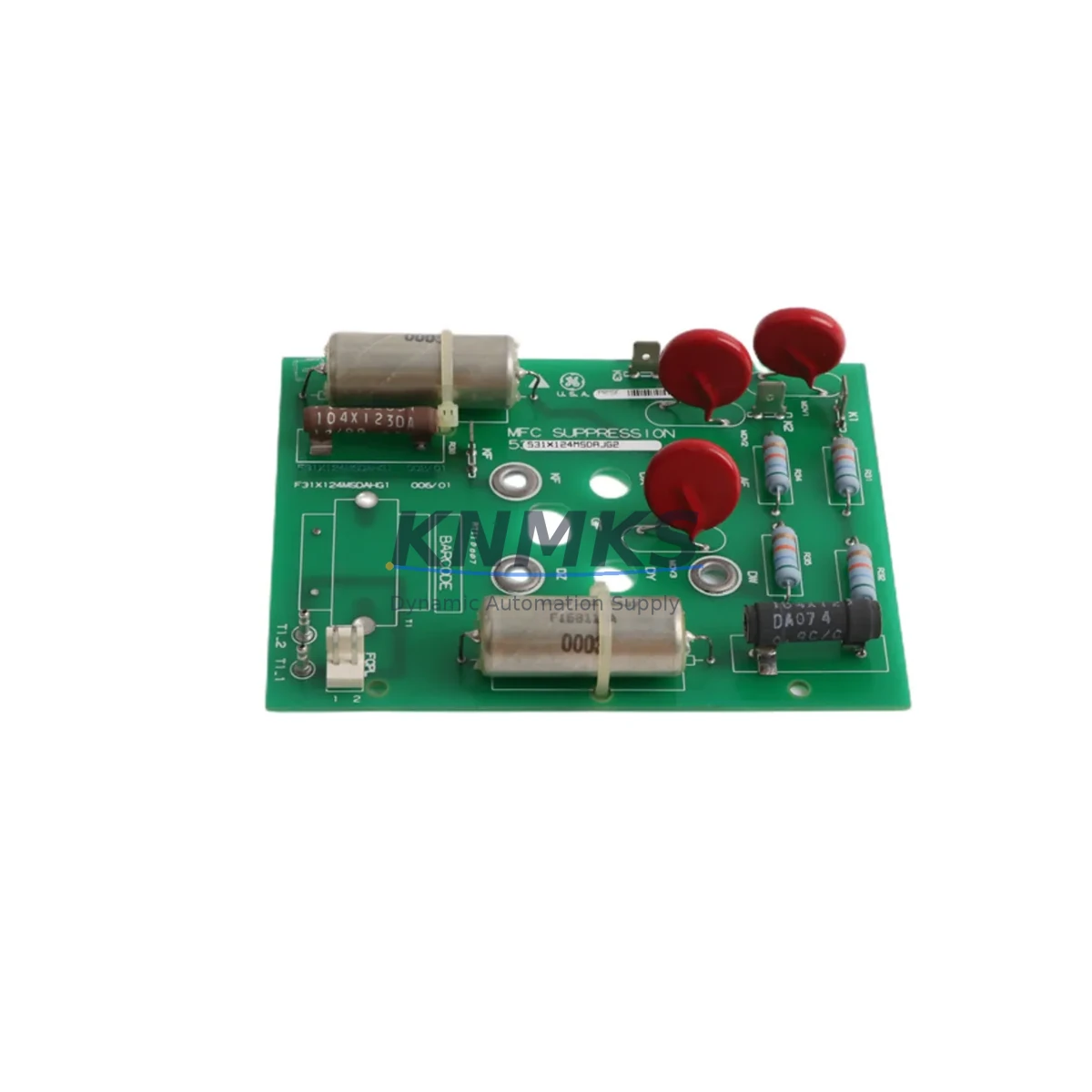
Siemens 531X124MSDAJG2 Maintenance-Proven Spare Part for Factory Uptime
The Siemens 531X124MSDAJG2 is an original PLC power supply module engineered for the Siemens 531X automation series. Designed for continuous industrial operation, this module delivers stable, regulated DC power to the PLC backplane and connected I/O assemblies. For maintenance engineers managing aging SIMATIC or 531X-based control systems, stocking the 531X124MSDAJG2 as a verified spare is a proven strategy to minimize unplanned downtime and accelerate fault recovery on the production floor.
Whether you are conducting routine control cabinet inspections, responding to an emergency shutdown, or executing a planned annual overhaul, the 531X124MSDAJG2 provides a direct, drop-in replacement path. Its original Siemens manufacturing ensures full electrical compatibility with the 531X backplane bus, eliminating the risk of voltage mismatch, timing faults, or communication errors that can arise from non-OEM substitutes. Each unit shipped from KNMKS is individually tested prior to dispatch and covered by a support terms confirmed by quotation.
Procurement engineers sourcing MRO spares for long-running 531X installations will find the 531X124MSDAJG2 increasingly difficult to source through standard distribution channels as the series approaches end-of-life. KNMKS maintains dedicated inventory of this module to support long-term supply continuity for customers operating legacy Siemens control architectures across automotive, chemical, utilities, and discrete manufacturing environments.
Spare Maintenance Table
| SKU / Part Number | 531X124MSDAJG2 |
| Brand | Siemens |
| Series | 531X Automation Series |
| Product Type | PLC Power Supply Module |
| Country of Origin | Germany (DE) |
| Output Voltage | 24 VDC (nominal, regulated) |
| Mounting | DIN Rail / Backplane slot, 531X rack compatible |
| Compatibility | Siemens 531X series PLC racks and I/O expansion assemblies |
| Application Environment | Industrial control cabinets, factory automation, process control |
| Condition | Original, new or refurbished-to-spec (confirmed at dispatch) |
| Pre-shipment Testing | Individually tested before dispatch |
| Support terms | 12 Months |
| Shipping | Global express; lead time confirmed at order |
| Weight | 120 g (approx.) |
Maintenance Planning for Continuous Operation
When replacing the 531X124MSDAJG2 power supply module during a scheduled or emergency maintenance event, a disciplined site inspection of the surrounding electrical circuit is essential to prevent repeat failures and ensure stable system recovery. Maintenance engineers should treat the power supply replacement as an opportunity to audit the full power distribution chain within the control cabinet.
Begin by verifying the incoming AC supply voltage and phase quality at the cabinet entry point. A degraded or fluctuating mains supply is a leading cause of premature power module failure in 531X installations. Inspect the primary fuse or circuit breaker protecting the power supply input — replace any fuse showing signs of thermal stress or intermittent continuity. Check the terminal blocks and wiring harness connecting the power supply output to the backplane bus; loose or corroded terminals can introduce voltage drops that destabilize the PLC CPU and I/O modules.
With the 531X124MSDAJG2 installed, validate the output voltage at the backplane connector before powering up the CPU. If the system includes a Siemens 531X CPU module (such as a 6ES5 or compatible 531X processor card), confirm that the CPU’s power-on diagnostics complete without fault codes related to supply voltage. Inspect any 531X digital or analog I/O modules seated in the same rack — a failing power supply often causes intermittent I/O errors that are misdiagnosed as field wiring faults.
For systems with PROFIBUS or MPI communication modules installed in the 531X rack, verify communication link integrity after power restoration. Communication modules are sensitive to supply ripple and may require a cold restart to re-establish network participation. If the cabinet includes a Siemens OP or TP series HMI panel powered from the same 24 VDC bus, confirm the HMI reconnects to the PLC without alarm. Additionally, inspect any signal isolators or relay output modules in the I/O circuit — these components can mask underlying power quality issues and should be part of the annual inspection checklist alongside the power supply module.
Procurement teams managing spare parts inventory for 531X-based lines should consider stocking at least one 531X124MSDAJG2 per control cabinet cluster, particularly for production lines where a single cabinet controls multiple process zones. The cost of a stocked spare is negligible compared to the production loss from an unplanned outage awaiting emergency sourcing.
Site Replacement Workflow
Step 1 — Isolate and de-energize: Follow site LOTO (Lockout/Tagout) procedures. Confirm zero voltage at the cabinet supply terminals before opening the rack.
Step 2 — Document existing configuration: Photograph the existing module position, wiring connections, and any DIP switch or jumper settings on the 531X124MSDAJG2 before removal. Note the rack slot number.
Step 3 — Remove the failed module: Disconnect the power input connector and backplane edge connector. Slide the module out of the DIN rail or rack slot. Inspect the slot for signs of arcing, contamination, or mechanical damage.
Step 4 — Inspect and prepare the replacement: Verify the replacement 531X124MSDAJG2 matches the original part number exactly. Confirm any jumper or switch settings match the removed unit before installation.
Step 5 — Install and reconnect: Seat the new module firmly into the rack slot. Reconnect the backplane and power input connectors. Torque terminal screws to specification.
Step 6 — Power-up and verify: Restore power in sequence. Monitor the power supply status LED and PLC CPU diagnostic indicators. Confirm all I/O modules report healthy status. Verify process signals are within expected range before releasing the line to production.
Step 7 — Update maintenance records: Log the replacement date, new module serial number, and any observations. Schedule the next inspection interval per the OEM maintenance guide.
Spare Parts Support FAQ
Q1: Is the 531X124MSDAJG2 still available as a new original part?
The Siemens 531X series is a mature product line. KNMKS sources original and refurbished-to-specification units from verified supply channels. Each unit is tested before dispatch. Contact admin@knmks.com to confirm current stock status and condition grade.
Q2: How do I verify compatibility with my existing 531X rack before ordering?
Confirm your rack model number and existing power supply slot configuration. The 531X124MSDAJG2 is designed for the 531X backplane architecture. If you are unsure, share your rack nameplate data with our technical team and we will confirm compatibility before shipment.
Q3: What does the support terms confirmed by quotation cover?
The support terms covers electrical failure under normal operating conditions for 12 months from the date of dispatch. It does not cover damage from incorrect installation, overvoltage events, or physical mishandling. KNMKS provides replacement or refund for confirmed support requests.
Q4: Can KNMKS support long-term supply for multiple units across a maintenance contract?
Yes. KNMKS supports blanket order arrangements and scheduled delivery programs for MRO customers managing multiple 531X installations. Contact admin@knmks.com or call +86 18359268345 to discuss volume pricing and supply continuity agreements.
© 2026 KNMKS. All rights reserved.
Original Source: https://knmks.com
Contact: admin@knmks.com | +86 18359268345
Product Identification
- Brand / Ecosystem
-
Siemens
Siemens - Model / Series
- 531X124MSDAJG2
- Product Family
- PLCs & Controllers
- Availability Status
- Available on request after model and quantity confirmation
- Inquiry Type
- B2B RFQ, replacement inquiry and project spare-part request
- Pre-Quote Check
- Exact SKU, brand, series, quantity, nameplate photos and destination country are checked before quotation
System Path
Where this product fits in the KNMKS automation structure.
Specification & Inquiry Focus
- Control platform
- PLC, PAC and modular controllers
- Common needs
- CPU, rack, power and I/O expansion
- Project support
- Replacement, cabinet build and maintenance
Buyer Confirmation
Information KNMKS checks before replying.
- Exact model
- 531X124MSDAJG2
- Brand / ecosystem
- Siemens
- Product family
- PLCs & Controllers
- Application note
- Replacement, maintenance, project build or spare-part list
- Useful photos
- Nameplate, installed unit, cabinet layout or connector side
- Delivery details
- Quantity, destination country and target schedule
Document Support
Files and notes can be confirmed during quotation.
- Product photos or nameplate confirmation when available
- Packing and delivery notes before quotation confirmation
- Support scope and delivery terms confirmed per inquiry
- Export document coordination for qualified B2B requests
Inquiry Support
- Model cross-checking before quotation
- CPU, power, rack and expansion module matching
- Support for replacement and project inquiry
What to Send Us
- Brand and exact model number: Siemens 531X124MSDAJG2
- Quantity and required delivery time
- Application, replacement requirement or nameplate photo
- Destination country and shipping preference
RFQ Preparation
This is a product inquiry page built for RFQ communication.
Fast Model Check
Send this model to KNMKS for confirmation.
Include quantity, destination country and photos if this is a maintenance replacement. The inquiry will be saved with a reference number after submission.
Brand & Compatibility Note
KNMKS displays automation product information for well-known industrial brand ecosystems and compatible replacement references. Brand names are used for product identification and compatibility reference only; final availability and commercial terms are confirmed per quotation.
 Manufacturing
 Machine Tools
 Packaging
 Energy & Power



 HMI & Displays
 Servo Systems
 Variable Frequency Drives
 Sensors