
Overview
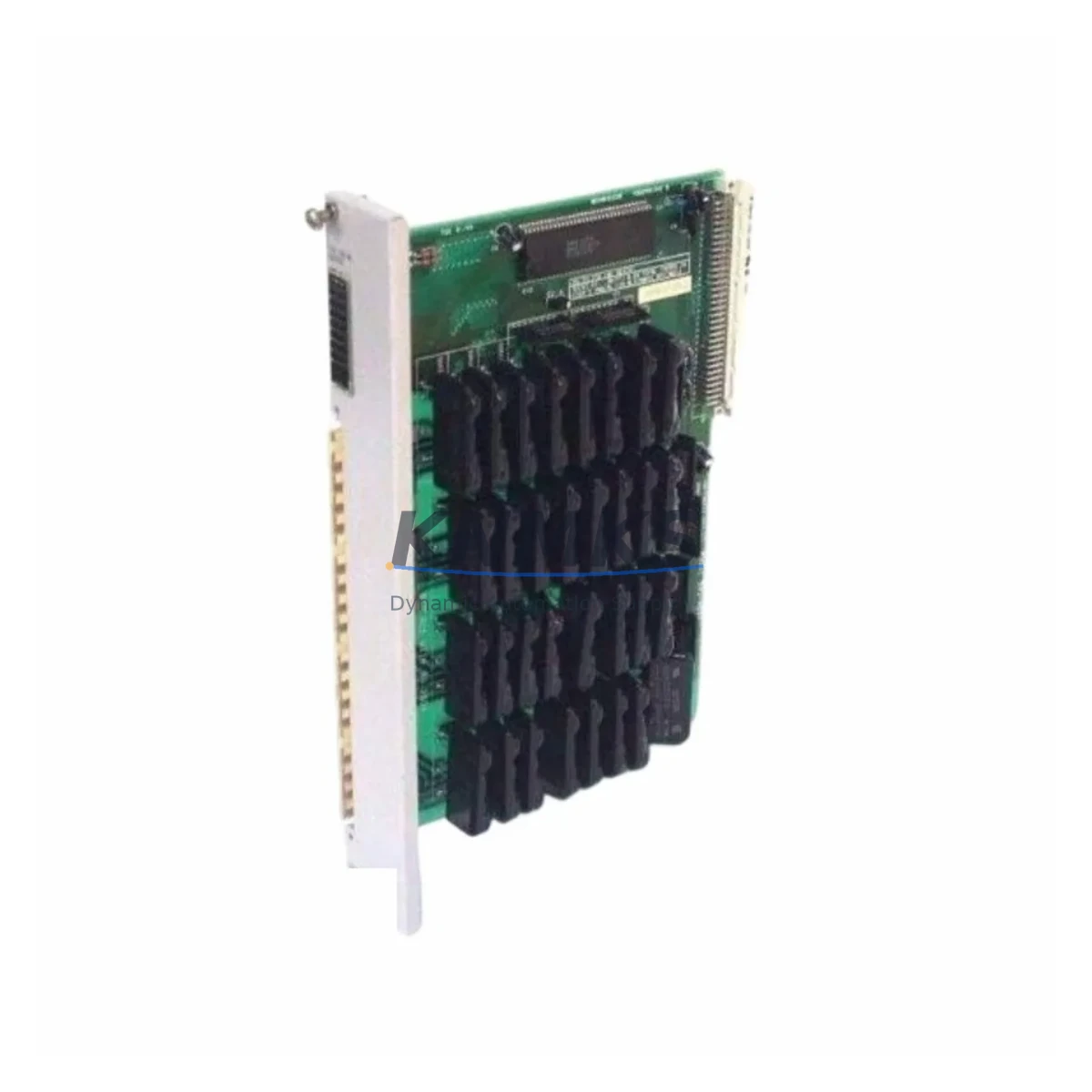
SIEMENS 505-4832 Migration-Ready AC Triac Output Module: Legacy System Retrofit & Upgrade
The SIEMENS 505-4832 is a 32-point AC Triac Output Module designed for the SIMATIC 505 programmable logic controller platform — one of Siemens’ most widely deployed legacy control architectures in process manufacturing, material handling, and discrete automation. As the SIMATIC 505 series has reached end-of-life status, the 505-4832 has become a critical spare for facilities managing aging control infrastructure, executing phased retrofits, or extending the operational life of existing control cabinets while a full migration to modern platforms such as SIMATIC S7-300 or S7-400 is planned and budgeted.
This module sources 32 individually isolated AC triac outputs, each capable of switching inductive and resistive loads in the 24–240 VAC range. Its solid-state switching design eliminates mechanical wear, making it particularly well-suited for high-cycle applications such as conveyor drives, solenoid valve banks, and motor starter circuits. When replacing a failed or end-of-life 505-4832 in an existing rack, engineers must confirm the backplane slot assignment, I/O address mapping in the TISOFT or STEP 5 program, and the output load current per point to avoid nuisance tripping or thermal derating.
Migration Compatibility Table
| Parameter | SIEMENS 505-4832 (This Module) | Retrofit / Migration Notes |
|---|---|---|
| Output Type | 32-pt AC Triac (Solid-State) | Verify load type (resistive vs. inductive) before replacement |
| Output Voltage Range | 24–240 VAC, 47–63 Hz | Confirm field wiring voltage matches; no rewiring required for like-for-like swap |
| Backplane Interface | SIMATIC 505 I/O Bus | Compatible with 505-6860, 505-6870 base racks; confirm slot address in TISOFT |
| I/O Address Mapping | Configured via rack/slot position | No program rewrite needed for direct slot-for-slot replacement |
| Communication Protocol | SIMATIC 505 proprietary I/O bus | Not compatible with PROFIBUS or PROFINET without gateway module |
| Power Consumption | Supplied via backplane 5 VDC bus | Verify rack power supply (e.g., 505-6860 PSU) capacity before adding modules |
| Installation Footprint | Single-slot SIMATIC 505 I/O module | Direct physical replacement; no panel modification required |
| Firmware | Hardware-configured; no firmware update required | No version dependency; compatible with all TISOFT and STEP 5 revisions |
| Replacement Path | Direct drop-in for failed 505-4832 units | For platform migration to S7-300/S7-400, additional I/O mapping and HMI screen updates required |
| Support terms | support terms confirmed by quotation — Functional test report available upon request | |
Retrofit Planning for Existing Automation Systems
Successful integration of the 505-4832 into an existing SIMATIC 505 control system requires a structured pre-installation review. Begin by auditing the rack assembly: the SIMATIC 505 base rack (such as the 505-6860 or 505-6870) must have sufficient available slots and adequate 5 VDC backplane current budget. Each output module draws from the shared backplane supply, and adding or replacing modules without verifying the power budget can cause intermittent faults or supply shutdown under load.
Terminal wiring on the 505-4832 uses a removable field wiring connector, which simplifies hot-swap procedures during planned maintenance windows. Before disconnecting the old module, photograph or document the terminal assignments — particularly for mixed-polarity or shared-neutral wiring configurations common in older panel builds. The field wiring connector can be transferred directly to the replacement module, eliminating re-termination errors and reducing installation time.
If the retrofit scope extends beyond a single module replacement to a broader control cabinet upgrade, consider the role of the SIMATIC 505 CPU (such as the 505-6860 or TI545 series) in managing the I/O scan cycle. Adding output modules increases the I/O scan load; verify that the CPU scan time remains within the application’s control loop requirements. For systems where the CPU is also approaching end-of-life, a phased approach — replacing I/O modules first while maintaining the existing CPU and program — is the lowest-risk migration strategy.
Communication architecture is another key consideration. The SIMATIC 505 platform uses a proprietary I/O bus that does not natively support PROFIBUS DP or PROFINET. If the migration roadmap includes integration with a modern SCADA system or a new S7-400 controller, a SIMATIC 505 to PROFIBUS gateway or a dedicated protocol converter will be required to bridge the legacy I/O bus to the new communication backbone. This gateway approach allows the existing 505-4832 output modules and field wiring to remain in service during the transition, significantly reducing the scope and cost of the initial migration phase.
For facilities running WinCC or older COROS LS-B HMI panels connected to the SIMATIC 505 CPU, any change in I/O addressing or CPU type will require corresponding updates to HMI tag databases and screen logic. Plan HMI validation as a parallel workstream to the hardware retrofit to avoid extending the commissioning window. Signal isolators — particularly for long cable runs or mixed-voltage field devices — should also be reviewed during the retrofit; SIEMENS SITRANS signal conditioners or equivalent DIN-rail isolators are commonly used alongside 505-series I/O to protect module inputs from field-side transients.
Finally, if the retrofit involves expanding I/O capacity beyond the existing rack, a SIMATIC 505 remote I/O drop using a 505-6850 remote base unit and appropriate communication adapter can extend the system without relocating the CPU or rewiring the main control cabinet. This approach is particularly effective in distributed plant layouts where field devices are located far from the main control room.
Downtime Control During System Migration
Minimizing unplanned downtime is the primary operational constraint in any legacy PLC retrofit. For a direct module replacement of the 505-4832, the procedure can typically be completed within a planned maintenance window of 30–60 minutes, provided the replacement module has been pre-tested and the field wiring connector is documented before removal.
Before powering down the rack, export and archive the current TISOFT or STEP 5 program from the CPU to a backup medium. Even for a like-for-like module swap that requires no program changes, having a verified program backup eliminates recovery risk if the CPU loses its program during the power cycle. Confirm that the backup file opens correctly in the programming software before proceeding with the hardware swap.
After installing the 505-4832, restore rack power and observe the module’s status LEDs during the CPU I/O initialization sequence. The module should enumerate correctly within the first scan cycle. Force individual output points from the programming terminal to verify field-side continuity before returning the system to automatic mode. This point-by-point verification — particularly for solenoid valves, motor starters, and safety-critical outputs — is the most effective method for confirming correct wiring and address mapping without relying on a full production run.
For larger retrofit projects involving multiple module replacements or a CPU upgrade, a staged cutover approach — replacing one rack section at a time while keeping the remainder of the system in service — is strongly recommended. This approach limits the blast radius of any commissioning issue and allows the control system to maintain partial production continuity throughout the migration. Each stage should be followed by a documented functional test before the next stage begins.
All units supplied by KNMKS undergo pre-shipment functional testing. A test report confirming output point continuity, isolation resistance, and backplane communication is available upon request, reducing the on-site verification burden and supporting faster return-to-service after installation.
Retrofit Support FAQ
Q1: Is the SIEMENS 505-4832 a direct drop-in replacement for the original module?
Yes. The 505-4832 is a slot-compatible, pin-compatible replacement for the original SIMATIC 505 AC Triac Output Module. No program changes, address remapping, or panel modifications are required for a like-for-like slot replacement. Transfer the existing field wiring connector directly to the replacement module to eliminate re-termination errors.
Q2: What pre-installation checks are required before fitting the replacement module?
Verify the rack power supply’s available 5 VDC backplane current, confirm the slot address in the TISOFT or STEP 5 program, document the field wiring terminal assignments, and back up the CPU program before powering down. For systems with shared-neutral output wiring, confirm neutral continuity before restoring power.
Q3: Can this module be used during a phased migration to SIMATIC S7-300 or S7-400?
Yes. The 505-4832 can remain in service on the existing SIMATIC 505 rack while a parallel S7-300 or S7-400 system is commissioned. A protocol gateway or remote I/O adapter is required to bridge the 505 I/O bus to PROFIBUS DP or PROFINET if the new CPU needs to read or write to the legacy I/O. This approach allows field wiring and existing output loads to remain unchanged during the transition.
Q4: What support terms and testing documentation is provided?
All SIEMENS 505-4832 units supplied by KNMKS carry a support terms confirmed by quotation covering manufacturing defects and functional failures under normal operating conditions. Pre-shipment functional test reports are available upon request. Units are shipped in anti-static packaging with lot traceability. For urgent retrofit projects, expedited dispatch and same-day shipping confirmation are available — contact admin@knmks.com or +86 18359268345 for availability.
© 2026 KNMKS. All rights reserved.
Original Source: https://knmks.com
Contact: admin@knmks.com | +86 18359268345
Product Identification
- Brand / Ecosystem
-
SIEMENS
Siemens - Model / Series
- 505-4832
- Product Family
- PLCs & Controllers
- Availability Status
- Available on request after model and quantity confirmation
- Inquiry Type
- B2B RFQ, replacement inquiry and project spare-part request
- Pre-Quote Check
- Exact SKU, brand, series, quantity, nameplate photos and destination country are checked before quotation
System Path
Where this product fits in the KNMKS automation structure.
Specification & Inquiry Focus
- Control platform
- PLC, PAC and modular controllers
- Common needs
- CPU, rack, power and I/O expansion
- Project support
- Replacement, cabinet build and maintenance
Buyer Confirmation
Information KNMKS checks before replying.
- Exact model
- 505-4832
- Brand / ecosystem
- SIEMENS
- Product family
- PLCs & Controllers
- Application note
- Replacement, maintenance, project build or spare-part list
- Useful photos
- Nameplate, installed unit, cabinet layout or connector side
- Delivery details
- Quantity, destination country and target schedule
Document Support
Files and notes can be confirmed during quotation.
- Product photos or nameplate confirmation when available
- Packing and delivery notes before quotation confirmation
- Support scope and delivery terms confirmed per inquiry
- Export document coordination for qualified B2B requests
Inquiry Support
- Model cross-checking before quotation
- CPU, power, rack and expansion module matching
- Support for replacement and project inquiry
What to Send Us
- Brand and exact model number: SIEMENS 505-4832
- Quantity and required delivery time
- Application, replacement requirement or nameplate photo
- Destination country and shipping preference
RFQ Preparation
This is a product inquiry page built for RFQ communication.
Fast Model Check
Send this model to KNMKS for confirmation.
Include quantity, destination country and photos if this is a maintenance replacement. The inquiry will be saved with a reference number after submission.
Brand & Compatibility Note
KNMKS displays automation product information for well-known industrial brand ecosystems and compatible replacement references. Brand names are used for product identification and compatibility reference only; final availability and commercial terms are confirmed per quotation.
 Manufacturing
 Machine Tools
 Packaging
 Energy & Power



 HMI & Displays
 Servo Systems
 Variable Frequency Drives
 Sensors