
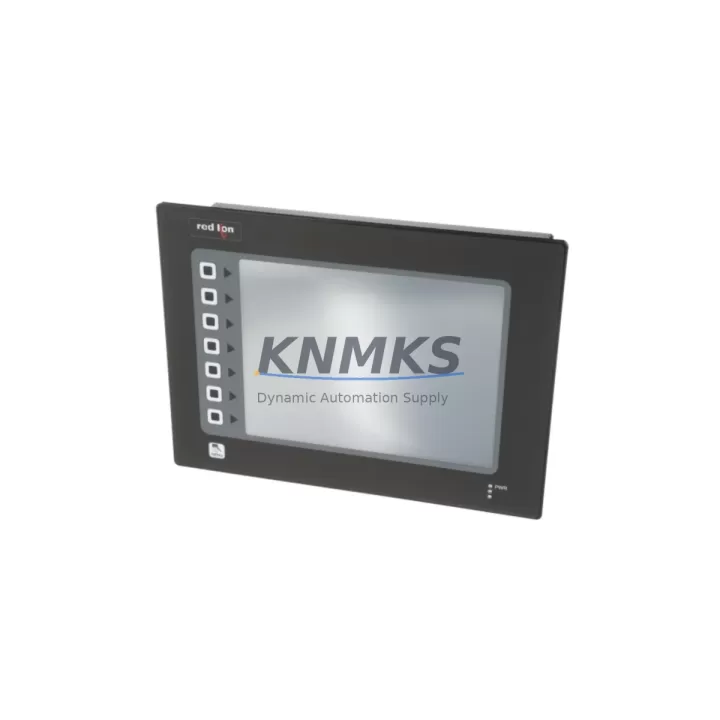
Overview
Red Lion G310C000 Migration-Ready Digital Panel Meter: Legacy System Retrofit & Compatibility Upgrade
The Red Lion G310C000 is a Gemini Series digital panel meter engineered for seamless integration into legacy control panel environments. Designed as a direct migration-ready replacement for discontinued G3-series and older analog panel meters, the G310C000 supports universal process input, RS-485 Modbus RTU communications, and a wide-range power supply — making it one of the most versatile retrofit instruments available for aging automation infrastructure.
For maintenance engineers and system integrators managing long-lifecycle installations, the G310C000 eliminates the need for full panel redesigns. Its compact 1/8 DIN form factor fits existing cutouts without modification, and its field-configurable input ranges allow direct substitution for meters previously wired to thermocouples, RTDs, process voltage, or current signals. Before installation, engineers should verify terminal block compatibility, confirm the existing wiring gauge against the G310C000’s terminal torque specifications, and validate that the power supply rail — typically 85–265 VAC or 12–24 VDC — matches the panel’s available feed.
When migrating from older Red Lion G3 or Pax series meters, the primary engineering checkpoints include: input signal type and range mapping, relay output count and load rating, RS-485 network address assignment (to avoid conflicts with existing Modbus device chains), and HMI display tag remapping if the meter’s process value is polled by a SCADA or HMI system such as a Red Lion Graphite HMI or a third-party panel PC. Firmware version compatibility should also be confirmed if the G310C000 is being integrated into a Crimson 3.x-based communication network.
Migration Compatibility Table
| Parameter | Legacy G3 / Pax Series | Red Lion G310C000 (Gemini) | Migration Note |
|---|---|---|---|
| Form Factor | 1/8 DIN | 1/8 DIN | Drop-in panel cutout fit; no modification required |
| Input Types | Fixed (TC / RTD / mA) | Universal (TC, RTD, V, mA, process) | Reconfigure via front keypad; verify signal wiring |
| Power Supply | 85–265 VAC or 12–24 VDC | 85–265 VAC or 12–24 VDC | Confirm panel rail voltage before energizing |
| Communication | RS-485 Modbus RTU (optional) | RS-485 Modbus RTU (standard) | Assign unique device address; update SCADA register map |
| Relay Outputs | Up to 2 SPDT | Up to 2 SPDT | Verify load rating; rewire if relay wiring changed |
| Display | 4-digit LED | 5-digit LED (red) | Update HMI display tags for decimal point position |
| Installation Space | Standard 1/8 DIN depth | ~101 mm panel depth | Confirm rear clearance in control cabinet |
| Firmware / Config | DIP switch or keypad | Front keypad + Crimson 3.x compatible | Re-enter scaling, setpoints, and alarm thresholds |
| Support terms | Varies (legacy) | 12 Months | All units ship with support terms confirmed by quotation coverage |
Retrofit Planning for Existing Automation Systems
A successful G310C000 retrofit begins well before the physical swap. Start by auditing the existing control cabinet layout: confirm that the panel cutout dimensions match the 1/8 DIN standard (92 mm × 45 mm), measure the available rear depth, and identify all signal cables routed to the legacy meter. In multi-meter panels, it is common to find shared RS-485 bus wiring connecting several instruments — including Red Lion PAX series meters, signal isolators, or third-party Modbus RTU devices — on a single daisy-chain. The G310C000 must be assigned a unique Modbus address before being connected to this bus to prevent address conflicts.
For I/O-intensive retrofit projects, engineers frequently pair the G310C000 with Red Lion IAMA0000 analog input modules or DSPSX000 signal conditioners to handle multi-channel process monitoring without replacing the entire control architecture. Where the legacy system relied on a Red Lion Data Station Plus or a Modbus-to-Ethernet gateway for remote data acquisition, the G310C000’s RS-485 port integrates directly into the existing communication chain with minimal reconfiguration.
Power distribution within the cabinet should also be reviewed. If the original meter was powered from a dedicated 24 VDC rail shared with PLCs, safety relays, or Red Lion power supplies, confirm that the rail has sufficient current headroom after adding the G310C000’s consumption. Terminal block labeling should be updated to reflect the new wiring, and all relay output circuits should be tested under load before returning the system to production.
Where HMI screens reference the legacy meter’s Modbus register addresses, update the tag database in the HMI project — whether running on a Red Lion Graphite terminal, a Weintek panel, or a PC-based SCADA — to reflect the G310C000’s register map. This step is critical to maintaining accurate process visualization and alarm annunciation after the retrofit.
Downtime Control During System Migration
Minimizing unplanned downtime is the primary concern in any live-system panel meter replacement. The recommended approach is to pre-configure the G310C000 on the bench before the scheduled maintenance window: enter all scaling parameters, setpoint values, alarm thresholds, Modbus address, and communication settings using the front keypad or Crimson 3.x software. Bench-test the meter with a signal simulator to verify that the display reads correctly across the full input range before the unit reaches the field.
During the physical swap, label all existing wiring before disconnection. Photograph the terminal block layout of the legacy meter as a reference. The G310C000’s terminal assignments may differ from the predecessor unit, so cross-reference the wiring diagram against the G310C000 installation guide. With pre-configuration complete, the physical installation — removal of the old meter, insertion of the G310C000, reconnection of signal, power, relay, and RS-485 wiring — can typically be completed within a single shift, keeping the control loop offline for the minimum necessary period.
After reconnection, perform a live signal verification: confirm the displayed value matches the process transmitter output, cycle each relay output through its setpoint, and verify Modbus communication by polling the G310C000 from the host SCADA or HMI. Document the as-installed configuration — including all keypad-programmed parameters — for the site maintenance record. All G310C000 units supplied by KNMKS are pre-tested prior to shipment and backed by a support terms confirmed by quotation, reducing the risk of field failures during the critical post-retrofit commissioning period.
Retrofit Support FAQ
Q1: Is the Red Lion G310C000 a direct drop-in replacement for the G3 series panel meters?
The G310C000 shares the same 1/8 DIN panel cutout as the G3 series and supports the same input signal types, making it a functionally compatible replacement. However, terminal pin assignments and Modbus register maps differ between generations. Engineers should cross-reference both wiring diagrams and update SCADA tag databases before commissioning. KNMKS provides pre-shipment testing on all units to confirm baseline functionality.
Q2: What commissioning steps are required after installing the G310C000 in a legacy RS-485 Modbus network?
Assign a unique Modbus device address via the front keypad, set the baud rate and parity to match the existing network configuration, and update the host SCADA or HMI register map to reflect the G310C000’s Modbus register layout. Verify communication by issuing a test poll from the master device before returning the system to automatic control.
Q3: Can the G310C000 accept the same thermocouple or RTD wiring as the meter it replaces?
Yes — the G310C000 supports universal input including Type J, K, T, E, R, S, B thermocouples and PT100/PT1000 RTDs, as well as 0–10 V and 4–20 mA process signals. Confirm the input type selection in the meter’s configuration menu matches the field sensor type. Cold junction compensation for thermocouple inputs is handled internally.
Q4: What support terms and stock availability does KNMKS offer for the G310C000?
All Red Lion G310C000 units supplied by KNMKS carry a support terms confirmed by quotation covering manufacturing defects and functional failures under normal operating conditions. Stock is maintained across regional distribution hubs to support urgent retrofit and breakdown replacement requirements. Contact admin@knmks.com or +86 18359268345 for lead time confirmation and volume pricing.
© 2026 KNMKS. All rights reserved.
Original Source: https://knmks.com
Contact: admin@knmks.com | +86 18359268345
Product Identification
- Brand / Ecosystem
-
Other Brands
Assorted Brands - Model / Series
-
G310C000
Assorted Series - Product Family
- Relays & Interface
- Availability Status
- Available on request after model and quantity confirmation
- Inquiry Type
- B2B RFQ, replacement inquiry and project spare-part request
- Pre-Quote Check
- Exact SKU, brand, series, quantity, nameplate photos and destination country are checked before quotation
System Path
Where this product fits in the KNMKS automation structure.
Specification & Inquiry Focus
- Interface range
- Relays, isolation and signal modules
- Common needs
- Coil voltage and contact rating
- Project support
- Panel wiring and signal protection
Buyer Confirmation
Information KNMKS checks before replying.
- Exact model
- G310C000
- Brand / ecosystem
- Other Brands
- Product family
- Relays & Interface
- Application note
- Replacement, maintenance, project build or spare-part list
- Useful photos
- Nameplate, installed unit, cabinet layout or connector side
- Delivery details
- Quantity, destination country and target schedule
Document Support
Files and notes can be confirmed during quotation.
- Product photos or nameplate confirmation when available
- Packing and delivery notes before quotation confirmation
- Support scope and delivery terms confirmed per inquiry
- Export document coordination for qualified B2B requests
Inquiry Support
- Relay base and module matching
- Signal isolation and protection options
- Panel accessory inquiry support
What to Send Us
- Brand and exact model number: Other Brands G310C000
- Quantity and required delivery time
- Application, replacement requirement or nameplate photo
- Destination country and shipping preference
RFQ Preparation
This is a product inquiry page built for RFQ communication.
Fast Model Check
Send this model to KNMKS for confirmation.
Include quantity, destination country and photos if this is a maintenance replacement. The inquiry will be saved with a reference number after submission.
Brand & Compatibility Note
KNMKS displays automation product information for well-known industrial brand ecosystems and compatible replacement references. Brand names are used for product identification and compatibility reference only; final availability and commercial terms are confirmed per quotation.
 Manufacturing
 Machine Tools
 Packaging
 Energy & Power
 PLCs & Controllers
 HMI & Displays
 Servo Systems
 Variable Frequency Drives