
Overview
NIKON 4S018-659 Maintenance-Proven Spare Part for Factory Uptime
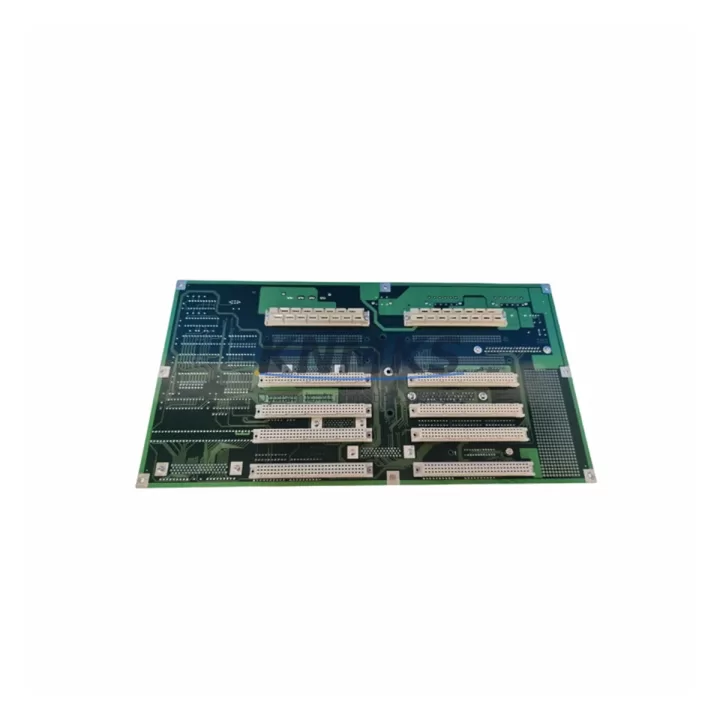
The NIKON 4S018-659 is an original backplane interface board designed for NIKON precision automation and semiconductor manufacturing systems. As a critical interconnect component within the control cabinet, this board manages signal routing between the main controller and peripheral I/O modules, ensuring stable communication across the entire automation platform. For maintenance engineers managing scheduled outages, emergency replacements, or long-term system life extension programs, stocking a verified 4S018-659 spare is a foundational element of any uptime protection strategy.
Sourced directly from authorized supply channels, each unit undergoes pre-shipment functional testing to confirm electrical integrity, connector alignment, and signal path continuity before dispatch. With a support terms confirmed by quotation and multi-region stock availability, the NIKON 4S018-659 supports both planned annual maintenance cycles and unplanned emergency callouts — minimizing mean time to repair (MTTR) and protecting production continuity in semiconductor fab, precision metrology, and industrial automation environments.
Spare Maintenance Table
| Parameter | Specification / Detail |
|---|---|
| Part Number | 4S018-659 |
| Brand | NIKON |
| Component Type | Backplane Interface Board |
| Series / Platform | NIKON Precision Automation / Semiconductor Systems |
| Origin | Japan (JP) |
| Condition | Original Spare — Pre-Tested Before Shipment |
| Compatibility | NIKON precision automation control cabinets; backplane-based I/O architectures |
| Connector Interface | Multi-pin backplane edge connector (system-specific) |
| Signal Function | Backplane signal routing, I/O bus interface, inter-module communication |
| Operating Environment | Industrial control cabinet; temperature-controlled enclosure recommended |
| Installation | Direct slot replacement; verify backplane slot alignment before seating |
| Maintenance Interval | Inspect annually or upon communication fault / I/O error alarm |
| Support terms | 12 Months from shipment date |
| Dispatch | Multi-region stock; global express shipping available |
Maintenance Planning for Continuous Operation
When a backplane interface board such as the NIKON 4S018-659 is flagged during a control cabinet inspection or triggers a communication fault alarm, experienced maintenance engineers know that the fault is rarely isolated to a single component. A structured inspection of the surrounding electrical circuit is essential before and after replacement to prevent repeat failures and confirm full system restoration.
Begin by verifying the 24 VDC backplane power supply rail — voltage sag or ripple on the backplane bus is a leading cause of interface board degradation in precision automation systems. If the power supply module feeding the backplane shows signs of aging (output voltage drift, increased ripple, or thermal discoloration), it should be replaced concurrently with the 4S018-659 to avoid premature failure of the new board. Similarly, inspect the system fuse block and circuit protection components serving the control cabinet’s backplane section; a blown or weakened fuse can indicate a transient overcurrent event that may have damaged the interface board in the first place.
Next, audit the I/O module connectors and ribbon cables seated on the backplane. Oxidized contacts, bent pins, or loose seating on adjacent I/O cards can introduce intermittent signal errors that are misdiagnosed as interface board failures. During the replacement window, clean all backplane connector surfaces and reseat neighboring modules. If the system includes signal isolation modules or signal conditioners between field devices and the backplane I/O, verify their output integrity — degraded isolation can allow ground loops or noise to propagate into the backplane bus, stressing the interface board.
For systems with integrated communication modules (such as PROFIBUS, DeviceNet, or proprietary NIKON fieldbus cards) mounted on the same backplane, confirm that these modules are functioning correctly after the 4S018-659 replacement, as backplane signal integrity directly affects fieldbus communication stability. If the control system includes an HMI panel or operator terminal connected via the backplane or a dedicated communication port, verify that the HMI re-establishes communication cleanly after the board swap — a failure to reconnect may indicate a deeper bus configuration issue rather than a hardware fault.
Finally, review the terminal block wiring and grounding connections within the control cabinet. Loose ground connections or corroded terminal blocks can introduce noise into the backplane signal environment, accelerating wear on interface boards. A complete cabinet inspection — covering power supply, fusing, I/O cabling, communication modules, signal isolation, and grounding — transforms a reactive spare part replacement into a proactive maintenance event that extends overall system life.
Site Replacement Workflow
Step 1 — Fault Confirmation: Log the active alarm code or communication fault from the NIKON system controller. Confirm that the fault is associated with the backplane interface layer (I/O bus error, module not recognized, or communication timeout) before proceeding with board removal.
Step 2 — Safe Isolation: Follow site LOTO (Lockout/Tagout) procedures. De-energize the control cabinet and discharge any residual voltage on the backplane bus. Allow capacitors to discharge fully before handling the board.
Step 3 — Board Removal: Document the slot position and orientation of the 4S018-659 before removal. Photograph connector positions and any cable routing for reference during reinstallation. Remove the board carefully, avoiding stress on the backplane edge connector.
Step 4 — Inspection: Inspect the vacated backplane slot for physical damage, burnt contacts, or contamination. Clean the slot and surrounding area before installing the replacement unit.
Step 5 — Installation of Replacement 4S018-659: Seat the new board firmly and evenly into the backplane slot. Confirm that all connector pins are fully engaged. Reconnect any associated cables or ribbon connectors per the original documentation.
Step 6 — Power-Up and Verification: Re-energize the cabinet in a controlled sequence. Monitor the system controller for fault clearance and confirm that all I/O modules on the backplane are recognized. Run a functional test of all associated I/O channels before returning the system to production.
Step 7 — Documentation: Record the replacement in the site maintenance log, including the date, fault code, replaced part number, and post-replacement test results. Update the spare parts inventory to trigger reorder of a replacement 4S018-659 unit to maintain stock levels.
Spare Parts Support FAQ
Q1: Is the NIKON 4S018-659 an original spare or a compatible aftermarket part?
The 4S018-659 supplied by KNMKS is an original NIKON spare part sourced through authorized supply channels. Each unit is pre-tested before shipment to confirm electrical functionality and connector integrity. We do not supply uncertified aftermarket substitutes for precision automation components.
Q2: How do I confirm compatibility before ordering?
Compatibility is confirmed by matching the full part number (4S018-659) against your system’s bill of materials, maintenance manual, or existing installed board label. If you are unsure of the exact variant or revision required for your NIKON system, contact our technical team at admin@knmks.com with your system model and serial number for verification before purchase.
Q3: What is the lead time and can I arrange long-term supply?
In-stock units are dispatched within 1–3 business days via global express courier. For facilities managing multiple NIKON systems or planning annual maintenance schedules, KNMKS offers long-term supply agreements and reserved stock arrangements to ensure availability when needed. Contact us to discuss volume pricing and scheduled delivery programs.
Q4: What does the support terms confirmed by quotation cover?
The support terms confirmed by quotation cover manufacturing defects and functional failures under normal operating conditions from the date of shipment. Each unit is pre-tested before dispatch. In the event of a support terms claim, KNMKS will arrange replacement or repair. The support terms does not cover damage resulting from incorrect installation, electrical overstress, or use outside the specified operating environment.
© 2026 KNMKS. All rights reserved.
Original Source: https://knmks.com
Contact: admin@knmks.com | +86 18359268345
Product Identification
- Brand / Ecosystem
-
Other Brands
Assorted Brands - Model / Series
-
4S018-659
Assorted Series - Product Family
- Relays & Interface
- Availability Status
- Available on request after model and quantity confirmation
- Inquiry Type
- B2B RFQ, replacement inquiry and project spare-part request
- Pre-Quote Check
- Exact SKU, brand, series, quantity, nameplate photos and destination country are checked before quotation
System Path
Where this product fits in the KNMKS automation structure.
Specification & Inquiry Focus
- Interface range
- Relays, isolation and signal modules
- Common needs
- Coil voltage and contact rating
- Project support
- Panel wiring and signal protection
Buyer Confirmation
Information KNMKS checks before replying.
- Exact model
- 4S018-659
- Brand / ecosystem
- Other Brands
- Product family
- Relays & Interface
- Application note
- Replacement, maintenance, project build or spare-part list
- Useful photos
- Nameplate, installed unit, cabinet layout or connector side
- Delivery details
- Quantity, destination country and target schedule
Document Support
Files and notes can be confirmed during quotation.
- Product photos or nameplate confirmation when available
- Packing and delivery notes before quotation confirmation
- Support scope and delivery terms confirmed per inquiry
- Export document coordination for qualified B2B requests
Inquiry Support
- Relay base and module matching
- Signal isolation and protection options
- Panel accessory inquiry support
What to Send Us
- Brand and exact model number: Other Brands 4S018-659
- Quantity and required delivery time
- Application, replacement requirement or nameplate photo
- Destination country and shipping preference
RFQ Preparation
This is a product inquiry page built for RFQ communication.
Fast Model Check
Send this model to KNMKS for confirmation.
Include quantity, destination country and photos if this is a maintenance replacement. The inquiry will be saved with a reference number after submission.
Brand & Compatibility Note
KNMKS displays automation product information for well-known industrial brand ecosystems and compatible replacement references. Brand names are used for product identification and compatibility reference only; final availability and commercial terms are confirmed per quotation.
 Manufacturing
 Machine Tools
 Packaging
 Energy & Power
 PLCs & Controllers
 HMI & Displays
 Servo Systems
 Variable Frequency Drives