
Overview
NI PCIE-8361 Maintenance-Proven Spare Part for Factory Uptime
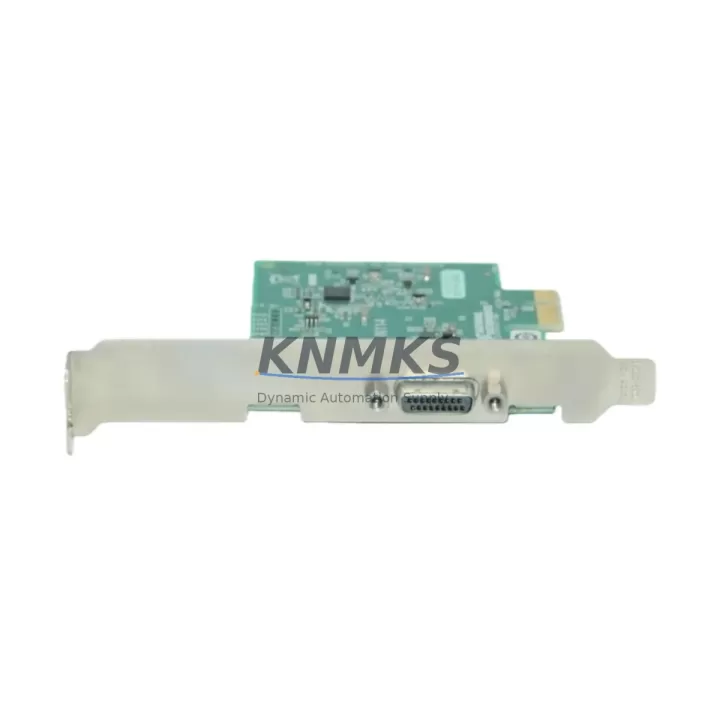
The NI PCIE-8361 is a National Instruments MXI-Express PCIe x1 host interface card designed to bridge a host PC to PXI and PXIe chassis in high-reliability industrial measurement and automation systems. As a maintenance-proven original spare, the PCIE-8361 is a critical component for test engineers, maintenance teams, and procurement specialists who cannot afford unplanned downtime in automated production lines, energy monitoring systems, or laboratory-grade data acquisition environments.
Sourced directly from verified supply channels, this original NI PCIE-8361 spare is inspection-tested prior to shipment and backed by a support terms confirmed by quotation. Whether you are managing a scheduled annual overhaul, responding to an emergency card failure, or building a strategic spare parts inventory for a multi-chassis PXI rack, the PCIE-8361 delivers the compatibility and reliability your system demands.
Spare Maintenance Table
| Parameter | Specification |
|---|---|
| Part Number | PCIE-8361 |
| Brand | National Instruments (NI) |
| Series | MXI-Express |
| Interface | PCIe x1 (Host PC) → PXI/PXIe Chassis |
| Compatibility | NI PXI-1042, PXI-1045, PXIe-1062Q, PXIe-1075, PXIe-1082, PXIe-1085 and compatible chassis |
| Form Factor | PCIe x1 low-profile card |
| Data Throughput | Up to 110 MB/s (MXI-Express Gen 1) |
| Operating Temperature | 0 °C to 55 °C |
| Storage Temperature | -20 °C to 70 °C |
| Power Consumption | ≤ 3.5 W (typical) |
| Installation | Standard PCIe x1 slot; NI-VISA / NI-MXI driver required |
| Application Environment | Industrial test, automated production, energy monitoring, R&D lab |
| Condition | Original, inspection-tested before shipment |
| Support terms | 12 Months |
Maintenance Planning for Continuous Operation
When a PCIE-8361 failure is identified during routine control cabinet inspection or a fault isolation procedure, the root cause is rarely limited to the host interface card alone. Experienced maintenance engineers know that a thorough replacement workflow must also evaluate the surrounding system components to prevent repeat failures and ensure full system restoration.
Begin by verifying the PCIe slot power rail on the host PC motherboard — a degraded 3.3 V or 12 V supply can stress interface cards and cause intermittent MXI link drops. If the host system uses a dedicated industrial PC or rack-mount server, inspect the ATX power supply unit for ripple or aging capacitors before installing the replacement PCIE-8361.
On the chassis side, confirm the integrity of the MXI-Express cable assembly (typically the NI MXI-Express x1 or x4 cable) — cable damage or connector oxidation is a common cause of link instability that is often misdiagnosed as a card failure. Inspect the PXI chassis backplane for bent pins or contamination at the system controller slot.
For systems running NI DAQ modules such as the NI PXI-6251 or NI PXIe-4300 series, validate that all I/O module seating is secure after the card swap, as vibration in industrial environments can cause partial ejection. If the system includes NI PXI-2530 switching modules or NI PXI-5922 digitizers, re-run the NI MAX self-test sequence to confirm all instruments are enumerated correctly post-replacement.
Where signal isolation is required between the PXI system and field wiring, verify that signal conditioning modules or isolation barriers upstream of the chassis remain within calibration. Fuse protection on field I/O lines should also be inspected — a blown fuse on an analog input channel can mask a deeper wiring fault that contributed to the original card failure.
Procurement teams should maintain at least one PCIE-8361 as a cold spare in facilities operating more than two PXI chassis. Long lead times on legacy NI MXI-Express hardware make reactive purchasing a significant downtime risk. Pairing the PCIE-8361 spare with a stocked MXI-Express cable and a spare PXI chassis fuse kit creates a complete first-response kit for most host interface failures.
Site Replacement Workflow
Step 1 — Pre-replacement verification: Document the current NI-MAX system configuration, including chassis alias, device names, and trigger routing. Export the configuration file as a backup before powering down.
Step 2 — Safe power-down: Shut down all NI software, close LabVIEW or TestStand sessions, and perform a controlled OS shutdown. Power off the host PC and the PXI chassis. Disconnect the MXI-Express cable from both ends.
Step 3 — Card removal and inspection: Remove the failed PCIE-8361 from the PCIe slot. Inspect the slot and surrounding area for debris, burn marks, or corrosion. Clean with compressed air if required.
Step 4 — Install replacement PCIE-8361: Seat the new card firmly in the PCIe x1 slot. Reconnect the MXI-Express cable. Ensure the chassis is powered on before the host PC to allow proper MXI link negotiation.
Step 5 — Driver and configuration restore: Boot the host PC and allow NI-MXI drivers to enumerate the chassis. Open NI-MAX and verify all modules appear under the chassis tree. Restore the saved configuration file and run the self-test on all installed instruments.
Step 6 — Functional validation: Execute a baseline measurement or I/O verification routine before returning the system to production. Log the replacement date, card serial number, and test results in your maintenance record.
This workflow minimizes mean time to recovery (MTTR) and ensures system compatibility is maintained without requiring a full reconfiguration from scratch.
Spare Parts Support FAQ
Q1: Is the PCIE-8361 compatible with both PXI and PXIe chassis?
Yes. The PCIE-8361 uses the MXI-Express protocol, which supports both standard PXI and PXIe chassis. Compatibility depends on the chassis model and the MXI-Express cable variant used. Confirm your chassis model against the NI compatibility matrix before ordering.
Q2: What is included in the support terms confirmed by quotation?
Each PCIE-8361 unit is inspection-tested prior to shipment and covered by a support terms confirmed by quotation against manufacturing defects and functional failure under normal operating conditions. Support requests are processed via admin@knmks.com with proof of purchase and a fault description.
Q3: Can you supply the PCIE-8361 on a long-term or blanket order basis?
Yes. KNMKS supports long-term supply agreements for critical spare parts. Contact our team to discuss scheduled delivery, reserved stock arrangements, and volume pricing for multi-site maintenance programs.
Q4: How do I verify the card is genuine before installation?
Each unit shipped by KNMKS includes original NI labeling and a traceable part number. We recommend running the NI-MAX self-test immediately after installation to confirm the card enumerates correctly and passes all built-in diagnostics before returning the system to service.
© 2026 KNMKS. All rights reserved.
Original Source: https://knmks.com
Contact: admin@knmks.com | +86 18359268345
Product Identification
- Brand / Ecosystem
-
Other Brands
Assorted Brands - Model / Series
-
PCIE-8361
Assorted Series - Product Family
- Relays & Interface
- Availability Status
- Available on request after model and quantity confirmation
- Inquiry Type
- B2B RFQ, replacement inquiry and project spare-part request
- Pre-Quote Check
- Exact SKU, brand, series, quantity, nameplate photos and destination country are checked before quotation
System Path
Where this product fits in the KNMKS automation structure.
Specification & Inquiry Focus
- Interface range
- Relays, isolation and signal modules
- Common needs
- Coil voltage and contact rating
- Project support
- Panel wiring and signal protection
Buyer Confirmation
Information KNMKS checks before replying.
- Exact model
- PCIE-8361
- Brand / ecosystem
- Other Brands
- Product family
- Relays & Interface
- Application note
- Replacement, maintenance, project build or spare-part list
- Useful photos
- Nameplate, installed unit, cabinet layout or connector side
- Delivery details
- Quantity, destination country and target schedule
Document Support
Files and notes can be confirmed during quotation.
- Product photos or nameplate confirmation when available
- Packing and delivery notes before quotation confirmation
- Support scope and delivery terms confirmed per inquiry
- Export document coordination for qualified B2B requests
Inquiry Support
- Relay base and module matching
- Signal isolation and protection options
- Panel accessory inquiry support
What to Send Us
- Brand and exact model number: Other Brands PCIE-8361
- Quantity and required delivery time
- Application, replacement requirement or nameplate photo
- Destination country and shipping preference
RFQ Preparation
This is a product inquiry page built for RFQ communication.
Fast Model Check
Send this model to KNMKS for confirmation.
Include quantity, destination country and photos if this is a maintenance replacement. The inquiry will be saved with a reference number after submission.
Brand & Compatibility Note
KNMKS displays automation product information for well-known industrial brand ecosystems and compatible replacement references. Brand names are used for product identification and compatibility reference only; final availability and commercial terms are confirmed per quotation.
 Manufacturing
 Machine Tools
 Packaging
 Energy & Power
 PLCs & Controllers
 HMI & Displays
 Servo Systems
 Variable Frequency Drives